OneBookPlus
The business dashboard that shows where every dollar sits
Live revenue, overdue invoices and today's bookings, with 328 reports one click deeper.
See revenue, overdue invoices and today's bookings the moment you log in, with a custom report builder and 328 built-in reports one click deeper. Configured for your industry automatically.
Replaces Spreadsheets, guesswork, siloed tools
In the product
A look inside OneBookPlus Dashboard
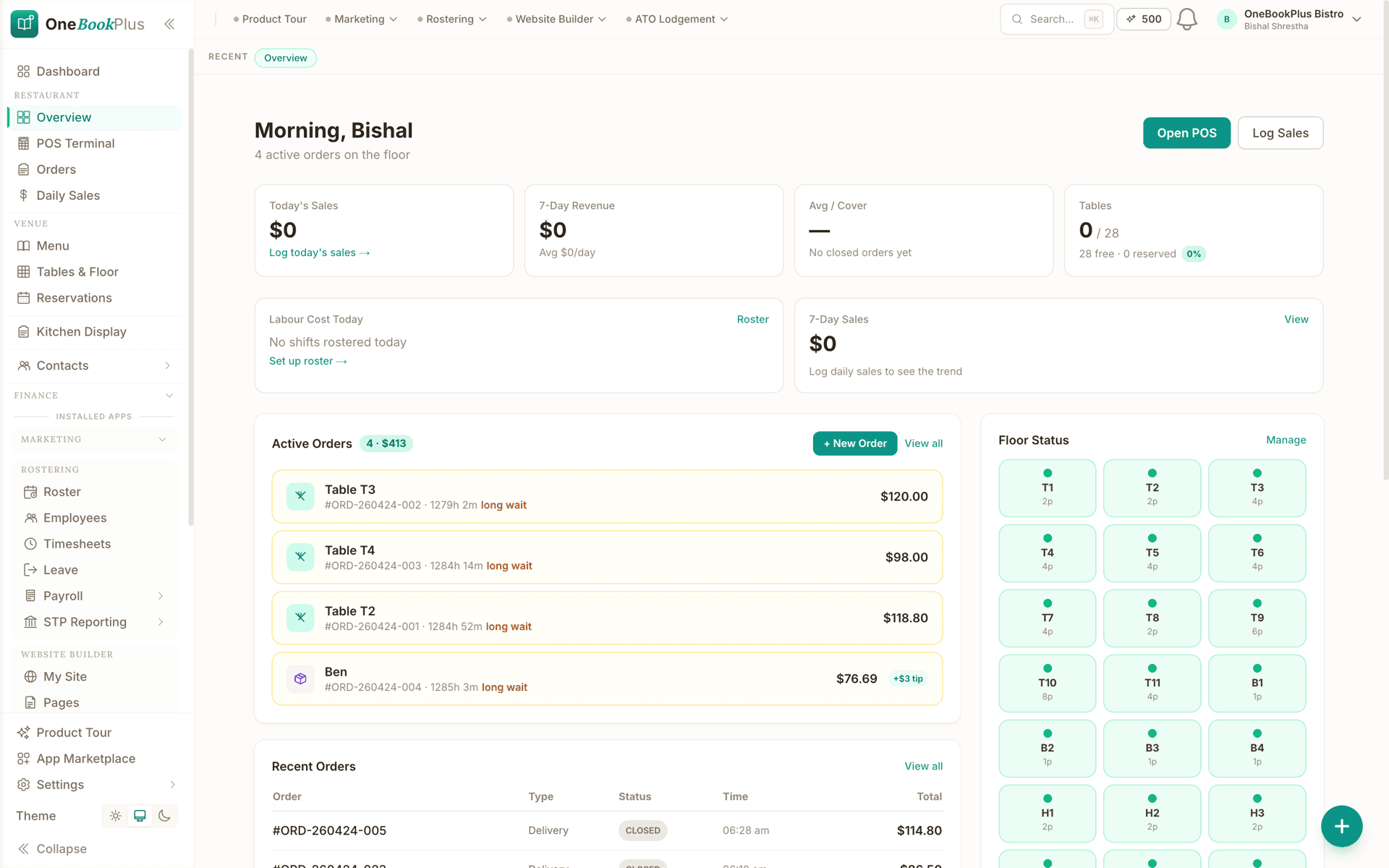
Bistro dashboard with today's revenue, active orders, floor status and reservations
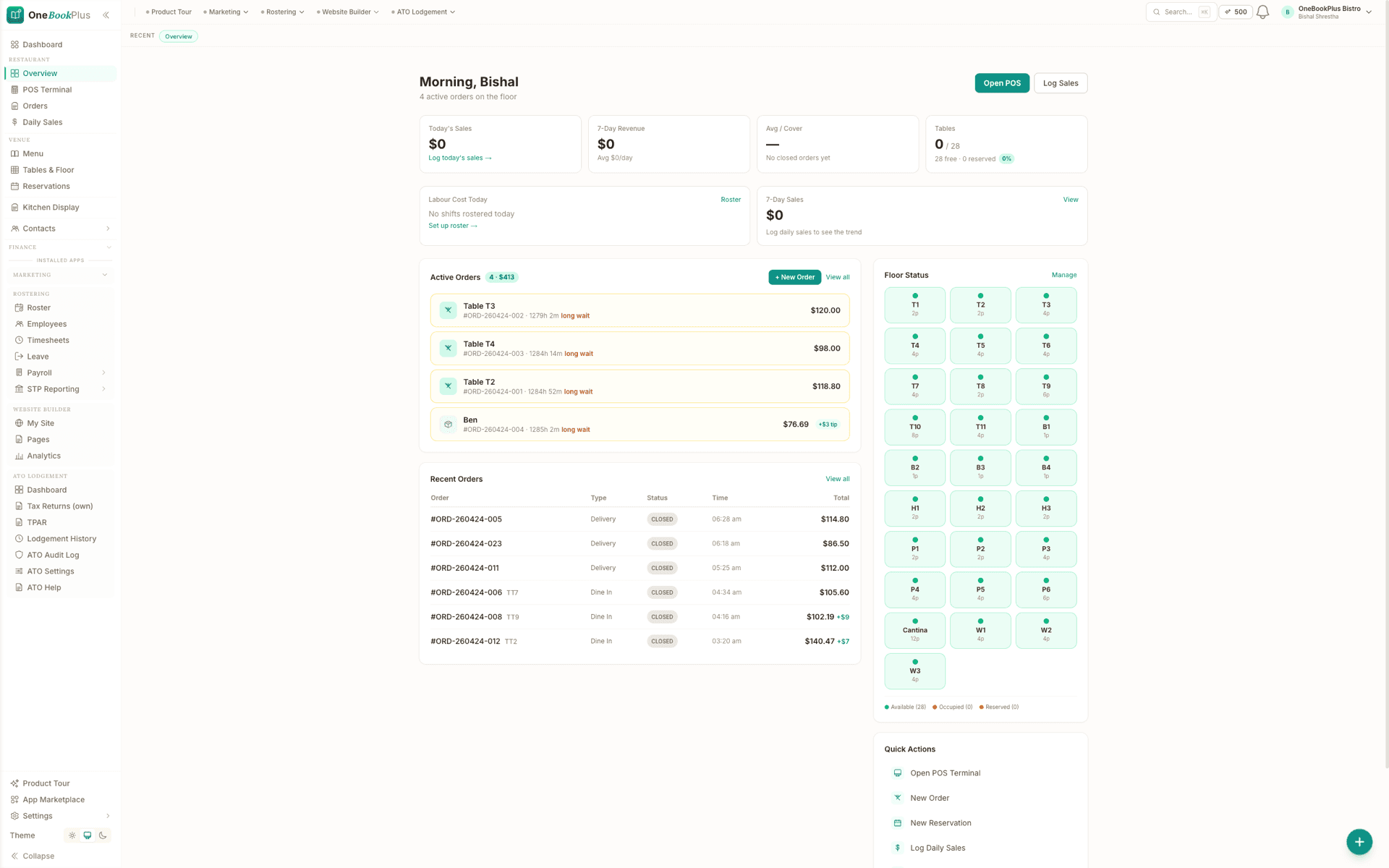
Dashboard at a glance, key numbers and recent activity
What's included
Everything in OneBookPlus Dashboard
Today's money on one screen
Tiles answer the morning questions before your coffee cools: revenue today and this month, what is outstanding, and what is overdue. The overdue tile turns red when something needs chasing and links straight to the filtered invoice list.
18 industry dashboard layouts
A tradie's dashboard leads with today's scheduled jobs and pending variations. A workshop shows vehicles in bay and parts below minimum stock. A hotel shows arrivals. OneBookPlus ships 18 purpose-built layouts and picks yours from the business type you choose at signup.
Custom report builder, no spreadsheets
Build your own reports from invoices, expenses and bills, payments, quotes or jobs. Group by month, customer, category or status, filter by date range or financial year, and render the result as a table, bar chart, line chart or single KPI.
10 one-click report templates
Sales by month, top customers, outstanding by customer, invoices by status, expenses by category, spend by supplier, payments received by month, quote pipeline and jobs by status: instantiate any of them with one click, then edit them like any report you built yourself.
Pin your own dashboards
Save any report as a half-width or full-width tile on a board you design. Starter boards ship per industry (Tradie overview, Workshop overview, Venue overview and more), so your first board builds itself and you refine it from there.
328 accounting reports behind it
When the glance is not enough, drill into profit and loss, balance sheet, trial balance, cash flow forecast, cash runway, aged receivables and payables, GST detail and break-even analysis. They all live in the accounting workspace, one click from the dashboard.
Bookings and activity in view
Your next bookings sit on the dashboard with client, service, time and duration, alongside a live feed of what just happened across the business: invoices sent, payments received, quotes accepted, bookings confirmed.
Quick-create from the dashboard
Raise an invoice, fire off a quick quote, add a booking or log an expense without leaving the screen. The most common actions in your day are one tap from the numbers that prompted them.
GST position by quarter
The tax summary shows GST collected (1A), GST on purchases and your net GST position per quarter for any financial year, assembled from the invoices and expenses you already logged. Export it as CSV and hand it to your accountant.
328
Built-in financial and operational reports
18
Industry dashboard layouts, picked automatically at signup
10
One-click report templates, fully editable once created
$0
The dashboard ships with the free core plan
Simple setup
How OneBookPlus Dashboard works
Pick your industry at signup
Choose your business type once. OneBookPlus selects the matching dashboard layout from 18 purpose-built variants and seeds a starter report board that fits how your kind of business actually runs.
Your data builds the picture
Every invoice, payment, booking, quote and expense you record feeds the dashboard. There is no separate reporting setup, no import step and nothing to sync, because the dashboard reads the same records you work in.
Read the morning numbers
Open the dashboard and scan revenue, outstanding, overdue and today's bookings in seconds. Anything that needs action links straight to the list where you fix it, like the overdue tile opening your overdue invoices.
Go deeper when you need to
Build custom reports and pin them to your own boards, or step into the accounting workspace for 328 formal reports, from profit and loss and trial balance to cash runway, with CSV export where you need it.
Business Dashboard & Analytics for Small Business
A business dashboard should answer the owner's first three questions in ten seconds: how much money came in, who owes me, and what is on today. OneBookPlus opens on exactly that: revenue today and this month, outstanding invoices, an overdue tile that turns red and links straight to the invoices that need chasing, plus today's bookings and a live activity feed. And because OneBookPlus knows your business type from signup, the layout is one of 18 industry-specific variants: a tradie's dashboard leads with scheduled jobs and pending variations, an auto workshop sees vehicles in bay and parts below minimum stock, a cafe sees daily sales.
Underneath the glance sits real analytics. The custom report builder turns your invoices, expenses and bills, payments, quotes and jobs into tables, bar charts, line charts or single KPIs, grouped by month, customer, category, status or payment method across any date range or financial year. Ten one-click templates (sales by month, top customers, outstanding by customer, quote pipeline, spend by supplier and more) mean you never start from a blank screen, and any report can be pinned to a dashboard you design, tile by tile.
When you or your accountant need formal numbers, the accounting workspace carries 328 built-in reports: profit and loss with comparative and quarterly views, balance sheet, trial balance, cash flow forecast, cash runway, aged receivables and payables, GST detail, BAS lodgement history and break-even analysis. The quarterly tax summary assembles GST collected, GST on purchases and your net position from the records you already keep, and CSV export covers the handover at BAS and year-end.
None of this needs configuration, imports or a sync tool, because the dashboard reads the same database your invoices, bookings and expenses are written to. It is fully responsive in any mobile browser, has a native iOS app, and ships with the free OneBookPlus core plan, so seeing your own numbers costs nothing.
Example walkthrough
A morning with the OneBookPlus dashboard
A worked example: an electrician's Monday check-in, phone only
Dave runs a two-sparkie electrical business in Ipswich. Monday, 6:45am, coffee in hand, he opens OneBookPlus on his phone.
The tiles do the talking: $14,200 in so far this month, $6,800 outstanding, and the overdue tile is red: $2,340 across two invoices. He taps it, lands on the filtered overdue list, and sends both reminders before the coffee cools.
His trades dashboard shows today's scheduled jobs with site suburbs and customer phone numbers, so he texts the first customer an ETA from the same screen. A variation on the Bellbird Park job is still waiting on approval; he flags it for a call at smoko.
On his pinned report board, the quote pipeline tile shows $18,400 sitting in sent quotes, and outstanding-by-customer shows one builder holds most of what he is owed. That one gets a phone call, not another email.
The quarter ends Friday, so he opens the tax summary: GST collected, GST on purchases, net position, already assembled from the invoices and expenses he logged all quarter. He exports the CSV for his bookkeeper.
Total time: about eight minutes, before the first job of the day.
Frequently asked questions
Common questions about OneBookPlus Dashboard.
Which reports are actually built in?
The reports area gives you performance (12-month revenue trend, outstanding ageing, top clients), cash flow, expenses and a quarterly GST tax summary. The accounting workspace goes much deeper: profit and loss (including comparative and quarterly views), balance sheet, trial balance, cash flow forecast, cash runway, aged receivables and payables, GST detail, BAS lodgement history and break-even analysis sit among 328 built-in reports. If a number exists in your business, there is almost certainly a report that shows it.
Can I build my own reports without exporting to a spreadsheet?
Yes. The report builder works from five sources (invoices, expenses and bills, payments, quotes, jobs), measures totals, amounts due, amounts paid or counts, and groups by month, customer, category, status or payment method. Render the result as a table, bar chart, line chart or single KPI, save it, and pin it to a dashboard. No formulas, no SQL, no CSV round-trips.
Does the dashboard work on my phone?
Yes. The full dashboard is responsive and works in any mobile browser, so you can check revenue, overdue invoices and today's bookings from the ute or the couch. There is also a native OneBookPlus iOS app on the App Store if you prefer an app icon and push notifications over a browser tab.
How up to date are the numbers?
Every figure is computed live from your actual records each time the dashboard loads. Record a payment, reopen the dashboard, and it is in your revenue. There is no overnight sync or import job that can fall behind, because the dashboard reads the same database your invoices, bookings and expenses are written to.
Do I have to set the dashboard up before it is useful?
No. You pick your business type at signup and OneBookPlus selects one of 18 industry layouts for you, so a tradie sees jobs and quotes on day one while a cafe sees daily sales. A one-click starter board (Tradie overview, Venue overview and similar) seeds your first custom dashboard, and everything on it stays editable.
Can I change what I see?
Yes. Pin any saved or template report to your own board as a half-width or full-width tile, reorder them, and keep as many boards as you like. The main dashboard also follows the modules you actually use: if you never take bookings, you will not stare at an empty bookings widget.
Can my team see the dashboard too?
Yes. Every team member you invite to your OneBookPlus account gets the dashboard, so your office manager sees the same live numbers you do instead of asking you for them. Roles and permissions govern what each person can do from there, like raising invoices or recording payments.
Can I get the numbers out for my accountant?
Yes. The cash flow, expenses, performance and GST tax summary reports export to CSV with one click, the trial balance exports for your accountant's working papers, and a year-end pack export bundles what they need at 30 June. Your accountant gets clean files instead of screenshots and shoebox receipts.
Is the dashboard an extra cost?
No. The dashboard, the report builder and the reports area ship with the free OneBookPlus core plan alongside invoicing, quotes, contacts and bookings. Paid add-on apps for specific industries extend the dashboard with their own widgets, but you never pay separately just to see your own numbers.
Australian Owned
Built in Melbourne, AU
GST Compliant
ATO-ready from day one
Encrypted & Isolated
TLS in transit, AES-256 at rest, tenant isolation at the database layer, read the security page
Free Plan Available
No credit card needed
Works great with
Other OneBookPlus products that pair naturally with Dashboard.
About the author

Bishal Shrestha
Founder & CEO, OneBookPlus
Bishal spent a decade running digital projects for Australian small businesses before founding OneBookPlus. He writes and maintains these pages, and publishes what OneBookPlus does not do alongside what it does.
Read the founder bioStart with OneBookPlus Dashboard
Start free. No credit card required. Upgrade when you're ready.
Reviewed by Bishal Shrestha