Skip to content
Pricing
Try a live demo, it's freeBook a DemoSign InStart free

Clients, Jobs & Lodgement in One Book

Accounting practice management software, built for Australian practices.

Lodge the BAS before the client's reminder email lands.

OneBookPlus is practice-management software for Australian accountants, BAS agents and bookkeepers, client CRM, GST-compliant invoicing, appointment booking, team management, and a full double-entry accounting module so you run your own firm as efficiently as you run your clients'. All-in-one for $0 to $69/mo, replaces MYOB Practice + Xero HQ + Calendly.

Free plan. No card required. · GST, ABN & TPB number built-in · BAS / IAS / IITR deadline tracker · Sign up in 60 seconds

Built and supported in AustraliaOpen a live demo business
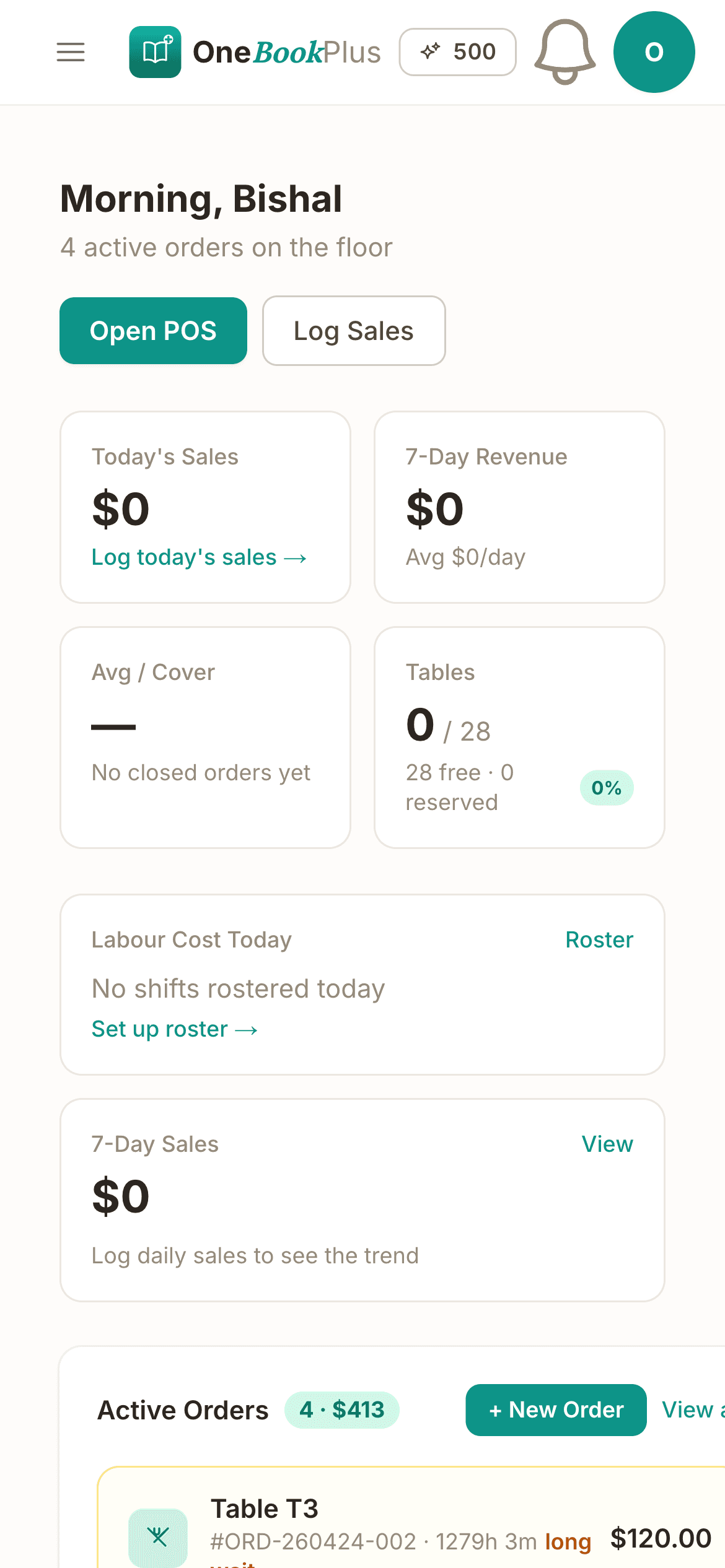
The OneBookPlus home dashboard in the iPhone app, showing today's sales, table status and the active orders list
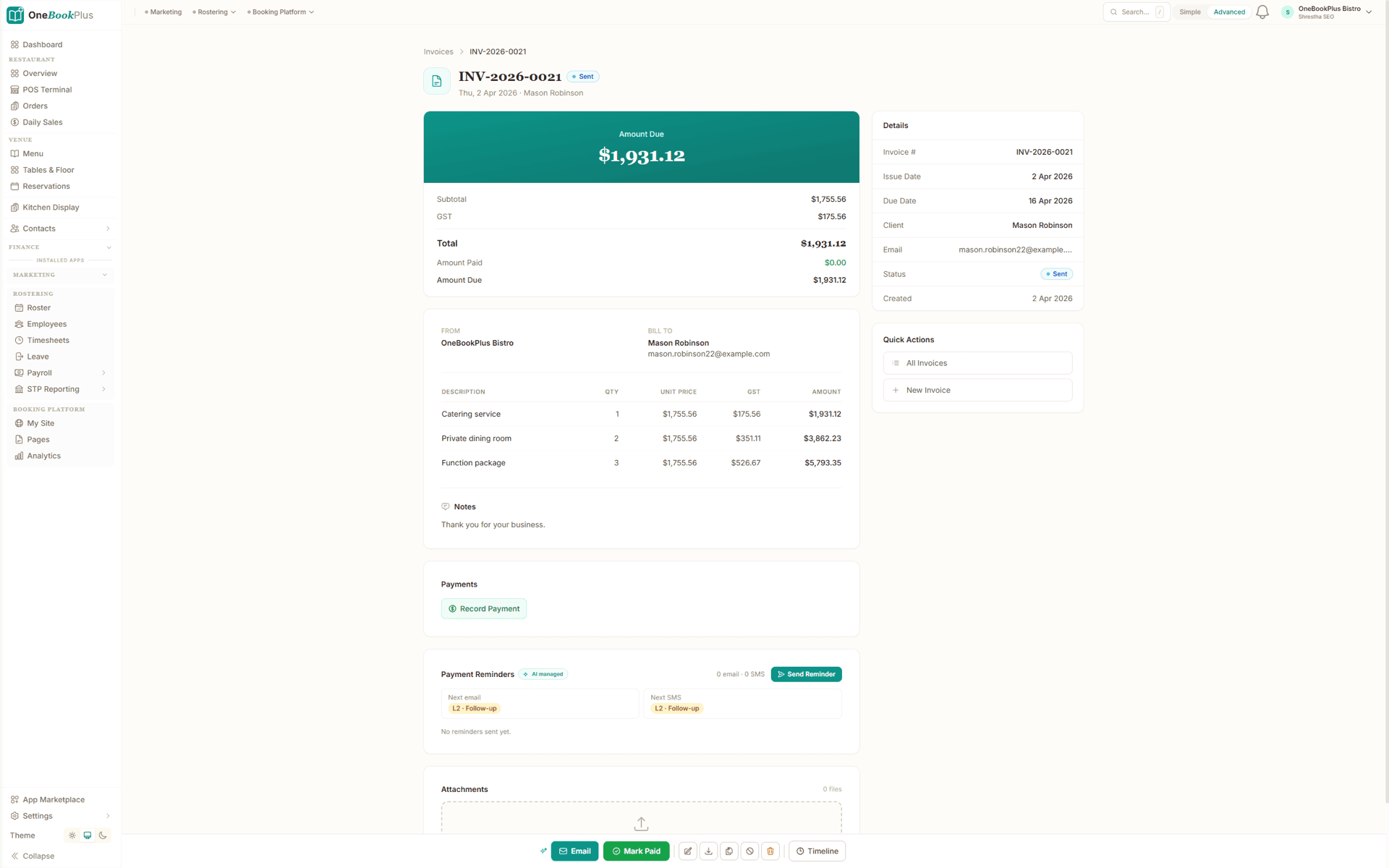
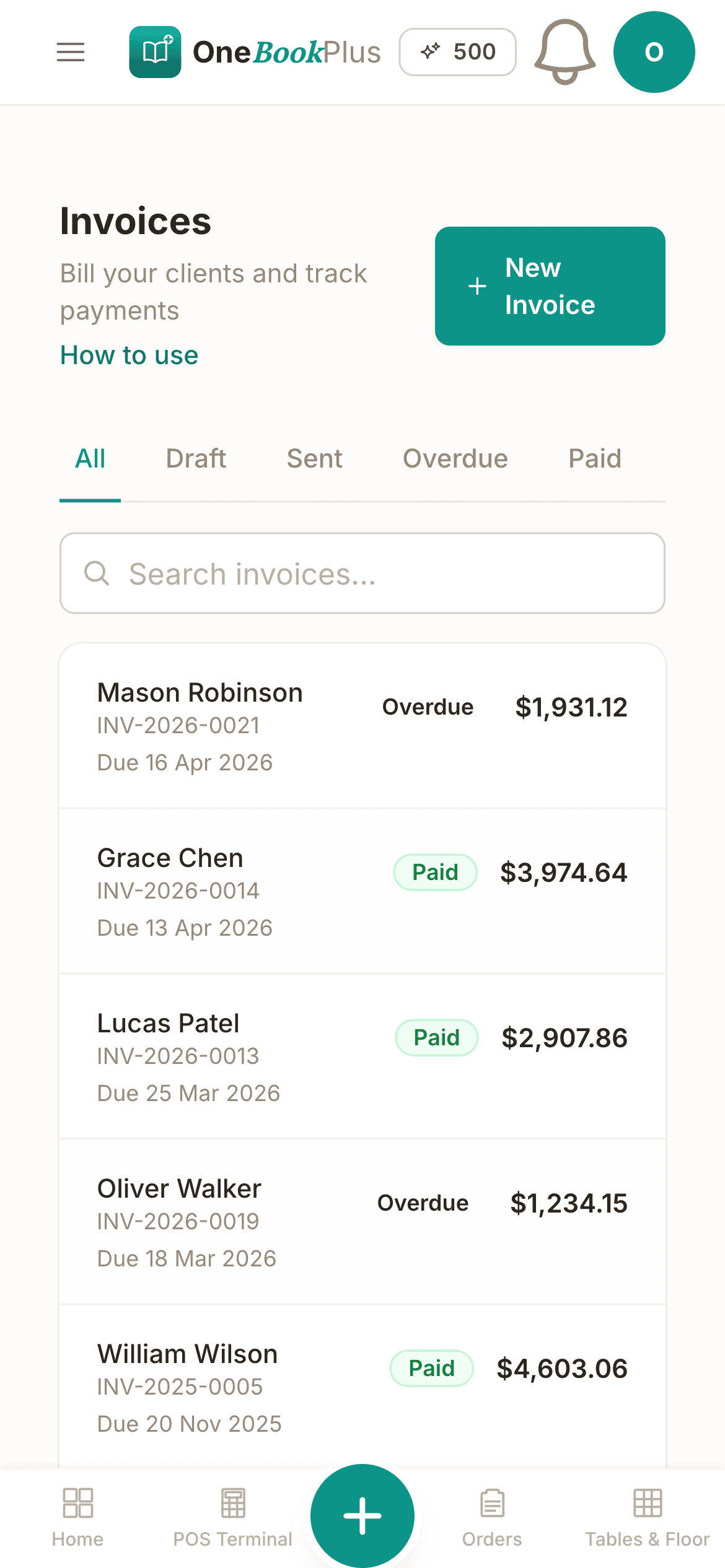
The invoices list in the OneBookPlus iPhone app, showing paid and overdue invoices with their due dates
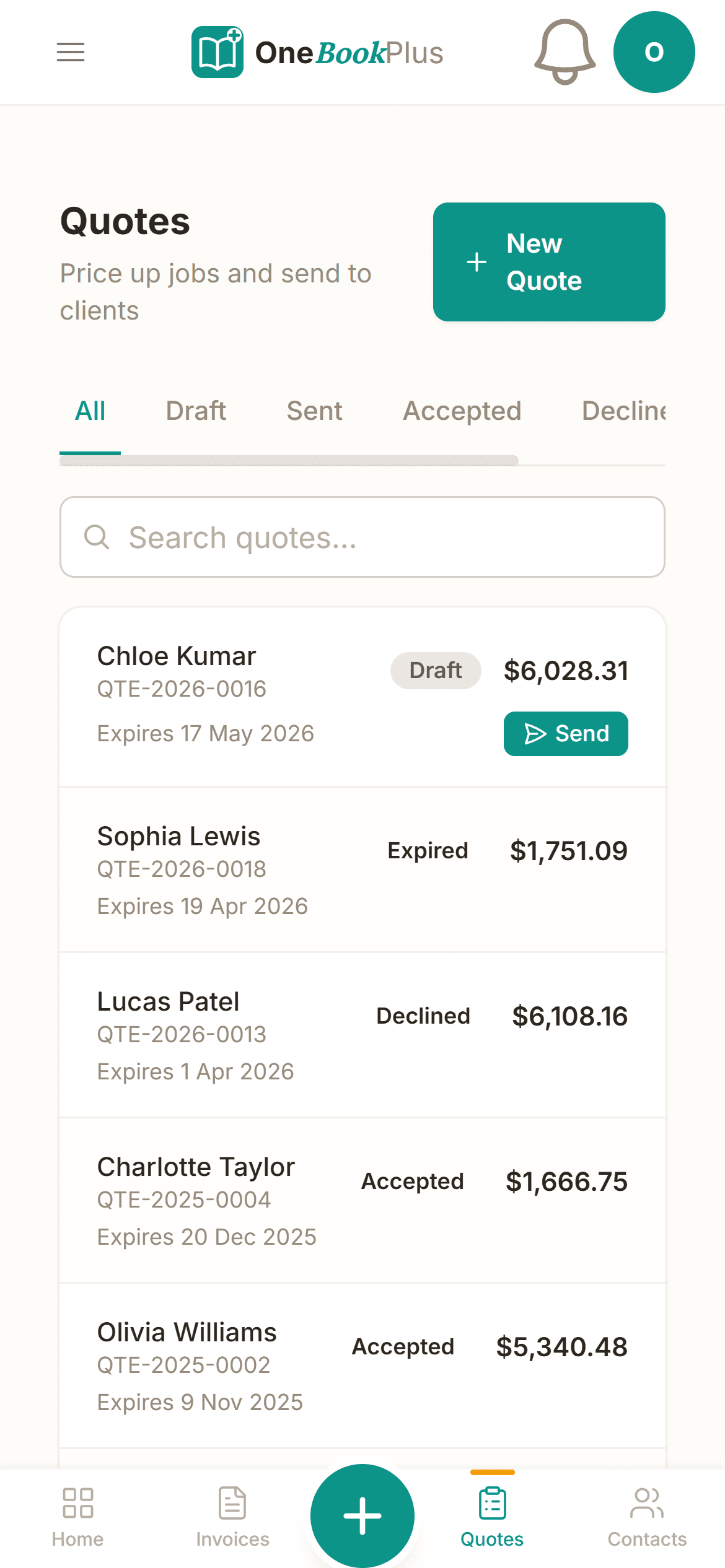
The quotes list in the OneBookPlus iPhone app, showing draft, sent, accepted and declined quotes
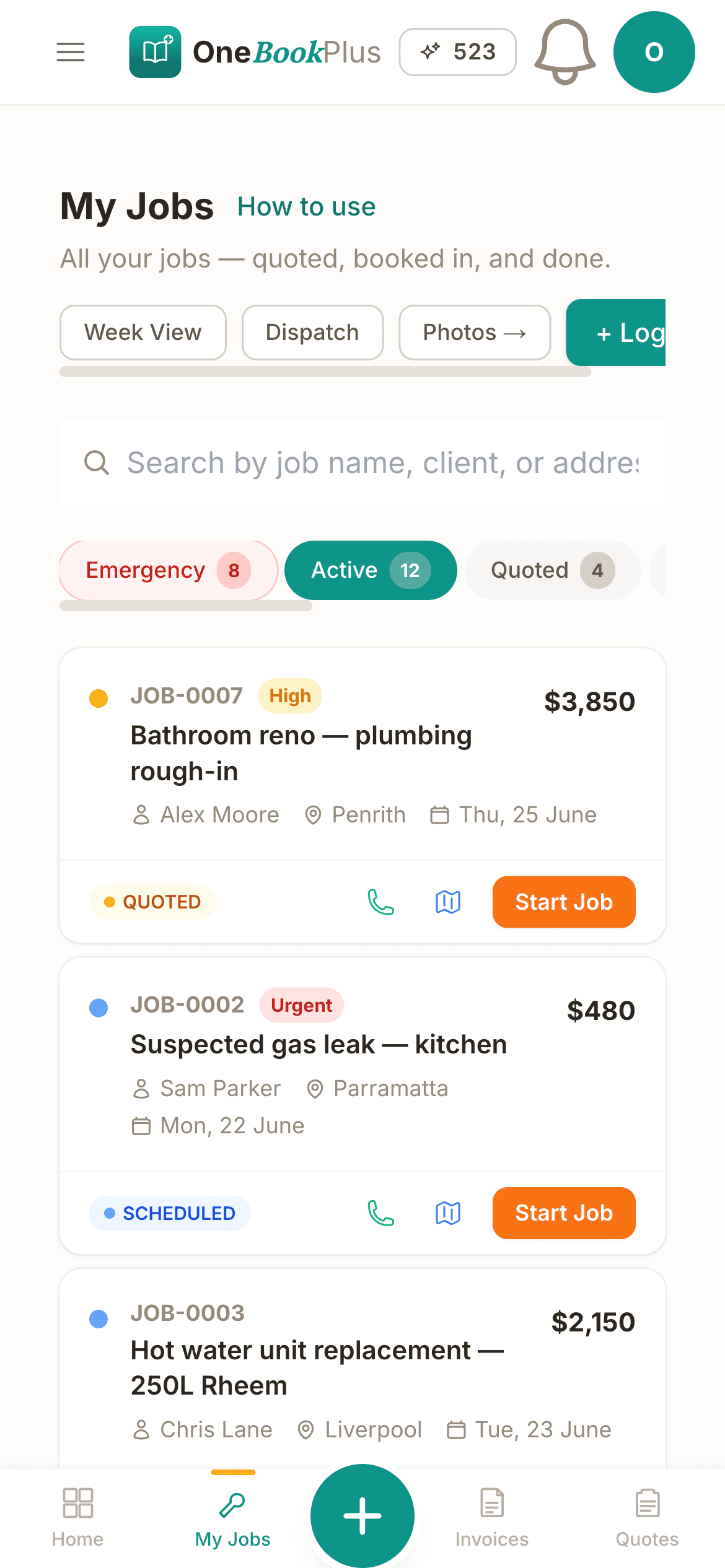
The My Jobs list in the OneBookPlus iPhone app, showing quoted and scheduled jobs with their values
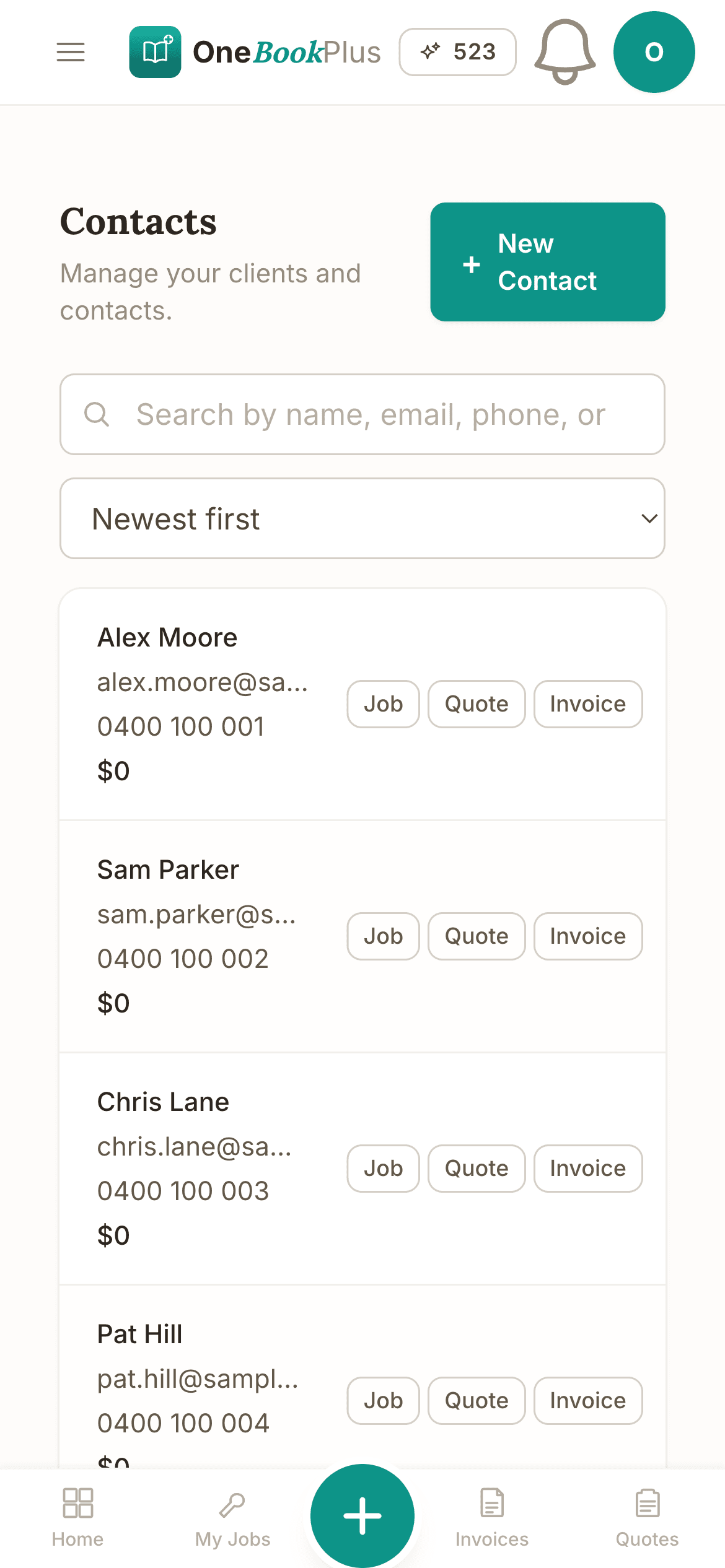
The contacts list in the OneBookPlus iPhone app, with a job, quote and invoice shortcut on every contact
Dashboard screen

Cut $66+/mo from your software stack by replacing MYOB Practice + Calendly + a CRM + Mailchimp with OneBookPlus.

See practice pricing

Lodgement status. Direct ATO e-lodgement via SBR is in final ATO certification, prepare and validate BAS and returns today; we'll tell you the moment lodgement goes live on your account. Client & practice management, BAS preparation, invoicing, billable time, tasks, reports, CPD and lodgement-deadline tracking are live today.

Key takeaways

5
  • OneBookPlus is practice-management software for Australian accountants, BAS agents, and bookkeepers, replacing stacks like MYOB Practice, Xero Practice Manager, Karbon, or Practice Ignition with one platform from $0/mo (Free), $29/mo (Starter), or $69/mo (Growth, billed in AUD).
  • Tax agent and BAS agent registration with the Tax Practitioners Board (TPB) is the legal prerequisite for charging fees for tax or BAS services in Australia. OneBookPlus stores your TPB registration number alongside your ABN and prints it on every quote and invoice.
Show 3 more
  • Practice membership credentials (CPA Australia, CA ANZ, IPA) and your professional indemnity insurance ($2m+ is industry-typical for tax practitioners) are tracked per practitioner so you can prove currency to clients and the TPB on demand.
  • Time-tracking with billable-hour conversion to fixed fees or progress invoices is the core workflow, start a timer per client engagement, then convert tracked hours to a GST-compliant invoice with one click.
  • Practice CRM tracks lodgement due dates (BAS quarterly, IAS monthly, IITR by 31 October for self-lodgers or your ATO tax-agent lodgement-program due date, commonly 15 May for many client returns), entity structures, and engagement history across hundreds of clients with bulk-action workflows for BAS season.

Everything You Need

Built for How Accounting Practices Actually Work

Stop using one tool for clients' books and another for your own practice. OneBookPlus gives accountants and bookkeepers everything they need to manage their firm in one place.

Client Practice CRM

Every client, every entity, every lodgement date, searchable from one screen. When a director rings, you've got their structure, last engagement and outstanding work in front of you before you say hello.

GST-Compliant Invoicing

10% GST, your ABN, billable time and disbursements, all on the invoice in under a minute. Most practices recover 3-5 hours a week that used to disappear into Word templates and copy-paste.

BAS & Tax Tracking

Quarterly BAS, FBT, payroll tax, individual returns, every lodgement obligation rolls up into a single calendar with traffic-light status. No more missed dates costing you a client.

Team Management

Assign clients to specific accountants and bookkeepers so workloads stay balanced, and on a Monday morning you can see who's slammed and who has capacity, before tax season blows up.

Client Portal

Clients upload their receipts, group certificates and bank statements straight into the portal, so the “chasing documents” email thread has somewhere better to live.

Appointment Booking

Drop your booking link in your email signature and clients pick a slot themselves. It checks your Google Calendar before offering anything, so you stop trading six emails to find a Tuesday.

Try all features free, sign up in 60 seconds

Free plan available · No credit card · Cancel anytime

Practice management

Accountancy practice software that tracks the client work itself.

Most accountancy practice software in Australia sits at one of two extremes: a heavyweight suite priced for a fifty-partner firm, or a generic project tool that has never heard of a lodgement program. OneBookPlus sits in the practical middle. It is client management software for accountants, CPAs, BAS agents and bookkeepers that tracks the client work itself (who is doing it, what it bills for, and when the ATO expects it) at a price a two-person practice can justify, starting free.

Client work tracking, engagement by engagement

Every client record carries the entity structure, ABN, engagement types and lodgement due dates, so the context is on screen before the work starts. From there, client work tracking runs through the same pipeline you use for billing: open a job for each engagement (a quarterly BAS, an annual return, a bookkeeping catch-up), assign it to a team member, and watch it move from booked to in progress to invoiced to paid. Billable time is tracked per client and converts to a GST-compliant invoice in one click, so fixed-fee and time-based engagements bill through one system instead of a timer app plus a Word template. Workloads stay visible across the team: assign clients to specific accountants and bookkeepers, and see who has capacity before BAS season starts rather than three weeks into it.

The Tax Practice Suite layer

For TPB-registered practices, the Tax Practice Suite app adds the deeper practice-management layer on top of any base plan: a practice task board with deadlines and follow-ups, client billable-time tracking that flows straight into invoices, per-client document storage, a CPD register that tracks TPB hour requirements, an ATO key-dates calendar covering BAS, SG, STP, TPAR and FBT, and practice performance reports. Explore the Tax Practice Suite app for the full feature list and pricing.

Runs as a virtual practice

Because the whole platform runs in the browser and is hosted in AWS Sydney, OneBookPlus doubles as virtual tax practice management software. Remote staff see the same task board, client records and deadline calendar as the office does, clients upload source documents through the portal instead of emailing attachments, and new meetings land through your online booking page whether you are at a desk or a kitchen table. And if your current tax office management software is a colour-coded spreadsheet, the switch is mostly an import: bring the client list across as a CSV, set your service types and billable rates, and the lodgement-deadline tracker replaces the spreadsheet's due-date column for good.

Lodgement

Lodgement, from deadline tracking to the ATO.

Lodgement management is live in OneBookPlus today. Quarterly BAS, monthly IAS and income-tax returns roll up into a single calendar with traffic-light status across your whole client base, and the BAS quarterly summary groups G1, 1A, G11, 1B, W1 and W2 straight from the client's books, ready to review and lodge through your existing channel.

Direct e-lodgement is the next step. The ATO Tax Lodgement app connects to the ATO through the secure SBR gateway and is in final ATO certification. Once lodgement is switched on for your account, you will lodge activity statements, company, trust, partnership and individual returns, TPAR and FBT without leaving the platform, with mandatory MFA, pre-submission validation against ATO rules and seven-year audit logging on every submission. Single Touch Payroll pay events are not part of this app and are not lodged from OneBookPlus. See the ATO Tax Lodgement app for the full form list and certification status, or pair it with the Tax Practice Suite if you lodge under your own TPB registration.

Inside the accounting module

Six groups, every report your tax agent expects.

Financial statements, tax & compliance, receivables and payables, planning and analysis, setup and data control, plus a 40-plus report library. Built to ATO specifications, cash or accrual, comparative against prior FY, every report drillable into source transactions.

Financial statements & ledger

The core reports you open every month, generated live from the GL with cash/accrual toggle, year-on-year comparatives and drill-through from any line to the source transaction.

See the finance features
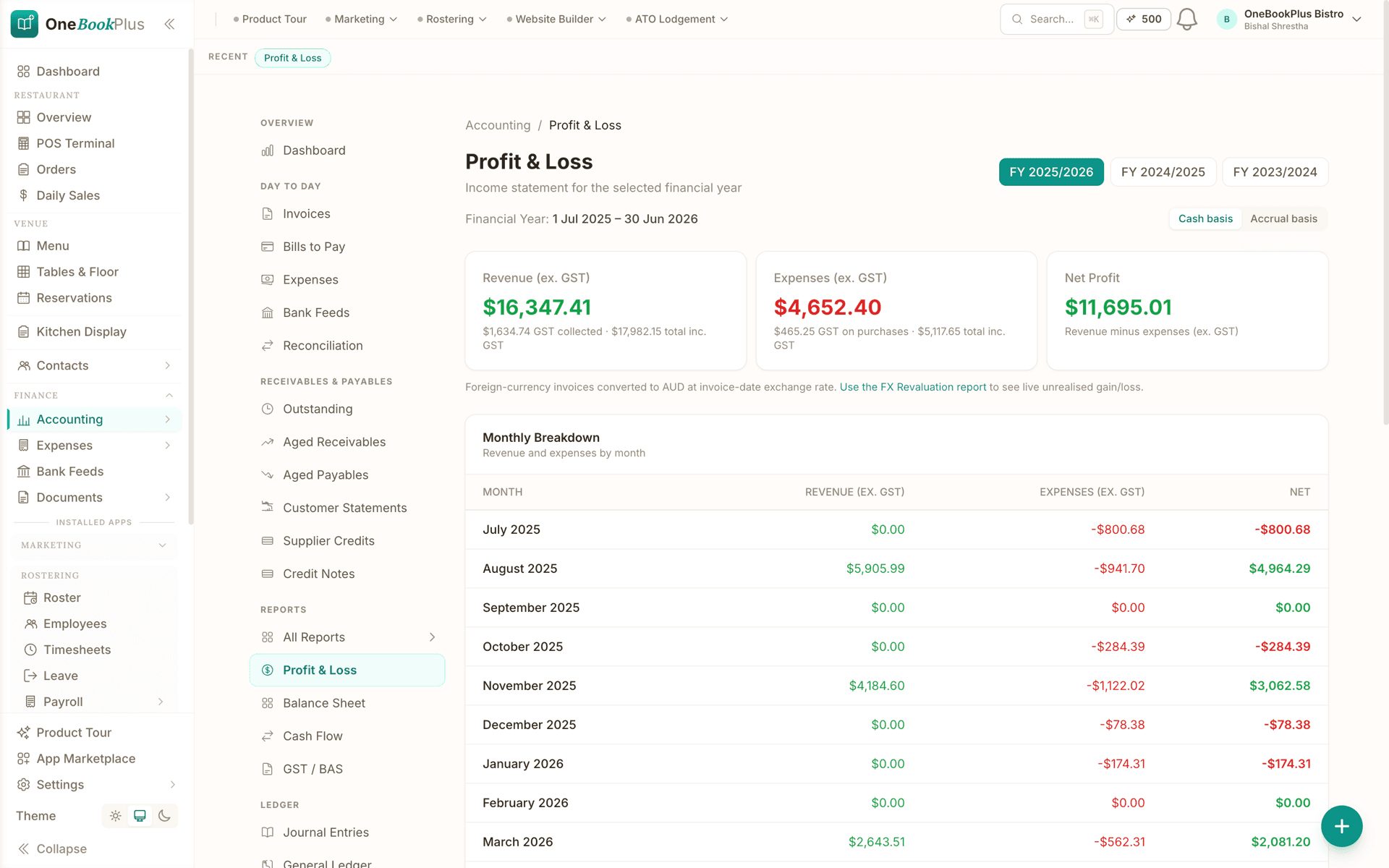
  • Profit & Loss

    Cash/accrual toggle, month-by-month, fixed-asset depreciation auto-included.

  • P&L Comparative (YoY)

    Variance dollar + percentage per category against prior FY.

  • Balance Sheet + Comparative

    Real-time net position with year-on-year movement per line.

  • Cash Flow Statement

    Operating, investing, financing: derived directly from your journals.

  • Trial Balance + Comparative + sign-off

    The diagnostic test for GL integrity, with frozen year-end snapshots.

  • General Ledger drill-down

    Drill from any P&L or balance-sheet line into account-level transactions.

  • Journal Entries + audit log

    Manual journals with multi-line entries, reversal, and append-only audit.

Tax & compliance

BAS, PAYG, super, TPAR and the ATO calendar in one place. Pre-lodgement audits catch anomalies before they end up in front of the ATO.

See the finance features
  • BAS / GST Report (G1, 1A, 1B, G10, G11, W2)

    Cash/accrual toggle. Derived from the GL: no parallel register to maintain.

  • BAS Lodgements + audit record

    Lodgement date, ATO receipt number and net amount frozen per BAS. Revisions create new snapshots.

  • GST Audit Report

    Flags invoices marked Standard with $0 GST, off-band rates, tax/non-tax conflicts.

  • GST Settlement

    Record the BAS payment or refund: clears the GST liability accounts in one journal.

  • PAYG Installments (T7 or T1×T2)

    Quarterly installments tracked as a prepayment of income tax.

  • Super Guarantee

    STP-derived per-employee SG at 11.5%, with clearing-house tracking against the 28-day deadline.

  • TPAR

    Auto-detect reportable contractor payments: ATO-format file generated at year end.

  • ATO Calendar (12 months forward)

    Every BAS, PAYG, super, TPAR and STP deadline with traffic-light status.

  • Deduction Finder

    Heuristic scan for under-claimed home-office, motor-vehicle, prepayment and depreciation patterns.

  • Receipt Coverage

    ATO substantiation check: flags expenses over the $82.50 threshold with no attached receipt.

  • Expense Anomalies

    Outlier detection: duplicate payments, categories that quintupled month-on-month.

  • Supplier ABN Audit

    TAA 1953 s 12-190: flags suppliers without a valid ABN before you withhold incorrectly.

  • FX Revaluation

    Unrealised gain/loss on open foreign-currency invoices at year-end, with auto-reversing journal.

Receivables, payables & cash

From the first invoice to the final write-off, receivables ageing, supplier statements, batch ABA payments, credit notes, bad-debt journals and payments matched back to the invoices they settle.

See the finance features
  • Aged Receivables + by Customer

    Current / 1-30 / 31-60 / 61-90 / 90+ buckets with per-customer drill-down.

  • Aged Payables + Supplier Statements

    Mirror of customer-side ageing for what you owe, with per-supplier YTD totals.

  • Invoice payment matching

    Allocate recorded payments against open invoices, part-payments and overpayments included.

  • Receipt and bill scanning

    Drag in a PDF or photo: supplier, date, GST and total are read for you, ready to post.

  • Payment Runs + ABA export

    Select bills, generate an ABA bank file, upload once: bank processes the whole batch.

  • Customer Statements (with share token)

    Email or share a tokenised public URL: customer views their statement without a login.

  • Credit Notes (customer + supplier)

    Allocate against the original invoice; GST flows correctly to the next BAS.

  • Credit Limits & Holds

    Per-customer limit with on-hold flag; new invoices over the limit require override.

  • Bad Debts

    Write-off under GSTR 2000/2 with GST adjustment journal posted automatically. Reversible.

  • Petty Cash (multiple floats)

    Track named cash tins with disbursements, top-ups and running balance.

  • Stripe Payouts Reconciliation

    Match each payout against the underlying charges, refunds and fees in one view.

Planning & analysis

The numbers behind the decisions, budget variance drill-downs, 12-week cash forecasts, working-capital ratios, break-even, recurring-revenue insights and franchise consolidation.

See the finance features
  • Budget vs Actual + Variance Drill-Down

    Annual targets per category, scaled monthly/quarterly/full-year: drill into the variance.

  • Cash Flow Forecast (12-week)

    Forward receipts + payments + closing balance, week-by-week. Negative weeks flagged red.

  • Sales Forecast

    Linear-regression projection from the trailing twelve months. Reset assumptions for scenarios.

  • Working Capital

    Current/quick ratios, DSO, DPO, DIO and cash conversion cycle: the four-number health check.

  • Break-Even Analysis

    Fixed costs ÷ contribution margin = break-even revenue. Adjust inputs live.

  • Cost-Plus Pricing

    Build a quote price from materials + labour + overhead + margin; saved against the quote.

  • Recurring Revenue Insights

    MRR, ARR, net new MRR, churn dollars and churn rate: for subscription businesses.

  • Recurring Invoices + Recurring Expenses

    Auto-generate on schedule. Projected MRR/ARR surfaced.

  • Fixed Assets Register

    Four depreciation methods (prime cost, diminishing value, SBE pool, immediate). Disposal journal automated.

  • Franchise Consolidation

    Aggregate P&L and balance sheet across multiple tenants in one consolidated view.

  • Tracking Categories

    Department, Location, Project allocations per transaction: drives dimensional reporting.

  • P&L by Tracking

    Slice the P&L by any tracking dimension. Side-by-side margins per Location or Department.

Setup & data control

How a new tenant gets operational in under a day, chart of accounts, opening balances, tax codes, tracking dimensions, receipt inbox and period locks once you start lodging.

See the finance features
  • Chart of Accounts (CSV import)

    33 default Australian accounts; replace wholesale via CSV from Xero, MYOB or QuickBooks.

  • Opening Balances Wizard

    Imports closing balances as a single OPENING-BAL journal with debit/credit validation.

  • Tax Codes

    Custom GST classifications: WET, LCT, capped input credits, GST-free variants.

  • Tracking Categories config

    Define Department / Location / Project dimensions and the values within each.

  • Period Locks

    Lock after BAS or tax-return lodgement; unlock events logged with actor + reason.

  • Receipt Inbox (email-in)

    Forward receipts to your tenant inbox. OCR-suggested expense fields ready for one-click creation.

  • Job Costing + Project Budget

    Estimate vs actual hours and materials per job, with red/amber/green margin flag.

  • Inventory tracking

    On-hand qty, low-stock alerts, stocktake workflow. Adjustments auto-post Dr Inventory / Cr COGS.

  • Quote Analytics + Quote-to-Invoice

    Acceptance rate, time-to-accept and won/lost value: one-click conversion to invoice.

  • Business Pulse widget

    Heuristic insights on the accounting overview: variance, runway, growing-expense alerts.

Reports library

Forty-plus reports across six groups, every one CSV-exportable, most with comparative and drill-down. The reports library inside the app lists them all in one place.

See the finance features
  • Sales by Customer / Location

    Ranked revenue with month-on-month deltas and concentration risk band.

  • Expenses by Supplier

    Suppliers ranked by spend with GST claimable and top expense category each.

  • Category Trend (12-month)

    Twelve-month sparkline per expense category: spot creeping subscription growth.

  • Payroll Summary (STP-ready)

    Per-employee gross, PAYG, super, net pay: feeds STP finalisation.

  • Customer LTV

    All-time revenue per customer, average days-to-pay, top-10 concentration band.

  • Outstanding Invoices

    Open AR sorted by age: the single working list for collections.

  • Year-End Pack

    One-click PDF/CSV bundle: TB, P&L, BS, FA register, AR/AP, BAS history, journals.

  • Month-End Digest

    Auto-generated month summary: revenue, GM, top expenses, AR ageing, cash on hand.

A note on framing

The capability list above describes what the accounting module does. It is not positioned as a Xero or MYOB replacement, those are good tools and many practices will keep using them for client work. OneBookPlus is the platform where your firm runs its own books alongside CRM, bookings and invoicing, and where you can offer clients a single workspace if they want one. The capability depth is here for practices that want to consolidate.

Common questions

Six questions accountants ask in the first month.

Preview snippets from the help centre. Each article is 200 to 400 words covering the actual mechanics, not marketing fluff. Click through for the full walkthrough, or browse the accounting help category for the full set.

BAS & GST

How OneBookPlus calculates GST on the BAS report

The BAS report doesn't read a separate GST register. It walks your general ledger for the BAS period and groups every line by its tax code. Each box on the BAS is derived from the journals that posted during the quarter, G1 from gross customer invoices, 1A from the 10% GST portion, G10 and G11 from bills against asset vs expense accounts. Switching the cash/accrual toggle re-runs the calculation in seconds.

Read “How OneBookPlus calculates GST on the BAS report

Receivables

Recording a bad-debt write-off

Under ATO ruling GSTR 2000/2, a debt is 'bad' once you've made a genuine commercial decision that it's unrecoverable, typically 12+ months overdue with collection attempts on record. The write-off posts Dr Bad Debts Expense, Dr GST on Sales (the adjustment), Cr Accounts Receivable. If the customer eventually pays, reverse the write-off and the original journal reverses verbatim.

Read “Recording a bad-debt write-off

Payables

Generating ABA bank files for batch supplier payments

Pay 30 supplier bills with one upload instead of 30 manual payments. Pick the source account and payment date, select the bills, and OneBookPlus writes the fixed-width ABA file every Australian business bank accepts. The bills stage as Awaiting confirmation until you mark the run processed, which posts Dr Accounts Payable, Cr Bank. Suppliers missing a BSB or a valid ABN are flagged before the file is generated.

Read “Generating ABA bank files for batch supplier payments

BAS & GST

Lodging the BAS: what to enter where

Field-by-field walkthrough of the quarterly BAS: G1 (gross sales including GST), 1A (the 10% portion), G10 (capital purchases), G11 (non-capital), 1B (the credit you claim back), W1 (gross wages), W2 (PAYG withheld), 5A (PAYG instalment). The summary computes 1A − 1B + W2 + 5A = net payment to the ATO. Run the GST Audit Report first, fixing anomalies after lodgement requires a formal revision.

Read “Lodging the BAS: what to enter where

Registers

Tracking fixed assets and depreciation

Anything tangible, used in the business, expected to last more than 12 months, and over the instant asset write-off threshold (currently $20,000 for SBE in 2024 to 2025). Four methods supported: prime cost, diminishing value, SBE pool, immediate write-off. Disposals post a balanced journal (Dr Bank, Dr Accumulated Depreciation, Cr Fixed Asset, Dr/Cr Gain or Loss) and flag 50% CGT discount eligibility for assets held over 12 months.

Read “Tracking fixed assets and depreciation

Planning

Cash flow forecasting: what the 12-week view does and doesn't

The forecast projects your closing bank balance week-by-week for the next 12 weeks. Receipts come from due-soon AR + recurring invoices; payments come from due-soon AP + recurring expenses + scheduled tax. It catches imminent shortfalls (payroll two weeks out vs the biggest AR invoice three weeks out), but it's not a prediction. A customer who always pays a fortnight late will still be modelled as paying on the due date until you adjust their expected pay date manually.

Read “Cash flow forecasting: what the 12-week view does and doesn't

Free booking page included

Your accounting business gets a booking page. Free.

Stop paying a website subscription you do not need, and skip the up-front designer quote. Every OneBookPlus accountant gets a branded booking page on the free plan. Want it on your own domain like a proper business website? The Website Builder app is $29/mo and we host it for you.

Freeyour-business.onebookplus.com.auoronebookplus.com.au/book/your-business
$29/moyourbusiness.com.au: your own branded domain, hosted by us

24/7 emergency callout booking

A new client books a 30-minute tax-planning consult at 9pm via your booking page while you're offline. It checks your Google Calendar first, lands in your dashboard with their entity type and the engagement they need, ready to confirm in the morning.

Branded with your colours, logo & licence

Brand color picker in settings. Logo upload. Trade licence number shown on every page so customers know you're legit.

Show service prices upfront

Individual tax return from $165. Quarterly BAS lodgement $180. Customers see prices before booking, kills the price-shopping phone calls.

Mobile-first: looks great on phones

Your booking page is built mobile-first, so a customer searching on a phone can book without pinching to zoom.

Bring your own domain: we host the site

Already own yourbusiness.com.au? Add the Website Builder app ($29/mo) and point your domain at the site we host for you, through a guided DNS and SSL wizard. We don't sell domains, keep yours wherever you registered it.

Local SEO baked in

Schema.org markup for accounting services + suburbs you cover. Google finds you for 'accountant in [suburb]' searches.

Accountants website cost, typical

What accountants pay for a website

  • Website builder

    Squarespace's cheapest plan billed monthly, verified 2 August 2026. Wix publishes no fixed Australian rate.

    From $24/mo
  • Web hosting + SSL

    Bundled in builders; separate if custom site

    $15 to $40/mo
  • Designer (one-off)

    Only if you want a custom-built site

    $1,500 to $3,000
  • Bookings on Calendly

    Per seat, billed in US dollars, verified 2 August 2026. Separate from your website.

    From US$10/mo

Typical recurring total

~$39 to $64/mo

+ US$10/mo per seat if you add Calendly for bookings, billed in US dollars, and $1,500 to $3,000 up-front if you hire a designer

With OneBookPlus

Included on every plan

  • Branded booking page, free plan
  • Hosting + SSL, free plan
  • 24/7 customer self-booking, free plan
  • Connect your own domain with the Website Builder app, +$29/mo (BYO)

Your total

$0 to $29/mo

Claim your free booking page

The app

Add full practice management for tax agents

For TPB-registered tax and BAS agents, the Tax Practice Suite app connects OneBookPlus to the ATO and adds the deeper practice-management layer on top of any base plan.

Tax Practice Suite

$29/mo

Practice management for registered tax agents and BAS agents

Practice management for registered tax agents and BAS agents, inside OneBookPlus rather than beside it. Manage clients, prepare and validate BAS, TPAR, company, trust, partnership and individual income tax returns, turn billable time into an invoice, and run the practice off a task board with the ATO key dates already on it. It carries a CPD register against the TPB hours, per-client document storage, a secure client portal, a 7-year audit log and enforced MFA. On lodgement, the position is exactly this: Direct ATO e-lodgement via SBR is in final ATO certification, prepare and validate BAS and returns today; we'll tell you the moment lodgement goes live on your account. Preparation, validation and the whole practice-management side are what you get today. Nothing is charged per lodgement while lodgement is not switched on. When lodgement goes live, income tax returns are planned at $2 per accepted IITR/CTR/PTR/TTR/FBT lodgement, first 5 free each month, with BAS and TPAR always included in base.

  • Prepare and validate BAS, TPAR, IITR, CTR, PTR, TTR and FBT
  • Client management with CUREL
  • Client billable-time tracking to invoice
  • Practice tasks, deadlines and follow-ups
  • Practice performance reports
  • ATO key-dates calendar (BAS, SG, STP, TPAR, FBT)
Explore Tax Practice Suite14-day free trial · cancel anytime

Simple Workflow

How OneBookPlus Works for Accountants

From client meeting to payment in four simple steps, designed around a typical accounting practice's workflow.

1
Step 1

Client books appointment

Clients schedule a consultation or meeting through your online booking page. All details flow into your calendar automatically.

2
Step 2

You do the work

Access client records, track time, and manage deliverables. Add notes, attach documents, and keep everything organised in one place.

3
Step 3

Invoice sent automatically

Convert tracked time or fixed fees into a GST-compliant invoice with one click. The client gets a professional PDF with a payment link.

4
Step 4

Client pays online

Clients pay invoices online via card. Automated reminders handle overdue payments so you can focus on client work, not collections.

Add your first client, Free

Send your first GST invoice the day you sign up

Who it's for

Built for every accounting practice

From sole practitioner to multi-partner firm. OneBookPlus scales with your practice.

Sole Practitioner

Running a one-person practice, handling BAS lodgements and tax returns. Needs client management, invoicing, and ATO integration.

Small Accounting Firm

2-10 staff managing 200+ clients. Needs bulk lodgement, practice dashboards, and team task management.

BAS Agent

Specialising in BAS preparation and lodgement. Needs streamlined BAS workflows, client data import, and ATO compliance.

Bookkeeper

Working with multiple business clients on reconciliation and reporting. Needs multi-tenant access and clean handoff to accountants.

What a four-tool stack costs each month

Named tools, at each vendor’s own cheapest published plan, and ours underneath. Vendor pricing changes, so check each one before you decide.

MYOB PracticePractice management
$95/mo
HubSpotCRM
US$20/mo
CalendlyClient bookings
US$10/mo
MailchimpClient newsletters
Not published
Total monthly cost$95/mo + US$30/mo + Mailchimp

Or use OneBookPlus

$29/mo

Everything in the list above, on one bill.

Start free

No credit card · Free forever · Cancel anytime

Example walkthrough

Monday of BAS week

An illustrative walkthrough of a typical practice day in BAS season

You open the dashboard at 8am with 12 BAS lodgements due this week across your client list. You sort by deadline and start with the most urgent.

For each client, you pull up their account: revenue from invoices and expenses logged. The BAS form auto-populates G1, 1A, G11 and 1B from the data. You review, adjust where needed, and validate against ATO rules.

By lunch you've prepared and validated six BAS returns. Each client gets an automatic email with their BAS summary, no manual PDF generation, no separate email tool.

In the afternoon, you invoice the morning's work at $180 per BAS lodgement on the example prices shown on this page, GST included. Payment links go out with the invoices, and several clients pay before end of day.

How we compare

OneBookPlus vs accounting practice software

See how we compare to the tools accounting practices typically use.

FeatureOneBookPlusMYOB PracticeXero HQFreshBooks
Client managementYesYesYesYes
BAS preparation & lodgementYesYesNoNo
Tax return preparationYesYesNoNo
Practice invoicingYesYesYesYes
Client booking pageYesNoNoNo
CRM & client historyYesNoNoNo
Email marketingYesNoNoNo
Practice dashboardYesYesYesYes
Multi-client managementYesYesYesNo
Free plan availableYesNoNoNo
PriceFrom $0/moSubscriptionContact sales$29+/mo

Built for Australian Accounting Practices

100%

ATO-compliant invoicing and reports

ABR

Live ABN lookup on every new client

1

Platform for clients, invoicing & scheduling

$0

Free plan to start, no card required

Incoming

OneBookPlus

AI Receptionist · incoming call

“I need help with my BAS, can we book a call?”

DeclineAnswer

If you don't answer, the AI books it, Consultation · Wed 11:00am, and texts a confirmation.

Australian Owned

Built in Melbourne, AU

GST Compliant

ATO-ready from day one

Encrypted & Isolated

TLS in transit, AES-256 at rest, tenant isolation at the database layer, read the security page

Free Plan Available

No credit card needed

Frequently Asked Questions

Common questions about practice management software for accountants in Australia.

Is OneBookPlus a Xero or MYOB alternative for accountants?

Not for your clients' books, Xero and MYOB are excellent general ledgers, and most of your clients will keep using them. OneBookPlus is the layer that runs your own practice on top: client CRM, appointment booking, GST-compliant invoicing, team management, and BAS/lodgement deadline tracking. Honestly, the cleanest setup for most firms is OneBookPlus for practice management plus Xero or MYOB for the bookkeeping engine, not one replacing the other.

Does OneBookPlus integrate with the ATO?

No. Direct ATO e-lodgement via SBR is in final ATO certification, prepare and validate BAS and returns today; we'll tell you the moment lodgement goes live on your account. Today OneBookPlus manages your client deadlines, BAS due dates, tax-return status and the whole practice around them (CRM, invoicing, billable time, tasks, reports, CPD and document management), and you lodge through your usual channel.

Can I manage hundreds of clients effectively?

Yes. OneBookPlus is built for practices of all sizes. Search, filter, and segment your client base. Track lodgement dates, engagement status, and billing across every client. Assign clients to team members and monitor workloads at a glance.

Does it support team features for multi-staff practices?

Absolutely. Invite team members, assign client responsibilities, and manage access levels. Track who is working on what, monitor capacity, and ensure nothing falls through the cracks during busy season.

What is the best accounting practice management software in Australia?

The right tool depends on your firm. MYOB Practice Manager and Xero Practice Manager (XPM) are the established, ledger-integrated options and suit firms already deep in those ecosystems. OneBookPlus is the modern, simpler alternative at a fraction of the cost: client CRM, invoicing, bookings, team management, and lodgement-deadline tracking without the legacy complexity, free to start, with affordable plans as you grow. If you want one workflow tool that isn't tied to a single ledger vendor, that's our sweet spot.

What is the Tax Practitioners Board (TPB)?

The Tax Practitioners Board (TPB) is the national body that registers and regulates tax agents and BAS agents in Australia. TPB registration is the legal prerequisite for charging fees to provide tax or BAS services. OneBookPlus stores your TPB registration number alongside your ABN and can print it on quotes and invoices.

Does OneBookPlus help track BAS, IAS, and tax-return due dates?

Yes. OneBookPlus tracks lodgement due dates across your client base, quarterly BAS, monthly IAS, and individual income tax returns (31 October for self-lodgers, or your ATO tax-agent lodgement-program date, commonly 15 May for many client returns). Each obligation rolls up into a single calendar with traffic-light status.

Can OneBookPlus run a virtual or fully remote tax practice?

Yes. OneBookPlus works as virtual tax practice management software: client records, the practice task board, billable-time tracking and the lodgement-deadline calendar all run in the browser, hosted in AWS Sydney. Remote staff log in with their own accounts, clients upload source documents through the secure portal instead of emailing attachments, and meetings are booked through your online booking page. There is no server in the office and nothing to install.

Is OneBookPlus client management software for accountants and CPAs?

Yes. The practice CRM stores each client's entity structure, ABN, engagement types, communication history and lodgement due dates, and client work tracking runs on top: each engagement becomes a job you can assign, track and invoice, with billable time converting to a GST-compliant invoice in one click. CPA Australia, CA ANZ and IPA membership details and your TPB registration are stored per practitioner. For deeper practice workflows (task board, CPD register, per-client document store), add the Tax Practice Suite app.

About the author

Bishal Shrestha, Founder of OneBookPlus

Bishal Shrestha

Founder & CEO, OneBookPlus

Bishal spent a decade running digital projects for Australian small businesses before founding OneBookPlus. He writes and maintains these pages, and publishes what OneBookPlus does not do alongside what it does.

A decade running digital projectsPersonal site: bishal.com.auMelbourne, Australia
Read the founder bio

How this page was researched

The compliance and licensing statements above are taken from the bodies this page links to, including Chartered Accountants ANZ, CPA Australia and the Tax Practitioners Board, so you can read the rule rather than take our word for it. Plan prices come from the OneBookPlus price registry, so the page and the checkout cannot disagree. Everything said about OneBookPlus describes what the product does today, and the page says so where it does not do something.

How OneBookPlus Works for Accountants

Accountants and bookkeepers spend their days managing other people's books. But when it comes to running their own practice, most rely on an awkward combination of MYOB Practice or Xero HQ for client work, a separate CRM or spreadsheet for prospect tracking, Calendly for appointment booking, and Outlook for everything else. The irony is that the professionals who keep everyone else's finances in order often have the messiest internal systems. OneBookPlus gives accounting practices a single platform for client management, appointment booking, invoicing, team coordination, and BAS preparation, so you can run your own firm as efficiently as you run your clients'.

The platform is designed around the practice workflow, not just the client ledger. You manage your entire client base in one CRM: contact details, entity structures, engagement types, lodgement due dates, and communication history. Clients book meetings through your branded online booking page, which syncs with Google Calendar to prevent double-bookings. When work is completed, you convert tracked time or fixed fees into a GST-compliant invoice with one click. The client receives a professional PDF with a payment link. Automated reminders chase overdue invoices so you can focus on billable work instead of collections.

Your Daily Workflow

Picture BAS season. You open your OneBookPlus dashboard at 8am: fourteen BAS lodgements due this week across your eighty-five clients, sorted by deadline. For each client, you pull up their account: revenue from invoices and expenses logged. The BAS figures (G1, 1A, G11, and 1B) are populated from the data. You review, adjust where needed, and validate against ATO rules. By lunch, you've prepared and validated seven returns. Each client gets an automatic email with their BAS summary. No manual PDF generation or separate email tool. In the afternoon, you invoice the morning's work at $180 per BAS, GST included. Payment links go out with the invoices. Three clients pay before end of day. Your practice dashboard shows monthly revenue trending 15% above last quarter.

Your Own Practice Books

OneBookPlus reconciles incoming client payments against the invoices you raised, so the practice ledger stays current. Your own practice expenses (professional indemnity insurance, software subscriptions, CPD courses, office rent) are categorised and tracked against fee revenue so you can see real practice profitability, not just billings. GST is calculated on every invoice and expense. At BAS time for your own practice, the same clean export you generate for clients works for your own lodgement. It's the shoemaker finally getting shoes: the same rigour you apply to client work, applied to your own firm's finances.

Getting Started

Sign up for free. No credit card, no lock-in. Add your practice details, team members, and service types (BAS preparation, tax returns, bookkeeping, advisory). Import your client list from a CSV or add clients as they come in. Set up your online booking page and share the link with clients so they can self-schedule meetings. The free plan includes 10 invoices and 5 quotes a month with up to 250 contacts, ideal for testing the system on real engagements. Upgrade to a paid plan when your client base grows, at a fraction of what MYOB Practice or Xero HQ charges.
See it with real data

The live demo is a working OneBookPlus account with invoices, quotes and jobs already in it, click around before you decide anything.

Your Clients' Books Are Sorted. Now Sort Your Own.

Join Australian accountants and bookkeepers who run their practice smarter with OneBookPlus. Free to start, upgrade when you're ready.

Get started free

Reviewed by Bishal Shrestha

What only OneBookPlus offers

Built so accountants have a seat at the table.

Read-only advisor access, BAS-ready summaries, and Australian hosting, the things an accountant actually needs in a client's books, not a re-skinned bookkeeping app.

Read-only advisor role

Your client invites you in with a dedicated advisor role. Access is read-only by default and protected by step-up authentication, so you see the books without risking a stray edit.

Tax-agency dashboard

A separate workspace where you switch between every client you advise, with their lodgement obligations rolled up across the practice.

BAS quarterly summary

G1, 1A, G11, 1B, W1, W2 already grouped by BAS quarter against the GL. Export to your lodgement tool of choice or use the figures to review the client.

P&L, GL, journal

The three reports you actually open during a review. Drill from a P&L line into the GL, into the journal, into the source transaction, no five-tab dance.

GST-native invoicing & AU payroll

Every invoice carries 10% GST correctly. Payroll is a $29/mo add-on covering pay runs, PAYG withholding, super and payslips. STP pay events are not lodged to the ATO from OneBookPlus.

ABN lookup + white-label portal

Live ABN/ABR lookup on new contacts. Your client's portal can run on your brand colours and logo for advisory engagements.

AWS Sydney hosting

All client data sits in AWS ap-southeast-2 (Sydney). Australian data, Australian time zones, no offshore round-trips.

ABN-anchored entity records

Every client entity is keyed to its ABN with TFN, address, and registration status, the data you need when a client rings about a TPB notice.

Stronger auth where it matters

Clients keep day-to-day login simple; advisor access to client books requires multi-factor authentication.

Pricing for accountants

Two apps, one bill.

Your own-business app

Bundled into every OneBookPlus base tier, CRM, invoicing, bookings, GST, the practice ledger. The same app your SMB clients use, to run your own firm.

  • Starter, $29/moup to 5 staff
  • Growth, $69/moup to 20 staff
  • Overage $3/employee/mo above tier. Rostering and Payroll is a separate $29/mo add-on. BAS / IAS / TPAR / PAYG bundled (unlimited) once direct ATO lodgement is switched on.

Tax Practice Suite

One add-on for the whole lodgement workflow, designed to sit alongside (or replace) LodgeiT/Xero Practice Manager, on top of any base plan (including Free).

  • Tax Practice Suite, $29/mofor TPB-registered tax & BAS agents
  • BAS & TPARunlimited, included in base
  • Income-tax returnsIITR / CTR / PTR / TTR / FBT, $2 each after the first 5 free every month
  • A solo agent on the Free plan runs at $29/mo all-in; pairing it with Starter ($29/mo) for unlimited invoicing is $58/mo all-in.

See OneBookPlus base-tier pricing, or book a 15-min pricing call before you migrate from a competitor, we can usually beat the renewal quote and back-fill any missing functionality during onboarding.

One day, written by itself, an illustrated day of an Australian accounting practice run on OneBookPlus

An illustrated day, not real customer data. Scroll through it from morning to 5pm: the AI receptionist answers and books a missed call, the work runs from the app, the GST invoice is sent on the spot, payment lands and the books balance themselves, a review invite is queued for the next daily run, and the day closes with the ledger already written.

8:05am

While you're with a client

The call that comes in two quarters late.

Anika's two BAS quarters behind and panicking. She calls the first accountant on Google, you.

AI Receptionist

Answered mid-consult, booked for ten.

The AI answers in two rings, books a 10am consult and emails a confirmation, while you finish your 8 o'clock.

In the consult

Her entity, her quarters, already on the card.

Her entity type, contact details and overdue quarters sit on the client card. Her scanned receipts are already on file.

Between appointments

Billed the moment the advice lands.

One tap turns the engagement into a GST invoice with a pay link. No end-of-month billing run.

While you're in the next consult

Paid. Reconciled. Balanced.

Card payment lands, the practice books update themselves, and $60.00 GST is set aside for your own BAS.

Reputation on autopilot

The review ask, once the panic is over.

Once the payment clears, the AI asks for the review at the delay you set. You never have to raise it with a client.

The day closes itself

Your own books, done before theirs.

You saw six clients and signed one more. The book did the rest.

$0

collected

0

admin tasks done by AI

0

evenings lost

An illustrated day, not real customer data. AI Receptionist is a $79/mo add-on that needs AI Companion ($25/mo, included on Growth), and AI Companion is what sends the review invite as well. The rest of the day is the app itself.

Practice pricing

Four plans. All built to run your firm.

Start free, upgrade when your client base justifies it. No contracts, no setup fees, no per-seat tax. The tax-agent lodgement app is a separate add-on priced by ITR count. Cancel any time.

Free

$0/forever

Sole practitioner

Run your first five client engagements today, no credit card.

  • Up to 5 clients
  • Client practice CRM + entity records
  • GST invoicing with ABN + TPB number
  • Booking page (clients self-schedule)
  • BAS / IAS / IITR deadline tracker
  • Live ABN/ABR lookup on new contacts
Start free

Starter

$29/mo

Up to 5 staff

Replaces MYOB Practice + Calendly + your CRM for the whole firm.

  • Everything in Free
  • Unlimited clients, invoices & quotes
  • Time-tracking to fixed-fee and progress invoices
  • Full double-entry accounting module
  • BAS quarterly summary (G1/1A/G11/1B/W1/W2)
  • Rostering & Payroll add-on, $29/mo (PAYG, super, payslips)
  • Stripe payments + automated reminders
  • Read-only advisor role on client books
Start 14-day trial

No card · Drops to Free if you don't upgrade

Our pick

Plus

$49/mo

Growing

Outgrowing the basics, unlimited contacts & bookings, advanced reporting.

  • Everything in Starter
  • Unlimited contacts & bookings
  • Advanced reporting & analytics
  • Batch invoicing
  • Budget tracking
  • 5 team logins
  • 10 GB website media storage
Start 14-day trial

Growth

$69/mo

Multi-partner firm

For firms running 200+ clients with marketing and advisory on the side.

  • Everything in Plus
  • Up to 20 staff (overage $3/employee/mo)
  • Tax-agency dashboard across all client books
  • White-label client portal (your brand)
  • 12-week cash-flow forecasting + 40+ reports
  • Email + SMS campaigns to your client list
  • Multi-factor authentication for advisor access
Start 14-day trial

Prices in AUD inc. GST. Add the Tax Practice Suite ($29/mo + $2 per income-tax return after the first 5 free each month) when you lodge under your own TPB registration. See the full plan comparison

Already on another tool?

Switching from Xero Practice Manager, MYOB Practice or Karbon?

Switching is designed to fit in a single evening between BAS quarters. Export your client list as CSV from your current tool, import it into OneBookPlus with the bulk importer, and you're running engagements before the next lodgement window opens.

  1. 1Export your client list + entities CSV from XPM, MYOB Practice or Karbon (5 min)
  2. 2Upload via the bulk importer, ABN, TFN and entity type auto-map, with live ABR validation (10 min)
  3. 3Set up your service types (BAS, IITR, advisory), billable rates and lodgement-program due dates (15 min)
  4. 4Cancel your old subscription at renewal, flat white in hand

Switch from

Xero Practice Manager
MYOB Practice
Karbon
Ignition
LodgeiT
Spreadsheets

How we compare

OneBookPlus vs Xero Practice Manager, MYOB Practice, Reckon One.

Capability-only, these are all good tools. The question is what your practice actually does day-to-day, and whether one platform can run both your books and your clients'.

CapabilityOneBookPlusXero Practice ManagerMYOB PracticeReckon One
Run your own practice books (CRM + invoicing + ledger)Yes, built inAdd Xero separatelyAdd MYOB Business separatelyYes
Read-only advisor role on client dataYes, MFA protectedYesYesLimited
BAS quarterly summary (G1/1A/G11/1B/W1/W2)Yes, nativeYesYesYes
P&L, GL, journal drill-throughYesYesYesYes
Payroll: pay runs, PAYG, super, payslipsYes, $29/mo add-onVia Xero PayrollVia MYOBAdd-on
STP Phase 2 lodgement to the ATONot available yetVia Xero PayrollVia MYOBAdd-on
Client bookings + CRM in same toolYesSeparateSeparateSeparate
White-label client portalYesLimitedLimitedNo
AWS Sydney hostingYesSydney/AWSAWS AUAWS AU
ABN lookup on new contactsYes, live ABRManualManualManual
Single platform for own-firm + tax-agent workflowYesTwo productsTwo productsTwo products

Comparison reflects feature availability for typical Australian SMB practices as at May 2026, check each vendor for current details.

Partner program

Become an OneBookPlus partner.

Recurring commission on every referred client, advisor seat, co-marketing support, and tier perks for active practices. Read the terms before you apply.

Become a partner

Authoritative sources

Where the regulatory and registration facts on this page come from

Australian tax and BAS agents are registered and regulated by the Tax Practitioners Board, lodge under the ATO tax-agent lodgement program, and typically hold membership of a recognised professional body. We cite the primary bodies for the claims on this page so you can verify directly.