OneBookPlus vs Square:
the all-in-one Square alternative
Square handles payments, but it's primarily a POS and payment processor. OneBookPlus gives Australian businesses invoicing, CRM, bookings, marketing, and accounting in one app.
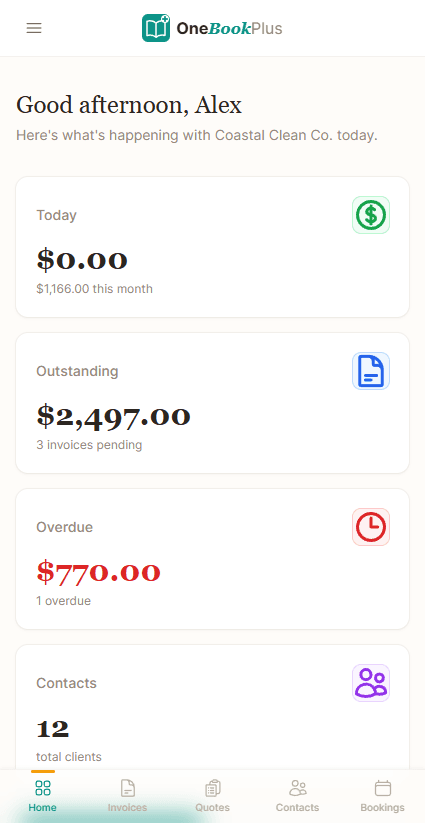
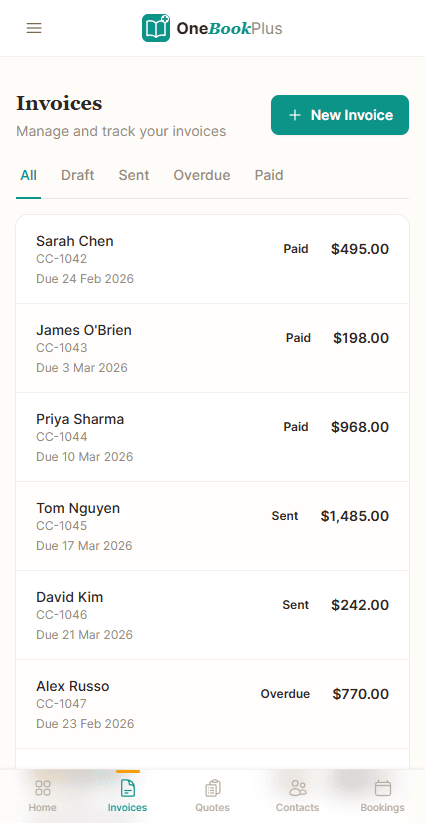
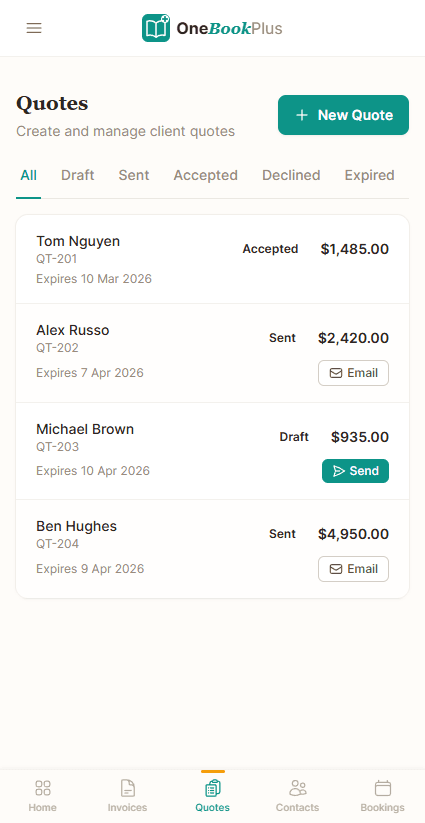
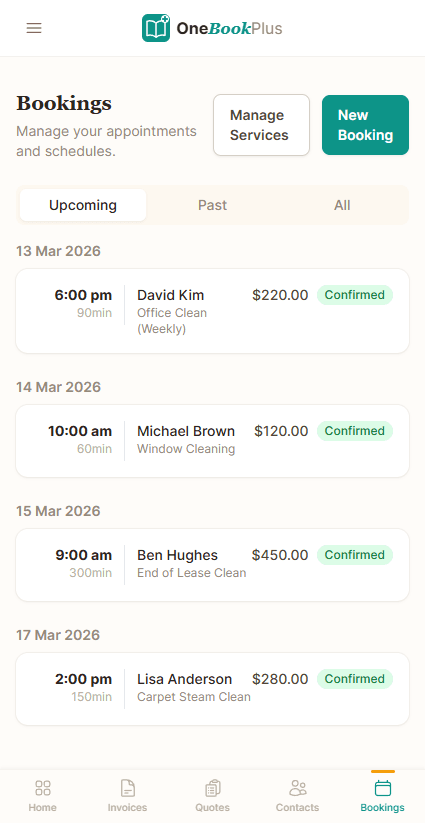
Key takeaways
5- Square's software is free to start and it earns on the card fee instead: one rate card-present, a higher rate card-not-present that covers online, invoice and manually keyed payments. Its deeper verticals, Square for Restaurants and Square Appointments, step up to paid tiers charged per location. The current AU figures are in the comparison table below, from squareup.com/au.
- Square is primarily a payment processor + POS. It doesn't include full accounting (no P&L, no balance sheet); Australian businesses typically pair Square with a Xero or MYOB subscription for accounting and BAS.
Show 3 moreShow less
- OneBookPlus is the back-of-house complement to Square (or replacement for the basic Square Appointments use case): invoicing, full accounting with BAS, CRM, online bookings, marketing, $0 to $69/month ($0 Free to $69 Growth), billed per business rather than per location.
- Both support 10% GST handling, ABN on receipts, and card payments. Square's card-present rate is competitive for high-frequency low-ticket sales (cafés, salons); OneBookPlus processes through Stripe, whose card-not-present rate is lower than Square's, which tends to matter more for higher-ticket service invoices.
- Square wins on: physical POS hardware (Square Reader, Square Terminal), pure-play card processing maturity, and cafés/restaurants/salons where the POS IS the front desk. OneBookPlus wins on: full accounting bundled, BAS-ready reporting, and per-business rather than per-location billing.
The counter, and everything behind the counter
OneBookPlus
From $0/mo. Bookings, invoicing, CRM and accounting on one plan; AI and payroll are add-ons
- GST invoicing & quoting
- CRM & contact management
- Online booking page
- Email marketing & campaigns
- Accounting & P&L reports
- BAS / ATO tax summaries
- Payment processing
- Mobile-first design
- Australian-built & supported
Square
From $0/mo, POS & payments only
- Payment processing
- Point of sale
- Basic invoicing
- Online bookings (Square Appointments)
- Customer Directory (basic profiles)
- Full CRM with client history
- Email marketing without a paid add-on
- Accounting & P&L
- BAS / ATO reports
- Requires separate software for accounting
OneBookPlus vs Square: detailed comparison
See exactly what's included in each platform. OneBookPlus goes far beyond payments to give Australian businesses a complete operating system.
| Feature | OneBookPlus | Square |
|---|---|---|
| GST-compliant invoicing | Yes | Yes |
| Online booking page | Yes | Yes |
| Full CRM with client history & pipeline | Yes | No |
| Email marketing included, not a paid add-on | Yes | No |
| Accounting & P&L reports | Yes | No |
| BAS / ATO tax summaries | Yes | No |
| Payment processing | Yes | Yes |
| Point of sale | Yes | Yes |
| Menu & order management | Yes | Yes |
| Google review requests | Yes | No |
| Quote to job to invoice pipeline | Yes | No |
| Bookings included, not billed per location | Yes | No |
| Native iOS app | Yes | Yes |
| Native Android app | No | Yes |
| Free plan available | Yes | Yes |
| Own POS hardware (readers, terminals, kiosks) | No | Yes |
| In-house payment processing & instant transfers | No | Yes |
| Price (AUD) | From $0/mo | From $0/mo |
| All included · per business | Free + fee per sale · paid tiers per location |
The dimensions a Square user checks before switching
Where the line falls between a card-present POS & payments tool and an all-in-one AU-tax-native platform, including the per-transaction fees and per-location billing that don’t show up on a feature checklist. Cited against Square’s Australian public pages.
| Category | Feature | OneBookPlus | Square |
|---|---|---|---|
| POS & card-present | In-store POS terminal + card reader | No in-house card reader. The browser till records the tender against the sale and you take the card on the terminal you already carry | Square Reader / Terminal / Register (source: squareup.com/point-of-sale) |
| Card processing fee | In-person tap-and-go rate | No card-present rate. OneBookPlus takes online and invoice payments only | 1.6% per tap-and-go (source: squareup.com/our-fees) |
| Online / e-invoice card rate | Stripe 1.7% + 30c online | 2.2% card-not-present (online, invoices, keyed) (source: squareup.com/our-fees) | |
| Invoicing | GST invoicing + ABN on every invoice | Yes | Square Invoices (basic; ABN not native) (source: squareup.com/invoices) |
| Bookings | Customer-facing online booking widget | Included on all plans | Yes, via Square Appointments (separate product, free tier) (source: squareup.com/appointments) |
| CRM | Full contact records, history, follow-up | Yes | Customer Directory (basic profiles) (source: squareup.com/point-of-sale) |
| Accounting | P&L, balance sheet, GST tracking | Yes | No (source: squareup.com/our-fees) |
| GST / BAS | Quarterly BAS-ready reports (G1, 1A, 1B) | Yes | Via Xero/MYOB add-on only (source: squareup.com/our-fees) |
| Quotes & jobs | Quote to job to invoice pipeline | Yes | Estimates in Invoices; no job pipeline (source: squareup.com/invoices) |
| Marketing | Email campaigns + Google review requests | Yes | Square Marketing (paid add-on, per send) (source: squareup.com/point-of-sale) |
| Hospitality | Table service / menu / KDS | Hospitality vertical (orders + menu) | Square for Restaurants (deep, mature): free tier, then Plus A$129/mo per location (source: squareup.com/restaurants/pricing) |
| Hardware | Branded POS hardware ecosystem | None to buy. Runs on the phone, tablet or laptop you already own, with keyboard-style barcode scanners and browser printing supported | Square Reader / Stand / Register / Kiosk (source: squareup.com/hardware) |
| Mobile | Native mobile app | Native iOS app; web app on Android | iOS + Android POS apps (source: squareup.com/point-of-sale) |
| AU tax built-in | GST, ABN validation, AUD-native | Built for AU from day one | US-built; GST/ABN bolted on (source: squareup.com/invoices) |
| Pricing model | Software cost vs per-transaction fees | Flat $0 to $69/mo, no per-sale software cut | Free software + fee on every sale (source: squareup.com/our-fees) |
| Per-location billing | Premium tiers charged per location | Per business, not per location | Square Appointments: free tier, then Plus A$40/mo and Premium A$90/mo, each per location (source: squareup.com/appointments/pricing) |
| Starting price (AUD, inc. GST) | From $0/mo | From A$0/mo | |
| Inc. GST · Per business · No per-sale software cut | Free + fee per sale · Restaurants/Appointments tiers per location |
Where Square wins
The best card-present counter on the market
Square has spent since 2009 building one of the best card-present experiences on the market, and for a café, food truck, market stall, or salon front desk where the POS is the counter, it is hard to beat. The Square hardware range (Reader, Stand, Terminal, Register, and self-serve Kiosk) is first-party, fast to set up, and tightly integrated with the POS app, and Square for Restaurants has mature table service, coursing, and kitchen display features. For high-frequency, low-ticket retail and hospitality where every second at the till counts, Square’s card-present rate and dedicated hardware ecosystem are genuinely strong. If the front-of-house terminal is the centre of your business, you may not need to leave.
Where OneBookPlus wins
Books bundled, software you buy once, a real CRM
Accounting and BAS are bundled, not a separate Xero bill. Square is a payment processor and POS. Its fees page lists no profit-and-loss, balance sheet, or BAS reporting, so Australian Square users run Square plus Xero or MYOB and reconcile takings into a second system each quarter. OneBookPlus ships full accounting, GST tracking, and BAS-ready summaries (G1, 1A, 1B) inside the same subscription: one source of truth, no quarter-end reconciliation tax.
You pay for software once, not a cut of every sale. Square’s model is free software plus a fee on each transaction, and its card-not-present rate, the one that applies to an emailed invoice, is the higher of its two rates, which compounds fast for higher-ticket service work like trades, allied health, and professional services. OneBookPlus charges a flat$0 to $69/month per business and processes cards through Stripe at a lower card-not-present rate, so a service business invoicing larger jobs typically keeps more of each payment.
A real CRM, bookings and marketing, not just a Customer Directory. Square’s point-of-sale gives you a basic customer directory, and bookings live in a separate Square Appointments product whose paid tiers are charged per location, while marketing emails are a paid add-on. OneBookPlus connects one client record across bookings, quotes, invoices, payments, and accounting, and includes an online booking page, email campaigns, and automated Google review requests, the after-the-sale machinery a card terminal was never built to run.
What a Square user gains by adding OneBookPlus behind the till
More than a payment terminal
Square is built around POS and card payments, with bookings and marketing sold alongside as separate products. OneBookPlus gives you one platform with invoicing, CRM, online bookings, email marketing, and accounting on a single per-business bill, so you manage everything from one dashboard instead of juggling several subscriptions.
Built-in accounting & BAS
Square doesn't include accounting, P&L reports, or BAS summaries. With OneBookPlus, your invoices, expenses, and payments automatically feed into your accounting reports and ATO-ready BAS summaries, no separate accounting software needed.
A real CRM, not a contact directory
Square's Customer Directory stores contact details and past purchases. OneBookPlus includes a full CRM so you can track client history, send follow-ups, manage leads, and build lasting relationships, all connected to your quoting, invoicing and booking data on the same record.
Australian-first compliance
OneBookPlus is built from the ground up for Australian businesses. GST calculation, ABN validation via the Australian Business Register, ATO-compliant BAS summaries, and AUD formatting are all included from day one, not retrofitted.
OneBookPlus vs Square: your questions answered
How does OneBookPlus compare to Square for an Australian business?
Square is an excellent POS and payment processor, and it does ship online bookings through Square Appointments, basic invoices and a Customer Directory. What it does not ship is full accounting, BAS reporting, a CRM with real client history, or marketing without a paid add-on, and its deeper tiers are charged per location. OneBookPlus covers that back-of-house half plus GST-compliant invoicing, BAS summaries and ABN validation from $0/month, billed per business. If the counter is your business and you live on a card reader, Square is the better fit and plenty of operators keep it there. If the paperwork behind the counter is the problem, that is the half OneBookPlus is built for.
Can I use OneBookPlus instead of Square?
Yes. OneBookPlus handles invoicing, payments, bookings, CRM, accounting, and marketing, covering far more than Square offers. You get GST-compliant invoicing, profit and loss reports, BAS tax summaries, email marketing, and an online booking page. For businesses that need more than just payment processing, OneBookPlus replaces Square and several other tools you'd normally pay for separately.
Does OneBookPlus support payment processing like Square?
Yes. OneBookPlus integrates with Stripe for secure payment processing, allowing you to accept card payments on invoices and bookings. While Square focuses on in-person POS transactions, OneBookPlus handles both online and invoice-based payments with full GST compliance and automatic receipt generation.
How much does Square cost compared to OneBookPlus?
Square's software starts free and it earns on the card fee instead, with one rate for card-present sales and a higher one for card-not-present, which covers online, invoice and manually keyed payments. To unlock the deeper verticals, Square for Restaurants and Square Appointments, you step up to paid tiers charged per location. The current AU figures are in the comparison table above, taken from Square's own fees and product pages. None of those tiers include accounting, so most Australian Square users add Xero or MYOB for BAS. OneBookPlus starts free and includes invoicing, CRM, bookings, full accounting with BAS, and marketing in one $0 to $69/month subscription billed per business, not per location.
How does OneBookPlus compare to Square for a service business that invoices larger jobs?
The two are built around different halves of that transaction. Square is excellent at card-present POS and hardware, but it has no full accounting, no BAS reporting, only a basic Customer Directory rather than a real CRM, and it charges its restaurant and appointments tiers per location. OneBookPlus bundles GST-native invoicing, full accounting with BAS-ready summaries, a real CRM, online bookings, and marketing into one Australian-built platform from $0/month, so you replace Square plus the Xero, CRM, and booking tools you'd otherwise run alongside it. Where Square stays ahead is the counter itself: for high-volume, low-ticket card-present sales its first-party hardware and Square for Restaurants table-service and kitchen-display tooling are deeper than anything OneBookPlus ships, which is why plenty of businesses keep Square at the till and run OneBookPlus behind it for the books, the CRM and the marketing.
What can OneBookPlus do that Square can't?
The clean gaps are full accounting with P&L reports, BAS/ATO tax summaries, a CRM with real client history rather than a contact directory, quoting with one-click accept, a quote-to-job pipeline, and automated Google review requests. The rest is a question of packaging: Square does have online bookings through Square Appointments and email campaigns through Square Marketing, but bookings sit in a separate product charged per location above the free tier and marketing is a paid add-on, whereas both are included in every OneBookPlus plan.
What is a BAS, and does OneBookPlus generate one when Square doesn't?
A BAS (Business Activity Statement) is the form GST-registered Australian businesses lodge with the ATO, usually quarterly, to report GST collected and paid, PAYG, and other tax obligations. OneBookPlus calculates 10% GST on every invoice and expense and generates ATO-ready BAS summaries directly from your live data, so you or your accountant can lodge with confidence. Square is a payment processor and POS; it does not produce BAS reports, so Square users typically add separate accounting software such as Xero or MYOB to prepare their BAS.
How OneBookPlus works for Australian businesses
Square was built for the American market and localised for Australia afterwards. It handles GST at the till, but there is no BAS reporting and no ABN validation in the platform. For Australian businesses, that means bolting on Xero or MYOB for accounting, a separate CRM for client management, and another tool for job tracking. OneBookPlus was built from the ground up for Australian compliance: GST, BAS, ABN and AUD are native, not retrofitted.
Where Square stops at the point of sale, OneBookPlus follows the full lifecycle of a customer relationship: from the first enquiry through quoting, booking, job delivery, invoicing, payment collection, and follow-up marketing. Payments recorded against an invoice clear it on the spot, and every sale, invoice and expense flows into your P&L and BAS summaries without re-keying.
Feature deep dive
- CRM and job pipeline: Track every lead from first contact to completed job. Attach quotes, convert accepted quotes to invoices, assign jobs to team members, and follow up with review requests, all from one client record. Square's Customer Directory holds contact details and purchase history; it has no job pipeline to hang them off.
- Invoice payments and receipt capture: Payments taken through the product clear the invoice they belong to, so you can see who has paid and who is overdue. Photograph a supplier bill and OneBookPlus reads the supplier, date, GST and total, without logging into a separate accounting app.
- Native GST and BAS summaries: Every invoice and expense automatically calculates GST and feeds into your ATO-ready BAS summary. No manual tax codes, no end-of-quarter panic. Square doesn't generate BAS reports, so you need separate accounting software for that.
Who should switch
OneBookPlus is ideal for Australian service businesses that need more than a payment terminal. If you're a restaurant managing bookings and supplier invoices, a salon tracking client history and sending marketing emails, or a trades business quoting jobs and chasing payments, you'll get far more value from OneBookPlus. Businesses that primarily need a hardware POS terminal for high-volume retail transactions may still prefer Square's dedicated card reader ecosystem.
Getting started
Create your free OneBookPlus account and you're up and running in minutes. Set up your services, publish your online booking page, and send your first GST-compliant invoice. Import your existing client list to keep your history intact. No credit card required, no transaction fees on invoices, and no US-centric workarounds for Australian tax compliance.
Who should switch from Square to OneBookPlus
Service businesses invoicing larger jobs.
Trades, allied health, consultants, and other appointment-based businesses send fewer, higher-value invoices, exactly where Square’s higher card-not-present rate bites hardest. OneBookPlus gives you GST invoicing with one-click quote acceptance, lower Stripe rates on higher-ticket payments, and a job pipeline Square’s POS simply doesn’t have.
Anyone tired of running Square + Xero + a CRM.
If your takings live in Square but your accountant needs Xero for BAS, your client list sits in a spreadsheet, and your bookings sit on a paid Square Appointments tier charged per location, you’re paying for, and reconciling, four systems. OneBookPlus folds invoicing, accounting, BAS, CRM, bookings, and marketing into one bill from $0/month, billed per business.
Businesses that want to win the next booking, not just ring up this one.
Square ends at the sale. If you want an online booking page, automated email campaigns to past customers, and Google review requests that fire after each completed job, OneBookPlus includes the after-the-sale machinery as standard rather than as a per-send Square Marketing add-on.
When Square might still be the better fit:
If your business is a café, restaurant, market stall, or retail counter where high-volume, low-ticket card-present sales run all day, the terminal is your front desk, and you rely on Square’s first-party hardware and Square for Restaurants table-service and kitchen-display tooling, Square’s POS specialism is genuinely deeper than OneBookPlus. Many such businesses keep Square at the counter and add OneBookPlus behind it for accounting, BAS, CRM, and marketing.
How to switch from Square to OneBookPlus
Export your Square customers and item catalogue
In the Square Dashboard, export your Customer Directory and Item Library as CSV files. Import the customers into the OneBookPlus CRM (names, emails, phone numbers and notes map across) and bring your items in as services or products. Your Square account stays live as a read-only archive of past sales.
Set ABN, GST, Stripe payments, and your booking page
Enter your ABN and GST settings so every invoice is ATO-compliant, connect Stripe to take card payments on invoices and bookings, and publish your online booking page. This takes about 15 minutes and replaces the Square Invoices, Square Appointments, and ad-hoc accounting setup in one pass.
Run takings through OneBookPlus, or keep Square at the counter
Start sending quotes and invoices from OneBookPlus and let every payment flow straight into your P&L and BAS summaries. If you still need Square’s card-present hardware for in-store sales, keep the terminal and reconcile its daily takings into OneBookPlus. You get the POS you like at the counter and full accounting, CRM and marketing behind it.
From the blog
Related reading: switching from square
Practical guides and explainers from the OneBookPlus blog, grouped by topic.
Best Booking Software in Australia
Two identical six-chair salons, one paying $29 a month for booking software and the other $252. Calendly, Acuity, Square, Setmore, Fresha, Timely and SimplyBook.me compared on what they actually cost an Australian business, with prices read from each vendor in August 2026.
15 min readRead articleBest Salon Software in Australia (2026): A Fresha Alternative That Keeps Your Client Data
Salon and beauty booking software in Australia for 2026, compared. Cut no-shows, take deposits, and keep your own client list.
10 min readRead articleBest Cleaning Business Software in Australia (2026): Scheduling, Invoicing & Recurring Jobs
Choosing cleaning business software in Australia for 2026: recurring schedules, on-site invoicing, rostering, payments and GST in one place.
10 min readRead articleBest Restaurant POS Systems Australia (2026 Comparison)
Restaurant POS systems in Australia compared for 2026: pricing, GST handling, and how to choose by venue type rather than by feature list.
9 min readRead article
Industries
Keep the till,
add the rest of the business
Quotes, invoices, bookings, CRM and BAS-ready accounting, around the payments you already take.
Free plan available, no card needed.
About this comparison
How we compared OneBookPlus to Square
Feature claims about OneBookPlus reflect what is shipping today on onebookplus.com.au. Square pricing and feature claims were read off Square’s public Australian product pages on . Vendor pricing changes frequently, so check the Square website for your specific situation before making a decision.
Disclosure: OneBookPlus publishes this comparison and stands to benefit if you switch. We aim to compare like-for-like on capability and Australian tax compliance, if you spot something out of date, email hello@onebookplus.com.au and we’ll review it.
About the author

Bishal Shrestha
Founder & CEO, OneBookPlus
Bishal spent a decade running digital projects for Australian small businesses before founding OneBookPlus. He writes and maintains these pages, and publishes what OneBookPlus does not do alongside what it does.
Read the founder bioHow this page was researched
Every Square price and capability claim on this page was read off Square's own published Australian pages on the date printed above, and recorded in competitor-facts.ts with that date. Claims about OneBookPlus describe what ships today, and the page names what we do not do.
Last reviewed and updated: by Bishal Shrestha