Pest control business management software for Australian technicians
Recurring treatments that schedule, remind and invoice themselves.
Set the quarterly spray once, log the chemical from the job, send the reminder before the ants come back, and invoice before you leave the kerb. All-in-one for $0 to $69/mo, replaces ServiceM8 + Xero + your CRM.
Free plan, no card needed. GST and ABN on every invoice, and a chemical record against every property.
Cut $61+/mo from your software stack by replacing Wix + Xero + ServiceM8 + Calendly + Mailchimp with OneBookPlus.
See your savingsFree Tools & Resources
Reference material for sole operators and contractor teams
Start a Trade Business
8-step founder guide, ABN, GST, licence, White Card, insurance, tools, pricing, first clients.
InteractiveTradie Quote Calculator
Interactive estimator combining hourly rate, materials markup, travel, callout, and GST.
ReferenceTrade Licence by State
State-by-state thresholds, regulators, and invoice requirements for AU trade licensing.
Operator GuideBuilding & Construction Award
Plain-English MA000020, CW/1–CW/10, industry/tool/fares allowances, RDO system.
ReferenceTradie Insurance Guide
PL, workers comp, tools, vehicle, PI, home warranty, contract works, coverage and premium ranges.
Key takeaways
5- Pest management technicians in Australia are licensed at state/territory level (e.g. NSW EPA, QLD Health, WA Health, SA Health, VIC's pest-control registration framework). Showing your pest-management licence number on every quote and invoice is standard practice and required in some jurisdictions.
- Pesticides used in pest control must be APVMA-registered and used in line with their approved label, and accurate chemical-application records are a standard obligation for pest managers. OneBookPlus stores product, active, batch, dilution, target pest and treated areas against each property.
Show 3 moreShow less
- OneBookPlus is the all-in-one alternative to the typical pest-control stack, ServiceM8 ($29 to $349 a month) + Xero (from $37/mo) + a CRM. Vendor prices verified 2 August 2026. Bundled from $0/month (Free), $29/month (Starter), or $69/month (Growth): recurring scheduling + jobs + invoicing + CRM + accounting + chemical records.
- Mobile-first design, most pest-control recording and invoicing happens on the phone at the property, not later in the office. Treatment-to-invoice in one tap; ABN on every invoice (prevents 47% no-ABN withholding); 10% GST automatic on labour and chemicals.
- Industry realities: recurring quarterly and annual agreements are the revenue spine of a pest business, and an agreement that lapses quietly is the most common way that revenue leaks. If chasing due re-services currently comes down to a wall calendar and memory, automated reminders are the part OneBookPlus takes over.
Built for how pest controllers work
OneBookPlus is the pest-control app for technicians who spend their days on a route, recording treatments at the property and invoicing from the ute.
Recurring service scheduling
Quarterly general pest, monthly commercial, annual termite inspections, set the cadence once and OneBookPlus generates every future job automatically. No more spreadsheet of who's due when.
Chemical and treatment records
Log the product, APVMA number, active constituent, batch number, dilution rate, quantity, method, target pest, treated areas, weather and technician, searchable by address so next year's technician can see what went down and where. Keeping accurate application records is a standard pest-management obligation. Part of the Timber Pest & Termite Reports app, $79/mo.
Property and service history
Every treatment at an address in one place, what was sprayed, when, by whom, and what was found. When a tenant calls back about ants, you already know last quarter's treatment and warranty status.
Automatic service reminders
Flag customers due for their next quarterly spray, annual termite inspection, or warranty re-treatment. Automated SMS and email reach out before the silverfish come back, and before they call a competitor.
GST and BAS-ready invoicing
Every invoice calculates 10% GST and shows your ABN and pest-management licence number. Convert a completed treatment to a GST-compliant invoice in one tap, and export a GST summary at BAS time.
Termite and timber-pest reports
Write the report itself, area by area, in the shape AS 4349.3 expects: moisture and thermal readings, photos, species and severity per area, and the areas you could not inspect recorded with the reason. Issue it as a branded PDF or a link the buyer or conveyancer opens without a login. Part of the Timber Pest & Termite Reports app, $79/mo with a 14-day free trial.
Route and day scheduling
See your whole week of treatments at a glance and assign jobs to each technician. Group nearby properties so your team isn't crossing town between a cockroach job and a rodent baiting.
Chemical costs and job margin
Put the baits, sprays and dusts a job consumed onto the job as costs, with receipt photos from your supplier runs, and see your true margin per treatment instead of guessing at year's end. This is per-job costing, not a stock-on-hand count: OneBookPlus does not track chemical inventory levels.
Free plan available, no card needed.
Free booking page included
Your pest control business gets a booking page. Free.
Stop paying a website subscription you do not need, and skip the up-front designer quote. Every OneBookPlus pest controller gets a branded booking page on the free plan. Want it on your own domain like a proper business website? The Website Builder app is $29/mo and we host it for you.
your-business.onebookplus.com.auoronebookplus.com.au/book/your-businessyourbusiness.com.au: your own branded domain, hosted by us24/7 emergency callout booking
Customers book a re-treatment online when they spot activity again, the job lands in your dashboard, tagged against the warranty on that property, ready for the route.
Branded with your colours, logo & licence
Brand color picker in settings. Logo upload. Trade licence number shown on every page so customers know you're legit.
Show service prices upfront
General pest treatment $180. Termite inspection $350. Customers see prices before booking, kills the price-shopping phone calls.
Mobile-first: looks great on phones
Your booking page is built mobile-first, so a customer searching on a phone can book without pinching to zoom.
Bring your own domain: we host the site
Already own yourbusiness.com.au? Add the Website Builder app ($29/mo) and point your domain at the site we host for you, through a guided DNS and SSL wizard. We don't sell domains, keep yours wherever you registered it.
Local SEO baked in
Schema.org markup for pest control services + suburbs you cover. Google finds you for 'pest control in [suburb]' searches.
Pest controllers website cost, typical
What pest controllers pay for a website
- From $24/mo
Website builder
Squarespace's cheapest plan billed monthly, verified 2 August 2026. Wix publishes no fixed Australian rate.
- $15 to $40/mo
Web hosting + SSL
Bundled in builders; separate if custom site
- $1,500 to $3,000
Designer (one-off)
Only if you want a custom-built site
- From US$10/mo
Bookings on Calendly
Per seat, billed in US dollars, verified 2 August 2026. Separate from your website.
Typical recurring total
~$39 to $64/mo
+ US$10/mo per seat if you add Calendly for bookings, billed in US dollars, and $1,500 to $3,000 up-front if you hire a designer
With OneBookPlus
Included on every plan
- Branded booking page, free plan
- Hosting + SSL, free plan
- 24/7 customer self-booking, free plan
- Connect your own domain with the Website Builder app, +$29/mo (BYO)
Your total
$0 to $29/mo
See it in action
The screens you work from, on site.
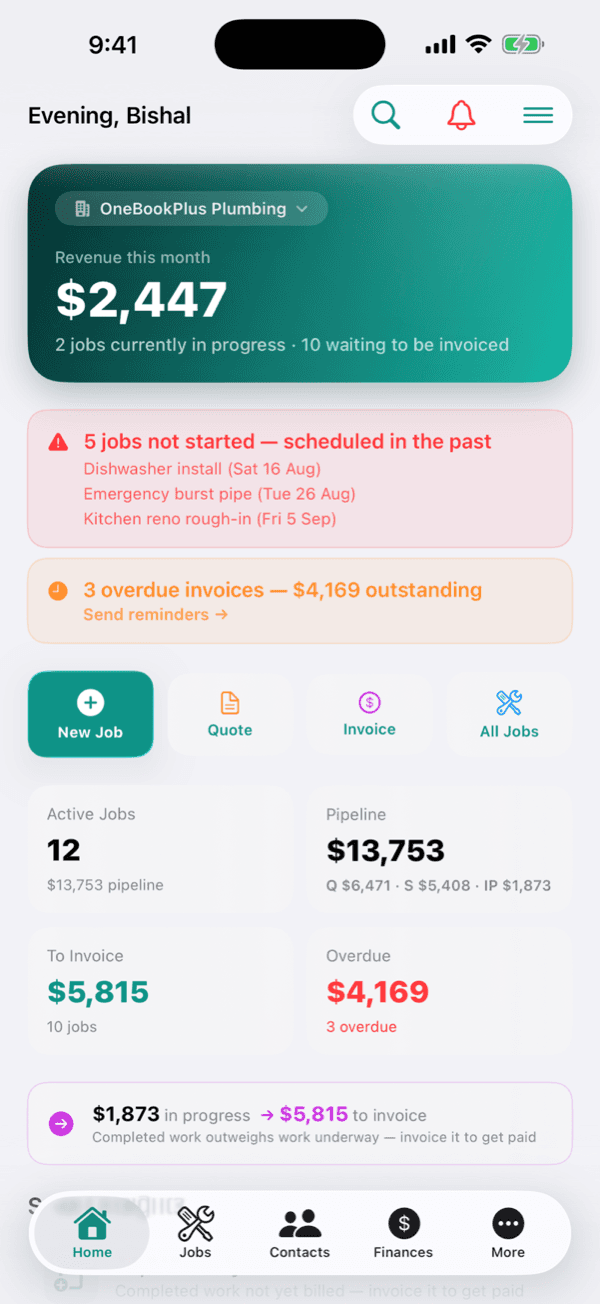
These are real product screens: the recurring bookings, per-property history and invoicing you'll run on the route. Tap any screen to zoom in.
Every treatment on the board
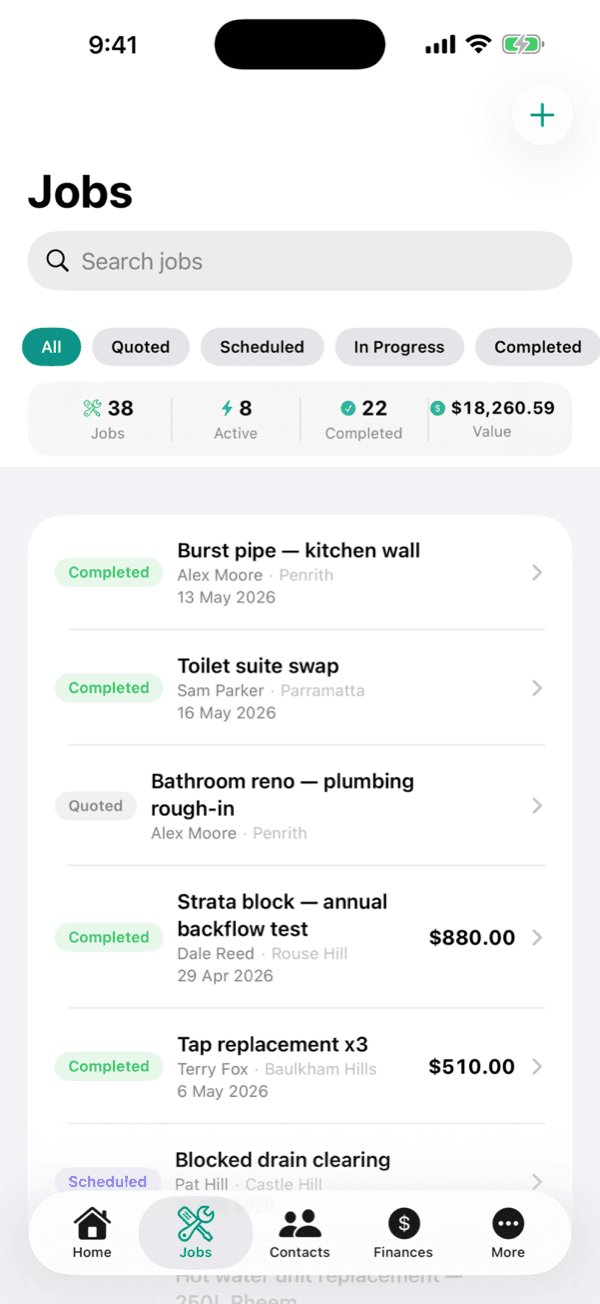
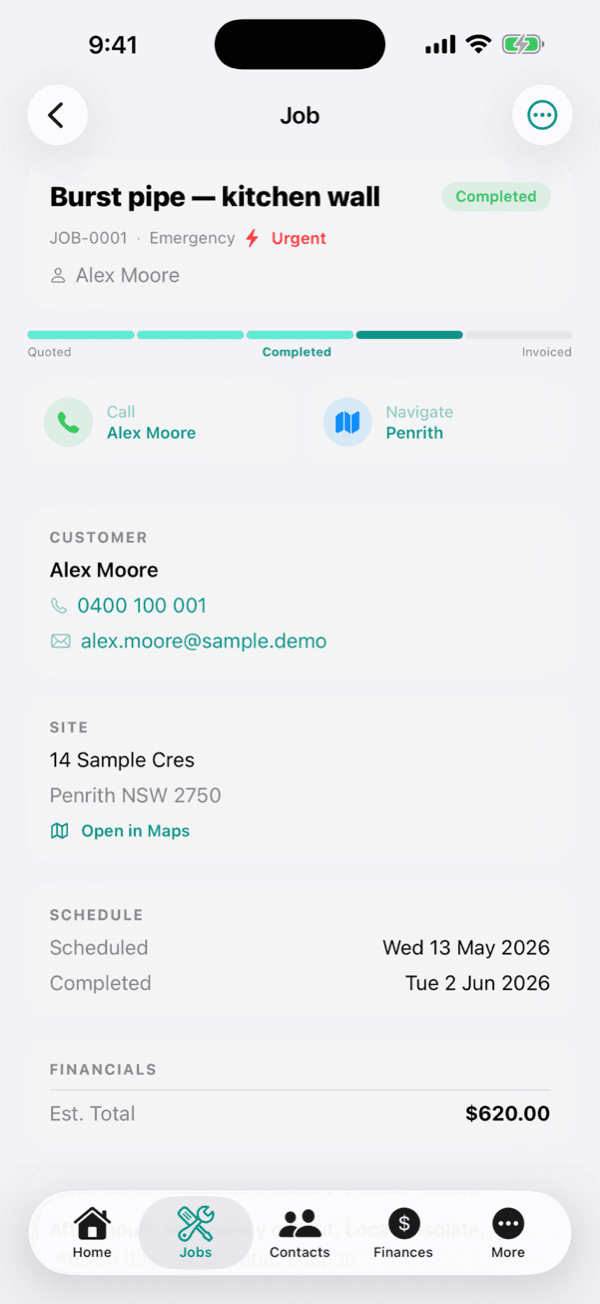
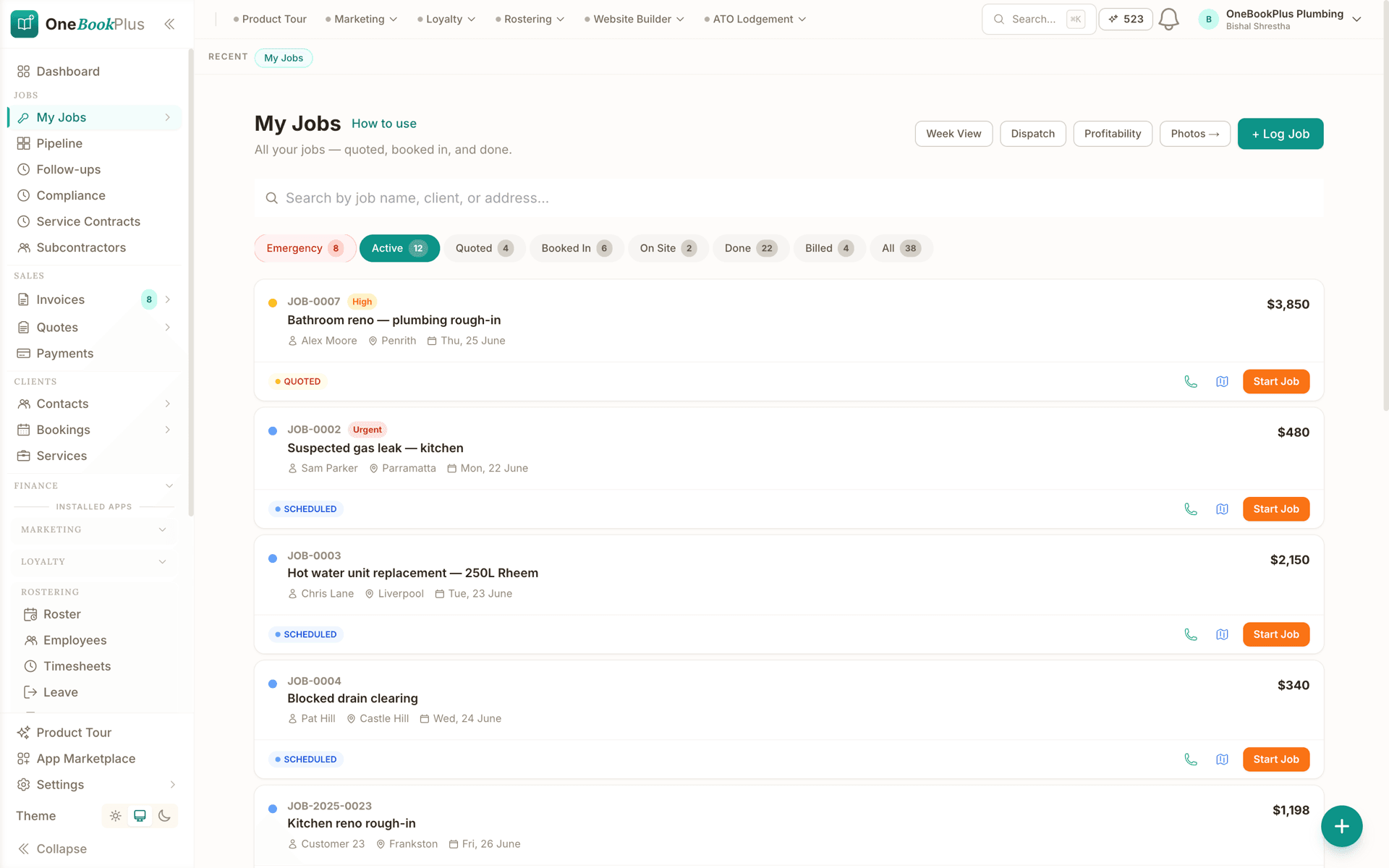
The jobs screen filtered by emergency, active, quoted, booked in, on site, done and billed. Each job carries the customer, the suburb, the booked date, the value and a one tap start.
One record per property
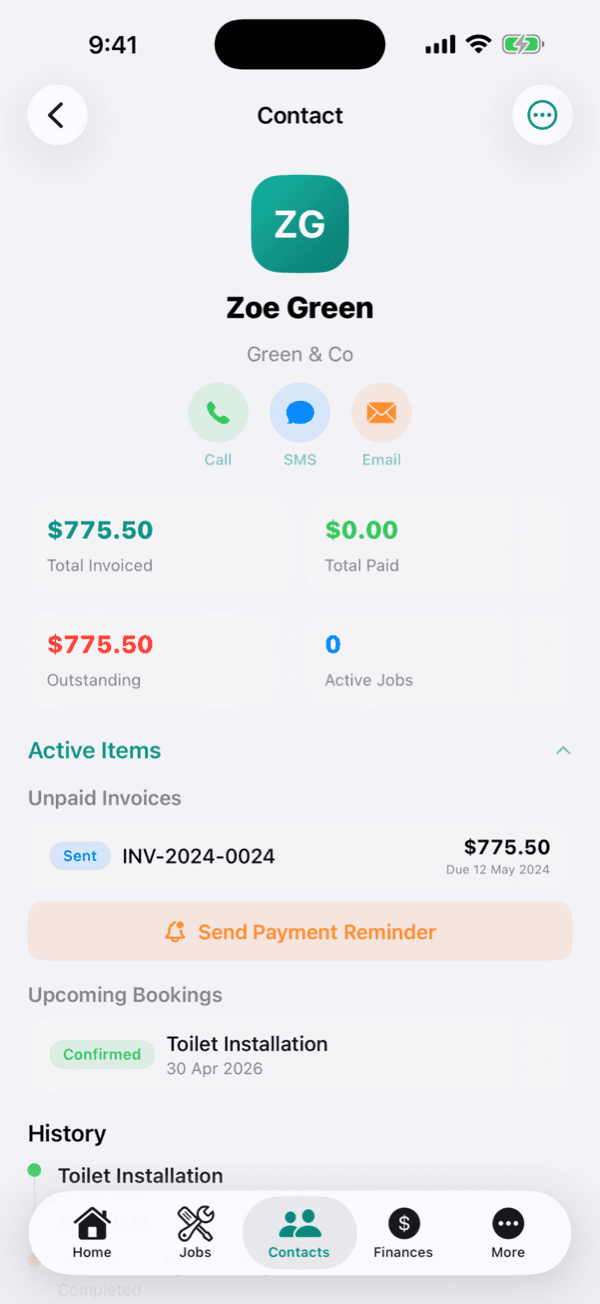
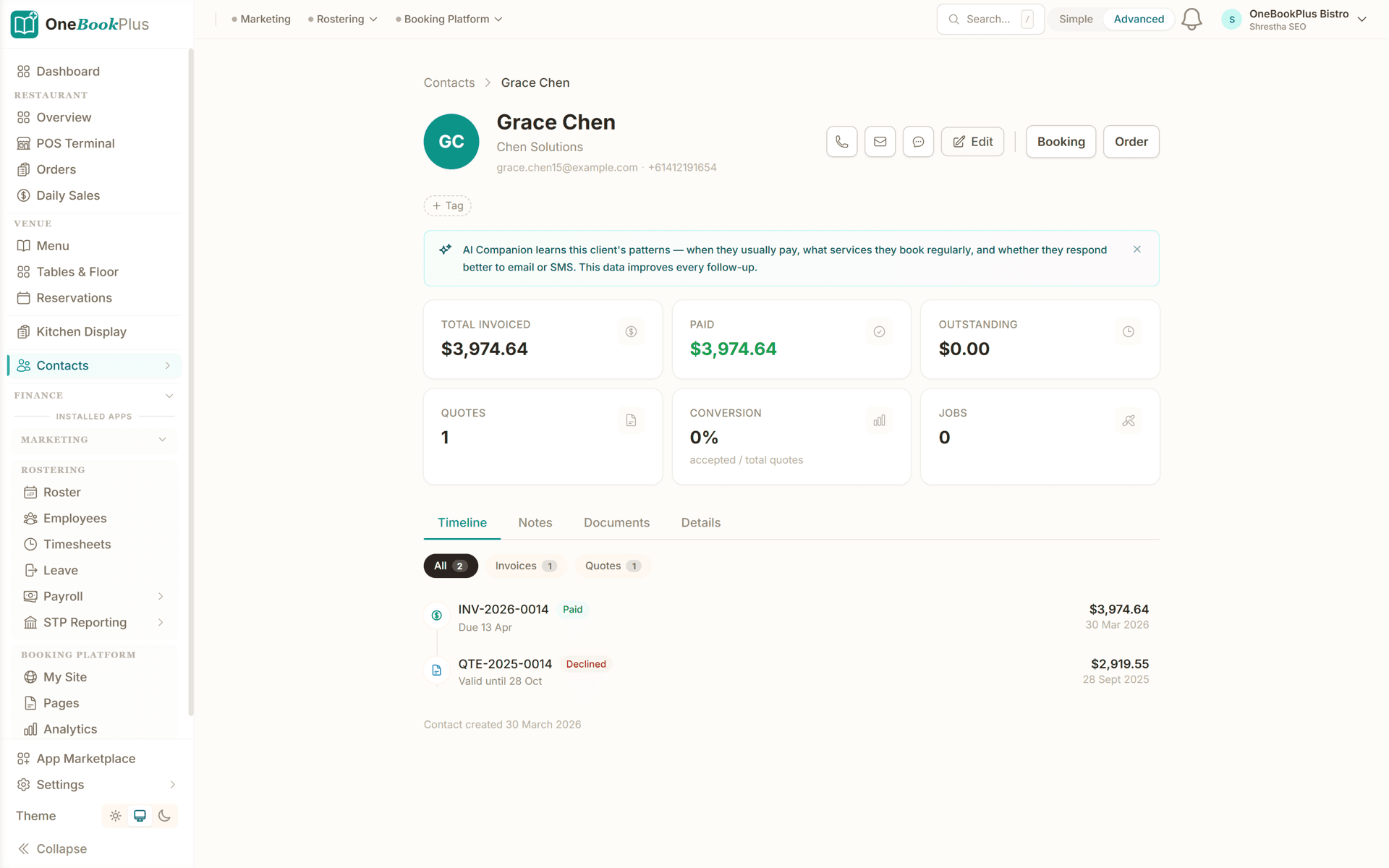
The customer record: total invoiced, paid and outstanding, quotes raised and jobs done, and a timeline of every invoice and quote with its status and date.
Invoice the treatment, chase it on a schedule
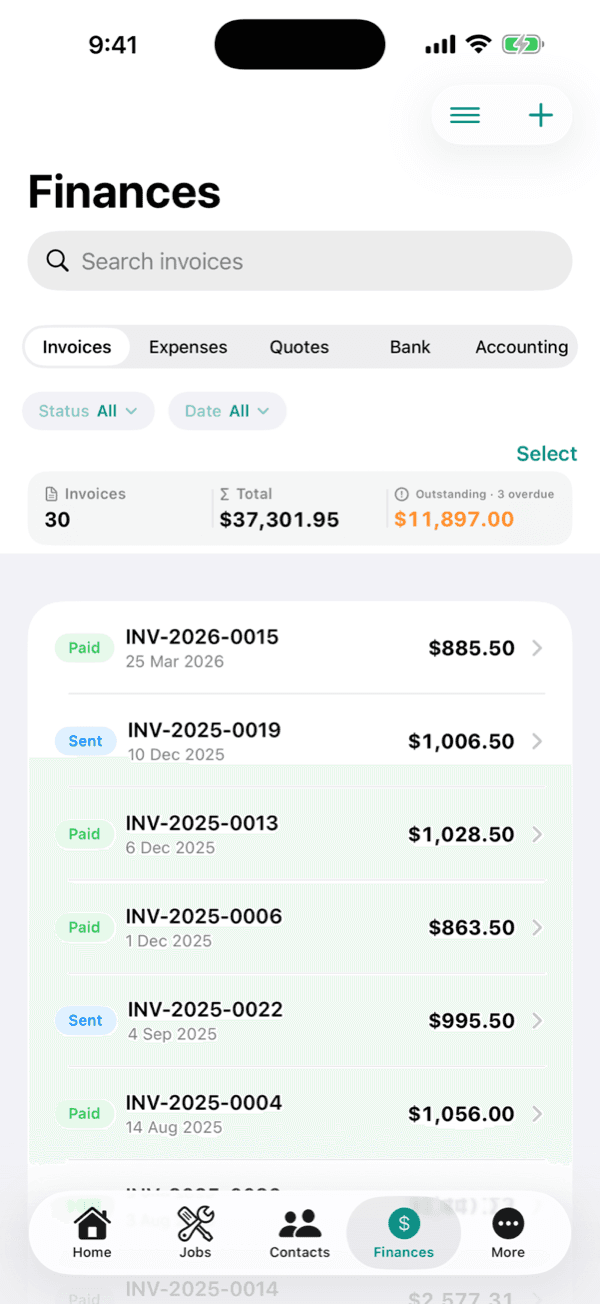
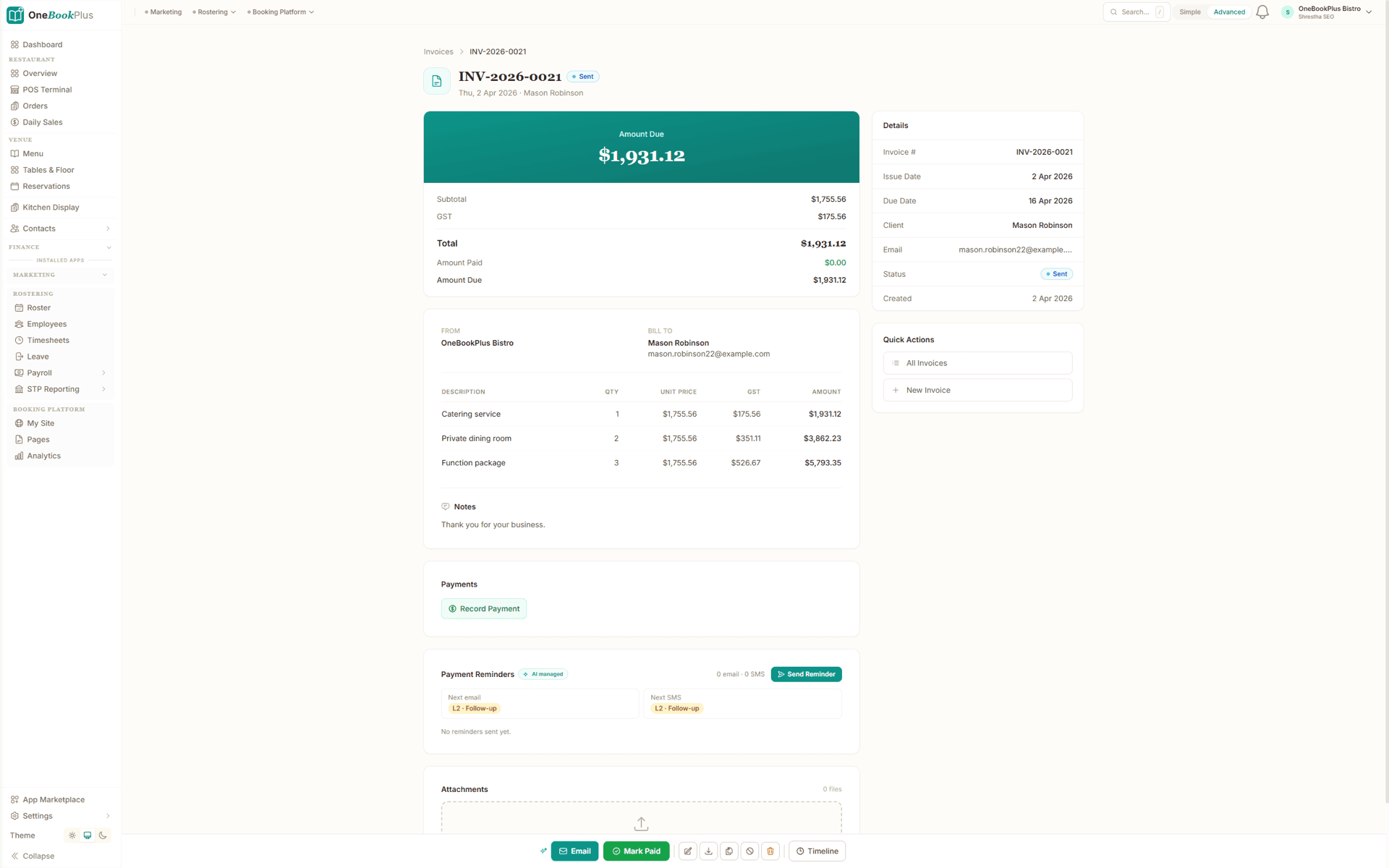
A GST invoice with the amount due on top, subtotal, GST, total, amount paid and amount due underneath, quantity, unit price and GST on every line, and reminders that queue the next email and the next SMS without you writing one.
From quote to recurring revenue in four steps
Built around a typical pest technician's route, from the first walk-through to the invoice you raise before you pack the sprayer away.
Quote the treatment
Build an itemised quote for the pest job: general pest spray, termite inspection, rodent program or a commercial contract. Labour, chemicals and GST calculated automatically, sent as a professional PDF with your ABN and licence number.
Schedule & set the recurrence
Once accepted, drop the job on the calendar and set the cadence: one-off, quarterly, monthly or annual. OneBookPlus generates every future visit and reminds the customer before each one.
Treat & record on-site
On the job, log the product, APVMA-registered active, batch, dilution and treated areas, snap before/after photos, and attach any timber-pest or inspection report: all against the property.
Invoice and get paid
Convert the completed treatment to a GST-compliant invoice in one tap. The customer pays online via the invoice link, and automated reminders chase anything overdue.
Set up your first recurring service the day you sign up
Who it's for
Who uses OneBookPlus
A sole operator on a suburban route, a termite specialist and a company running four technicians on commercial contracts have very different weeks. Here is what each one uses.
Sole-operator technician
Running a route solo, treating from the ute, recording chemicals on-site and invoicing between jobs. Needs fast mobile recording, recurring scheduling and automatic GST.
Termite specialist
Inspections, baiting systems and chemical barriers across suburbs. Needs detailed reports, timber-pest documentation and warranty-period service history per property.
Pest company owner
Managing several technicians and routes across the city. Needs day scheduling, team assignment, chemical records and revenue tracking.
Commercial contractor
Recurring contracts for restaurants, strata and food premises. Needs recurring job templates, audit-ready service records and batch invoicing.
What a five-tool stack costs each month
Named tools, at each vendor’s own cheapest published plan, and ours underneath. Vendor pricing changes, so check each one before you decide.
Or use OneBookPlus
$29/mo
Everything in the list above, on one bill.
Start freeNo credit card · Free forever · Cancel anytime
Example walkthrough
Tuesday on the quarterly route
An illustrative walkthrough of a typical pest-control day
Your week view opens grouped by suburb, so the route does not zig-zag across town. First up is a quarterly general-pest spray that OneBookPlus generated from the recurring agreement, and the customer was reminded by SMS yesterday.
On-site you treat the perimeter and the internal hot spots, then log the chemical against the job: product, APVMA-registered active, batch number, dilution rate, target pests and treated areas. Two photos go on the job card, and the visit converts to a GST invoice that the client pays by card on the spot through the Pay Now link.
Next is a pre-purchase termite inspection. You record the moisture and thermal readings, flag a subfloor risk, and attach the timber-pest report to the property so the buyer's conveyancer has it the same day.
Mid-afternoon is a commercial kitchen on a monthly agreement, where a timestamped service record per visit is the point. A second technician is running a rodent-baiting route on the other side of the city, assigned and tracked from the same board.
By the end of the day every visit is logged, every chemical application is recorded against its address, and the clients due next month are already queued for their reminders. The GST on the day's invoices is sitting in the BAS summary without anyone re-keying it.
How we compare
OneBookPlus vs pest control software
See how we compare to the tools pest controllers typically use.
| Feature | OneBookPlus | Xero | ServiceM8 | Fieldpop |
|---|---|---|---|---|
| GST invoicing | Yes | Yes | Yes | Yes |
| Recurring service scheduling | Yes | No | Yes | Yes |
| Chemical & treatment records | Yes | No | No | Yes |
| Automatic service reminders | Yes | No | Yes | Yes |
| Property & service history | Yes | No | Yes | Yes |
| Termite / timber-pest report attachments | Yes | No | No | Yes |
| Online booking page | Yes | No | No | No |
| CRM included | Yes | No | Yes | No |
| BAS-ready tax reports | Yes | Yes | No | No |
| Large third-party add-on marketplace | No | Yes | Yes | No |
| Free plan available | Yes | No | No | No |
| Price | From $0/mo | $37+/mo | $29+/mo | Subscription |
Pest controller savings calculator
What does your current pest controller software stack cost you?
Adjust the numbers below to match your real monthly spend. The total updates live, and so does what you'd save by replacing the lot with OneBookPlus.
Accounting (Xero, MYOB, QuickBooks)
Xero's cheapest published plan
Jobs & quotes (ServiceM8, Fieldpop, Pestpac)
ServiceM8's cheapest published plan
Website + hosting (Squarespace, Wix)
Squarespace's cheapest published plan, billed monthly
Bookings (Calendly, Acuity)
Calendly publishes US$10/mo. Type what you pay in Australian dollars.
CRM (HubSpot, Pipedrive)
HubSpot publishes US$20/mo. Type what you pay in Australian dollars.
Email marketing (Mailchimp, Klaviyo)
Mailchimp publishes no ongoing price. Type what you pay.
Rows open at the cheapest plan Xero, ServiceM8 and Squarespace publish, verified 2 August 2026. Calendly and HubSpot publish in US dollars and Mailchimp publishes no ongoing rate, so those three rows open at zero for you to fill in rather than carry a converted figure.
Your current stack
$90/mo
= $1,080/year
With OneBookPlus Starter
$29/mo
Replaces everything in the list. One bill.
Free plan available · No card required · Cancel anytime
One day, written by itself, an illustrated day of an Australian plumbing business run on OneBookPlus
An illustrated day, not real customer data. Scroll through it from morning to 5pm: the AI receptionist answers and books a missed call, the work runs from the app, the GST invoice is sent on the spot, payment lands and the books balance themselves, a review invite is queued for the next daily run, and the day closes with the ledger already written.
7:00am
While you're in the shower
A call you'd have missed.
Mrs Chen's hot-water system died overnight. She calls the first plumber on Google, you.
AI Receptionist
Answered. Booked. Texted.
The AI answers in two rings, books 9:30 am, and texts her a confirmation, before you've found your keys.
On the job
You just turn up.
Job card on your phone: address, fault notes, history. The quote's pre-filled from your price book.
From the ute
Invoice sent before lunch.
One tap converts the job to a GST invoice with a pay link. No laptop, no evening paperwork.
While you're on the next job
Paid. Booked. Balanced.
Card payment lands, the books update themselves, and $76.36 GST is set aside for BAS.
Reputation on autopilot
The review ask, without the chase.
Paying puts Mrs Chen in the queue. The 2pm run takes it from there, once per client per 90 days, so nobody gets asked twice.
The day closes itself
Your books, already written.
You did one job and quoted another. The book did the rest.
$0
collected
0
admin tasks done by AI
0
evenings lost
An illustrated day, not real customer data. AI Receptionist is a $79/mo add-on that needs AI Companion ($25/mo, included on Growth), and AI Companion is what sends the review invite as well. The rest of the day is the app itself.
Four plans, all built for pest control
Start free, upgrade when revenue justifies it. No contracts, no setup fees, no per-user tax. Cancel any time.
Free
$0/forever
Record your first treatment today, no credit card.
- 10 invoices/month
- 5 quotes/month
- Branded booking page
- GST + ABN built-in
- Chemical service records
- Mobile PWA (works on the route)
Starter
$29/mo
Replaces Xero + ServiceM8 + Calendly + your website builder.
- Everything in Free
- Unlimited invoices, quotes & jobs
- Recurring treatment scheduling
- Stripe online payments
- Payment & service reminders
- Email campaigns to past customers
- Accounting, P&L & BAS reports
- 3 team members (1 owner + 2 technicians)
No card, drops to Free if you don't upgrade
Plus
$49/mo
Outgrowing the basics, unlimited contacts & bookings, advanced reporting.
- Everything in Starter
- Unlimited contacts & bookings
- Advanced reporting & analytics
- Batch invoicing
- Budget tracking
- 5 team logins
- 10 GB website media storage
Growth
$69/mo
For businesses running 3+ technicians with marketing on the side.
- Everything in Plus
- Unlimited contacts + bookings
- Paid add-on: Google Ads dashboard, $99/mo
- AI ad copywriting + auto-bidding
- SMS marketing to your customer list
- Reputation Engine (auto Google reviews)
- 10 team members
Prices in AUD inc. GST. Online card payments carry Stripe processing fees (1.7% + 30¢ AU cards) plus a 2.5% OneBookPlus platform fee. Read the full plan comparison
Switching from ServiceM8, Fieldpop, Pestpac or a spreadsheet?
Switching is designed to fit in a single evening. Export your customers + recurring contracts as CSV from your current tool, import them into OneBookPlus with our bulk importer, and you're live the next morning.
- 1Export contacts + recurring jobs CSV from your current tool (5 min)
- 2Upload via OneBookPlus bulk importer, auto-maps columns (10 min)
- 3Re-create your services + recurring cadences and chemical templates (15 min)
- 4Cancel your old subscriptions tomorrow morning
Switch from
Built-in AI
Can’t get to the phone? Your AI can.
You can't sit by the phone all day, and every missed call is work that goes to whoever answers first.
OneBookPlus
AI Receptionist · incoming call
“Can I book in sometime this week?”
If you don't answer, the AI books it, Booking · Tue 10:30am, and texts a confirmation.
Extend Your Toolkit
Apps for Pest Control
Add advertising, tax lodgement, booking pages, and more to grow your pest-control business.
Australian Owned
Built in Melbourne, AU
GST Compliant
ATO-ready from day one
Encrypted & Isolated
TLS in transit, AES-256 at rest, tenant isolation at the database layer, read the security page
Free Plan Available
No credit card needed
Questions pest controllers ask
Common questions about scheduling, job management and invoicing software for pest control in Australia.
How does OneBookPlus compare to ServiceM8, Fieldpop and Pestpac for pest control?
ServiceM8, Fieldpop and Pestpac are capable field-service tools, and Pestpac in particular is built around pest-specific workflows that a generalist platform does not try to match. What several of them leave out is the rest of the business: accounting still goes to Xero or MYOB, and the booking page still goes to Wix or Calendly. OneBookPlus takes the all-in-one route, combining recurring-treatment scheduling, jobs, chemical-record keeping, automatic service reminders, GST and BAS-ready invoicing and a free booking page in one platform from $0/month. When you compare, price the whole stack rather than the job app alone, and weigh how much pest-specific depth your work needs.
Is OneBookPlus a good ServiceM8 alternative for pest control?
Yes. OneBookPlus is a genuine ServiceM8 alternative for Australian pest controllers. ServiceM8 is a well-established field-service app, but it meters job allowances and still needs Xero for accounting and a separate tool for your website and marketing. OneBookPlus bundles recurring scheduling, jobs, GST invoicing, accounting, CRM, a booking page and chemical service records together, with a free plan to start on. We're upfront that ServiceM8 has a longer track record and a bigger add-on marketplace; our advantage is one all-in-one subscription with no per-job metering and recurring-treatment scheduling built in.
Is OneBookPlus free for pest control technicians?
Yes, our free plan includes 10 invoices and 5 quotes a month and up to 250 contacts. Ideal for a sole-operator pest technician just getting started. Upgrade to Starter ($29/mo) for unlimited invoices and quotes as your route and customer base grow.
Can I schedule recurring treatments automatically?
Yes. Set a cadence once, quarterly general pest, monthly commercial, annual termite inspection or a custom interval, and OneBookPlus generates every future job and reminds the customer before each visit. You manage the route from your week view instead of a spreadsheet of who's due when.
Does it keep chemical and treatment records, and what detail sits against each property?
Yes, through the Timber Pest & Termite Reports app ($79/mo). Each record holds the product, APVMA number, active constituent, batch number, dilution rate, quantity applied, application method, target pest, treated areas, weather, temperature, wind, technician and licence, and a warranty-until date, searchable by address rather than sitting in a paper logbook. A record does not have to hang off a job or a report, which matters because a no-charge warranty re-treatment often has neither and still needs recording. It is an internal record rather than something posted out with the invoice: the client receives the GST invoice, and the treatment detail sits on their history so next year's technician can open the address and see what was applied and where. Job photos and notes can be shared when someone asks for documentation, such as a strata manager or a conveyancer. Keeping accurate records of chemical applications is a standard obligation for pest managers, and having them searchable per address makes audits, warranty claims and callbacks straightforward.
How does pest control billing work for a monthly commercial agreement?
The schedule and the bill are two different cycles, and OneBookPlus keeps them separate. The recurring job schedule puts a technician on site at whatever cadence the agreement calls for, monthly for a food premises or quarterly for a strata block, while the recurring invoice bills on its own cycle: weekly, fortnightly, monthly, quarterly or annually. A restaurant serviced monthly can be billed quarterly in advance without either side being re-keyed. Recurring invoices and payment reminders are included from Starter ($29/mo). Because invoicing and the ledger share one database, aged receivables show which sites are behind by 30, 60 or 90 days, and a customer statement can be emailed or shared as a tokenised link the client opens without a login.
How do clients get reminded when their annual treatment is due?
Two mechanisms do most of the work. The recurring job schedule creates next year's inspection ahead of time and assigns it to the right technician if you switch on auto-assign, so the visit exists on the calendar before anyone has to remember it, and automated client reminders go out 24 hours and 1 hour before the appointment. Separately, for clients whose agreements have already lapsed, email campaigns (Starter and above) and SMS marketing campaigns (Growth) let you target a CRM tag or a contact source, for example everyone tagged for annual termite inspections. Recipients resolve from live records at send time, anyone who has opted out is excluded automatically, and the Spam Act mechanics including a visible unsubscribe link and RFC 8058 one-click unsubscribe are built in.
Does pest control invoicing software handle GST automatically?
Every invoice automatically calculates 10% GST, displays your ABN and pest-management licence number, and meets ATO requirements. Convert a completed treatment to an invoice in one tap, and at BAS time export a GST summary in one click.
Can I manage termite inspections and timber-pest reports?
Yes, and you write the report in OneBookPlus rather than attaching one you produced elsewhere. The Timber Pest & Termite Reports app ($79/mo, 14-day free trial) starts every report with the nine areas AS 4349.3 expects you to cover and asks you to mark each one inspected, limited or not inspected with the reason, so an area you could not reach is on the page instead of missing from it. Per area you record a moisture meter reading, thermal notes, species and severity, tick live activity, damage, workings and conducive conditions separately, and attach photos. Then scope and limitations, overall risk, recommendations and a next-inspection date. Issue it and the client gets a branded PDF or a link they open without a login; void it and that link stops working. Pre-purchase, annual re-inspection and AS 3660.2 termite management types are all included. It gives you somewhere to record a competent report; it does not certify one, and pest-management licensing is set state by state, so check your own regulator.
Does OneBookPlus include job management and reporting for pest control?
Yes. Every treatment runs through a quote-to-invoice job pipeline: an accepted quote becomes a scheduled job, assigned to a technician, tracked from booked to completed to invoiced, with the chemical record, photos and notes attached to the job card. On the reporting side, revenue, profit and loss and BAS-ready GST summaries are built in, job costing shows your margin per treatment once chemicals are logged, and the per-property service history gives commercial clients a timestamped treatment record on request.
Can I show my pest-management licence number on quotes and invoices?
Yes. Your licence or registration number sits in your business details and prints on quotes, invoices and job documents alongside your ABN, so you are not re-typing it per document. Pest-management technicians are licensed at state and territory level, and what must appear on customer paperwork differs between jurisdictions, so check your own regulator's requirements rather than treating a field on an invoice as proof of compliance. If you hold more than one state licence, keep the numbers in your document footer text so both appear on interstate work. This is general information, not legal advice.
How should I handle a warranty re-treatment that I am not charging for?
Raise it as a job anyway. A no-charge re-treatment still needs the chemical record, the photos and the date against the property, and it still consumes a slot on your route. Create the job, log the treatment as normal, and either invoice it at zero or leave it uninvoiced and marked complete. Either way the property history shows a technician attended under warranty, which is the record you want if the client escalates later or a new owner asks what was done. Jobs that are complete but uninvoiced are visible from the week view, so a genuine chargeable visit does not quietly hide among the warranty ones.
Can two technicians work in the same account without seeing each other's whole day?
Team members are added per plan tier, three on Starter and ten on Growth, and jobs are assigned per person, so each technician opens the app to their own scheduled work while the owner sees the full board. It is role and assignment based rather than a hard partition of the customer list: an assigned technician can open the property record they are attending, including its past treatments, which is usually what you want when someone covers a route. If you need stricter separation than that, test it on the free plan before you commit a team to it.
About the author

Bishal Shrestha
Founder & CEO, OneBookPlus
Bishal spent a decade running digital projects for Australian small businesses before founding OneBookPlus. He writes and maintains these pages, and publishes what OneBookPlus does not do alongside what it does.
Read the founder bioHow this page was researched
The compliance and licensing statements above are taken from the bodies this page links to, including the APVMA, Standards Australia and the NSW EPA, so you can read the rule rather than take our word for it. Plan prices come from the OneBookPlus price registry, so the page and the checkout cannot disagree. Everything said about OneBookPlus describes what the product does today, and the page says so where it does not do something.
How OneBookPlus works for pest control
Pest-control businesses in Australia live and die on recurring revenue and accurate records, and most are managing both with a wall calendar, a paper logbook of chemical applications, and a separate accounting subscription. You're trying to remember which customers are due for their quarterly spray, hand-writing the product and batch number on a job card that gets lost in the ute, and then spending your evenings matching invoices against bank deposits. Many technicians pay from $37/mo for Xero and from $29/mo for ServiceM8 or a pest-specific tool, and still end up doing double-entry. The result is missed re-services that walk straight to a competitor and a logbook you'd rather not have to produce if anyone ever asked.
OneBookPlus gives you one app for your entire pest-control business. Set a recurring cadence once, quarterly general pest, monthly commercial, annual termite inspection, and every future job is generated automatically, with the customer reminded by SMS or email before each visit. On-site, record the product, APVMA-registered active, batch number, dilution rate, target pest and treated areas against the property, snap before/after photos, attach a timber-pest report, and convert the visit to a GST-compliant invoice with one tap. Log the baits, sprays and chemicals you used so you can see your true margin on every job. No more guessing which house is due, no more loose job cards, no more Saturday-morning data entry.
Your daily route
Your week view opens grouped by suburb so your team isn't crossing town between a cockroach job and a rodent baiting. First up is a quarterly general-pest spray that OneBookPlus generated from the recurring contract, the customer was reminded yesterday. You treat, log the chemical record against the property, snap a photo and invoice on the spot, paid by card via the Pay Now link. Next is a pre-purchase termite inspection: you record moisture and thermal readings, flag a subfloor risk, attach the timber-pest report, and the buyer's conveyancer has it within the hour. A monthly commercial-kitchen contract gets its audit-ready, timestamped service record. At the end of the day, every recurring service is logged, every chemical recorded, and next month's customers are already queued for their reminders.
Job management and reporting
Every treatment in OneBookPlus runs through the same job pipeline: an accepted quote becomes a job, the job is scheduled to a technician, and its status moves from booked to completed to invoiced. The job card carries everything that matters at the property: the customer and site details, the linked quote, the chemical record, before/after photos, notes and the final invoice. A callback six months later starts from the full picture, not a filing cabinet. Statuses are visible at a glance from the week view, which means a treatment can't quietly sit finished-but-uninvoiced while you're three suburbs away on the next job. To see how that quote-to-invoice pipeline works across every trade, read our guide to job management software for Australian businesses.
Because jobs, invoicing and accounting share one database, reporting isn't an export-and-merge exercise across three tools. Your dashboard shows revenue as it lands, profit and loss reports are built in, and job costing shows your margin per treatment once the chemicals and materials are logged against the job. The per-property service history doubles as a treatment report for commercial clients: a restaurant or strata manager who asks what was done, when and with what gets a timestamped record rather than a reconstructed one. At BAS time the GST summary exports in one click, drawn from the same invoices your technicians raised on-site.
For businesses running more than one technician, jobs are assigned per person, so each tech opens the app to their own day while the owner watches the whole board: who's where, what's done, what's still open. Recurring contracts feed the same view, so the customers due for their next quarterly service are already queued rather than rediscovered from a spreadsheet.
Records, compliance and accounting
Pesticides used in pest control must be APVMA-registered and used in line with their approved label, and keeping accurate records of chemical applications is a standard obligation for pest managers across Australia. OneBookPlus stores each application, product, active constituent, batch, dilution, target pest, treated areas, weather and technician, against the property, so an audit, a warranty claim or a callback is a search, not a shoebox. Pest-management technicians are licensed at state and territory level (for example NSW EPA, QLD Health, WA Health and SA Health administer the relevant frameworks), and your licence number prints on every quote and invoice. On the money side, customer payments made through the invoice link clear the invoice on their own, and chemical purchases and fuel are categorised as job expenses when you enter or import them. There is no live bank feed at the moment, so anything paid outside the link is imported from a statement. Come BAS time, your GST summary is already prepared.
Termite work and the paperwork that outlives the job
Termite management is the part of the trade where the documentation matters long after the technician has driven off. A pre-purchase timber-pest inspection is read by a buyer, a conveyancer and sometimes a lender. A chemical or physical barrier installed to the AS 3660 termite-management series is expected to come with an install record, a durable notice and a re-inspection interval. A managed baiting system generates a visit record every time a station is checked. Handled on paper, that is three different filing systems for the same address. In OneBookPlus each of those documents attaches to the property record rather than to a job card in the ute, so the annual re-inspection opens on top of the original install detail, the readings and the photos. When a new owner rings two years later asking what was done under the slab, you answer from the record instead of from memory. If your termite work leans on agency and strata referrals, the same history is what those clients want to see, and it is the same record set property managers use OneBookPlus for when they order treatments across a portfolio. The standards and licensing links at the foot of this page are the primary sources; treat this as workflow, not compliance advice.
Pricing a route so the drive time is paid for
Pest work is priced per job but earned per route. A $180 general treatment that took forty minutes on site can still be a poor job if it sat alone on the other side of the city, and the summer run of ant and cockroach callouts hides that from you because the diary looks full. Two habits fix it. Price from a rate you have actually worked out rather than from what the last quote said, which is what the hourly rate calculator for tradies is for, and check the margin after chemicals with the markup and margin calculator. Then let the recurring schedule do the geography: agreements that fall due in the same suburb in the same week are worth nudging onto the same day, because the saved travel is margin you never had to quote for. For larger barrier or fit-out jobs, an itemised quote with a deposit line billed up front and the balance on completion keeps both invoices on the one job. GST on every line is calculated for you, and the GST calculator is there when you want to sanity-check a price before you send it.
Getting started
Sign up free, no credit card, no lock-in contract. Select “Pest Control” as your business type and OneBookPlus pre-configures your account with pest service categories, typical job types (general pest, termite inspection, rodent program, commercial contract) and invoice templates that include your pest-management licence number. Import your customer list and recurring contracts via CSV from ServiceM8, a pest-specific tool, or a spreadsheet. You can set up your first recurring agreement the day you sign up, and the wall calendar stops being the thing your revenue depends on.
Pest control invoicing and billing for recurring work
A pest round is built out of small invoices. A general treatment at $180, a pre-purchase termite inspection at $350, a rodent bait station refresh on the way home, and six commercial sites sitting on quarterly agreements that bill to their own calendar. Pest control billing software has one job there: make sure none of that work leaves the business unpaid.
The leak is never one big unpaid invoice
Almost nobody in pest control loses a $12,000 debtor. The money goes in dribs: a dozen small visits squeezed between the booked jobs and never written up, a warranty re-treatment done as a favour and never billed, and the annual inspections nobody reminded the client about, so the agreement lapsed quietly and they rang a competitor the next time they saw activity. Pest control business management software only earns its subscription if three things close: every completed visit produces an invoice, every agreement produces its own next visit, and every client knows their next treatment is due before you ring them.
Invoicing on the property, before you pack the sprayer away
Raise the invoice against the job on your phone before you leave the property. Every line calculates 10% GST, with an inclusive or exclusive toggle to match how you quote, and your ABN and pest-management licence number print on the document. Branded PDF templates, eight of them, come with Starter ($29/mo) and above, as does the Stripe Pay Now link that lets a residential client settle the $180 treatment by card before the sprayer is back in the ute. Online card payments carry a 2.5% platform fee on top of Stripe's standard processing. Cards you take on your own terminal carry only that terminal's fees. Tap to Pay on iPhone is built but stays switched off in the public app until Apple grants the distribution entitlement, so plan on the payment link. Automated reminder schedules, before due, on the due date and after due, are included from Starter as well, because a $180 treatment is not worth a phone call to chase. The mechanics are set out on our GST invoicing and payments feature page.
Billing a commercial agreement rather than a visit
A food-premises or strata agreement is not billed the way a one-off treatment is. Recurring invoices run weekly, fortnightly, monthly, quarterly or annually from Starter ($29/mo), and they are deliberately separate from the recurring job schedule that puts a technician on site. That separation is the thing most field-service tools blur: the schedule creates the attendance, the recurring invoice creates the bill, and the two do not have to run on the same cycle. A restaurant serviced monthly can be billed quarterly in advance. Because invoicing and the books share one double-entry ledger from Starter, the rest follows from the same events: aged receivables show which sites are behind, customer statements can be shared as a tokenised link the client opens without a login, and your GST summary is BAS-ready at the end of the quarter. BAS-ready, not lodged for you.
What the client gets, and what you keep
The client gets the GST invoice. What you keep is the job record behind it: product used, APVMA-registered active, batch number, dilution rate, target pest and treated areas, plus the photos, logged against the property rather than a job card in the ute. It sits on the client's history, so next year's technician opens the address and sees what was applied, where, and what was found. It is your internal record, not a document that goes out with the invoice. Automated reminders reach the client 24 hours and 1 hour before the visit, and the free Live Customer Tracker app sends a tokenised ETA link on the day so nobody rings to ask whether you are still coming. Keeping accurate records of chemical applications is a standard obligation for pest managers; this is a record-keeping workflow that makes yours searchable per address, not a compliance guarantee.
Put the wall calendar and the paper logbook away
Recurring schedules, chemical records against every property, and GST invoicing raised on the job. Free to start, upgrade when you're ready.
Reviewed by Bishal Shrestha
Authoritative sources
Where the regulatory and licensing facts on this page come from
Pesticides used in pest control are regulated nationally by the APVMA, and pest-management technicians are licensed at state and territory level. We cite the primary regulators and standards bodies for every claim on this page so you can verify directly.
- Australian Pesticides and Veterinary Medicines Authority (APVMA), National regulator for agricultural and veterinary chemicals, including pesticides used in pest control.
- NSW EPA, Pesticide Training and Licensing, Pest-management technician licensing and record-keeping requirements in NSW.
- Queensland Health, Pest Management, Pest-management technician licensing in QLD.
- WA Department of Health, Pesticides, Pesticide use and pest-control licensing in WA.
- AS 3660, Termite Management, Australian Standard series for the management of termites in and around buildings.
- Fair Work Ombudsman, Modern award and employment conditions guidance for staff you employ.
From the blog
Related reading for pest control
Practical guides and explainers from the OneBookPlus blog, grouped by topic.
The Fuel Excise Snap-Back 2026
Fuel excise returns to 53.7 cents a litre on 3 August 2026. The rise lands on three tiers of business vehicle in three different ways, and the tier that absorbs all of it is the ute and van under 4.5 tonnes that most Australian small businesses drive.
19 min readRead articleBest Job Invoicing Software in Australia (2026): Quote-to-Invoice in One App
Most invoicing apps make you retype the job to raise an invoice. What job invoicing software is, and how quote to invoice gets you paid faster.
9 min readRead article