OneBookPlus
Email marketing for small business, with your list already built
Send campaigns to the customers already in your invoicing app.
Email marketing software for small business Australia. Send campaigns to the contacts already in your invoicing app, track opens and clicks, and collect Google reviews automatically. Spam Act unsubscribe handling built in.
Replaces Mailchimp, Brevo, Klaviyo
In the product
A look inside OneBookPlus Marketing
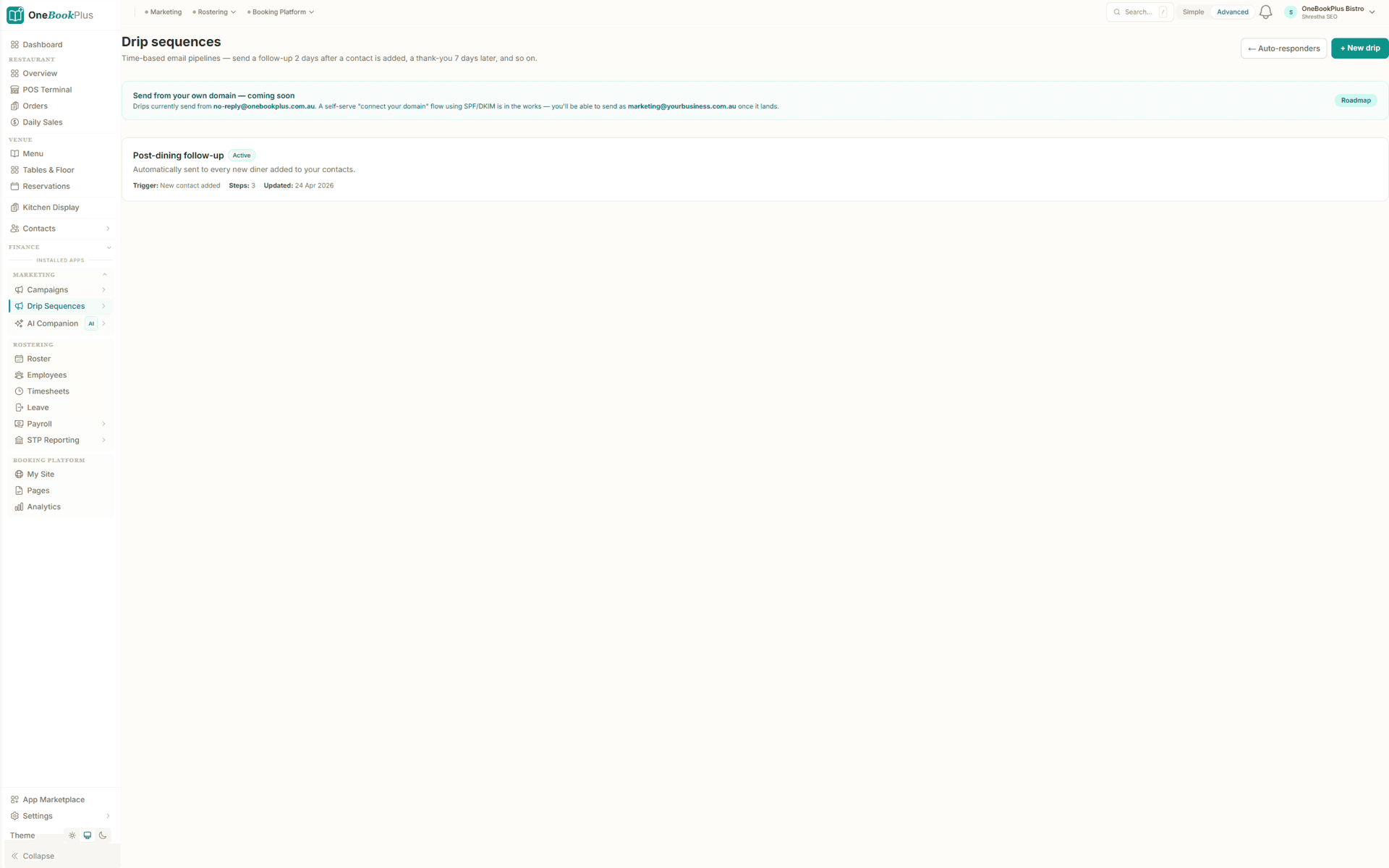
Visual drip flow builder with branching steps
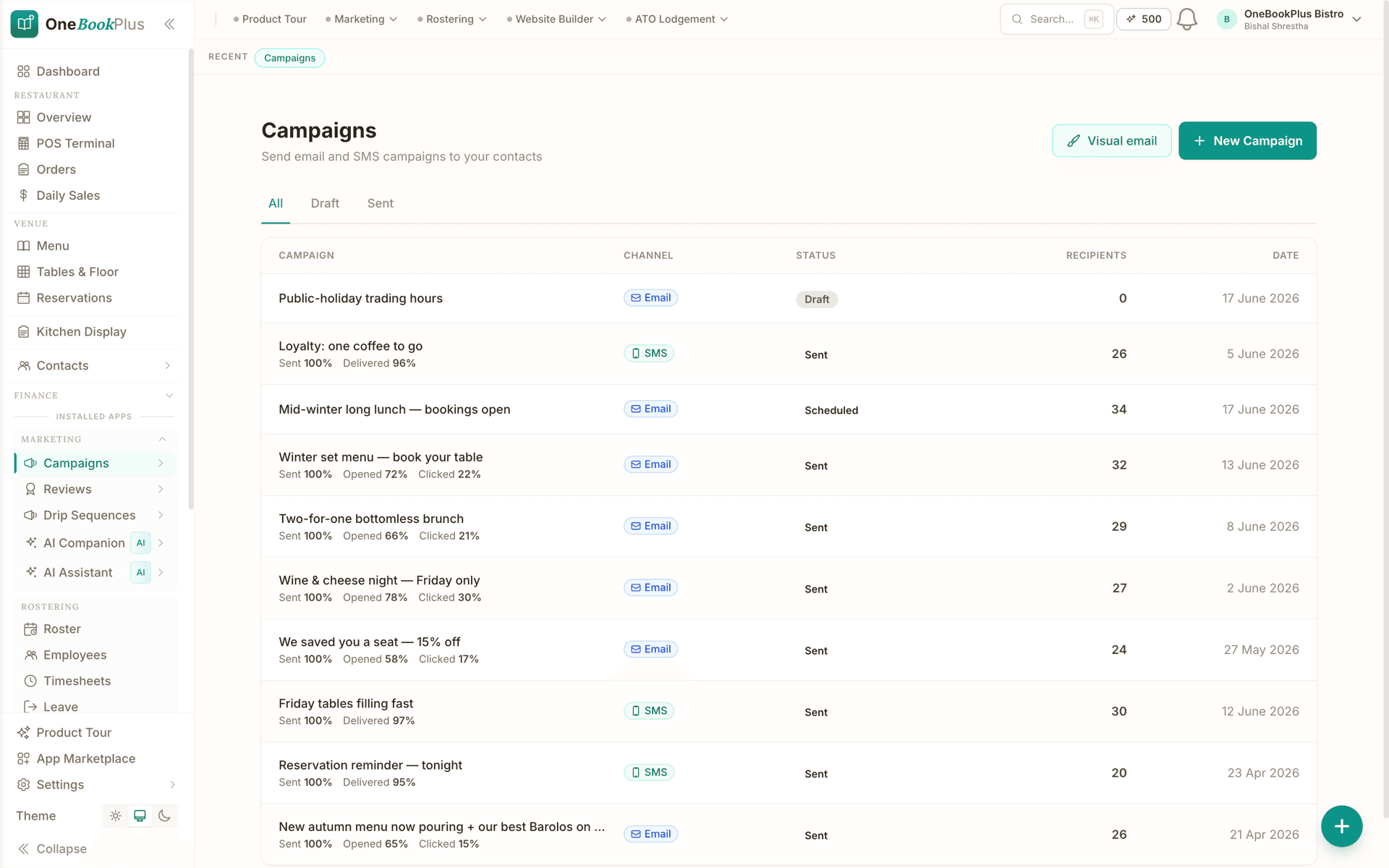
Email campaign with open and click stats
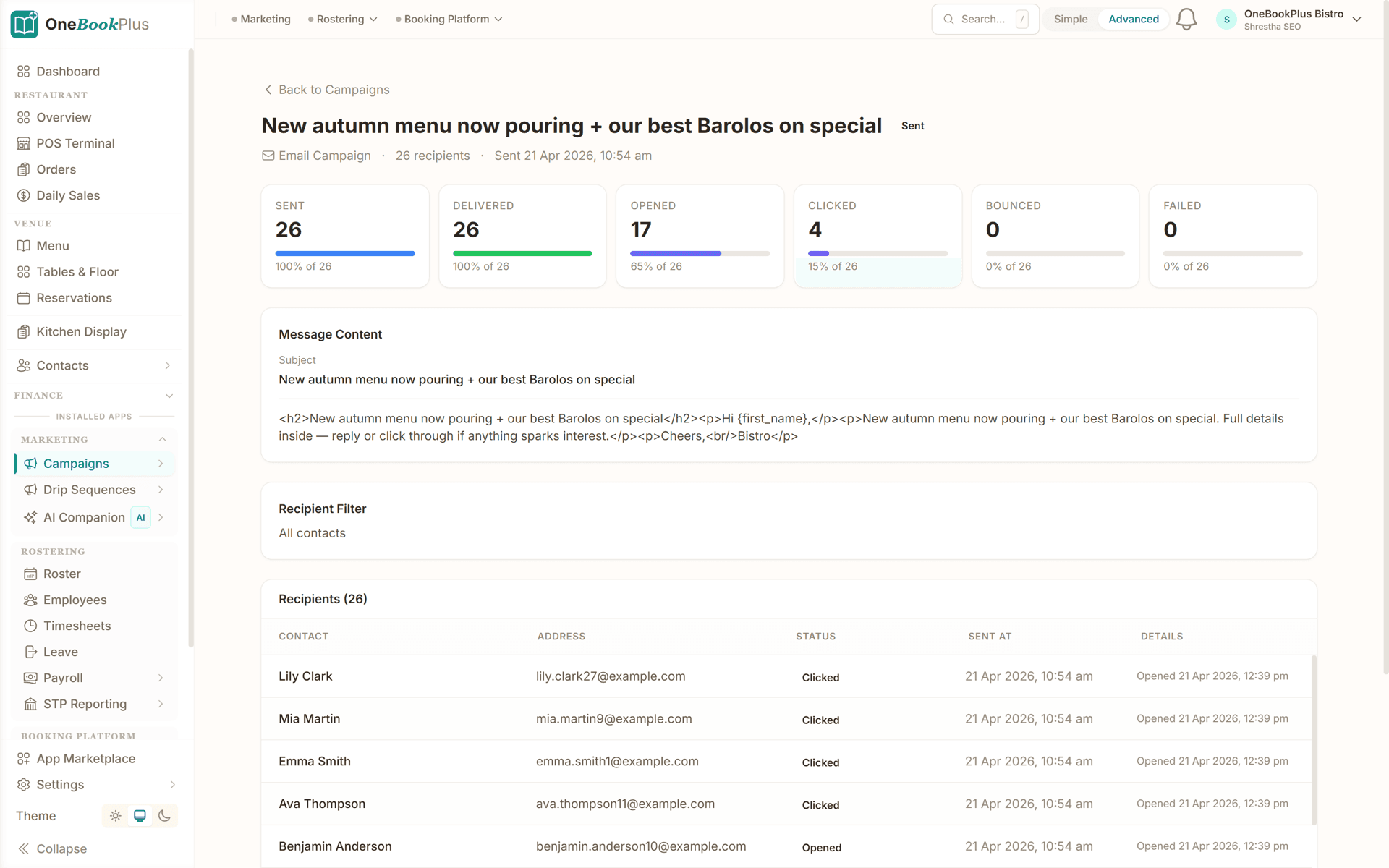
Campaign recipient list and delivery stats
What's included
Everything in OneBookPlus Marketing
Email campaigns from your CRM
Send to every contact, a CRM tag, a contact source, or a hand-picked list. Recipients resolve from live records at send time, opted-out contacts are excluded automatically, and merge fields drop in each customer's name. Send now or schedule for later.
A/B subject line testing
Write two subject lines and OneBookPlus assigns them round-robin across recipients. Opens and clicks are attributed to each variant separately, so you learn which framing your customers actually respond to and reuse it next campaign.
Open, click and bounce tracking
Every campaign email carries an open pixel and click-tracked links. See sent, delivered, opened, clicked and bounced counts per campaign, then drill into individual recipients to see exactly who opened and clicked, and when.
Templates and AI drafting
Start from ready-made templates for re-engagement, seasonal promotions and follow-ups, or type a one-line goal and let the AI draft the email in your business's voice. Edit it, pick your audience, and send.
Drip sequences
Build multi-step email sequences with day offsets in a visual flow builder, triggered automatically when a new contact is added. A welcome series runs itself while you are out on jobs, no manual sending required.
SMS campaigns (Growth)
Send SMS to the same contact list on the Growth plan, powered by Twilio and prepaid credits with no monthly SMS commitment. Delivery is tracked per message, replies land in a conversations view, and SMS opt-outs are honoured automatically.
Automated review requests (Growth)
When a job is completed or an invoice is paid, OneBookPlus sends a review request automatically: multi-touch, with configurable delays, alternating email and SMS. Happy customers land one click from your Google review page. The Reputation Engine runs on the Growth plan; the single post-booking review ask is on every plan.
Private feedback capture (Growth)
A customer who leaves a low rating also sees a private make-it-right form, so the complaint reaches you directly and you get a chance to fix the problem before it turns into a public one-star review.
Spam Act mechanics built in
Every marketing email carries a visible unsubscribe link plus RFC 8058 one-click unsubscribe. Opt-outs are logged with a timestamp and flagged on the contact instantly, so no future campaign can reach that address.
0
CSV imports needed: your invoiced customers are already contacts
1 click
For customers to unsubscribe (RFC 8058), recorded instantly
A/B
Subject line testing with per-variant open and click rates
$29/mo
Starter plan includes email campaigns plus invoicing, CRM and accounting; SMS campaigns and the reviews engine are on Growth
Simple setup
How OneBookPlus Marketing works
Pick your audience
Your contacts are already in OneBookPlus from every invoice, quote and booking you have raised. Choose everyone, filter by CRM tag or contact source, or hand-pick recipients. Anyone who has unsubscribed is excluded automatically.
Write it once
Start from a template or a one-line AI brief, personalise with merge fields like first name and company, and add a second subject line if you want an A/B test on the send.
Send now or schedule
Fire the campaign immediately or schedule it for an hour your customers actually read email. Scheduled campaigns stay editable right up until they go out.
Read the results
Track opens, clicks and bounces per campaign and per recipient, and compare open rates across campaigns in the analytics view. Unsubscribes are handled and recorded for you, with no manual list hygiene.
Email Marketing for Small Business, Without the List Admin
Most email marketing for small business fails before the first campaign is ever sent, and it is rarely the writing that kills it. It is the list admin: exporting customers from your invoicing system, importing a CSV into a marketing platform, deduplicating, and then keeping unsubscribes in sync between two tools forever. OneBookPlus removes that step entirely. Campaigns live inside the same platform as your invoicing, quotes, bookings and CRM, so every customer you have ever invoiced or booked is already a contact you can email today.
That contacts-already-in-app difference compounds every time you send. When you create a campaign, you choose the audience from live CRM records: everyone, contacts carrying a specific tag, contacts from a particular source, or a hand-picked list. Anyone who has unsubscribed is excluded at send time, automatically, because the opt-out lives on the same contact record your invoices do. Merge fields personalise each email with the customer's first name and company. There is no sync job, no Zapier bridge, and no moment where your billing system and your marketing list quietly disagree about who your customers are.
Sending is fast even if you have never run a campaign before. Start from templates for re-engagement, seasonal promotions and follow-ups, or give the AI a one-line goal and edit its draft. Add a second subject line and OneBookPlus runs an A/B test, assigning variants round-robin and attributing opens and clicks to each one separately. Schedule the send for a sensible hour, then watch results come in: sent, delivered, opened, clicked and bounced, per campaign and per individual recipient, with a campaign analytics view comparing open and click rates across everything you have sent.
Compliance with the Spam Act 2003 is engineered in rather than left to you. The Act requires consent, sender identification, and a functional unsubscribe facility honoured within five business days. Every marketing email OneBookPlus sends identifies your business and carries a visible unsubscribe link plus RFC 8058 one-click unsubscribe, the standard that lets recipients opt out from a button in Gmail or Apple Mail without hunting through the footer. Opt-outs are recorded in a ledger with a timestamp and flagged on the contact immediately, so no future campaign can reach that address. Consent itself remains your responsibility, but emailing your own existing customers puts you in a far stronger position than any purchased list ever could.
The pricing model is different too. Mailchimp's Essentials plan starts around US$13 per month for 500 contacts and rises as your list grows (mailchimp.com/pricing). Klaviyo starts around US$20 per month for 500 profiles and scales with active profiles (klaviyo.com/pricing). Brevo charges by email volume instead, from around US$9 per month (brevo.com/pricing). With OneBookPlus, email campaigns are included in the Starter plan at $29 per month, and that subscription is not a marketing bill: it also covers invoicing, quoting, bookings, CRM and full double-entry accounting. You are not paying per contact, and you are not paying a second subscription to talk to customers your business software already knows.
The same module quietly handles your reputation. Automated review requests fire when a job is completed or an invoice is paid, with multi-touch follow-ups on configurable delays that can alternate between email and SMS. The customer lands on a rating page: a happy customer is one click from your Google review link, while a low rating additionally opens a private make-it-right form so you hear about the problem before the internet does. Your dashboard tracks requests sent, ratings received and your recent Google reviews in one place. The multi-touch Reputation Engine runs on the Growth plan; the single post-booking review ask is on every plan.
When you outgrow one-off sends, drip sequences take over: multi-step email flows with day offsets, built in a visual flow builder and triggered automatically when a new contact is added. SMS campaigns reach the same list on prepaid credits with the same opt-out handling. And because the free plan includes invoicing and CRM, your list is already building before you spend a dollar on marketing: start free, and switch on campaigns when the list is worth emailing.
How we compare
Marketing vs the competition
See how OneBookPlus compares to the tools you might already be using.
| Feature | OneBookPlus | Mailchimp | Brevo | Klaviyo |
|---|---|---|---|---|
| Email campaigns with open and click tracking | Yes | Yes | Yes | Yes |
| A/B subject line testing | Yes | Yes | Yes | Yes |
| Contacts filled automatically from your invoices, quotes and bookings | Yes | No | No | No |
| Segments built from CRM tags, no CSV imports or sync tools | Yes | No | No | No |
| One-click unsubscribe handled and logged automatically | Yes | Yes | Yes | Yes |
| Automated Google review requests after paid invoices | Yes | No | No | No |
| Private feedback form for unhappy customers | Yes | No | No | No |
| SMS campaigns to the same contact list | Yes | Yes | Yes | Yes |
| Invoicing, quoting, bookings and accounting in the same subscription | Yes | No | No | No |
| Pricing independent of contact-list size | Yes | No | Yes | No |
| Price | From $29/mo (whole platform) | US$13+/mo | US$9+/mo | US$20+/mo |
Example walkthrough
A Tuesday with OneBookPlus Marketing
A worked example: a four-van carpet cleaning business in Logan filling a quiet fortnight
7:40am. Dee checks the reviews dashboard over coffee: two new Google reviews landed overnight, both from automated requests that fired after Saturday's invoices were paid. One customer left a 3-star rating and used the private make-it-right form: a wet patch near the hallway. Dee rings her before 8am and books a free re-clean. That review never goes public, and the customer is stunned anyone called.
8:15am. The next fortnight looks light, so Dee builds a campaign: contacts tagged "bond clean" who rent in her service area, 214 of them, pulled straight from the CRM with no export. She types a one-line brief and the AI drafts the email; she trims it, adds two subject lines ("Moving out soon?" vs "Get your full bond back") for an A/B test, and schedules the send for 10am.
2:30pm. The campaign detail shows the second subject line winning on opens, and 19 clicks through to her booking page. Three unsubscribes handled and logged automatically, nothing for Dee to do. By Thursday, the quiet fortnight has seven bond cleans booked in.
Total time spent on marketing: about 25 minutes, all of it inside the same app that will invoice those jobs and then ask each customer for the next Google review.
Frequently asked questions
Common questions about OneBookPlus Marketing.
Why use OneBookPlus instead of a dedicated email marketing platform?
Because the hardest part of email marketing for small business is the list, and yours already exists here. Every customer you have invoiced, quoted or booked is a contact you can email today, with opt-outs tracked on the same record. Dedicated platforms make you export, import and re-sync that data forever. If you ever want Mailchimp as well, a sync integration is available, but most small businesses never need it.
Is OneBookPlus email marketing compliant with the Australian Spam Act?
The mechanics the Spam Act 2003 requires are built in: every marketing email identifies your business and carries a visible unsubscribe link plus RFC 8058 one-click unsubscribe. Opt-outs are logged with a timestamp and take effect immediately, well inside the five-business-day window the Act allows. Consent remains your responsibility: emailing your own existing customers is a far stronger position than a purchased list, and ACMA publishes plain-English guidance on inferred consent.
How much does email marketing for small business cost with OneBookPlus?
Email campaigns are included in the Starter plan at $29 per month, which also covers invoicing, quoting, bookings, CRM and full accounting. There is no per-contact pricing. By comparison, Mailchimp's Essentials plan starts around US$13 per month for 500 contacts and climbs as your list grows (mailchimp.com/pricing), and Klaviyo starts around US$20 per month for 500 profiles (klaviyo.com/pricing).
Can I segment who receives each campaign?
Yes. Target every contact, contacts carrying specific CRM tags (for example "bond clean" or "commercial"), contacts from a particular source, or a hand-picked list. Because segments resolve against your live CRM at the moment you send, you are never mailing a stale export, and anyone who has opted out is excluded from the send automatically.
Does it track opens and clicks?
Yes. Each campaign email carries an open pixel and click-tracked links, and every recipient gets their own row showing sent, delivered, opened, clicked or bounced, with timestamps. A campaign analytics page compares open and click rates across everything you have sent, and A/B subject variants are reported separately so you can see which subject line won.
Can I send SMS marketing as well as small business email marketing?
Yes. SMS campaigns go to the same contact list via Twilio and run on prepaid SMS credits you top up as needed, so there is no monthly SMS commitment. Delivery is tracked per message and replies appear in a conversations view inside the dashboard. SMS opt-outs are respected the same way email opt-outs are, and SMS marketing is included in the Growth plan.
How do the automated Google review requests work?
You connect your Google Business Profile place ID once and choose the trigger: a completed job, a paid invoice, or both. OneBookPlus then sends a review request automatically, with multi-touch follow-ups on configurable delays that can alternate between email and SMS. The customer lands on a rating page, and a happy customer is one click from leaving a Google review.
What happens when a customer leaves a bad rating?
A low rating additionally opens a private make-it-right form on the same page, so the customer can tell you what went wrong directly. Those submissions land in a feedback inbox in your dashboard, giving you the chance to call and fix the problem first. The Google link is never hidden, so the flow stays within Google's review policies.
Do I need to import a contact list before I can send email marketing?
No. If you already run your invoicing, quotes or bookings through OneBookPlus, your list builds itself: every customer becomes a contact automatically. Starting fresh, you can import contacts into the CRM once or add them as you go, and from then on campaigns always draw on the live list rather than a spreadsheet you have to keep current.
Is this one of those email marketing services for small business, or do I run it myself?
OneBookPlus is software, not an agency, but it is built so the recurring work runs itself: review requests fire after every paid invoice, drip sequences welcome new contacts, and AI drafting plus templates get a one-off campaign written in minutes. If you do work with a marketing agency, invite them as a team member and they can run campaigns inside your account.
Australian Owned
Built in Melbourne, AU
GST Compliant
ATO-ready from day one
Encrypted & Isolated
TLS in transit, AES-256 at rest, tenant isolation at the database layer, read the security page
Free Plan Available
No credit card needed
Works great with
Other OneBookPlus products that pair naturally with Marketing.
About the author

Bishal Shrestha
Founder & CEO, OneBookPlus
Bishal spent a decade running digital projects for Australian small businesses before founding OneBookPlus. He writes and maintains these pages, and publishes what OneBookPlus does not do alongside what it does.
Read the founder bioStart with OneBookPlus Marketing
Start free. No credit card required. Upgrade when you're ready.
Reviewed by Bishal Shrestha