OneBookPlus vs FreshBooks
The all-in-one FreshBooks alternative
FreshBooks is solid invoicing software, but it's built for North America. OneBookPlus is built from the ground up for Australian businesses with GST, ABN, and BAS compliance.
Key takeaways
5- FreshBooks prices its Australian site in AUD across three self-serve plans (Lite, Plus, Premium) plus a quote-only Select tier; the current ladder is set out in the pricing question below.
- FreshBooks pricing scales with your client count: the plan you need is set by how many billable clients you hold, not by revenue or actual usage, and archived clients still count.
Show 3 moreShow less
- OneBookPlus has no client cap on any tier: Free (10 invoices/month, 5 quotes/month, 250 contacts), Starter $29/month, Plus $49/month, Growth $69/month.
- Both handle invoicing, expense tracking, time tracking, and basic project management. OneBookPlus also bundles bookings, CRM, marketing, and Australian compliance (10% GST, ABN validation, BAS-ready quarterly reports), FreshBooks treats AU as a localised market, not a primary one.
- FreshBooks wins on: 20+ years of freelancer-focused invoicing depth, mature time-tracking with billable-hour automation, and project profitability reporting. OneBookPlus wins on: no per-client tier scaling, AU-first compliance, and bundled bookings + CRM + marketing.
Billable hours, or the whole customer-to-BAS trail
OneBookPlus
From $0/mo. Bookings, invoicing, CRM and accounting on one plan; AI and payroll are add-ons
- GST invoicing & quoting
- CRM & contact management
- Online booking page
- Email marketing & campaigns
- Accounting & P&L reports
- BAS / ATO tax summaries
- Google review requests
- Mobile-first design
- Australian-built & supported
FreshBooks
From A$29/mo: invoicing focused pricing
- Invoicing & quoting
- Expense tracking
- Basic client list
- Online bookings
- Email marketing
- BAS / ATO reports
- Job & appointment scheduling
- Review management
- Built for North America, not Australia
FreshBooks capabilities checked against its public features and pricing pages; items shown as “no” are not documented there. HQ: Canada.
OneBookPlus vs FreshBooks: detailed comparison
See exactly what's included in each platform. OneBookPlus covers more of the business in one subscription, with no cap on how many clients you bill.
| Feature | OneBookPlus | FreshBooks |
|---|---|---|
| GST-compliant invoicing | Yes | Yes |
| Quoting | Yes | Yes |
| CRM & contact management | Yes | Partial |
| Online booking page | Yes | No |
| Calendar subscription link (Apple, Google, Outlook) | Yes | No |
| Email marketing | Yes | No |
| Accounting & P&L reports | Yes | Yes |
| BAS / ATO tax summaries | Yes | No |
| Google review requests | Yes | No |
| Payment reminders | Yes | Yes |
| Expense tracking | Yes | Yes |
| Menu & order management | Yes | No |
| Job management & pipeline | Yes | No |
| Basic sales register (full POS $39/mo add-on) | Yes | No |
| Native iOS app | Yes | Yes |
| Native Android app | No | Yes |
| Free plan available | Yes | No |
| Mileage tracking in the mobile app | No | Yes |
| Retainer billing built in | No | Yes |
| Price (AUD) | From $0/mo | From A$29/mo |
| All included | Invoicing focused |
The 16 dimensions Australian operators check first
Where the line between a US-built cloud-invoicing point tool and an all-in-one AU-tax-native platform actually shows up. Cited against FreshBooks’ public Australian pages.
| Category | Feature | OneBookPlus | FreshBooks |
|---|---|---|---|
| Invoicing | Recurring invoices + payment reminders | Yes | Yes (source: freshbooks.com/en-au/features) |
| GST-native invoicing + ABN validation | Yes | GST configurable; ABN validation not documented (source: freshbooks.com/en-au/features) | |
| Time & projects | Billable-hour time tracking + project profitability | Time tracking on jobs | Mature time tracking + project profitability (source: freshbooks.com/en-au/features) |
| Accounting | Double-entry accounting + P&L / balance sheet | Yes | Yes (source: freshbooks.com/en-au/accounting) |
| GST / BAS | Quarterly BAS-ready figures (G1, 1A, 1B) | Yes | No native AU BAS (source: freshbooks.com/en-au/accounting) |
| STP / Payroll | STP Phase 2 lodgement & SuperStream | Payroll add-on; no STP lodgement yet | Payroll listed, but not AU STP (source: freshbooks.com/en-au/features) |
| Bank feeds | Australian bank feeds | Withdrawn while we replace the provider | Aggregator imports (source: freshbooks.com/en-au/accounting) |
| CRM | Full contact CRM + lead pipeline | Yes | Client list on invoices (source: freshbooks.com/en-au/features) |
| Bookings | Customer-facing online booking widget | Yes | No (source: freshbooks.com/en-au/features) |
| Marketing | Email campaigns + Google review requests | Yes | No (source: freshbooks.com/en-au/features) |
| Payments | Stripe + Stripe Tax surcharging | Stripe + Stripe Tax | FreshBooks Payments / Stripe (source: freshbooks.com/en-au/features) |
| AI features | AI Companion (chase, follow-up, winback, EOD) | Yes | Not documented (source: freshbooks.com/en-au/features) |
| Client cap | Billable-client limit by tier | No per-client cap | 5 (Lite) / 50 (Plus) / unlimited (Premium) (source: freshbooks.com/en-au/pricing) |
| Mobile | Native mobile app | Native iOS app; web app on Android | iOS + Android (source: freshbooks.com/en-au/features) |
| Integrations | Third-party app marketplace | Stripe, ABN lookup, Xero/MYOB-ready export today; a live two-way sync is not built and is not on a date | 100+ app marketplace (source: appstore.freshbooks.com) |
| Billing currency | Prices shown in AUD | AUD billed | AUD prices on its Australian site (source: freshbooks.com/en-au/pricing) |
| Starting price (AUD, inc. GST) | From $0/mo | From A$29/mo | |
| Inc. GST · AUD billed · no per-client cap | 5 billable clients on Lite · no native BAS |
Not mockups, real product screens
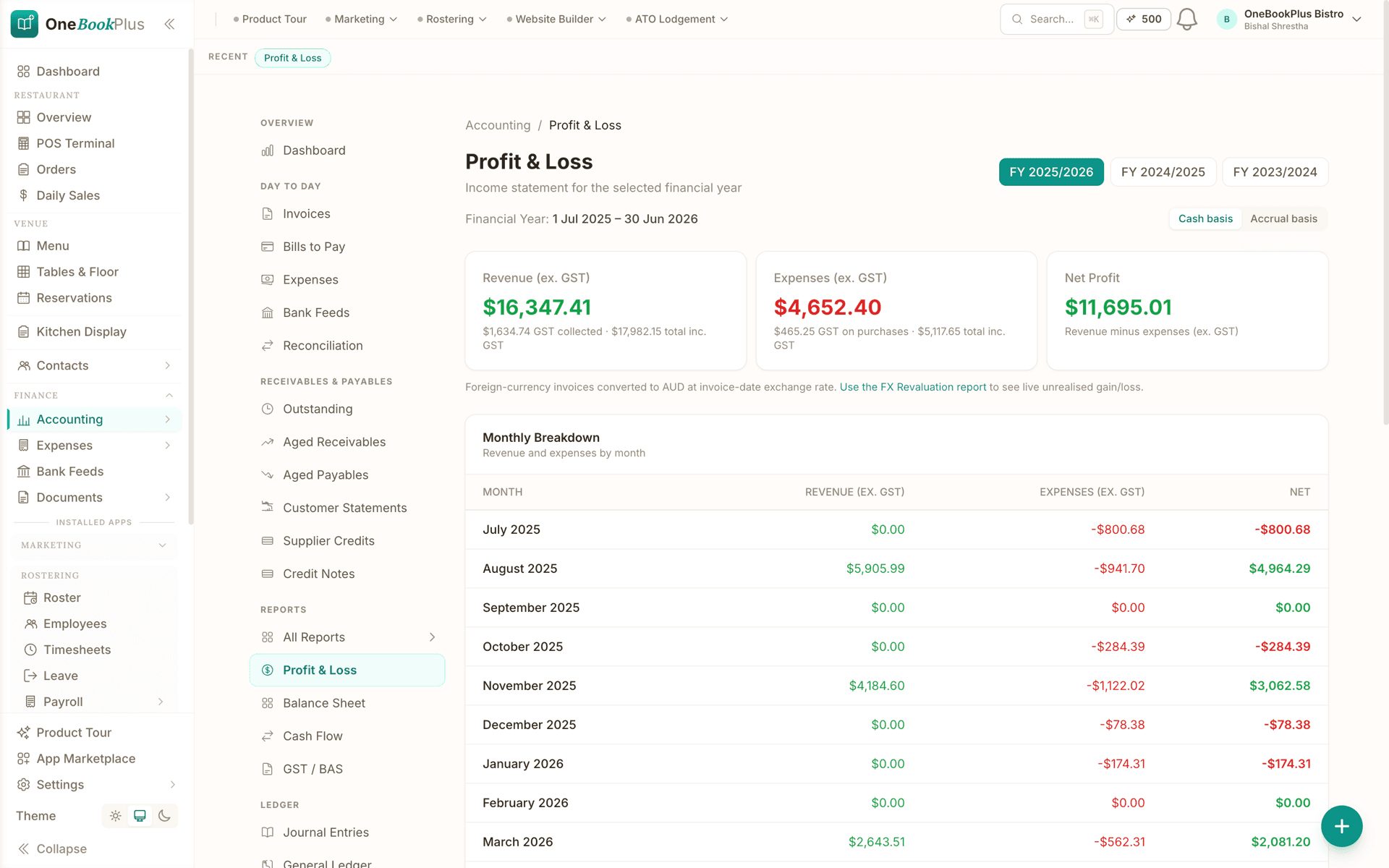
The books the invoices land in
Every competitor row above cites FreshBooks's own page. Our side of the table says the accounting is in the same subscription as the invoicing, so here is the report it produces.
Open the same screens yourself
The live demo is a working OneBookPlus account with jobs, bookings, quotes and invoices already in it. Click into the screens above rather than taking the ticks on faith.
Where FreshBooks wins
Billable hours and project margin, done deeper
FreshBooks has spent 20+ years building cloud invoicing for freelancers and service businesses, and that focus is genuine. Its billable-hour time tracking is mature: you can run a timer, log it against a client and project, and turn tracked hours into an invoice line in one step. Its project profitability reporting is deeper than ours for agencies and consultants who bill hourly and need to see margin per project, and its invoicing UX is consistently rated among the most polished in the category. If you bill North American hourly clients, lean heavily on time-to-invoice automation, or need a specific tool from its app marketplace, the switch isn’t urgent. FreshBooks is good at the one job it was built for.
Where OneBookPlus wins
Native AU tax, one platform, no client ceiling
Australian tax is native, not configured. OneBookPlus ships 10% GST on every invoice and expense, ABN validation against the Australian Business Register, and quarterly BAS-ready figures (G1, 1A, 1B) in the core product. Payroll is a separate add-on at $29/month, covering rosters, timesheets, pay runs, PAYG withholding to the ATO coefficients, penalty rates, leave accrual, payslips and an ABA bank file. It works out super and records it against the quarterly due dates, but it does not remit through SuperStream, and it does not lodge Single Touch Payroll pay events to the ATO, so you still report each pay run through STP-enabled software. FreshBooks’ accounting page treats Australia as a localised market: GST is a configurable tax rate, and there is no native BAS, so AU operators end up working around a US/Canadian tax model every quarter.
One platform, not invoicing plus three bolt-ons. FreshBooks tracks clients as names on invoices and has no online booking page or email marketing on its features page. OneBookPlus bundles a full CRM with lead pipeline, a customer-facing booking widget, email campaigns, and automated Google review requests, so a service business runs one record instead of FreshBooks plus Calendly plus Mailchimp plus a CRM.
No per-client tier ceiling. FreshBooks’ pricing page caps billable clients by tier (5 on Lite, 50 on Plus, unlimited only on Premium, and archived clients still count), so growing your client base pushes you up a tier whatever your revenue did. OneBookPlus has no per-client cap on any tier and adds an AI Companion (payment chase, no-show follow-up, winback, review harvesting, end-of-day summary) that FreshBooks does not publicly document.
Where a FreshBooks bill stops making sense in Australia
Built for Australia, not America
FreshBooks was designed for US and Canadian businesses. OneBookPlus is built in Australia for Australian businesses, with GST calculation, ABN validation, ATO-compliant BAS summaries, and AUD formatting built in from day one.
One plan instead of three tools
Every FreshBooks tier is invoicing and basic accounting, so the booking tool, the CRM and the mailer are separate bills on top. OneBookPlus starts free and includes invoicing, CRM, bookings, marketing, and accounting on the one plan. Whether that is cheaper depends on the tier you are on and what else you pay for, so check it against your own bill.
Bookings & CRM included
FreshBooks' features page doesn't document an online booking page or a full CRM, clients are tracked as names on invoices. With OneBookPlus, clients can book appointments directly from your website, and every interaction is tracked in your built-in CRM, no extra tools or subscriptions needed.
BAS-ready from day one
FreshBooks' accounting page documents GST as a configurable tax rate with no native BAS, so Australian tax support is limited. OneBookPlus automatically tracks GST collected and paid, validates ABN numbers, and generates ATO-ready BAS summaries so you or your accountant can lodge with confidence.
OneBookPlus vs FreshBooks: your questions answered
How does OneBookPlus compare to FreshBooks for an Australian business?
They start from different places. FreshBooks is solid invoicing software built for the North American market (HQ in Canada), and its invoicing and time-tracking are mature. OneBookPlus is built from the ground up for Australian businesses, with 10% GST, ABN validation against the Australian Business Register, and ATO-ready BAS summaries in the core product rather than configured around a US tax model. It also bundles CRM, online bookings, and email marketing, none of which FreshBooks documents on its features page, and it has a free tier where FreshBooks starts on a paid plan. If your work is billing North American hourly clients, FreshBooks stays the sharper tool for that job.
Can OneBookPlus replace FreshBooks?
Yes. OneBookPlus handles everything FreshBooks does, invoicing, expense tracking, payment reminders, and basic accounting, plus much more. You also get CRM and contact management, online booking pages, a calendar subscription link that Apple, Google and Outlook pick up (two-way Google sync is built but not yet open to customers), email marketing, BAS/ATO tax summaries, and Google review requests. It's a complete business platform, not just an invoicing tool.
How much does FreshBooks cost compared to OneBookPlus?
Checked against freshbooks.com/en-au/pricing on 1 August 2026, FreshBooks publishes three self-serve plans in AUD: Lite A$29/month for up to 5 billable clients, Plus A$43/month for 50 clients, and Premium A$60/month for unlimited clients, plus a quote-only Select tier. Those are the standard rates before the intro discount FreshBooks runs for new subscriptions, and archived clients count towards the cap. None of the plans include CRM, bookings, or marketing tools. OneBookPlus starts free and has no per-client cap on any tier, with invoicing, CRM, bookings, marketing, and accounting on the one plan. Whether that saves you money depends on which tier you are on and what else you are paying for, so compare it against your own bill.
How does OneBookPlus handle Australian tax compared to FreshBooks?
FreshBooks is a Canada-HQ product focused on the US and Canadian markets; its public accounting page treats GST as a configurable tax rate and does not document a native Australian BAS, so AU tax support is limited. OneBookPlus automatically calculates 10% GST on all invoices and quotes, validates ABN numbers via the Australian Business Register, tracks GST collected and paid, and generates ATO-ready BAS summaries. Australian tax compliance is built in from the ground up.
What features does OneBookPlus have that FreshBooks doesn't?
OneBookPlus includes several features FreshBooks lacks: online booking pages for clients to self-schedule, a calendar subscription link that Apple, Google and Outlook pick up (two-way Google sync is built but not yet open to customers), email marketing campaigns, BAS/ATO tax summaries, Google review requests, menu and order management, and a proper CRM with contact history and lead tracking. OneBookPlus also offers a free plan, while FreshBooks requires a paid subscription from day one.
Does OneBookPlus have Australian bank feeds?
Not right now. Bank feeds are withdrawn while we replace the provider, so OneBookPlus does not import bank transactions automatically. Expenses and bills are recorded in the app, and you can scan them instead of typing them: drag in a photo or a PDF and OneBookPlus reads the supplier, date, GST and total. Payments recorded against invoices still reconcile, and your GST and BAS-ready figures come from that data. FreshBooks' accounting page documents bank-feed imports via aggregators.
Is OneBookPlus or FreshBooks better value as your client list grows?
The choice is one platform against a US-built invoicing point tool plus bolt-ons. FreshBooks caps billable clients by tier, so a growing client list pushes you up a plan whatever your revenue did; OneBookPlus has no per-client cap and bundles invoicing, CRM, online bookings, email marketing, accounting, native 10% GST, ABN validation, and BAS-ready quarterly reports. If you bill North American hourly clients and lean on FreshBooks' project-profitability and billable-hour automation, FreshBooks stays deeper at that one job, but for an Australian operator who wants bookings, CRM, and BAS in the same record, OneBookPlus is the stronger fit.
How OneBookPlus runs your service business
Running an Australian service business on FreshBooks usually means FreshBooks for invoices and time, a separate booking tool like Calendly or Acuity, a CRM or a spreadsheet for client history, and a workaround (or your accountant) for BAS. OneBookPlus collapses that into one workflow. When a lead arrives (through your online booking page, a phone call, or a referral) it lands as a contact in your built-in CRM with full history, not just a name that will later appear on an invoice.
You quote with one tap; the client receives a professional PDF carrying your ABN, a 10% GST breakdown, and a one-click accept button. Accepted work flows into your scheduling pipeline and onto a calendar you can subscribe to from Apple, Google or Outlook, so site visits don’t clash with the rest of your week. On the job you track time and expenses from the mobile app, snap receipts for instant logging, and convert the completed work into a GST-compliant invoice. Payment reminders go out automatically, the same chase loop FreshBooks does well, without leaving the platform.
Where OneBookPlus diverges from FreshBooks is what happens to the money afterwards on Australian terms. Every dollar feeds a double-entry accounting engine built for AU tax: profit and loss and balance sheet update live, and receipts and supplier bills are scanned rather than typed, with the supplier, date, GST and total read straight off the photo or PDF. FreshBooks covers the same ground with the aggregator imports documented on its accounting page for Australian banks. When BAS quarter lands, OneBookPlus generates your G1, 1A and 1B figures straight from live data. No CSV export, no copying numbers into the ATO portal, no reconciliation between two systems.
After a job is paid, OneBookPlus can send an automated Google review request and add the client to an email marketing list for seasonal reminders, maintenance offers, or referral incentives. FreshBooks’ features page lists no bookings, review requests, or campaign tools, so most operators either skip this or pay for yet another platform. With OneBookPlus it’s the same record, the same login, and one AUD bill.
How to switch from FreshBooks to OneBookPlus
Export clients and invoice history from FreshBooks
In FreshBooks go to Settings > Export Data to download your client list and invoice history as CSV. Import the contacts into OneBookPlus: names, emails, phone numbers, and addresses map across into full CRM records. Your FreshBooks account stays live as a read-only archive while you transition.
Set your ABN, GST treatment, and payment terms
Confirm your ABN, set your default GST treatment, upload your logo, and configure payment terms, about 15 minutes in all. Scan in your open supplier bills, drag the PDF or photo in and the supplier, date, GST and total are read for you.
Send new invoices from OneBookPlus, wind down FreshBooks
Raise all new quotes and invoices in OneBookPlus. Each goes out with correct 10% GST and your ABN, payments record against the invoice they settle, and your next BAS quarter is already being calculated in the background. Most businesses run both for one billing cycle, then cancel FreshBooks once the new workflow feels routine.
Why Australian businesses outgrow FreshBooks
FreshBooks is a solid invoicing and accounting tool, for North America. It was built for US and Canadian freelancers (its HQ is in Canada), and while it technically works in Australia, the friction shows up everywhere. GST handling requires manual configuration. ABN validation isn't documented. BAS reporting needs workarounds or a third-party integration. Bank feeds use aggregator imports (see FreshBooks' accounting page).
OneBookPlus is built Australian-first. GST, ABN, and BAS aren't features that were patched in, they're foundational. Receipts and supplier bills are scanned rather than keyed in: drag in the photo or PDF and the supplier, date, GST and total are read for you. And where FreshBooks stops at invoicing and expenses, OneBookPlus adds a full client CRM and service bookings, so sole traders get one platform instead of stitching together three.
Feature deep dive
Native GST, ABN and BAS reporting: Every invoice, expense and bill in OneBookPlus carries GST treatment natively, no manual tax line configuration, no custom tax rates to set up. Your ABN prints on every invoice automatically. When BAS quarter arrives, OneBookPlus generates your Business Activity Statement figures directly from your live data. No CSV exports, no copying numbers into the ATO portal by hand, no reconciliation spreadsheets.
Receipt and bill scanning: Drag in a photo of a receipt or a supplier bill as a PDF and OneBookPlus reads the supplier, date, GST and total, then files it as an expense against the account you choose, so the shoebox never reaches your accountant. On bank feeds, ours are withdrawn while we replace the provider, so there is no automatic import of bank transactions today. FreshBooks documents Australian bank feeds via aggregator imports (see its accounting page).
CRM and bookings included: FreshBooks tracks clients as names on invoices. OneBookPlus gives every client a full profile, contact details, communication history, invoice and payment records, booking history, outstanding balances, and custom notes. If your business takes appointments or bookings, that's built in too. No need for a separate Calendly, Acuity, or booking plugin. One client record, one history, one platform.
Who should switch
- Australian sole traders tired of manually configuring GST rates and working around FreshBooks' US-centric tax model every BAS quarter.
- Small businesses that would rather scan a receipt or supplier bill than key every expense in line by line.
- Service professionals who need invoicing, client management, and appointment booking in one place instead of paying for FreshBooks plus a separate booking tool.
Stay with FreshBooks if: you operate primarily in North America where FreshBooks' tax integrations shine, need its project-based time tracking for billing hourly clients, or rely on its third-party app marketplace.
Getting started
Switching from FreshBooks takes about fifteen minutes. Export your client list and invoice history from FreshBooks (Settings > Export Data) and import the CSV into OneBookPlus. Confirm your ABN, set your default GST treatment, and configure your payment terms. New invoices go out with correct GST from day one, payments record against the invoice they settle, and your next BAS quarter is already being calculated in the background.
From the blog
Related reading: switching from freshbooks
Practical guides and explainers from the OneBookPlus blog, grouped by topic.
Best Invoicing Software Australia (2026): Top 9 Compared
The nine invoicing apps Australian small businesses actually shortlist in 2026, with cited pricing, GST and BAS notes, and which are genuinely free.
10 min readRead articleThe True Cost of Running Software for an Australian Small Business in 2026
A data-led analysis of what Australian small businesses actually pay for software in 2026, based on verified pricing from Xero, MYOB, ServiceM8, Stripe, Cliniko, Shopify and 30+ other platforms, cross-checked with ABS, ASBFEO, RBA and Xero Small Business Insights data.
25 min readRead article
Ready to run more of the
business from one app?
Invoicing, CRM, bookings and Australian GST in one app, with no cap on how many clients you bill.
Free plan available, no card needed.
About this comparison
How we compared OneBookPlus to FreshBooks
Feature claims about OneBookPlus reflect what is shipping today on onebookplus.com.au. FreshBooks pricing and feature claims were read off FreshBooks’s public Australian product pages on . Vendor pricing changes frequently, so check the FreshBooks website for your specific situation before making a decision.
Disclosure: OneBookPlus publishes this comparison and stands to benefit if you switch. We aim to compare like-for-like on capability and Australian tax compliance, if you spot something out of date, email hello@onebookplus.com.au and we’ll review it.
About the author

Bishal Shrestha
Founder & CEO, OneBookPlus
Bishal spent a decade running digital projects for Australian small businesses before founding OneBookPlus. He writes and maintains these pages, and publishes what OneBookPlus does not do alongside what it does.
Read the founder bioHow this page was researched
Every FreshBooks price and capability claim on this page was read off FreshBooks's own published Australian pages on the date printed above, and recorded in competitor-facts.ts with that date. Claims about OneBookPlus describe what ships today, and the page names what we do not do.
Last reviewed and updated: by Bishal Shrestha