OneBookPlus vs ShiftCare
More than just care management
ShiftCare handles rostering and NDIS claiming well, but your agency needs more than that. OneBookPlus gives you a complete business platform with invoicing, accounting, a booking website, quality dashboard, and digital forms, alongside everything ShiftCare offers.
Key takeaways
5- ShiftCare is billed per user per month, so the cost scales linearly with headcount rather than sitting on a flat tier. Their pricing page carries the current rate; we don't restate it here because it moves.
- A typical Australian NDIS/home-care stack pairs ShiftCare with a separate Xero or MYOB subscription for accounting, because ShiftCare covers care management and basic invoicing rather than double-entry books and BAS.
Show 3 moreShow less
- OneBookPlus is AUD-billed from $0/mo Free (10 invoices/mo, 250 contacts), $29/mo Starter, $49/mo Plus, or $69/mo Growth, with NDIS claiming, full accounting and DVA billing in the plan, SCHADS-aware rostering and payroll as a $29/mo add-on on top, and no per-seat fee below each tier's login cap (1 / 3 / 5 / 10 by tier).
- ShiftCare genuinely wins on dedicated care-management focus and an established Australian NDIS user base, a mature mobile app for carers and a long track record of rostering and basic NDIS billing.
- OneBookPlus wins on consolidating ShiftCare-plus-Xero into one platform: full P&L and BAS, a quality dashboard mapping to the 8 Aged Care Quality Standards and NDIS Practice Standards, online booking website, DVA billing, and SCHADS Award interpretation.
The carer app, and the claim that follows it
OneBookPlus
Core plan $0 to $69/mo, complete business platform; rostering and payroll are a $29/mo add-on
- NDIS claiming & bulk billing
- Rostering & scheduling ($29/mo add-on)
- Care notes & progress tracking
- GST invoicing & full accounting
- Online booking website
- Family portal for participants
- Quality & standards dashboard
- Digital forms builder
- DVA & HCP billing
- SCHADS Award interpretation
ShiftCare
Per user, per month. Care management (source)
- NDIS claiming & billing
- Rostering & scheduling ($29/mo add-on)
- Care notes
- Basic invoicing
- Accounting & P&L reports
- Online booking website
- Family portal
- Quality standards dashboard
- Digital forms builder
- Per-user pricing scales up
OneBookPlus vs ShiftCare: detailed comparison
ShiftCare covers care management basics. OneBookPlus adds a full business suite so you can stop paying for separate accounting, booking, and compliance tools.
| Feature | OneBookPlus | ShiftCare |
|---|---|---|
| NDIS claiming & billing | Yes | Yes |
| Rostering & scheduling ($29/mo add-on) | Yes | Yes |
| Care notes & progress tracking | Yes | Yes |
| GST-compliant invoicing | Yes | Yes |
| Full accounting & P&L reports | Yes | No |
| Online booking website | Yes | No |
| Family portal | Yes | Yes |
| Quality & standards dashboard | Yes | No |
| Digital forms builder | Yes | No |
| HCP package management | Yes | Yes |
| DVA billing support | Yes | No |
| SCHADS Award interpretation | Yes | No |
| Job management & pipeline | Yes | No |
| Basic sales register (full POS $39/mo add-on) | Yes | No |
| Native iOS app | Yes | Yes |
| Native Android app | No | Yes |
| Longer NDIS-sector track record | No | Yes |
| Document expiry tracking for worker compliance | No | Yes |
| Price (AUD) | From $0/mo | Per user, per monthShiftCare pricing source |
| Complete business platform | Care management only |
The dimensions NDIS & home-care operators check first
Where the difference between a dedicated rostering-and-claiming tool and an all-in-one, AU-tax-native care platform shows up. Cited against ShiftCare’s public pages.
| Category | Feature | OneBookPlus | ShiftCare |
|---|---|---|---|
| Rostering | Shift scheduling with availability & conflict checks | Yes | Yes (source: shiftcare.com/features) |
| Award interpretation | SCHADS Award rate interpretation on shifts | Built-in SCHADS interpretation | Rostering yes; SCHADS auto-interpretation not documented (source: shiftcare.com/features) |
| NDIS claiming | NDIS line-item billing & bulk claim export | Yes | Yes (source: shiftcare.com/ndis-software) |
| Care delivery | Carer mobile app, shifts, care notes, forms | Native iOS app; web app on Android | iOS + Android carer app (source: shiftcare.com/features) |
| Family portal | Participant / family visibility portal | Yes | Yes (source: shiftcare.com/features) |
| Invoicing | GST-native tax invoices + ABN validation | Yes | Basic invoicing; full GST/ABN handling not documented (source: shiftcare.com/features) |
| Accounting | Built-in P&L, balance sheet, double-entry ledger | Yes | No (source: shiftcare.com/features) |
| GST / BAS | Quarterly BAS-ready reports (G1, 1A, 1B) | Yes | Via Xero/MYOB only (source: shiftcare.com/features) |
| DVA billing | DVA fee-schedule billing workflow | Yes | Not documented (source: shiftcare.com/features) |
| Quality & compliance | Aged Care Quality + NDIS Practice Standards dashboard | Yes | Not documented (source: shiftcare.com/features) |
| New-client intake | Public booking / enquiry website for referrals | Yes | No (source: shiftcare.com/features) |
| Forms | Custom digital forms builder | Yes | Care-note templates; open form builder not documented (source: shiftcare.com/features) |
| Marketing | Email campaigns & review requests | Yes | No (source: shiftcare.com/features) |
| Integrations | Accounting integration model | Native accounting; Xero export optional | Xero / MYOB integration required for accounting (source: shiftcare.com/features) |
| Pricing model | How the bill grows with headcount | Flat plan, logins included (1 / 3 / 5 / 10 by tier) | Per-user, scales with team size (source: shiftcare.com/au/pricing) |
| Annual pricing transparency | Annual price shown alongside monthly | Yes | Per-user monthly (source: shiftcare.com/au/pricing) |
| Starting price (AUD, inc. GST) | From $0/mo | Per user, per month | |
| Inc. GST · Flat plan · logins 1 / 3 / 5 / 10 by tier | Scales with headcount · see shiftcare.com/au/pricing · Xero/MYOB needed for accounting |
Not mockups, real product screens
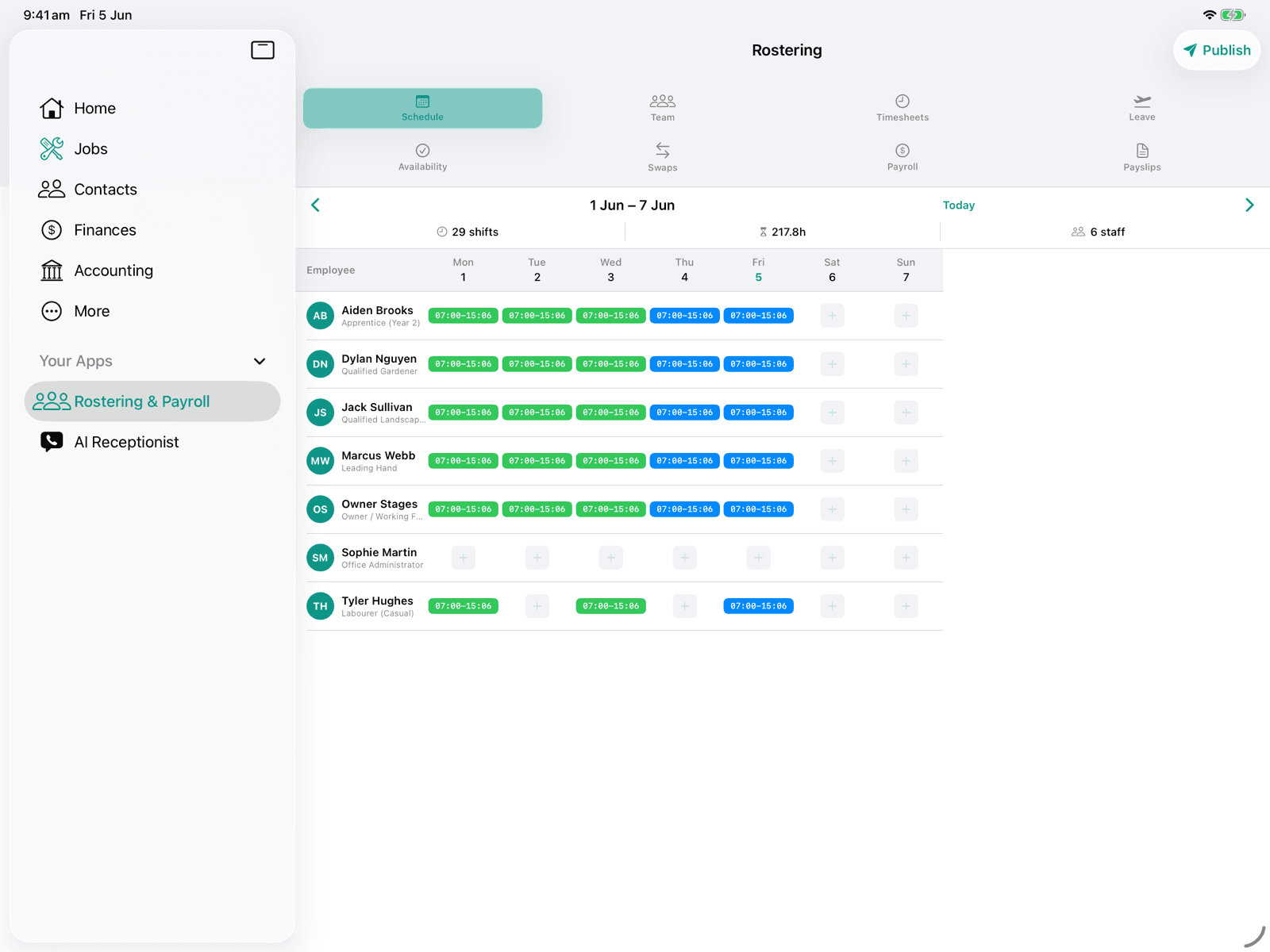
The roster, published from the app
Every competitor row above cites ShiftCare's own page. Our side of it is rostering and timesheets in the same subscription as the invoicing, so here is the screen that does it.
Open the same screens yourself
The live demo is a working OneBookPlus account with jobs, bookings, quotes and invoices already in it. Click into the screens above rather than taking the ticks on faith.
Where ShiftCare wins
A mature carer app and a well-worn claiming flow
ShiftCare is an Australian-built product with a single audience: NDIS and home-care providers. That focus shows. Its carer mobile app is mature and purpose-built for the field: clock on and off a shift, log progress notes against a participant, capture an incident, and see today’s run on a phone. Rostering handles availability, recurring shifts, and the day-to-day churn of cancellations and replacements that defines a roster coordinator’s week, and the NDIS line-item claiming workflow is well-worn by a large established base of Australian agencies. If your agency’s entire operating problem is “get the right carer to the right participant and claim it correctly,” and your accountant already owns the books in Xero, ShiftCare does that job and your coordinators already know it.
Where OneBookPlus wins
Books in the platform, plan pricing, and a quality dashboard
Accounting is in the platform, not a separate Xero bill. OneBookPlus ships a full double-entry ledger with P&L, balance sheet, quarterly BAS reports, and DVA billing inside the same subscription that runs your roster and NDIS claims. ShiftCare’s public features page covers care management and basic invoicing, so the typical agency runs ShiftCare plus Xero or MYOB, two subscriptions, two sync points, and a reconciliation tax every quarter-end as shift data is matched against the ledger.
Plan-based pricing instead of per-user. ShiftCare’s pricing page bills per user per month, so the bill climbs every time you onboard a carer or coordinator and the software cost tracks your headcount rather than your revenue. OneBookPlus is plan-based ($0 Free, $29Starter, $49 Plus, $69 Growth) so you can put every carer on the carer app without watching the software bill scale against your own growth.
Quality dashboard, booking website, and marketing ShiftCare doesn’t document. OneBookPlus adds a quality & standards dashboard mapping to the 8 Aged Care Quality Standards and the NDIS Practice Standards, a public booking-and-enquiry website that feeds new referrals straight into your CRM, a custom digital forms builder, and email/review marketing, capabilities the ShiftCare features page does not document, leaving agencies to bolt on a separate quality system and intake channel.
What a care agency picks up by leaving ShiftCare
Replace ShiftCare + Xero in one app
Most ShiftCare agencies also pay for Xero or MYOB for accounting. OneBookPlus gives you NDIS claiming, rostering, and care management plus GST invoicing, P&L reports and BAS summaries, all in one platform, so it's one subscription and one sync point instead of two.
Online booking website included
OneBookPlus includes a customisable booking page where new clients and families can request services, book assessments, and enquire about availability. ShiftCare's features page doesn't document a public intake channel, so you'd need a separate website or booking tool to capture new business.
Quality & standards dashboard
Stay audit-ready with OneBookPlus's quality dashboard that tracks compliance against Aged Care Quality Standards and NDIS Practice Standards. Monitor incidents, track corrective actions, and generate compliance reports, a capability ShiftCare's features page doesn't document.
Plan-based, not per-user
ShiftCare charges per user per month, so growing the team grows the bill. OneBookPlus is plan-based and bands logins instead: one on Free, three on Starter, five on Plus and ten on Growth, with no per-seat charge below the cap. Carers you roster are staff records, not paid seats. Over ten logins, talk to us about an enterprise arrangement.
OneBookPlus vs ShiftCare: your questions answered
How does OneBookPlus compare to ShiftCare for an NDIS provider?
It depends on how much of the business you want in one system. ShiftCare is a focused, Australian-built platform for rostering and NDIS claiming, and it's well-worn at that job by a large base of agencies. OneBookPlus covers the same rostering and claiming ground and adds the business layer around it: invoicing, accounting and P&L, an online booking website, a quality standards dashboard, and digital forms. If your whole operating problem is getting the right carer to the right participant and claiming it correctly, ShiftCare's focus is a fair answer. If you're running ShiftCare plus Xero or MYOB and want one system instead of two, that's the case for moving.
How does ShiftCare's pricing model compare to OneBookPlus?
The models differ more than the numbers do. ShiftCare charges per user per month, so the bill climbs every time you onboard a carer or coordinator, and their pricing page is the place to check the current rate for your team size. OneBookPlus is plan-based: $0/month Free (10 invoices and 5 quotes a month, 250 contacts), $29 Starter, $49 Plus, $69 Growth, and what it bands is logins, one on Free, three on Starter, five on Plus and ten on Growth, with no per-seat charge below the cap, so putting the roster on the carer app doesn't change what you pay. The other half is scope: ShiftCare agencies generally add Xero or MYOB for accounting and BAS, where OneBookPlus includes invoicing, accounting, family portal, booking website and quality dashboard in the plan.
Does ShiftCare include accounting and BAS, or do I still need Xero?
ShiftCare is care-management software, rostering, NDIS claiming, care notes, and basic invoicing, but it does not include double-entry accounting, a profit and loss report, bank reconciliation, or BAS preparation. That's why most ShiftCare agencies run Xero or MYOB alongside it. OneBookPlus builds accounting into the same platform: every NDIS or HCP service you deliver flows from the roster into a GST-compliant invoice, then into your P&L and a quarterly BAS-ready summary (G1, 1A, 1B) with no second subscription and no CSV exports between systems.
Does OneBookPlus have rostering like ShiftCare?
Yes. OneBookPlus includes full rostering and scheduling with SCHADS Award interpretation, conflict detection, mobile notifications, and travel time tracking. Carers get a mobile app to view shifts, accept or decline, log care notes, and complete digital forms. The difference is that OneBookPlus also handles your invoicing, accounting, and business operations, so you don't need ShiftCare plus three other tools.
Can OneBookPlus replace ShiftCare and Xero together?
Absolutely. This is the most common switch we see. Agencies using ShiftCare for rostering and NDIS claiming plus Xero for invoicing and accounting can consolidate everything into OneBookPlus. You get NDIS claiming, rostering, care notes, GST-compliant invoicing, and full accounting with P&L reports and BAS summaries, all connected in one platform so data flows automatically between care delivery and billing.
Which agencies switch from ShiftCare to OneBookPlus, and which should stay?
The agencies that move are usually already paying for ShiftCare plus Xero or MYOB and want a complete business platform, not just care management software. While ShiftCare focuses on rostering and NDIS claiming, OneBookPlus adds full accounting, an online booking website, a quality standards dashboard, digital forms, and DVA billing, all in one app with transparent pricing and no per-seat charge below each plan's login cap (1 / 3 / 5 / 10 by tier). Agencies whose whole operating problem is rostering and NDIS claiming have less to gain: ShiftCare's Australian track record in NDIS rostering and claiming is genuine, coordinators who already know its carer app carry that fluency, and if your accountant is happy owning the books in Xero, the case to move is weaker.
How OneBookPlus works for care agencies
Most care agencies using ShiftCare quickly discover they need more than rostering and NDIS claiming. They bolt on Xero for invoicing, a spreadsheet for tracking expenses, maybe a separate booking tool for new client enquiries. Before long, the same data lives in three places and nothing talks to anything else. OneBookPlus was built to solve exactly this problem: a single platform where care delivery, billing, accounting, and client management all connect automatically.
When a carer logs a shift in OneBookPlus, that data flows straight through to NDIS claiming, invoicing, payroll calculations, and your P&L report. No re-keying, no CSV exports, no reconciliation headaches at the end of the month.
Feature deep dive
Integrated invoicing & accounting: Generate GST-compliant invoices directly from delivered services, track payments against NDIS plans and HCP budgets, and run profit and loss reports without ever opening Xero. Payments are recorded against the invoices they settle, so aged receivables show what is genuinely outstanding, and BAS summaries are ready when your accountant needs them.
Online booking & enquiry page: Give prospective clients and families a branded page where they can request services, book initial assessments, and enquire about availability. New leads flow directly into your CRM, with no manual data entry from email enquiries or phone messages. ShiftCare doesn't offer this, leaving agencies to manage intake through separate channels.
Quality & standards dashboard: Track compliance against Aged Care Quality Standards and NDIS Practice Standards in real time. Log incidents, assign corrective actions, monitor completion rates, and generate audit-ready reports. It's the kind of compliance visibility that usually requires a dedicated quality management system on top of ShiftCare.
Who should switch
The switch makes the most sense if you're currently paying for ShiftCare plus Xero or MYOB and want to consolidate into one platform. It's also the right fit if you're a growing NDIS or home care provider frustrated by per-user pricing that climbs every time you hire, or if you need compliance tracking and a client-facing booking page that ShiftCare's features page doesn't document. Agencies running DVA services will also benefit, since OneBookPlus includes DVA billing that ShiftCare doesn't document.
When ShiftCare might still be the better fit:
If your agency's whole operating problem is rostering and NDIS claiming, your roster coordinators are already fluent in ShiftCare's carer app and shift-replacement flow, and your accountant owns the books in Xero and is happy to keep them there, the case to move is weaker. You've already absorbed the learning curve on a purpose-built care-roster tool. ShiftCare's long Australian track record specifically in NDIS rostering and claiming is genuine, and for a small agency that does not need accounting, a quality dashboard, DVA billing, or a public intake website inside the same system, that focused depth may be all you need.
How to switch from ShiftCare to OneBookPlus
Export participants, staff, and rosters from ShiftCare
In ShiftCare, export your client/participant list and staff records as CSV, and download your current roster. Import these into OneBookPlus: participant details, NDIS plan numbers, carer profiles, and contact records map across. Keep your ShiftCare account active as a read-only archive of historical care notes and past claims while you transition.
Set up NDIS line items, SCHADS rates, and your books
Configure your NDIS price-guide line items, HCP and DVA fee schedules, SCHADS Award pay rates, and your ABN and GST settings. Because accounting is built in, this is also where you set up your chart of accounts and opening balances, the step that, with ShiftCare, would have lived separately in Xero or MYOB. Invite your coordinators and carers; there is no per-user charge as you add the whole team.
Run live rosters in OneBookPlus, then retire ShiftCare + Xero
Start rostering and claiming the new period in OneBookPlus so shifts flow straight into invoicing, NDIS claims, and your P&L. Most agencies run one pay/claim cycle in parallel, confirm the BAS figures and the P&L line up, then cancel both ShiftCare and the separate accounting subscription, collapsing two bills and two sync points into one platform.
Industries
Comparisons
Ready to run your whole agency
from one platform?
Rostering, NDIS claiming, invoicing and accounting in one subscription.
Free plan available, no card needed.
About this comparison
How we compared OneBookPlus to ShiftCare
Feature claims about OneBookPlus reflect what is shipping today on onebookplus.com.au. ShiftCare pricing and feature claims were read off ShiftCare’s public Australian product pages on . Vendor pricing changes frequently, so check the ShiftCare website for your specific situation before making a decision.
Disclosure: OneBookPlus publishes this comparison and stands to benefit if you switch. We aim to compare like-for-like on capability and Australian tax compliance, if you spot something out of date, email hello@onebookplus.com.au and we’ll review it.
About the author

Bishal Shrestha
Founder & CEO, OneBookPlus
Bishal spent a decade running digital projects for Australian small businesses before founding OneBookPlus. He writes and maintains these pages, and publishes what OneBookPlus does not do alongside what it does.
Read the founder bioHow this page was researched
Every ShiftCare price and capability claim on this page was read off ShiftCare's own published Australian pages on the date printed above, and recorded in competitor-facts.ts with that date. Claims about OneBookPlus describe what ships today, and the page names what we do not do.
Last reviewed and updated: by Bishal Shrestha