Skip to content
Pricing
Try a live demo, it's freeBook a DemoSign InStart free
VSComparison

OneBookPlus vs Calendly The all-in-one Calendly alternative

Calendly handles scheduling, but it's only a booking tool. OneBookPlus gives Australian businesses bookings, invoicing, CRM, marketing, and accounting in one app.

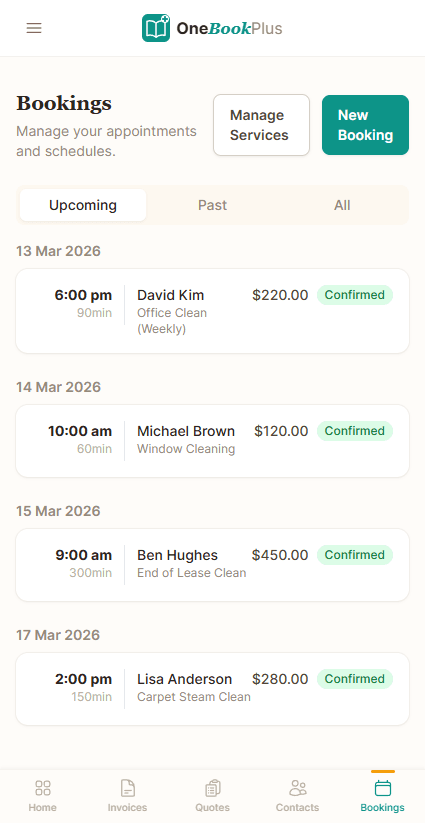
OneBookPlus booking list on a phone showing upcoming appointments grouped by date, each with the start time, the duration in minutes, the client, the service booked, the price and a confirmed status
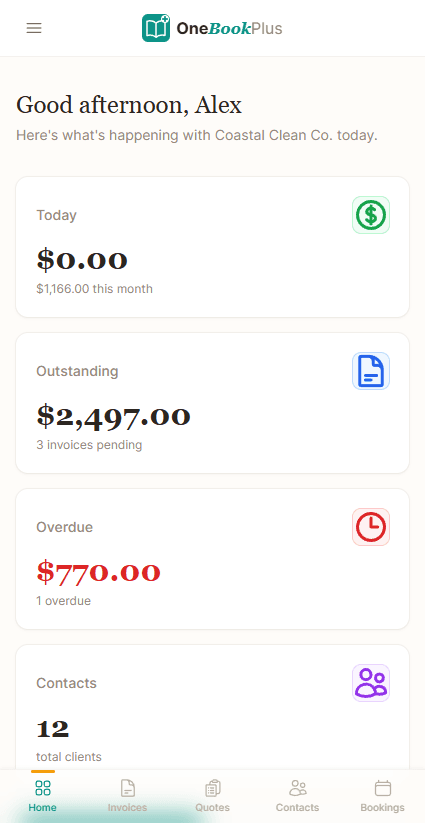
OneBookPlus home screen on a phone showing $0.00 taken today against $1,166.00 this month, $2,497.00 outstanding across 3 pending invoices, $770.00 overdue on 1 invoice, and 12 total clients
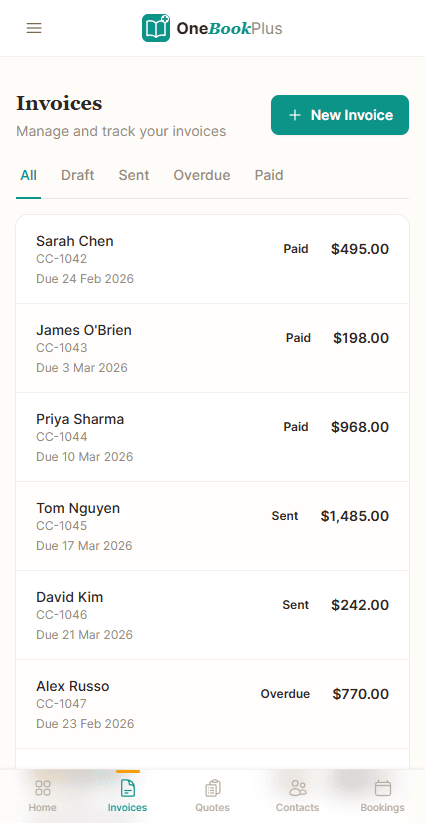
OneBookPlus invoice list on a phone showing six invoices with the client name, invoice number, due date, a paid, sent or overdue status and the amount, with All, Draft, Sent, Overdue and Paid filters and a New Invoice button
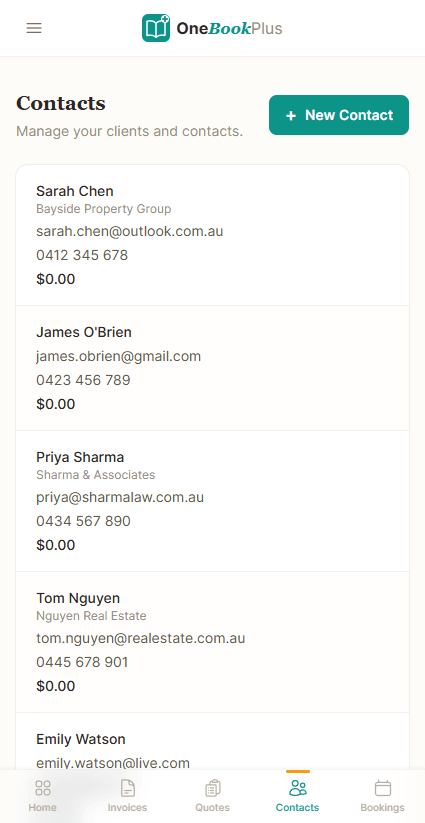
OneBookPlus contact list on a phone showing each client's name, their business, their email address, their mobile number and the balance they owe
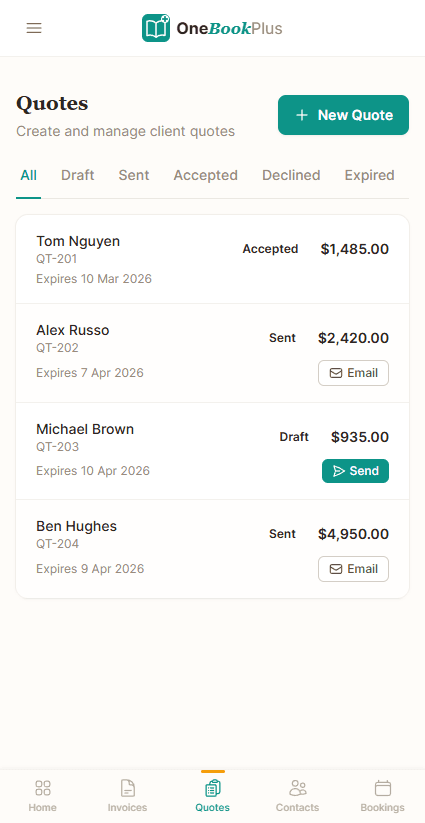
OneBookPlus quote list on a phone showing four quotes with the client name, quote number, expiry date, an accepted, sent or draft status and the amount, with Send and Email actions on the unsent ones
Bookings screen

Key takeaways

5
  • Calendly is dedicated meeting-scheduling software priced in USD per seat, with a free tier capped at one event type, two paid per-seat tiers, and an Enterprise tier quoted by sales against a published annual floor. Every tier is on calendly.com/pricing and the AUD equivalents are in the comparison table below. The shape is what matters: the bill grows with each person you add, and AU customers carry FX risk on every renewal.
  • OneBookPlus replaces Calendly + the booking-adjacent tools that follow it (CRM for the contact, Stripe for the payment, accounting for the invoice, marketing for the follow-up) with a single subscription from $0/month (Free), $29/month (Starter), $49/month (Plus), or $69/month (Growth), billed in AUD.
Show 3 more
  • Both handle calendar sync (Google, Outlook, iCal), reminders, and round-robin team scheduling. OneBookPlus also creates the customer record, sends the GST-compliant tax invoice on completion, and triggers a Google review request, Calendly stops at the booking event.
  • Privacy posture: Calendly is a US-headquartered company that hosts personal information on US infrastructure (per calendly.com/security), so bookings made by Australian residents involve cross-border data transfer subject to Australian Privacy Act APP 8. OneBookPlus stores AU customer data on Australian-hosted infrastructure with no offshoring of session contents.
  • Calendly wins on: pure-play scheduling polish, embeddable widget depth, integration breadth (100+ connectors listed on calendly.com/integrations, including Salesforce, HubSpot, and Microsoft Teams), and the Calendly brand recognition (asking 'send me a Calendly link' is now a verb).

Where the booking stops, and where the job starts

OneBookPlus

From $0/mo. Bookings, invoicing, CRM and accounting on one plan; AI and payroll are add-ons

  • Online booking page
  • GST invoicing & quoting
  • CRM & contact management
  • Email marketing & campaigns
  • Accounting & P&L reports
  • BAS / ATO tax summaries
  • Payment processing
  • Job management & pipeline
  • Australian-built & supported

Calendly

From $0/mo, scheduling only

  • Online booking & scheduling
  • Calendar integration
  • Team scheduling
  • Automated reminders
  • Payment collection
  • GST invoicing & quoting
  • CRM & contacts
  • Accounting & P&L
  • BAS / ATO reports
  • Email marketing
  • Requires separate tools for invoicing, CRM, accounting

OneBookPlus vs Calendly: detailed comparison

See exactly what's included in each platform. OneBookPlus goes far beyond scheduling to give Australian businesses a complete operating system.

FeatureOneBookPlusCalendly
Online booking pageYesYes
Calendar integrationYesYes
Team schedulingYesYes
Automated remindersYesYes
Payment collectionYesYes
GST-compliant invoicingYesNo
CRM & contact managementYesNo
Accounting & P&L reportsYesNo
BAS / ATO tax summariesYesNo
Email marketingYesNo
Quoting with one-click acceptYesNo
Job management & pipelineYesNo
Google review requestsYesNo
Round-robin & collective team event typesNoYes
Meeting polls & one-off scheduling linksNoYes
PriceFrom $0/mo AUDFrom $0/mo USD
All includedScheduling only

The 16 dimensions buyers check before replacing a booking link

Where a dedicated meeting-scheduling tool ends and an AU-tax-native business platform begins. Scheduling rows are an honest draw or a Calendly win; the back-office rows are where OneBookPlus bundles what Calendly leaves to other apps. Cited against Calendly’s public pages.

CategoryFeatureOneBookPlusCalendly
SchedulingSelf-serve booking page with availability rulesYesYes (source: calendly.com/features)
Round-robin / collective / group event typesRound-robin + team schedulingCategory-leading routing & round-robin (source: calendly.com/features/routing)
CalendarTwo-way sync (Google, Outlook, iCal)iCal subscribe live; two-way Google sync built, not yet open to customersYes (source: calendly.com/features)
RemindersAutomated email remindersYesEmail free; SMS on paid tiers (source: calendly.com/pricing)
PaymentsTake a deposit / payment at bookingOn the invoiceStripe / PayPal at booking (source: calendly.com/features/accept-payments)
InvoicingGST tax invoice on completion + ABN validationYesNo (source: calendly.com/features)
CRMCustomer record, history, lead pipelineYesConnector to external CRM only (source: calendly.com/integrations)
Quotes & jobsQuote to job to invoice pipelineYesNo (source: calendly.com/features)
Bank feedsAustralian bank feeds + reconciliationWithdrawn while we replace the providerNo (source: calendly.com/features)
GST / BASBAS-ready GST reporting (G1, 1A, 1B)YesNo (source: calendly.com/features)
MarketingEmail campaigns + Google review requestsYesNo (source: calendly.com/features)
IntegrationsThird-party connector marketplaceStripe, ABN lookup, Xero/MYOB-ready export today; a live two-way sync is not built and is not on a date100+ (Salesforce, HubSpot, Teams) (source: calendly.com/integrations)
Billing currencyBilled in AUD (no FX on renewal)AUDUSD-billed (source: calendly.com/pricing)
Pricing modelPer-seat vs whole-business pricingFlat plan, logins included (1 / 3 / 5 / 10 by tier)Per-seat (source: calendly.com/pricing)
Data residencyWhere AU customer data is storedAWS Sydney (ap-southeast-2)US infrastructure (APP 8 transfer) (source: calendly.com/security)
Native mobileNative business app (iPhone + iPad)Native iOS app; web app on AndroidBooking app (no invoicing/accounting) (source: calendly.com/features)
Starting price (AUD, inc. GST)From $0/moFrom US$10/seat/mo
AUD, inc. GST · whole business, 1 / 3 / 5 / 10 logins by tierUSD per seat, billed yearly: Free (one event type), Standard US$10/seat/mo, Teams US$16/seat/mo, Enterprise from US$15k/yr (calendly.com/pricing, August 2026) · scheduling only, so accounting needs other tools

Not mockups, real product screens

The booking page, and the diary behind it

Every competitor row above cites Calendly's own page. Our side says the page your customers book from and the record your business runs on are the same thing, so here are both ends of it.

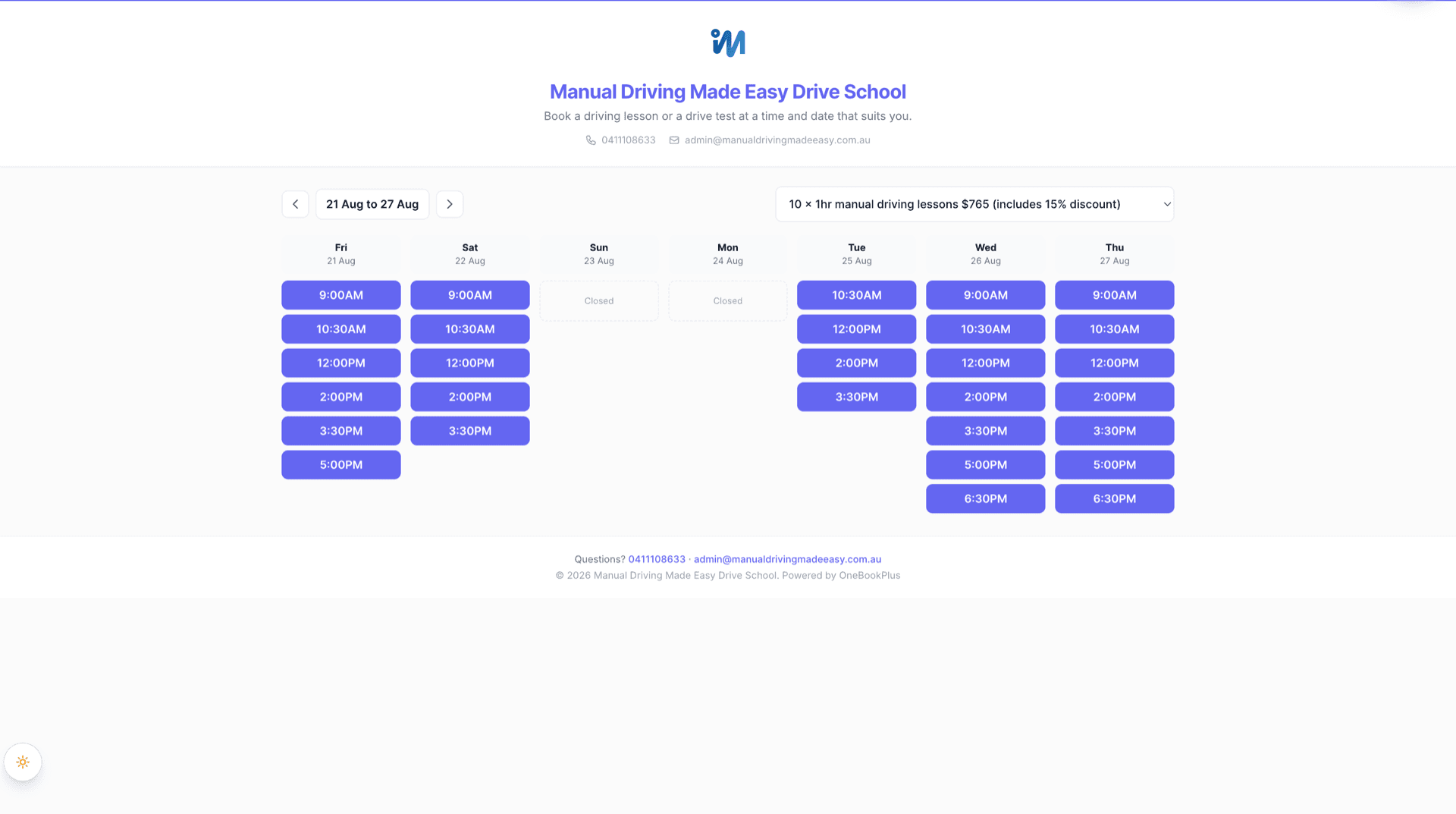
A OneBookPlus public booking page for a driving school, carrying that business's own logo, name and colours, showing the week of 21 to 27 August as columns of bookable times with Sunday and Monday marked closed, back and forward week controls, and a package selector set to ten one hour manual lessons at $765
The booking page a customer actually lands on, in the business's own branding at its own address: a week of real available times, closed days shown as closed, and the package being booked against in the selector. This one belongs to a driving school; every business on OneBookPlus gets its own.
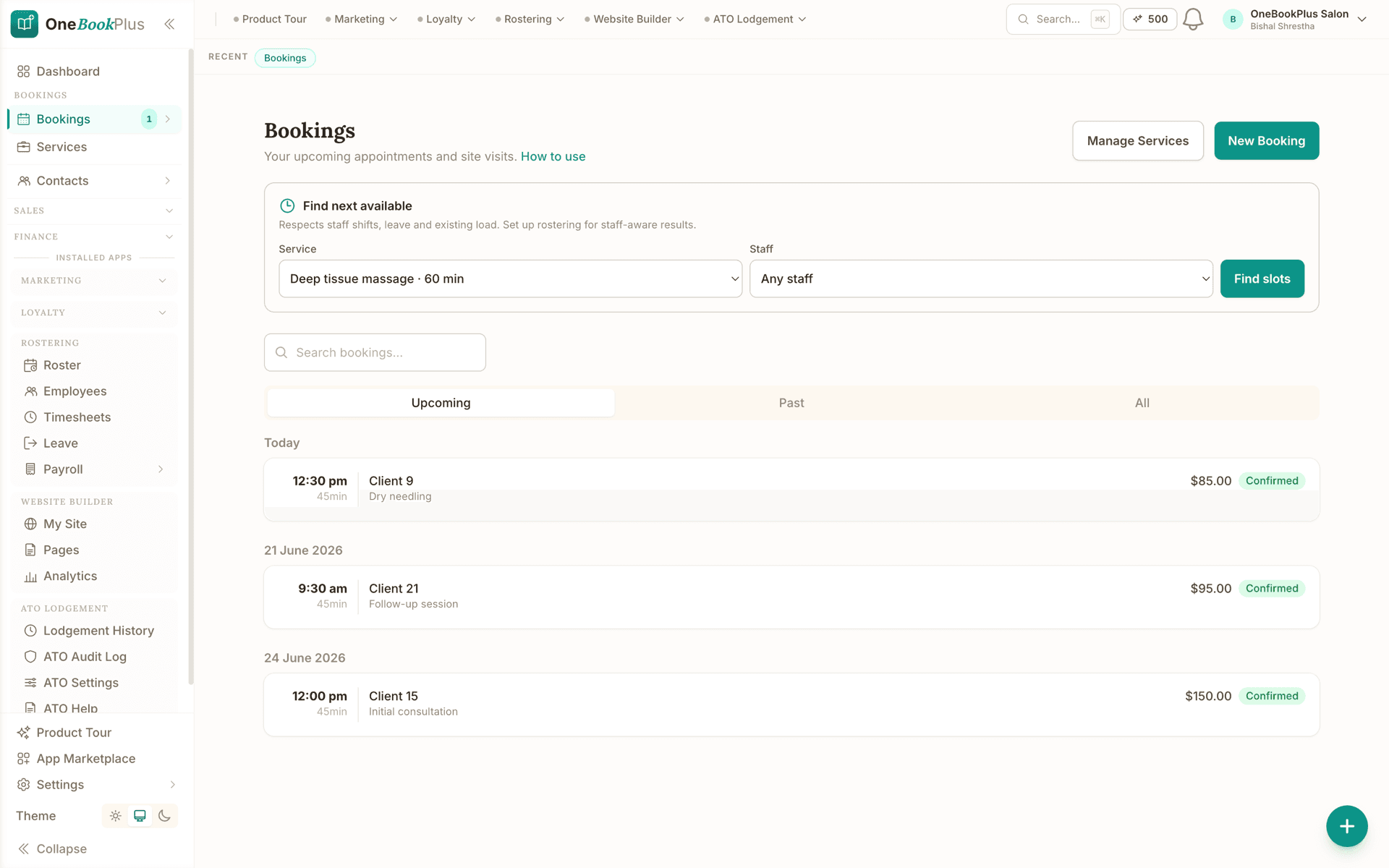
The OneBookPlus Bookings screen showing a Find next available panel with a service picker set to a 60 minute deep tissue massage and a staff picker set to any staff, then upcoming appointments grouped by date with the start time, the length in minutes, the client, the service and the price, each marked confirmed
The diary behind that page: Find next available searches against staff shifts, leave and existing load, and each upcoming appointment carries the time, the length, the client, the service and the price. The same record feeds contacts, invoices and the books.

Open the same screens yourself

The live demo is a working OneBookPlus account with jobs, bookings, quotes and invoices already in it. Click into the screens above rather than taking the ticks on faith.

Where Calendly wins

The routing engine is still the category benchmark

Calendly has been refining one job since 2013: getting a meeting booked with zero friction. It shows. The routing and round-robin engine distributes leads across reps with weighted rules that are still the category benchmark; the embeddable widget, ICS handling, timezone logic, and rescheduling links are battle-tested at huge volume; and the 100+ integration marketplace connects natively to Salesforce, HubSpot, and Microsoft Teams. If you run an outbound sales team where “send me your Calendly link” is part of the pitch and the meeting lives in Salesforce, Calendly is purpose-built for exactly that, and switching off it for the sake of switching makes no sense.

Where OneBookPlus wins

Past the calendar event, in AUD, with AU tax native

The booking doesn’t stop at the calendar event. A Calendly booking is a calendar invite. To get paid you then re-key the customer into a CRM, raise an invoice in another tool, and reconcile it in accounting. OneBookPlus turns the same booking into a contact record, a GST tax invoice on completion, a reconciled payment, and a Google review request, all in one pass. Calendly’s own features page stops at scheduling, reminders and routing: there is no invoicing, accounting, or CRM of record.

Priced in AUD for the whole business, not USD per seat. Calendly’s pricing page bills in USD per seat, so adding a front-desk person or a second therapist adds a seat and FX exposure on every renewal, and the jump to the Enterprise tier is a sales conversation rather than a checkout. OneBookPlus is one AUD price for the whole business ($0/month (Free), $29/month (Starter), $49/month (Plus), or $69/month (Growth)) with no per-seat ladder and no currency conversion at renewal. It bands logins instead: one login on Free, three on Starter, five on Plus and ten on Growth, so adding a therapist below the cap does not re-price the subscription.

Australian tax and data residency are native, not bolt-ons. OneBookPlus calculates GST, validates ABNs against the Australian Business Register, produces BAS-ready figures, and stores AU customer data in AWS Sydney (ap-southeast-2). Calendly was built for the US market and hosts on US infrastructure, so a booking by an Australian resident is a cross-border disclosure under Calendly’s security posture that an APP 8-sensitive organisation (clinic, school, council) has to assess, and it has no Australian tax features at all.

What you gain when the booking link is part of the business

More than a scheduling link

Calendly is built around one thing: letting people book a time slot. OneBookPlus gives you that same booking capability plus invoicing, CRM, accounting, quoting, job management, and email marketing, so you can manage your entire business from one dashboard instead of stitching together five different apps.

Built-in invoicing & accounting

Calendly can collect a payment at booking, but it doesn't generate GST-compliant invoices, track expenses, or produce P&L reports. With OneBookPlus, every booking flows into your invoicing and accounting automatically, no separate accounting software needed, and your BAS summaries are always ready.

CRM & client management included

Calendly doesn't offer CRM or client history. OneBookPlus includes a full CRM so you can track every client interaction from first booking to repeat visit, send follow-ups, manage leads, and build lasting relationships, all connected to your booking, invoicing, and marketing data.

Australian-first compliance

OneBookPlus is built from the ground up for Australian businesses. GST calculation, ABN validation via the Australian Business Register, ATO-compliant BAS summaries, and AUD formatting are all included from day one. Calendly was built for the US market and has no Australian tax compliance features.

OneBookPlus vs Calendly: your questions answered

How does OneBookPlus compare to Calendly for an Australian business?

They are scoped differently. Calendly is a polished, dedicated scheduling tool and it is genuinely the best in its category at getting a meeting booked with no friction, but it stops at the calendar event: no invoicing, no CRM of record, no accounting, no marketing. OneBookPlus covers the same booking job, then continues into GST-compliant invoicing, BAS summaries, client management, email campaigns, and full accounting on one AUD bill from $0/month. If standalone scheduling is genuinely all you need, Calendly is the sharper tool and there is no reason to move. If the booking is the start of a job you then quote, deliver, invoice and chase, the extra hops between apps are what OneBookPlus removes.

Can I use OneBookPlus instead of Calendly?

Yes. OneBookPlus includes an online booking page with calendar integration, automated reminders, and payment collection, covering Calendly's core features. On top of that, you get GST-compliant invoicing, CRM, accounting with P&L reports, BAS tax summaries, quoting, job management, and email marketing. Instead of paying for Calendly plus separate tools for invoicing and accounting, OneBookPlus replaces them all in a single platform.

Does OneBookPlus support online bookings like Calendly?

Yes. OneBookPlus provides a shareable online booking page where clients can view your availability and book services directly. You get automated email reminders, calendar sync, and the ability to collect card payment on the invoice each booking becomes. The difference is that every booking automatically connects to your CRM, invoicing, and accounting, so there's no manual data entry between scheduling and getting paid.

How much does Calendly cost compared to OneBookPlus?

Calendly bills in USD per seat, with a free tier limited to one event type, two paid per-seat tiers, and an Enterprise tier with a published annual floor. The current figures are in the comparison table above, taken from calendly.com/pricing. Two things about the shape matter more than the numbers: the price scales with every person you add, and you carry the exchange rate on each renewal. Because Calendly only handles scheduling, invoicing, CRM, accounting and marketing still have to come from somewhere else. OneBookPlus starts free and its Starter plan is $29 AUD/month, and that one AUD price covers bookings, invoicing, CRM, accounting, BAS summaries, and marketing for the whole business, with no per-seat ladder and no FX on renewal. What our plans band instead is logins. Each plan includes a set number of logins, one login on Free, three on Starter, five on Plus and ten on Growth, and below the cap there is no per-seat charge at all. On Growth an extra login is $9/mo, added to the same invoice, so an eleventh person costs $9 and not a new plan. Staff you roster and book but who never sign in (instructors, carers, cleaners, stylists) are free and unlimited on every plan.

What can OneBookPlus do that Calendly can't?

OneBookPlus includes many features Calendly doesn't offer: GST-compliant invoicing, full accounting with P&L reports, BAS/ATO tax summaries, CRM and contact management, email marketing campaigns, quoting with one-click accept, job management pipelines, point of sale, and Google review requests. Calendly is focused solely on appointment scheduling. OneBookPlus is a complete business operating system built for Australian compliance.

Is Calendly's data stored in Australia, and does that matter for my business?

No, Calendly is a US-headquartered scheduling company and, per its security page (checked https://calendly.com/security), hosts personal information on US infrastructure, so a booking made by an Australian resident is a cross-border disclosure of personal information under Australian Privacy Principle 8 of the Privacy Act 1988 (Cth). For most businesses that's a manageable risk, but for regulated organisations, health clinics, schools, local councils, Commonwealth-contracted suppliers, sending client PII offshore can trigger a privacy impact assessment and extra contractual safeguards. OneBookPlus stores Australian customer data in AWS Sydney (ap-southeast-2), so it removes that cross-border step entirely.

Should I keep Calendly, or move scheduling into OneBookPlus?

The ones who switch are Australian service businesses where the booking is the start of a paid job, so they want it tied to the rest of their operations. Where Calendly is a polished, USD-billed, per-seat scheduling link that stops at the calendar event, OneBookPlus matches the core booking capability, shareable booking page, two-way calendar sync, reminders, team scheduling, and then continues into GST-compliant invoicing, CRM, accounting, BAS summaries, email marketing, and Google review requests, all billed in AUD and hosted in Australia. The ones who should stay are teams that genuinely only need a standalone scheduling link with round-robin across a Salesforce sales team, where Calendly remains the specialist and its routing engine is still the category benchmark.

How OneBookPlus works for Australian businesses

Calendly was built for the American market as a standalone scheduling tool. It does one thing well, letting people pick a time slot, but it stops there. For Australian businesses, that means bolting on Xero or MYOB for accounting, a separate CRM for client management, another tool for invoicing, and yet another for marketing. OneBookPlus was built from the ground up as a complete business platform with Australian compliance native: GST, BAS, ABN and AUD are built in, not afterthoughts.

Where Calendly stops at the calendar invite, OneBookPlus follows the full lifecycle of a customer relationship: from the first booking through quoting, job delivery, invoicing, payment collection, and follow-up marketing. A payment against an invoice clears it in the ledger, and every transaction flows into your P&L and BAS summaries without manual data entry.

Feature deep dive

  • Bookings that connect to everything: Unlike Calendly where a booking is just a calendar event, OneBookPlus bookings automatically create a client record in your CRM, can trigger a quote or invoice, and feed into your accounting reports. No copy-pasting between apps, no lost client data.
  • Payments that close out the invoice: Clients pay the Pay Now link on the invoice by card or BECS debit, the payment records against that invoice, and the receivable clears. See exactly who's paid, who's overdue, and what your cash position looks like, something Calendly can't do at all.
  • Native GST and BAS summaries: Every invoice and expense automatically calculates GST and feeds into your ATO-ready BAS summary. No manual tax codes, no end-of-quarter panic. Calendly has zero accounting or tax compliance features. You need entirely separate software for that.

Who should switch

OneBookPlus is ideal for Australian service businesses that need more than a booking link. If you're a salon managing client history and sending marketing emails, a consultant tracking projects and chasing invoices, or a trades business quoting jobs and collecting payments, you'll get far more value from OneBookPlus. If you only need a simple scheduling link with no invoicing, CRM, or accounting, Calendly may still suit your needs.

Getting started

Create your free OneBookPlus account and you're up and running in minutes. Set up your services, publish your online booking page, connect Stripe so clients can pay the invoice online, and send your first GST-compliant invoice. Import your existing client list to keep your history intact. No credit card required, no transaction fees on invoices, and no US-centric workarounds for Australian tax compliance.

How to switch from Calendly to OneBookPlus

1

Rebuild your event types as OneBookPlus services

List each Calendly event type (the 30-minute consult, the 60-minute appointment, the paid session) and recreate them as services in OneBookPlus with the same duration, buffers, and price. Because every OneBookPlus booking becomes a GST tax invoice with a Stripe Pay Now link, you can carry over any Calendly “accept payment” event types and add a GST line so the customer pays on a compliant tax invoice.

2

Connect your calendar and publish the new booking link

Connect the same Google or Outlook calendar Calendly was reading so your real availability carries across with no double-bookings. Publish your OneBookPlus booking page, then update the link everywhere your Calendly URL lives: email signature, Google Business profile, Instagram bio, website embed. Keep the Calendly link pointed at the new page (or leave Calendly live on its free tier) for a fortnight while traffic moves over.

3

Export your invitees, then cancel the Calendly seats

Export your Calendly scheduled events / invitees as CSV and import the contacts into the OneBookPlus CRM so past clients land in one record with their booking history. Once new bookings are flowing in, each one now creating a contact, an invoice and an accounting entry automatically, cancel your USD per-seat Calendly subscription. Most businesses run both for two to four weeks, then drop Calendly entirely.

Ready to go beyond scheduling
and run your entire business from one app?

Bookings, GST invoicing, CRM and BAS-ready accounting in one Australian app, billed in AUD.

Free plan available, no card needed.

Compliance, data residency and honest trade-offs

OneBookPlus and Calendly both move appointment data, names, emails and sometimes phone numbers, so where that data lives, and how reliably the booking lands in your calendar, matters as much as the feature list. This section is the candid version.

Privacy Act 1988 and APP 8 cross-border disclosure

Calendly is a US-headquartered SaaS that hosts personal information on US infrastructure. Under Australian Privacy Principle 8 (Cross-border disclosure of personal information) in the Privacy Act 1988 (Cth), an Australian organisation that sends personal information overseas remains accountable for any act or practice of the overseas recipient that would breach the APPs, unless one of the narrow exceptions applies. For regulated sectors such as health (Privacy Act + state health-records laws like the Health Records Act 2001 (Vic) and HRIP Act 2002 (NSW)), schools, local councils, and Commonwealth-contracted bodies subject to the Protective Security Policy Framework, sending client PII to a US processor can require an additional contractual carve-out, a privacy impact assessment, and explicit notification to data subjects. OneBookPlus is hosted in AWS ap-southeast-2 (Sydney), with personal information stored and processed in Australia. For an APP 8-sensitive organisation that simply cannot disclose PII overseas without going through a procurement gauntlet, OneBookPlus removes the gauntlet.

Booking deliverability and calendar sync: an honest comparison

Calendly’s core competency is reliable, low-friction scheduling: it has spent a decade refining ICS attachments, timezone handling, and rescheduling links that just work. OneBookPlus offers a calendar subscription link (Apple, Google or Outlook pick up confirmed bookings automatically on their own refresh schedule) and email confirmations with ICS attachments; two-way Google Calendar sync is built but not yet open to customers. We are honest that Calendly has more polish at the edges too: group polls, complex buffer rules, and a longer-running deliverability reputation on confirmation emails. For most service businesses the gap is small; for high-volume sales teams it can matter.

What Calendly does that OneBookPlus doesn’t (yet)

Three honest gaps: (1) round-robin distribution across multiple sales reps with weighted rules, where Calendly is the category leader; (2) third-party CRM connectors to Salesforce, HubSpot, and the long tail of vertical CRMs, where Calendly’s marketplace is genuinely deep; (3) native Microsoft Teams integration for video links, where OneBookPlus supports Google Meet and Zoom but not Teams natively at time of writing.

Honest summary: if you are a regulated AU organisation (clinic, school, government supplier) where APP 8 friction is real, or a small business that wants bookings tied to invoicing and BAS, OneBookPlus is the right call. If you are a sales-led team running round-robin on Salesforce with Microsoft 365 video, stay with Calendly.

About this comparison

How we compared OneBookPlus to Calendly

Feature claims about OneBookPlus reflect what is shipping today on onebookplus.com.au. Calendly pricing and feature claims were read off Calendly’s public Australian product pages on . Vendor pricing changes frequently, so check the Calendly website for your specific situation before making a decision.

Disclosure: OneBookPlus publishes this comparison and stands to benefit if you switch. We aim to compare like-for-like on capability and Australian tax compliance, if you spot something out of date, email hello@onebookplus.com.au and we’ll review it.

About the author

Bishal Shrestha, Founder of OneBookPlus

Bishal Shrestha

Founder & CEO, OneBookPlus

Bishal spent a decade running digital projects for Australian small businesses before founding OneBookPlus. He writes and maintains these pages, and publishes what OneBookPlus does not do alongside what it does.

A decade running digital projectsPersonal site: bishal.com.auMelbourne, Australia
Read the founder bio

How this page was researched

Every Calendly price and capability claim on this page was read off Calendly's own published Australian pages on the date printed above, and recorded in competitor-facts.ts with that date. Claims about OneBookPlus describe what ships today, and the page names what we do not do.

Last reviewed and updated: by Bishal Shrestha