Locksmith scheduling software for jobs, dispatch and invoicing
Invoice the lockout before you leave the doorstep.
Quote the rekey on the kerbside, take payment on the spot, and chase the next callout, not the paperwork. All-in-one for $0 to $69/mo, replaces ServiceM8 or Tradify + Xero + your CRM.
Free plan, no card needed. GST and ABN on every invoice, quote to invoice in one tap.
Cut $61+/mo from your software stack by replacing Wix + Xero + ServiceM8 + Mailchimp with OneBookPlus, before the USD-billed CRM seat on top.
See your savingsFree Tools & Resources
Reference material for sole traders and contractor teams
Security Licence by State for Locksmiths
Eight security industry Acts and eight regulators, plus the probity check, restricted keyway authority and key register that apply everywhere.
Founder GuideStart a Trade Business
8-step founder guide, ABN, GST, licence, White Card, insurance, tools, pricing, first clients.
InteractiveTradie Quote Calculator
Interactive estimator combining hourly rate, materials markup, travel, callout, and GST.
ReferenceTrade Licence by State
State-by-state thresholds, regulators, and invoice requirements for AU trade licensing.
Operator GuideBuilding & Construction Award
Plain-English MA000020, CW/1–CW/10, industry/tool/fares allowances, RDO system.
ReferenceTradie Insurance Guide
PL, workers comp, tools, vehicle, PI, home warranty, contract works, coverage and premium ranges.
Key takeaways
5- Locksmith and security work is regulated at the state/territory level. Several jurisdictions require a security licence to carry out particular security-installation activities (for example through NSW Police SLED, Victoria Police LRD, or your state's police/fair-trading licensing body), the exact requirement depends on the work and where you operate, so check your relevant regulator.
- Best practice is to show your ABN and any applicable licence number on every quote and invoice. OneBookPlus stores those details once so they appear automatically; it records but does not issue or verify any licence.
Show 3 moreShow less
- OneBookPlus is the all-in-one alternative to the typical locksmith stack: a job app (ServiceM8 from $29/mo by job volume, or Tradify from $48 per user per month ex GST) plus Xero ($37 to $500 a month) plus a CRM. Bundled from $0 a month (Free), $29/mo (Starter), or $69/mo (Growth): jobs + quotes + invoicing + CRM + accounting + photo evidence.
- Mobile-first design, most locksmith invoicing happens on the phone at the doorstep, not later in the office. Quote-to-invoice in one tap; ABN on every invoice (prevents 47% no-ABN withholding); 10% GST automatic on labour and hardware.
- Industry rhythm: emergency lockout callouts typically carry an after-hours premium over standard rates; restricted-key and access-control work involves recording the customer's authority and ID. SMS reminders cut no-shows on booked commercial and install work.
Built for how locksmiths work
OneBookPlus runs from the phone because that is where the work is: on the road, at the doorstep, between callouts. Quotes, jobs, payments and GST invoices without a trip back to the office.
Lockout and callout management
Locked out at midnight? Log the callout with a priority flag, capture the property and access details on arrival, and invoice before you pack the kit away, after-hours rate included.
Quotes in minutes
Build itemised quotes for rekeys, lock supply and fit, restricted-key systems, master-key suites, safe servicing or access-control installs, right from your phone. Customers accept with one click and it converts to an invoice instantly.
GST and BAS ready
Every invoice automatically calculates 10% GST and displays your ABN. Export a GST summary at BAS time so the quarterly lodgement is a one-click job, not a glovebox of receipts.
Mobile scheduling and week view
See your whole week at a glance, lockouts, rekeys, commercial fit-outs, safe jobs. Assign work to locksmiths on your team and track every job from Quoted through to Invoiced.
Take payment on site
Send the invoice with a Stripe Pay Now link and the customer settles on their own phone before you leave. Tapping their card on your phone is coming to the iOS app rather than shipped, so take it on the terminal you already carry if you want it card-present. Automated reminders chase anything outstanding so you spend less time on debt collection.
Customer and key history
Keep a record of every site you've worked on, which locks you fitted, which keys you cut, restricted-key authorities, and access-control credentials issued. When a regular calls back, you already know their system.
Job photos and documentation
Snap before-and-after photos of every lock, hardware and access-control install against the job record. Capture the customer's ID-and-authority sign-off for restricted work, all stored in one place and easy to retrieve.
Stock and materials tracking
Log cylinders, blanks, hardware, safes and access-control kit against each job. Snap supplier receipts so you know exactly how profitable every callout and install really is.
Free plan available, no card needed.
Free booking page included
Your locksmith business gets a booking page. Free.
Stop paying a website subscription you do not need, and skip the up-front designer quote. Every OneBookPlus locksmith gets a branded booking page on the free plan. Want it on your own domain like a proper business website? The Website Builder app is $29/mo and we host it for you.
your-business.onebookplus.com.auoronebookplus.com.au/book/your-businessyourbusiness.com.au: your own branded domain, hosted by us24/7 emergency callout booking
Customers book lockout callouts at midnight while you sleep. The job lands in your dashboard tagged urgent, flagged Emergency for first thing.
Branded with your colours, logo & licence
Brand color picker in settings. Logo upload. Trade licence number shown on every page so customers know you're legit.
Show service prices upfront
House lockout from $120. Rekey a deadlock $90. Mortice supply & fit $260. Customers see prices before booking, kills the price-shopping phone calls.
Mobile-first: looks great on phones
Your booking page is built mobile-first, so a customer searching on a phone can book without pinching to zoom.
Bring your own domain: we host the site
Already own yourbusiness.com.au? Add the Website Builder app ($29/mo) and point your domain at the site we host for you, through a guided DNS and SSL wizard. We don't sell domains, keep yours wherever you registered it.
Local SEO baked in
Schema.org markup for locksmith services + suburbs you cover. Google finds you for 'locksmith in [suburb]' searches.
Locksmiths website cost, typical
What locksmiths pay for a website
- From $24/mo
Website builder
Squarespace's cheapest plan billed monthly, verified 2 August 2026. Wix publishes no fixed Australian rate.
- $15 to $40/mo
Web hosting + SSL
Bundled in builders; separate if custom site
- $1,500 to $3,000
Designer (one-off)
Only if you want a custom-built site
- From US$10/mo
Bookings on Calendly
Per seat, billed in US dollars, verified 2 August 2026. Separate from your website.
Typical recurring total
~$39 to $64/mo
+ US$10/mo per seat if you add Calendly for bookings, billed in US dollars, and $1,500 to $3,000 up-front if you hire a designer
With OneBookPlus
Included on every plan
- Branded booking page, free plan
- Hosting + SSL, free plan
- 24/7 customer self-booking, free plan
- Connect your own domain with the Website Builder app, +$29/mo (BYO)
Your total
$0 to $29/mo
See it in action
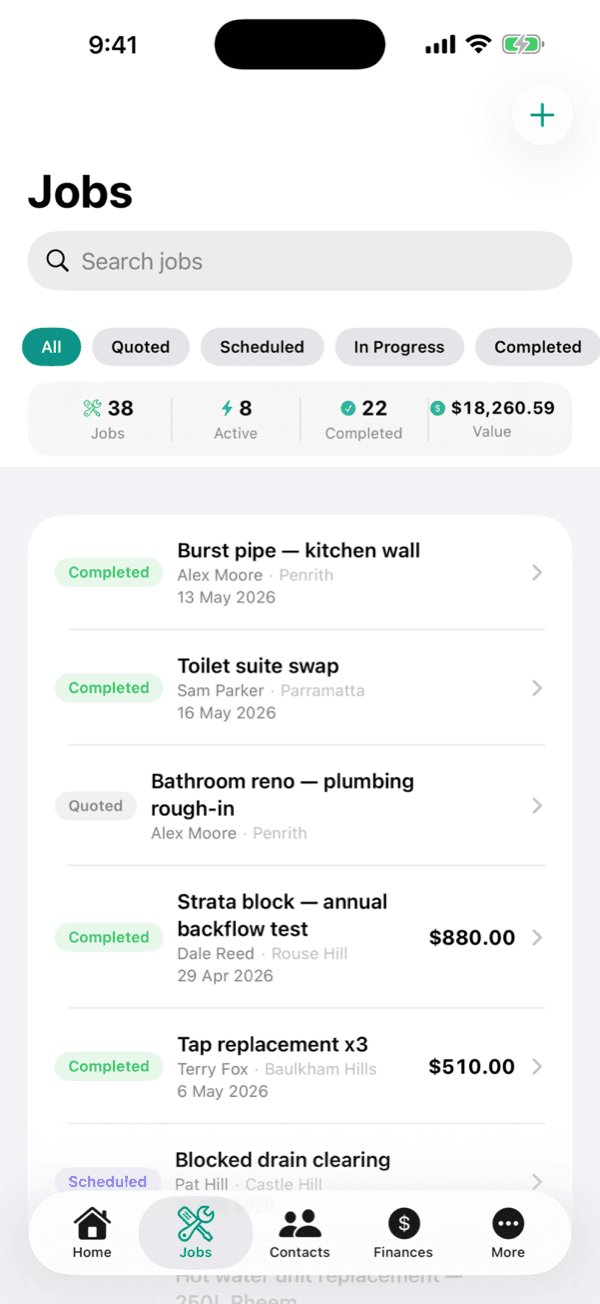
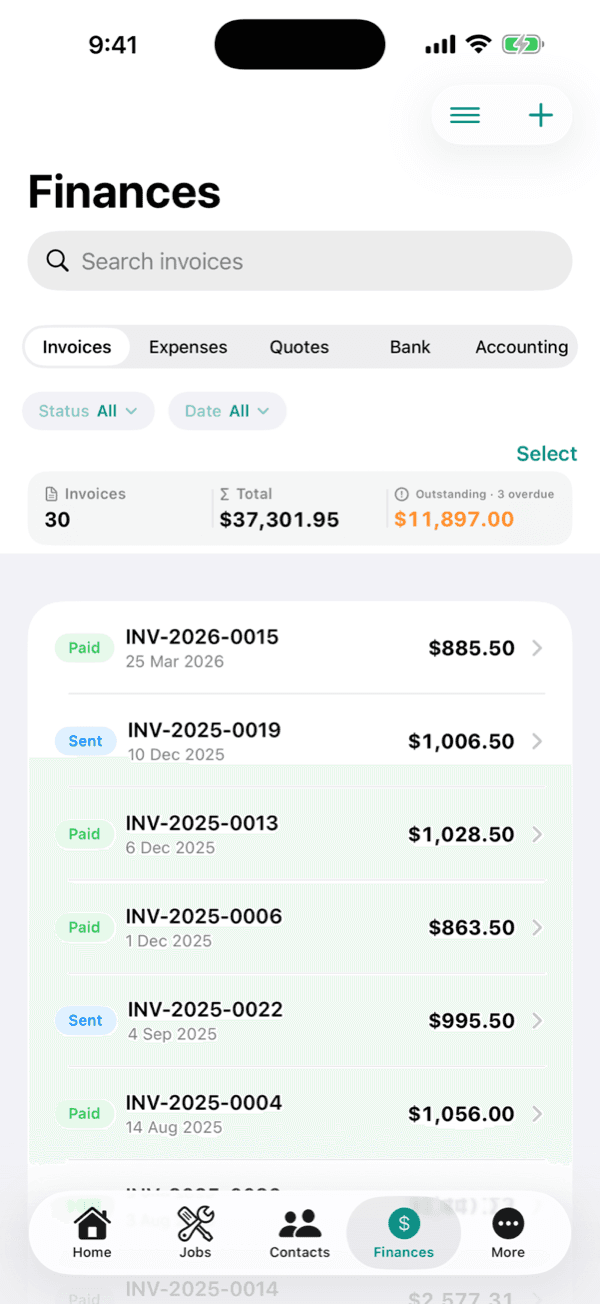
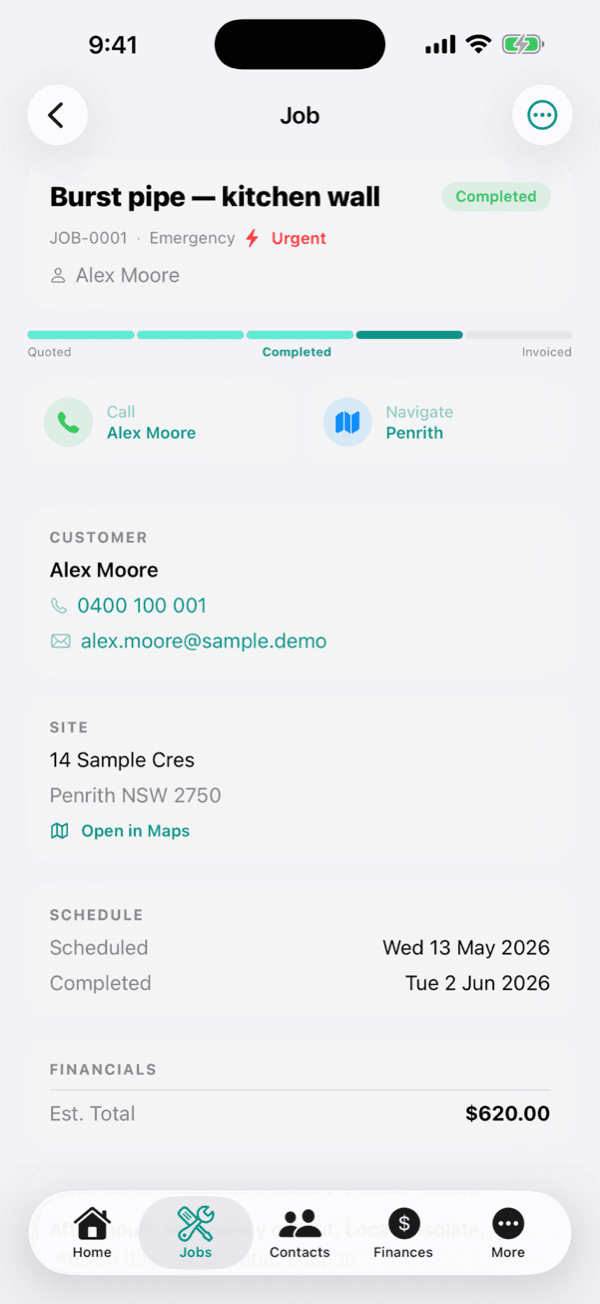
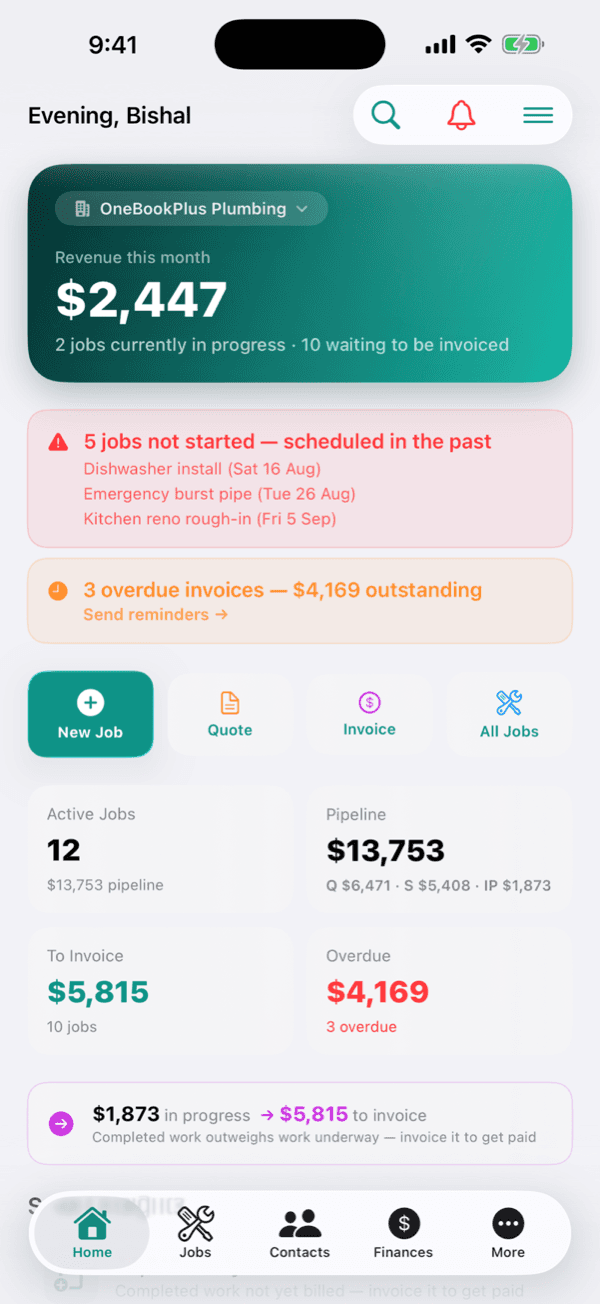
The screens you work from, on site.
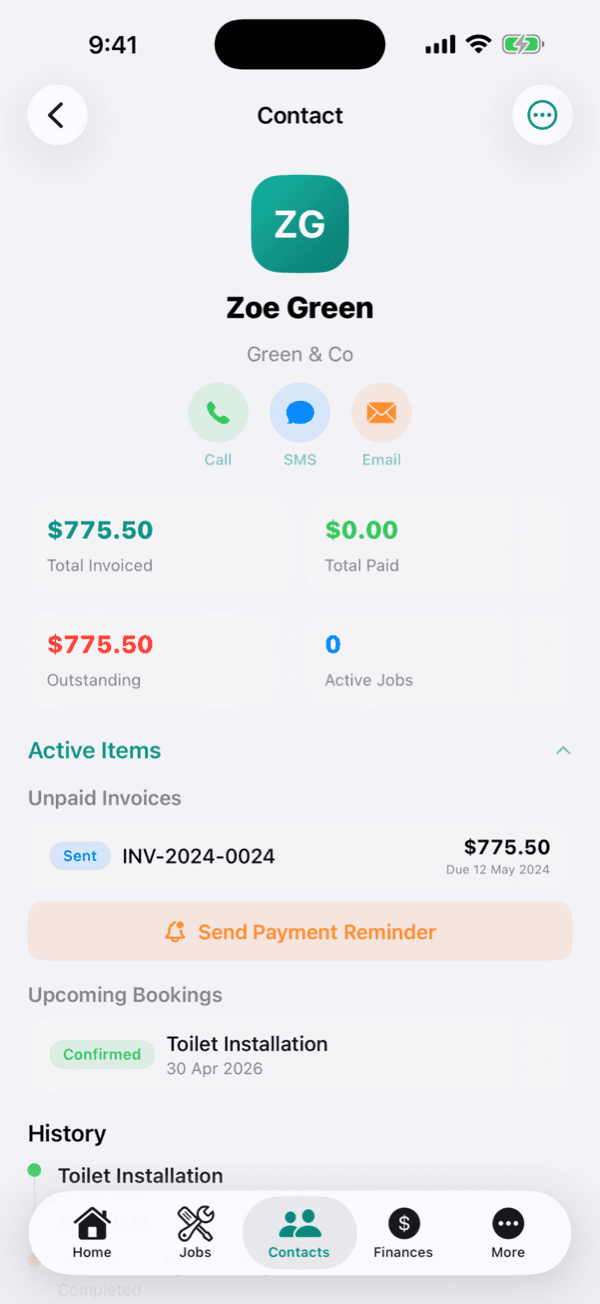
Real product screens: the job board, quotes and invoices a mobile locksmith runs the day on. Tap any screen to zoom in.
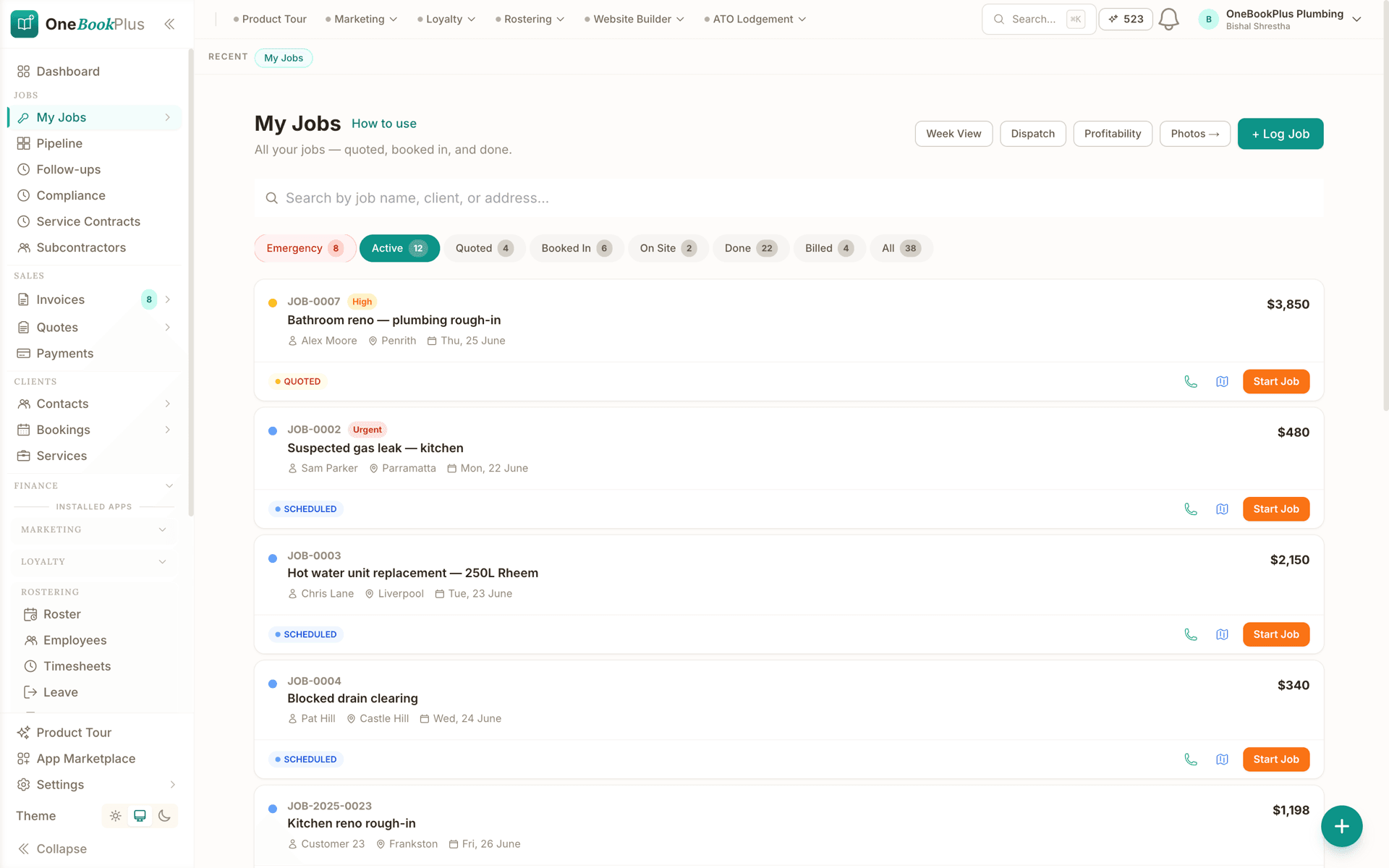
Drag-and-drop job pipeline
Every job visible at a glance, from quote to paid. Drag between lanes: status updates as the job moves, and the invoice is one tap away.
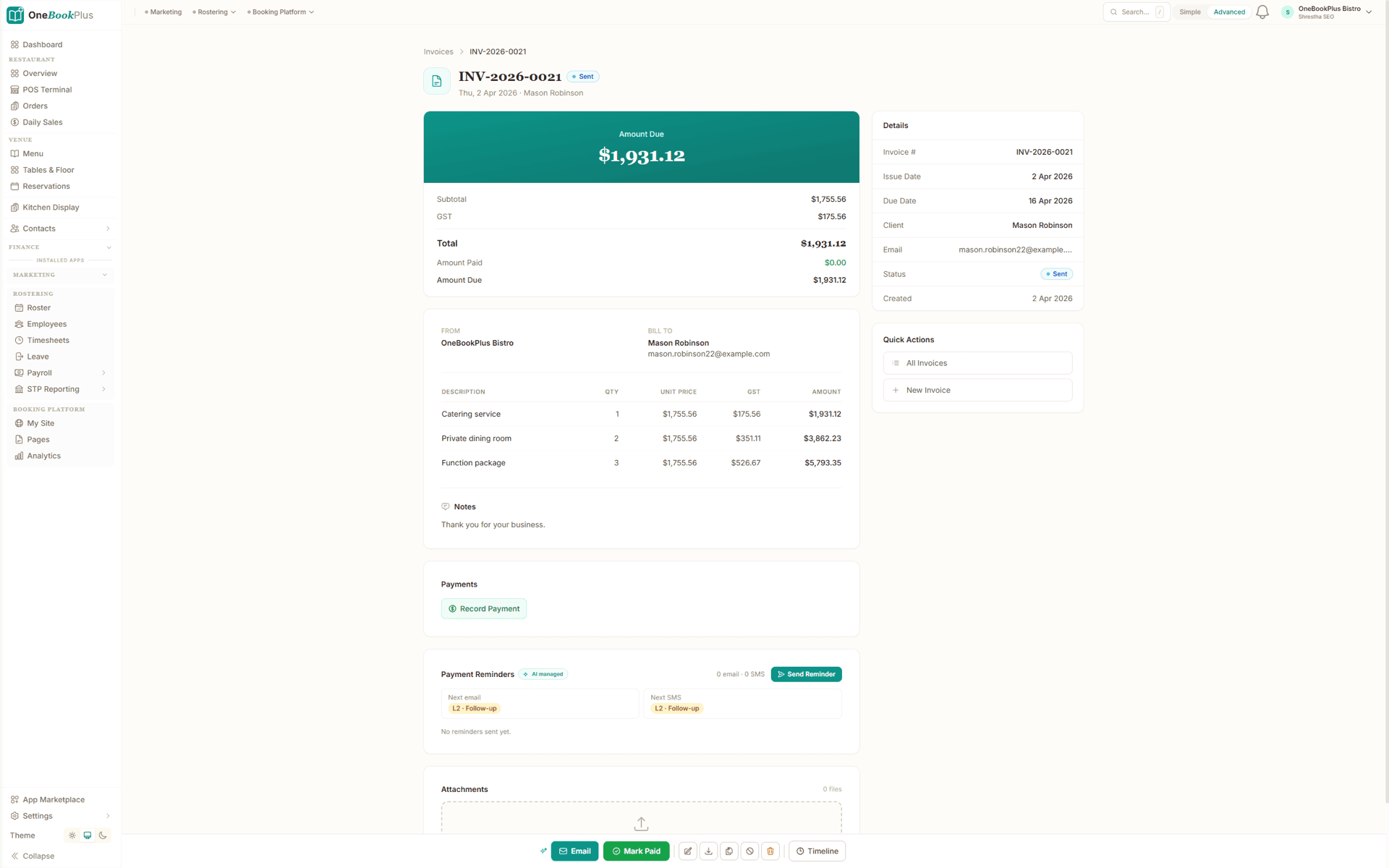
GST-compliant invoice, Pay Now link
Branded PDF, line items, ABN. Stripe for card, Open Banking for BECS. Clients tap, pay, done.
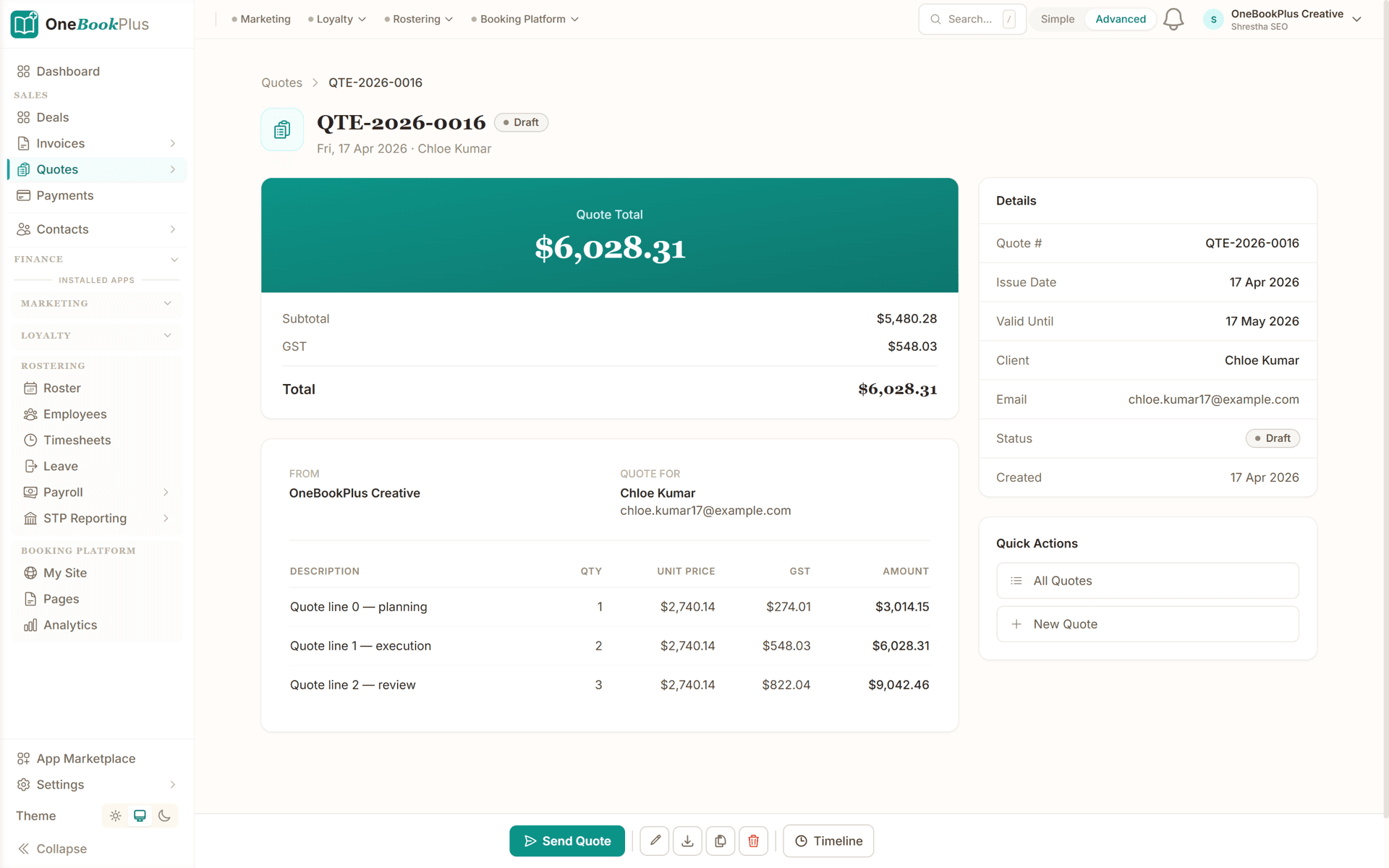
Quote, accepted in one click
Build a quote before you leave the driveway. Client reviews on their phone, taps Accept, and when the job's done it becomes a GST invoice in one tap.
From quote to payment in four steps
Designed around a locksmith's day on the road: quote at the kerb, invoice at the door.
Quote the job
Create an itemised quote for the lockout, rekey, supply-and-fit, restricted-key system or access-control install: labour, hardware and callout fees with GST calculated automatically. Send it as a professional PDF carrying your ABN and licence details.
Schedule & complete the work
Once accepted, the job drops into your week view. Track time on-site, log the locks, cylinders and keys used, and snap before-and-after photos against the job record.
Invoice on the spot
Convert the quote to a GST-compliant invoice with one tap and send it to the customer before you leave the doorstep: no more end-of-week invoice pile.
Get paid faster
Customers pay from the invoice Pay Now link on their own phone before you leave. Automated reminders chase overdue payments so you can focus on the next callout, not the chasing.
Send a real quote the day you sign up
Who it's for
Solo van, shop counter or commercial crew
A one-van mobile locksmith, a shopfront with a counter and a commercial access-control crew run very different weeks. Here is what each one uses.
Mobile locksmith
Running callouts from the van: lockouts, rekeys, car keys. Needs fast mobile quoting, on-site payment, automatic GST and emergency callout tracking.
Shop-based locksmith
Key cutting, locks and hardware over the counter plus mobile jobs. Needs a booking page, customer history and invoicing tied to the till.
Commercial and access control
Master-key suites, restricted-key systems and access-control installs for businesses and strata. Needs quoting, key/credential history and progress documentation.
Locksmith business owner
Managing several locksmiths across the city, tracking who's where. Needs job scheduling, team assignment and revenue tracking in one place.
What a five-tool stack costs each month
Named tools, at each vendor’s own cheapest published plan, and ours underneath. Vendor pricing changes, so check each one before you decide.
Or use OneBookPlus
$29/mo
Everything in the list above, on one bill.
Start freeNo credit card · Free forever · Cancel anytime
Example walkthrough
Tuesday, a lockout, a rekey and a strata job
An illustrative walkthrough of a typical mobile locksmith's day
Your phone buzzes before 7am: an emergency lockout booked overnight through your booking page, already flagged urgent in the dashboard. You check whether you have worked the property before and head out.
On arrival you gain entry and write the quote on your phone, callout fee with the early-start rate itemised, GST calculated automatically. The customer taps accept on the spot and pays through the invoice link before you are back at the van.
Your week view shows a restricted-key rekey for a strata block mid-morning and a commercial access-control install after lunch. For the strata job you record the strata manager's authority and ID against the job, snap before-and-after photos of the new cylinders, and convert the quote to an invoice in one tap.
The install runs long, but the deposit was invoiced up front and the balance invoice goes out with your ABN and licence details already on it. Back at the shop, the counter keeps trading: cut keys and padlocks ring through the sales register while you are on the road.
End of day: every job invoiced, most already paid, cylinders and hardware logged with supplier receipt photos. Come BAS time, the GST summary exports in one click.
How we compare
OneBookPlus vs locksmith software
See how we compare to the tools locksmiths typically use.
| Feature | OneBookPlus | Xero | ServiceM8 | Tradify |
|---|---|---|---|---|
| GST invoicing | Yes | Yes | Yes | Yes |
| Quotes with one-click accept | Yes | Yes | Yes | Yes |
| Lockout / emergency callout flags | Yes | No | Yes | Yes |
| Mobile scheduling & week view | Yes | No | Yes | Yes |
| Take payment on site (Stripe Pay Now link) | Yes | No | Yes | Yes |
| CRM & key/site history | Yes | No | Yes | No |
| Online booking page | Yes | No | No | No |
| Job photos & documentation | Yes | No | Yes | Yes |
| BAS-ready tax reports | Yes | Yes | No | No |
| Add-on marketplace & integrations | No | Yes | Yes | Yes |
| Free plan available | Yes | No | No | No |
| Price | From $0/mo | From $37/mo | From $29/mo | From $48/user/mo |
Locksmith savings calculator
What does your current locksmith software stack cost you?
Adjust the numbers below to match your real monthly spend. The total updates live, and so does what you'd save by replacing the lot with OneBookPlus.
Accounting (Xero, MYOB, QuickBooks)
Xero's cheapest published plan
Jobs & quotes (ServiceM8, Tradify)
ServiceM8's cheapest published plan
Website + hosting (Squarespace, Wix)
Squarespace's cheapest published plan, billed monthly
Bookings (Calendly, Acuity)
Calendly publishes US$10/mo. Type what you pay in Australian dollars.
CRM (HubSpot, Pipedrive)
HubSpot publishes US$20/mo. Type what you pay in Australian dollars.
Email marketing (Mailchimp, Klaviyo)
Mailchimp publishes no ongoing price. Type what you pay.
Rows open at the cheapest plan Xero, ServiceM8 and Squarespace publish, verified 2 August 2026. Calendly and HubSpot publish in US dollars and Mailchimp publishes no ongoing rate, so those three rows open at zero for you to fill in rather than carry a converted figure.
Your current stack
$90/mo
= $1,080/year
With OneBookPlus Starter
$29/mo
Replaces everything in the list. One bill.
Free plan available · No card required · Cancel anytime
One day, written by itself, an illustrated day of an Australian plumbing business run on OneBookPlus
An illustrated day, not real customer data. Scroll through it from morning to 5pm: the AI receptionist answers and books a missed call, the work runs from the app, the GST invoice is sent on the spot, payment lands and the books balance themselves, a review invite is queued for the next daily run, and the day closes with the ledger already written.
7:00am
While you're in the shower
A call you'd have missed.
Mrs Chen's hot-water system died overnight. She calls the first plumber on Google, you.
AI Receptionist
Answered. Booked. Texted.
The AI answers in two rings, books 9:30 am, and texts her a confirmation, before you've found your keys.
On the job
You just turn up.
Job card on your phone: address, fault notes, history. The quote's pre-filled from your price book.
From the ute
Invoice sent before lunch.
One tap converts the job to a GST invoice with a pay link. No laptop, no evening paperwork.
While you're on the next job
Paid. Booked. Balanced.
Card payment lands, the books update themselves, and $76.36 GST is set aside for BAS.
Reputation on autopilot
The review ask, without the chase.
Paying puts Mrs Chen in the queue. The 2pm run takes it from there, once per client per 90 days, so nobody gets asked twice.
The day closes itself
Your books, already written.
You did one job and quoted another. The book did the rest.
$0
collected
0
admin tasks done by AI
0
evenings lost
An illustrated day, not real customer data. AI Receptionist is a $79/mo add-on that needs AI Companion ($25/mo, included on Growth), and AI Companion is what sends the review invite as well. The rest of the day is the app itself.
Four plans, all built for locksmiths
Start free, upgrade when revenue justifies it. No contracts, no setup fees, no per-user tax. Cancel any time.
Free
$0/forever
Quote your first lockout today, no credit card.
- 10 invoices/month
- 5 quotes/month
- Branded booking page
- GST + ABN built-in
- Licence details on every invoice
- Mobile PWA (works in the van)
Starter
$29/mo/mo
Replaces Xero + ServiceM8 or Tradify + Calendly + your website builder.
- Everything in Free
- Unlimited invoices, quotes & jobs
- Stripe online payments, paid from the invoice link on site
- Custom invoice branding + ABN/licence
- Payment reminders + recurring invoices
- Email campaigns to past customers
- Accounting, P&L & BAS reports
- 3 team members (1 owner + 2 locksmiths)
No card · Drops to Free if you don't upgrade
Plus
$49/mo
Outgrowing the basics, unlimited contacts & bookings, advanced reporting.
- Everything in Starter
- Unlimited contacts & bookings
- Advanced reporting & analytics
- Batch invoicing
- Budget tracking
- 5 team logins
- 10 GB website media storage
Growth
$69/mo/mo
For shops running 3+ locksmiths with marketing on the side.
- Everything in Plus
- Unlimited contacts + bookings
- Paid add-on: Google Ads dashboard, $99/mo
- AI ad copywriting + auto-bidding
- SMS marketing to your customer list
- Reputation Engine (auto Google reviews)
- AI receipt and supplier-bill scanning
- 10 team members
Prices in AUD inc. GST. Online card payments carry Stripe processing fees (1.7% + 30¢ AU cards) plus a 2.5% OneBookPlus platform fee. Read the full plan comparison
Switching from ServiceM8, Tradify or simPRO?
Switching is designed to fit in a single evening. Export your customers + jobs as CSV from your current tool, import them into OneBookPlus with our bulk importer, and you're live the next morning.
- 1Export contacts + jobs CSV from your current tool (5 min)
- 2Upload via the OneBookPlus bulk importer, auto-maps columns (10 min)
- 3Re-create your services + price list and add your ABN/licence (15 min)
- 4Cancel your old subscriptions the next morning
Switch from
Built-in AI
Can’t get to the phone? Your AI can.
You can't sit by the phone all day, and every missed call is work that goes to whoever answers first.
OneBookPlus
AI Receptionist · incoming call
“Can I book in sometime this week?”
If you don't answer, the AI books it, Booking · Tue 10:30am, and texts a confirmation.
Extend Your Toolkit
Apps for locksmiths
Add advertising, tax lodgement, booking pages, and more to grow your locksmith business.
Australian Owned
Built in Melbourne, AU
GST Compliant
ATO-ready from day one
Encrypted & Isolated
TLS in transit, AES-256 at rest, tenant isolation at the database layer, read the security page
Free Plan Available
No credit card needed
Frequently asked questions
Common questions about invoicing and job management software for locksmiths in Australia.
How does OneBookPlus compare to ServiceM8 and Tradify for locksmiths?
ServiceM8 and Tradify are both capable field-service apps with longer track records and bigger add-on marketplaces, and if you only want job management they are worth a look. The difference is coverage: both leave accounting to Xero or MYOB and a booking page to Wix or Calendly, so the real monthly cost is the whole stack. OneBookPlus combines quotes, lockout and callout management, mobile scheduling, on-site payments, GST/BAS-ready invoicing and a free booking page in a single platform from $0/month. When you compare, put the all-in monthly cost of each stack side by side, not just the job-app line item.
Is this a fair swap for Tradify on a locksmith van?
Yes. OneBookPlus is a genuine ServiceM8 and Tradify alternative for Australian locksmiths. Both are well-established field-service apps, but they meter job allowances and still need Xero for accounting and a separate tool for your website and email marketing. OneBookPlus bundles job management, quotes, GST invoicing, accounting, CRM and a booking page together, with a free plan to start on. We're upfront that ServiceM8 and Tradify have a longer track record and bigger add-on marketplaces; our advantage is one all-in-one subscription with no per-job metering.
Is OneBookPlus free for locksmiths?
Yes, our free plan includes job management with no cap on jobs, plus quotes, invoices and a small client list, which is ideal for a sole-trader mobile locksmith just getting started. Upgrade anytime as your locksmith business grows and you need unlimited invoices and quotes, extra team members and accounting.
Does an after-hours lockout invoice carry GST and my ABN?
Every invoice automatically calculates 10% GST and displays your ABN, and meets ATO requirements for a valid tax invoice. At BAS time, export a GST summary in one click to hand to your accountant or lodge yourself.
Can I manage emergency lockout callouts with OneBookPlus?
Yes. Log emergency lockout callouts with priority flags, capture the job and access details on arrival, and invoice immediately, including an after-hours rate. The customer settles the invoice on their own phone through the Pay Now link before you've packed up.
Does OneBookPlus work for rekeys, restricted-key systems and access control?
Absolutely. Create detailed quotes for any locksmith work, lockouts, rekeys, lock supply and fit, restricted-key and master-key suites, safe servicing, and access-control or electronic-lock installs. Itemise labour, hardware and callout fees separately, and keep key and credential history against each site.
Do I need a security or locksmith licence to operate in Australia, and does OneBookPlus track it?
Locksmith and security-related work is regulated at the state and territory level, and several jurisdictions require a security licence to carry out particular security-installation activities, the exact requirement depends on the work and where you operate, so check with your relevant state regulator (for example NSW Police Security Licensing & Enforcement Directorate, Victoria Police Licensing & Regulation Division, or your state's equivalent fair-trading or police licensing body). OneBookPlus is business software for quoting, jobs, payments and invoicing: you can record your licence and ABN details so they appear on your quotes and invoices, but it does not issue, verify or renew any licence, keeping current licensing is your responsibility. This is general information, not legal advice.
Who answers my phone when I'm on a job or asleep at 2am?
Two options inside OneBookPlus. Your free branded booking page takes lockout and callout bookings around the clock, so a customer can book while you sleep and the job lands in your dashboard flagged urgent. For callers who want to speak to someone, the OneBookPlus AI Receptionist add-on answers every call and text 24/7, books the job straight into your calendar, captures the caller's details and job address, sends an SMS confirmation, and can hand the live call over to you whenever you want to jump in. It comes with a free Australian number and a flat monthly fee, so the 2am lockout doesn't ring out to the next locksmith on Google.
How much does locksmith software cost in Australia?
A typical locksmith software stack is a field-service app, a separate accounting subscription, and then a CRM and a website or booking tool on top. The three are priced differently, which is what makes them hard to compare: ServiceM8's Australian tiers go by job volume from $29/mo, Tradify bills per user from $48 per user per month ex GST, and Xero's published plans run $37 to $500 a month. A one-van locksmith on the entry tier of a job app plus the entry tier of Xero is already at about $66 a month before a booking page exists. OneBookPlus bundles job management, quotes, GST invoicing, accounting, CRM and a booking page into one subscription: $0 a month on Free, $29/mo on Starter, or $69/mo on Growth. Compare the all-in monthly cost of the whole stack, not just the job-app line item.
Can customers book a locksmith job online with OneBookPlus?
Yes. Every OneBookPlus account includes a branded booking page (on the Free plan too) where customers can book lockouts, rekeys and other services 24/7, with your prices shown up front. Emergency bookings land in your dashboard tagged urgent so you see them first thing, and standard jobs drop straight into your week view ready to assign and dispatch.
How does locksmith scheduling software cope with a day that keeps changing?
Half a locksmith's week is booked and half of it arrives by phone, so the schedule has to survive being rewritten twice a day. Four things do the work. The calendar runs in day, week or month view at 15-minute precision with priority markers, so booked rekeys and installs hold a real time slot. The dispatch board gives each locksmith a column and lets you drag work between them when the shape of the day changes. Conflict detection warns you before the same person is double-booked across a booking and a job. And the next-available finder surfaces the earliest genuine gap, so you can tell a caller how soon someone can get there without putting them on hold. Once a locksmith is on the way, the free Live Customer Tracker sends the customer a tokenised link with an ETA countdown that refreshes every 30 seconds, and alerts the dispatcher if the run is 15 minutes or more past the promise. It shows an ETA, not a live map of the van.
Can I run a mobile locksmith and a shop counter in one account?
Yes. Mobile work runs as jobs on the calendar and the dispatch board, invoiced at the doorstep. The counter runs on the basic point-of-sale and sales register included on every plan, Free included, with barcode scanning from Starter, so cut keys, padlocks and hardware sold over the counter are recorded as sales at the time rather than reconstructed at the end of the week. Because both sit in the same account they share one ledger: the day's counter takings and the day's job invoices produce a single BAS-ready GST position, with full accounting from Starter at $29/mo. One boundary worth being clear about: the $39/mo Point of Sale app in the marketplace is the full hospitality upgrade, dine-in and table-service orders with split bills, and a locksmith counter has no use for it.
Can I take a deposit on a supply-and-fit or access-control job?
Yes. Quote the job, invoice a deposit up front, and invoice the balance on completion. That is the usual shape for lock supply-and-fit and access-control installs, where hardware is ordered before the work starts: the deposit invoice carries GST and your ABN like any other, and the balance invoice goes out the day the job finishes. If a customer sits on the balance, automated payment reminders chase it so you don't have to.
What should I record for restricted-key or master-key work?
Common practice is to record the customer's authority to order the work and sight ID before cutting restricted keys or altering a master-key suite, and to keep that record with the job. In OneBookPlus you attach the signed authority and the ID sign-off to the job, and the keying history stays on the property record, so the next request against that system starts from the file rather than from memory. Requirements vary between restricted-key systems and manufacturers, so follow the issuing locksmith's or manufacturer's authorisation rules. This is general information, not legal advice.
How do I invoice an after-hours callout fee?
Itemise it. An after-hours callout sits on the invoice as its own line next to labour and hardware, so the customer can see what the 2am attendance cost against what the rekey cost, and GST is calculated across the lot automatically. Setting the after-hours rate is your pricing decision; OneBookPlus makes it a line item you add in a tap rather than a number scribbled on a card at the door.
About the author

Bishal Shrestha
Founder & CEO, OneBookPlus
Bishal spent a decade running digital projects for Australian small businesses before founding OneBookPlus. He writes and maintains these pages, and publishes what OneBookPlus does not do alongside what it does.
Read the founder bioHow this page was researched
The compliance and licensing statements above are taken from the bodies this page links to, including the Queensland Government, Consumer Protection WA and NSW Police, so you can read the rule rather than take our word for it. Plan prices come from the OneBookPlus price registry, so the page and the checkout cannot disagree. Everything said about OneBookPlus describes what the product does today, and the page says so where it does not do something.
How OneBookPlus works for locksmiths
Locksmith businesses in Australia live and die by speed at the doorstep, but the paperwork rarely keeps up. You're writing callout fees on a notepad, texting photos of a fitted deadlock, and then spending evenings matching invoices against bank deposits. Many locksmiths pay $37/mo for Xero's entry plan and another $29/mo for the cheapest ServiceM8 tier, and still end up with a glovebox of supplier receipts that never get logged. The result is that you don't know how profitable a job was until your accountant tells you months later, if they can untangle it at all.
OneBookPlus gives you one app for the whole business. Build itemised quotes on your phone for lockouts, rekeys, supply-and-fit, restricted-key systems and access control, with labour, hardware and GST calculated automatically. When the customer accepts via the quote link, the job drops straight into your week view. Complete the work, snap before-and-after photos, record the customer's authority and ID for restricted jobs, and convert the quote to a GST-compliant invoice with one tap, then send the Pay Now link and take payment before you leave. Log cylinders, blanks and hardware against the job with supplier receipt photos so you can see your true margin on every callout.
Your daily workflow
It's 6:50am and your phone buzzes: an emergency lockout booked overnight through your OneBookPlus booking page. You flag it urgent, check whether you've worked the property before, and head out. On-site, you gain entry, build a quote for the callout and any new hardware, and the customer taps Accept and pays through the invoice link before you're back at the van. Your week view shows a strata rekey on a restricted-key system at 9:30 and a commercial access-control install after lunch. For the strata job you record the customer's authority and ID against the job, snap photos of the new cylinders, and invoice on the spot. At the end of the day you check your dashboard: four jobs completed and invoiced, hardware logged with supplier receipt photos, two payments already in.
Quoting the job: labour, hardware and the callout line
Locksmith quotes carry an unusual amount of structure for their size. A rekey is labour plus cylinders; a supply-and-fit is hardware the customer will compare against Bunnings prices, so the labour line has to justify itself; a master-key suite is design work, hardware and a keying schedule; and every after-hours attendance carries a callout line of its own. The quoting feature keeps those as separate itemised lines rather than one blended number, which is what lets a customer accept a $260 supply-and-fit without a phone call, and what lets you see later where the margin came from. If you are still settling your labour rate or your hardware markup, the free hourly rate calculator and markup and margin calculator are built for exactly that arithmetic. On bigger installs, quote a deposit up front and invoice the balance on completion; both invoices carry GST and your ABN automatically.
Getting paid without becoming a debt collector
Doorstep work mostly pays at the door, and the section above covers that. The slower money is the account work: strata managers, real estate agents and commercial clients who pay on terms. For those, the invoice goes out the moment the job closes, payment reminders run on a schedule you set (before due, on the due date, after due), and aged receivables show which accounts have drifted past 30, 60 or 90 days. If you ever want to know what an unpaid invoice is costing you while you wait, the free late payment interest calculator puts a number on it. And every payment, doorstep or account, lands in the same ledger, so the GST on the quarter is a report you export, not a reconstruction. For a deeper comparison of how this stacks against a dedicated job app, read the OneBookPlus vs ServiceM8 comparison.
Licensing, ABN and documentation
Locksmith and security work is regulated state by state, and several jurisdictions require a security licence for particular security-installation activities. OneBookPlus doesn't issue or verify any licence, that stays your responsibility, but it does store your ABN and licence details once so they appear automatically on every quote and invoice, and it keeps your job photos, the customer's authority and ID sign-off for restricted work, and key and credential history together against each site. When a regular calls back about a master-key suite you fitted last year, the record is one tap away. Always confirm your current licensing obligations with your relevant state regulator.
Getting started
Sign up free, no credit card, no lock-in contract. Select “Locksmith” as your business type and OneBookPlus pre-configures your account with locksmith service categories, typical job types (emergency lockout, rekey, supply and fit, access control) and invoice templates that carry your ABN and licence details. Import your customer list via CSV from ServiceM8, Tradify or a spreadsheet, and you can send your first quote the day you sign up.
Emergency locksmith dispatch: from the 2am call to the booked job
The after-hours lockout is the best-paying job on a locksmith's board and the easiest one to lose. A tenant standing outside their flat at 2am doesn't leave a voicemail and wait: they call down the search results until somebody picks up. If your phone rings out, the callout (and often the rekey that follows it) goes to the next locksmith on Google. Most job-management apps do nothing about this. They organise the work you already won; they don't win the work that arrives while you're asleep, under a bonnet, or halfway through a mortice install with both hands occupied.
OneBookPlus closes that gap two ways. First, your free branded booking page takes lockout and callout bookings around the clock, with your after-hours pricing shown up front, so a customer who prefers to book online can lock the job in while you sleep. Second, for the callers who want to hear a voice before they hand over an address, the OneBookPlus AI Receptionist answers every call and text 24/7, including that 2am lockout. It books the job straight into your calendar, captures the caller's name, number and job address, quotes your standard rates, and sends the customer an SMS confirmation, and if you're awake and want the call, you can take the live call over from your phone at any point. It comes with a free Australian number on a flat monthly fee, so there's no per-minute answering-service meter running while a distressed caller explains which door they're locked out of.
Either way, the job arrives in your dashboard tagged urgent, not scribbled on a bedside notepad. From there, dispatch is the same one-screen exercise as the rest of your week: see every lockout, rekey and install in the week view, assign the job to yourself or the locksmith best placed to take it, and check the site's key and hardware history before you roll. The after-hours rate is itemised on the quote, the quote converts to a GST invoice in one tap on completion, and the whole callout is documented (photos, authority sign-off, payment) before you're back in bed.
On-site invoicing: paid before you leave the doorstep
Locksmith work is done when the door opens or the cylinder turns, and that's exactly when the customer is most willing to pay. Wait until Sunday night to type up the week's invoices and you've turned a doorstep transaction into a debt to chase. OneBookPlus is built around invoicing at the job, not after it: convert the accepted quote to a GST-compliant tax invoice with one tap, with the 10% GST calculated automatically and your ABN and licence details already on the document. The customer pays through the Stripe Pay Now link on the emailed invoice, on their own phone, before you've packed the kit away.
For the jobs that don't settle on the doorstep (strata work, commercial installs, account customers), automated payment reminders chase the outstanding balance so you don't have to. Every payment is recorded against the job, hardware and supplier receipts are logged where you can find them, and at BAS time your GST summary exports in one click. Because the cylinders, blanks and callout fee all sit on the same record, you also see the true margin on each job rather than guessing at quarter's end. The end of the callout is the end of the paperwork.
Locksmith scheduling and job management, from booked job to filed record
Half the day is booked and half is not
Monday looks settled: three rekeys and a restricted-key install already in the diary. The lockout at 11am and the one at 4pm are not, because nobody has been locked out yet. Locksmith scheduling software has to hold both halves of that day. The job scheduling calendar and dispatch board run in day, week or month view, drop a job onto an exact slot at 15-minute precision, and flag urgent work with priority markers. Drag a job between locksmiths' columns and the day reorders. Conflict detection refuses to double-book the same person. The next-available finder answers the question the caller actually asked, how soon can someone get here, while they are still on the phone.
On the way, the free Live Customer Tracker app keeps the customer off your phone: tap an ETA preset of 10, 15, 20, 30 or 45 minutes and they get a tokenised link with a countdown that refreshes every 30 seconds. It is an ETA, not a live map of your van. Run 15 minutes or more past the promise and the dispatcher is alerted before the customer complains.
A mobile van and a shop counter in one account
Plenty of locksmith businesses are really two businesses. The van does lockouts, rekeys and access-control installs: jobs, dispatch and an invoice at the doorstep. The counter cuts keys and sells cylinders, padlocks and safes, and a walk-in sale never becomes a job. Job management software for locksmiths usually handles the first and ignores the second, so the counter takings end up keyed into the books twice.
Both run in one account. Jobs live on the calendar and the dispatch board, and the counter uses the basic point-of-sale and sales register included on every plan, Free included, with barcode scanning from Starter. To be clear about the boundary: the $39/mo Point of Sale app in the marketplace is the full hospitality upgrade, floor plans, table management and split bills, and a locksmith has no use for it. One account also means one ledger, so counter takings and job invoices produce a single BAS-ready GST position, with full accounting from Starter at $29/mo.
Each job carries what you will want six months later: photos, notes, and a job template that pre-fills the scope, estimate and pre-start checklist. If the scope grows on site, from a rekey to a full cylinder replacement, the customer signs the variation on screen before you start, and a fixed-amount variation becomes an invoice line item.
The record that matters later
A locksmith is trusted with access, so the record is part of the service. Each client and property record carries one timeline of every quote, job, booking and invoice, plus multiple addresses, secondary contacts, notes, tags and visit history. The master-key suite you installed two years ago and the restricted-key authorisation on file are attached to the property, not to somebody's memory. Contacts create themselves the first time you invoice or take a booking, and a CSV import brings your existing list across on day one.
Two limits, stated plainly. There is no purpose-built restricted-key authorisation register: you attach the authority and the ID sign-off to the job and the property, which is how most locksmiths already work, but it is not a keying-system database. And the pipeline here tracks work from quote to job to invoice, not configurable multi-stage sales forecasting. Licensing is a separate question again, covered in the FAQ above.
Take the callout, quote it and invoice it from the van
Quote at the kerb, invoice at the door, and get paid before you pack the kit away. Free to start, upgrade when you're ready.
Reviewed by Bishal Shrestha
Authoritative sources
Where the regulatory and licensing facts on this page come from
Locksmith and security work in Australia is licensed at the state and territory level, and requirements vary by the type of work. We link the primary regulators so you can confirm what applies where you operate. This page is general information, not legal advice.
- NSW Police, Security Licensing & Enforcement Directorate (SLED), security industry licensing under the Security Industry Act 1997 (NSW).
- Victoria Police, Licensing & Regulation Division, private security licences and registration under the Private Security Act 2004 (VIC).
- Queensland, Security providers licensing (OFT), security provider licences under the Security Providers Act 1993 (QLD).
- WA, Security and related activities licensing, licensing under the Security and Related Activities (Control) Act 1996 (WA).
- Australian Taxation Office, Valid tax invoices & GST, what a compliant tax invoice must show, including ABN and 10% GST.
- Fair Work Ombudsman, Modern awards, check which modern award covers your employees' pay and conditions.
From the blog
Related reading for locksmiths
Practical guides and explainers from the OneBookPlus blog, grouped by topic.
From Quote to Paid in One App: The Australian Job Workflow
One landscaping job followed from quote to money in the bank, with the customer, quote, job, invoice, payment and BAS all staying linked.
24 min readRead articleThe Australian Small Business Cash Flow & Late Payments Report 2026
In the March quarter 2026, Australian small businesses waited an average of 24.1 days to be paid and were paid 6.9 days late (Xero Small Business Insights). This fully-sourced report aggregates the latest getting-paid, cash-flow, insolvency and payments-reform figures from Xero, the Payment Times Reporting Regulator, the RBA, ASBFEO, the ABS, CommBank-UNSW and CreditorWatch into one extractable resource.
27 min readRead articleBest Plumbing Software in Australia (2026): Quoting, Invoicing & Job Management Compared
Choosing plumbing software in Australia for 2026: which features matter on the tools, how the main options compare, and quoting to paid in one app.
9 min readRead articleBest Invoicing Software Australia (2026): Top 9 Compared
The nine invoicing apps Australian small businesses actually shortlist in 2026, with cited pricing, GST and BAS notes, and which are genuinely free.
10 min readRead article