OneBookPlus vs QuickBooks
Australian-first business software
QuickBooks was built for American businesses and retrofitted for Australia. OneBookPlus is built in Melbourne, from the ground up, for Australian small to medium businesses, with GST, ABN, BAS, and ATO compliance baked in.
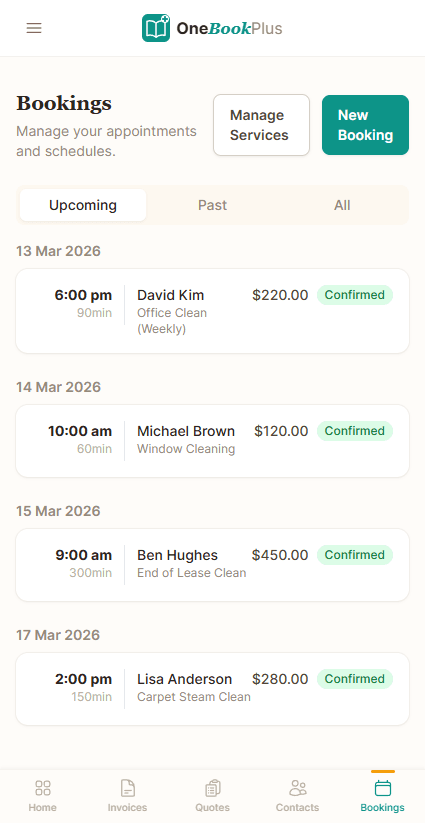
Key takeaways
5- QuickBooks Online AU runs four tiers (Simple Start, Essentials, Plus and Advanced), advertised from A$9.90/month under a 70% off for the first 6 months intro offer, with the standard rate applying after that (quickbooks.intuit.com/au/pricing). The localised AU edition handles 10% GST and BAS but uses Intuit's North-American-first feature shape.
- OneBookPlus is built in Melbourne specifically for the Australian market, with native ATO-aligned ABN validation and BAS-ready quarterly summaries built in, not bolted on. Rostering and payroll is a separate $29/month add-on.
Show 3 moreShow less
- Both handle 10% Australian GST and quarterly BAS-ready reporting. Intuit is a registered ATO Digital Service Provider; OneBookPlus is in DSPPT-49533 onboarding and does not lodge Single Touch Payroll pay events. Direct ATO e-lodgement via SBR is in final ATO certification, prepare and validate BAS and returns today; we'll tell you the moment lodgement goes live on your account. Check the ATO's Digital Service Provider register for each product's current SBR/PLS status.
- QuickBooks wins on: deep, long-established accounting feature depth, multi-currency, a mature integration ecosystem, and Intuit's bookkeeper marketplace (each detailed and cited in the 'Where QuickBooks wins' section below). OneBookPlus wins on: total cost (replaces QuickBooks + Calendly + HubSpot + Mailchimp in one), AU-first compliance, and a unified customer record across modules.
- OneBookPlus replaces the typical QuickBooks-centred stack (QuickBooks for the ledger, a scheduler, a CRM and a mailer) with one platform from $0/month (Free), $29/month (Starter), $49/month (Plus), or $69/month (Growth), billed in AUD. What that saves depends on which subscriptions you retire.
Accounting depth, or accounting plus the customer it came from
OneBookPlus
From $0/mo. Bookings, invoicing, CRM and accounting on one plan; AI and payroll are add-ons
- Australian GST invoicing
- ABN validation & lookup
- BAS / ATO tax summaries
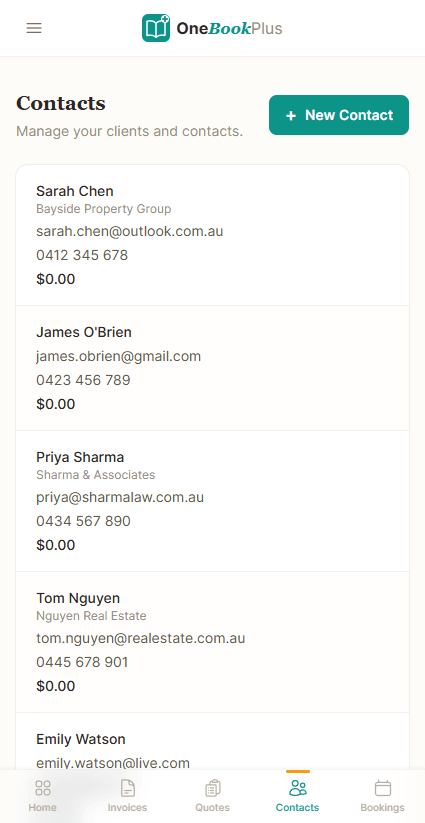
- CRM & contact management
- Online booking page
- Email marketing & campaigns
- Accounting & P&L reports
- Google review requests
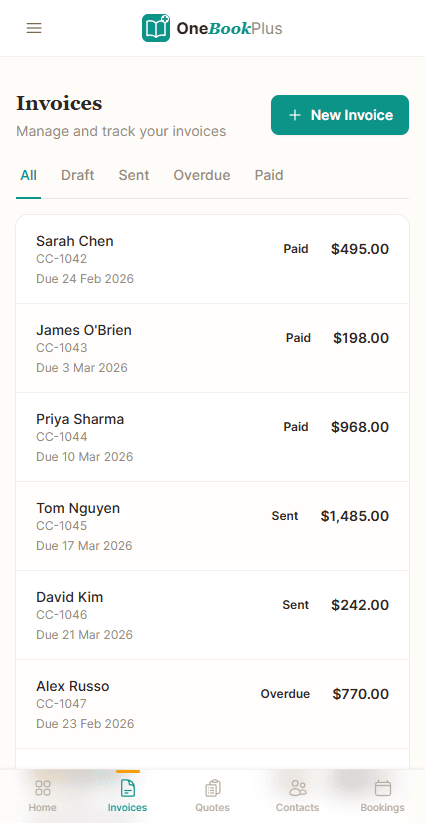
- Mobile-first, built in Melbourne
QuickBooks
Simple Start upwards: accounting only
- Invoicing (US-centric design)
- Native ABN validation
- Native BAS summaries
- CRM & contacts
- Online bookings
- Email marketing
- Accounting & P&L
- Review management
- US-first, retrofitted for AU
OneBookPlus vs QuickBooks: detailed comparison
QuickBooks is a solid US accounting tool, but Australian businesses deserve software built for Australian tax law and business practices.
| Feature | OneBookPlus | QuickBooks |
|---|---|---|
| GST-compliant invoicing (Australia) | Yes | Yes |
| ABN validation & lookup | Yes | No |
| BAS / ATO tax summaries | Yes | Yes |
| CRM & contact management | Yes | No |
| Online booking page | Yes | No |
| Job management & pipeline | Yes | No |
| Calendar subscription link (Apple, Google, Outlook) | Yes | No |
| Email marketing & campaigns | Yes | No |
| Accounting & P&L reports | Yes | Yes |
| AI for bank reconciliation / categorisation | No | Yes |
| Bank feed auto-reconciliation | No | Yes |
| Payroll add-on (OneBookPlus $29/mo; QuickBooks via Employment Hero) | Yes | Yes |
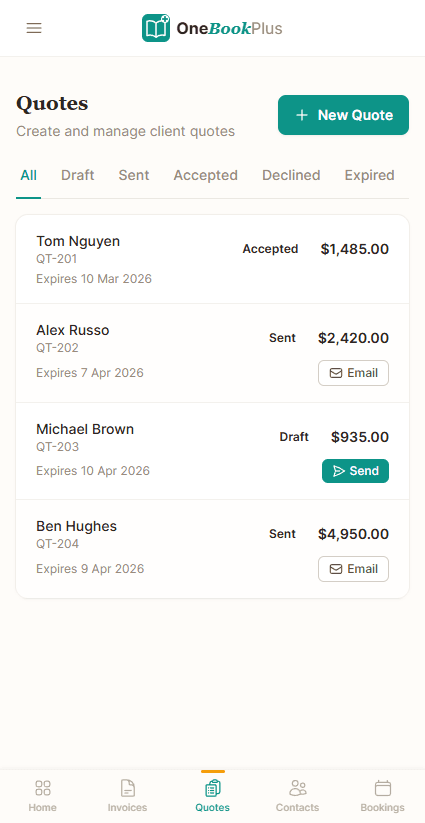
| Quoting with one-click accept | Yes | Yes |
| Basic sales register (full POS $39/mo add-on) | Yes | No |
| Google review requests | Yes | No |
| Native iOS app | Yes | Yes |
| Native Android app | No | Yes |
| Free plan available | Yes | No |
| Multi-currency accounting | No | Yes |
| Global accountant & bookkeeper ecosystem | No | Yes |
| Price (AUD) | From $0/mo | From A$9.90/month intro |
| Modules included, payroll extra | Accounting only |
Cloud accounting vs an all-in-one platform
QuickBooks is a deep accounting ledger. OneBookPlus does the accounting too, then bundles the CRM, bookings, job pipeline, and marketing you’d otherwise buy separately. Each row is cited against QuickBooks’ public Australian pages.
| Category | Feature | OneBookPlus | QuickBooks |
|---|---|---|---|
| Verticals | Vertical-specific dashboards (trades, salon, hospitality, aged care) | 18 verticals | Generic accounting ledger (source: quickbooks.intuit.com/au) |
| Invoicing | GST-native invoicing | Yes | Yes (source: quickbooks.intuit.com/au) |
| ABN validation against the Australian Business Register | Yes | Not native (manual entry) (source: quickbooks.intuit.com/au) | |
| GST / BAS | BAS-ready GST summaries (G1, 1A, 1B) | Yes | Yes (source: quickbooks.intuit.com/au) |
| STP / Payroll | STP Phase 2 payroll | Payroll add-on; no STP lodgement yet | Add-on (Employment Hero) (source: quickbooks.intuit.com/au/payroll) |
| Accounting | P&L, balance sheet, bank reconciliation | Yes | Yes (source: quickbooks.intuit.com/au) |
| Bank feeds | Automated Australian bank feeds | Withdrawn while we replace the provider | Intuit bank feed (source: quickbooks.intuit.com/au) |
| CRM | Built-in CRM & contact management | Yes | No (source: quickbooks.intuit.com/au) |
| Bookings | Customer-facing online booking page | Yes | No (source: quickbooks.intuit.com/au) |
| Jobs | Quote to job to invoice pipeline | Yes | Basic project tracking only (source: quickbooks.intuit.com/au) |
| Marketing | Email marketing & Google review requests | Yes | No (source: quickbooks.intuit.com/au) |
| AI features | AI accounting / categorisation | AI Companion | Intuit Intelligence (Accounting / Customer / Tax AI) (source: quickbooks.intuit.com/au) |
| Multi-currency | Multi-currency accounting | AUD-first; single-currency | Multi-currency on higher tiers (source: quickbooks.intuit.com/au/pricing) |
| Mobile | Native iOS + responsive web | Native iOS app; web app on Android | iOS + Android app (source: quickbooks.intuit.com/au) |
| Build origin | Built for the Australian market | Built in Melbourne | US-first, localised AU edition (source: quickbooks.intuit.com/au) |
| Annual pricing transparency | Standard price shown without intro-discount confusion | Flat AUD price | Headline price is a 70%-off, 6-month intro rate (source: quickbooks.intuit.com/au/pricing) |
| Starting price (AUD, inc. GST) | From $0/mo | From A$9.90/month intro | |
| Modules included · payroll a $29/mo add-on · AUD · no intro-discount cliff | 70% off for 6 months, then standard rate · payroll & CRM/bookings/marketing extra |
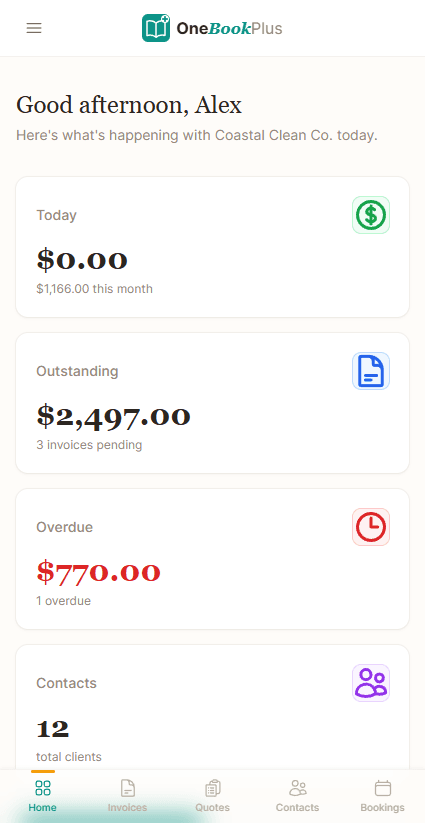
Not mockups, real product screens
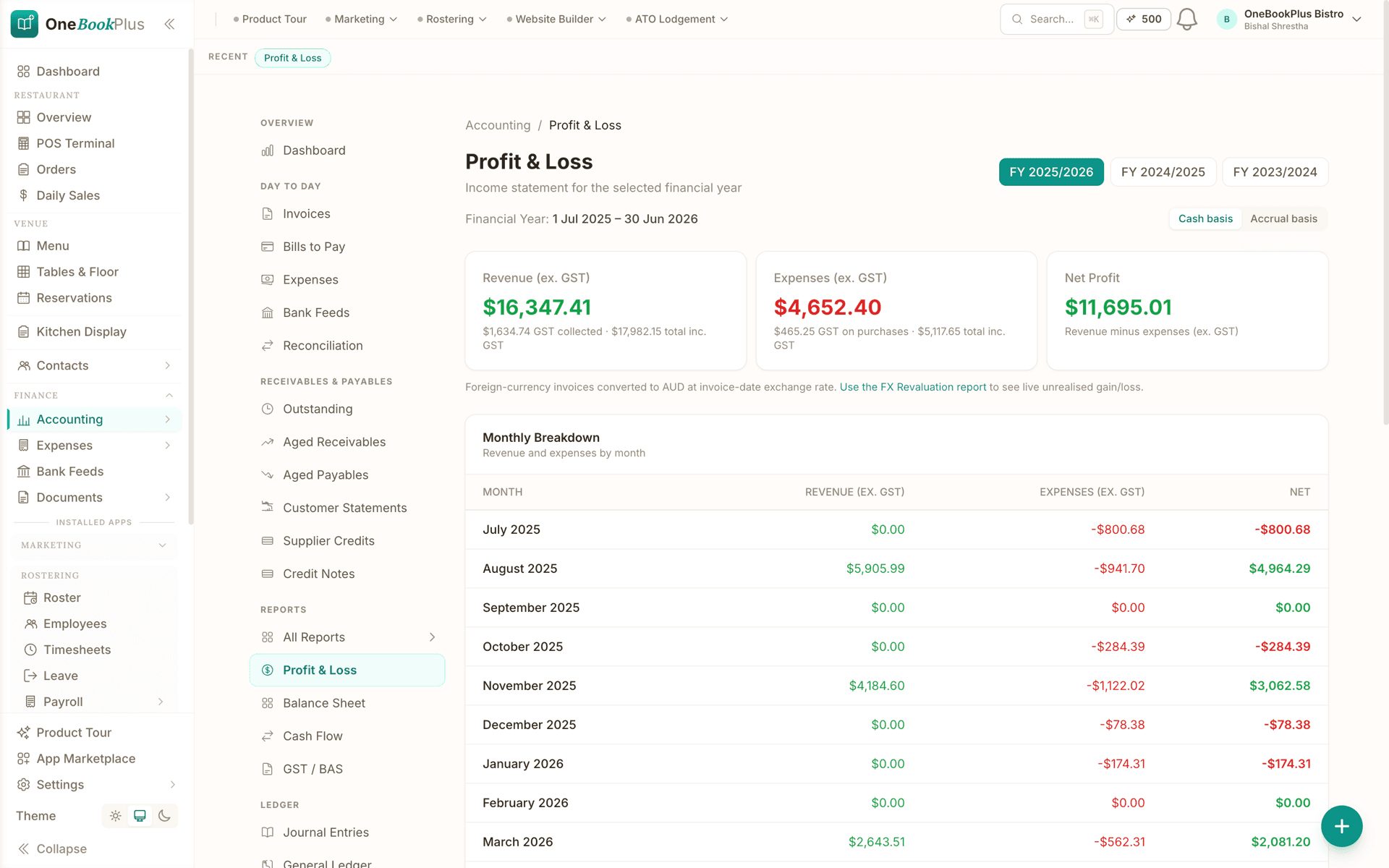
The books the invoices land in
Every competitor row above cites QuickBooks's own page. Our side of the table says the accounting is in the same subscription as the invoicing, so here is the report it produces.
Open the same screens yourself
The live demo is a working OneBookPlus account with jobs, bookings, quotes and invoices already in it. Click into the screens above rather than taking the ticks on faith.
Where QuickBooks wins
Multi-currency, class tracking and a deeper AI layer
Intuit has been building accounting software since 1983, and that depth is real. QuickBooks Online handles multi-currency, class and location tracking, inventory on its Plus and Advanced tiers, and a genuinely strong AI layer. Intuit Intelligence’s Accounting AI, Customer AI, and Business Tax AI go further on pure-accounting automation than OneBookPlus claims to. Its ProAdvisor bookkeeper network and decades of reporting maturity mean that if you run a complex, multi-currency books-first operation and your accountant is already a QuickBooks specialist, the ledger itself is hard to fault. For a pure accounting tool with a deep app marketplace, QuickBooks is a category leader, and we’re not pretending otherwise.
Where OneBookPlus wins
One platform, Australian-first, one customer record
One platform, not accounting plus four subscriptions. QuickBooks is the ledger. When you need to manage a contact pipeline, take online bookings, run an email campaign, or chase a Google review, you buy add-ons (CRM, Calendly, Mailchimp). Even payroll is a separate Employment Hero-powered add-on. OneBookPlus ships invoicing, accounting, CRM, bookings, job pipeline and marketing in the one platform, with rostering and payroll as our own $$29/month add-on rather than someone else’s product: one login, one bill, one customer record.
Australian-first, not a localised US edition. QuickBooks’ Australian edition adds 10% GST and BAS support on top of an Intuit product shaped for North America. OneBookPlus is built in Melbourne: 10% GST is the default, ABN validation runs live against the Australian Business Register, BAS summaries generate automatically, and a scanned supplier bill is read for its ABN, GST and total, with no US-centric date, currency, or tax defaults to fight.
The customer record spans the whole job, not just the ledger. In a QuickBooks-centred stack, the contact who booked through your scheduler, the lead in your CRM, and the invoice in your books are three records in three tools. OneBookPlus uses one contact across booking, quote, job, invoice, payment, and review, so a tradie or salon owner sees the entire relationship in one place instead of reconciling exports between QuickBooks and the apps bolted around it.
Why Australian businesses choose OneBookPlus over QuickBooks
Australian-first, not US-retrofitted
QuickBooks was built for American businesses and adapted for Australia. OneBookPlus is designed in Melbourne specifically for Australian tax law, ABN validation, GST calculation, and ATO-compliant BAS reporting. No workarounds needed.
More than just accounting
QuickBooks gives you accounting and invoicing. OneBookPlus gives you that plus CRM, online bookings, email marketing, review management, and a full business dashboard. One subscription replaces five.
One bill, not five
QuickBooks charges for accounting, then payroll (Employment Hero) is extra, CRM is extra, bookings are extra, marketing is extra. OneBookPlus covers accounting, CRM, bookings and marketing from $0 to $69 a month, with rostering and payroll as a $29/month add-on. What that saves you depends on which of those subscriptions you can retire, so compare it against your own bill.
Built for sole traders & small teams
QuickBooks can be overwhelming with features designed for larger US businesses. OneBookPlus is purpose-built for Australian sole traders, freelancers, tradies, and small teams who want simplicity without sacrificing power.
OneBookPlus vs QuickBooks: your questions answered
How does OneBookPlus compare with QuickBooks for an Australian business?
The two start from different places. QuickBooks is designed primarily for the US market. While it has an Australian version with GST and BAS support, many features feel retrofitted, ABN validation isn't native, and the payroll is powered by a third-party (Employment Hero), per QuickBooks' AU payroll page (quickbooks.intuit.com/au/payroll/). QuickBooks does have strong AI features through Intuit Intelligence (Accounting AI, Customer AI, Business Tax AI), documented on quickbooks.intuit.com/au, but OneBookPlus is built from the ground up for Australian tax compliance with automatic GST calculation, ABN lookup via the Australian Business Register, and ATO-ready BAS summaries. Plus, OneBookPlus includes CRM, bookings, job management, and marketing that QuickBooks doesn't offer.
Can OneBookPlus replace QuickBooks for my business?
Yes. OneBookPlus handles everything small to medium businesses use QuickBooks for, invoicing, expense tracking, profit and loss reports, and tax compliance, plus it adds CRM, online bookings, job management, email marketing, POS, and review management. If you're an Australian business using QuickBooks, switching to OneBookPlus means better tax compliance, more features, and lower costs. QuickBooks' advantage is its Intuit AI suite and large integration ecosystem; OneBookPlus's advantage is that everything is built-in from day one.
Is QuickBooks cheaper than OneBookPlus for a sole trader?
QuickBooks Online AU sells four tiers: Simple Start, Essentials, Plus and Advanced. Checked on 2 September 2026, Intuit fronts quickbooks.intuit.com/au/pricing with A$9.90/month under a 70% off for the first 6 months offer. We could not read a standard post-promo rate for any tier off that page, and the standard rate is what you pay from month seven, so read your own tier's standard price off Intuit rather than trusting a figure here. On top of accounting, payroll is an add-on powered by Employment Hero with Standard and Advanced tiers, and CRM, bookings and marketing are separate subscriptions again. OneBookPlus starts free, and paid plans at $29 to $69 a month include invoicing, CRM, bookings, email marketing, job management, and full accounting. Rostering and payroll is a $29/month add-on on top of any plan, with a 14 day trial, and it does not lodge Single Touch Payroll to the ATO. What you save depends on which of those subscriptions you actually retire, so price it against your own stack.
Does QuickBooks offer AI tools OneBookPlus has not built?
Yes, QuickBooks markets a suite of AI tools through Intuit Intelligence (documented on quickbooks.intuit.com/au): Accounting AI categorises and reconciles transactions, Customer AI identifies leads and drafts follow-ups, and Business Tax AI helps optimise deductions. These are impressive features. OneBookPlus focuses on giving you a complete business platform at an affordable price, with an AI Companion that reads a receipt or supplier bill you drop in and suggests the expense category. If AI-powered accounting is your top priority, QuickBooks' Intuit Intelligence is strong. But if you want one Australian-built app that handles CRM, bookings, jobs, marketing, and accounting without paying for separate tools, OneBookPlus is the smarter choice.
How does OneBookPlus compare to QuickBooks for running an Australian sole trader or small team?
The difference is where each product starts from. QuickBooks is a US-centric accounting tool with an Australian edition layered on top; OneBookPlus is built in Melbourne specifically for Australian businesses. It includes GST invoicing, ABN validation, BAS summaries, CRM, online bookings, job management, POS, email marketing, and review management, all in one app from $0/month, and it is shaped for sole traders, tradies, freelancers, and small teams who want Australian-first software. Where QuickBooks stays ahead is the ledger itself: multi-currency, class and location tracking, and inventory on its Plus and Advanced tiers (quickbooks.intuit.com/au/pricing), the Intuit Intelligence AI suite, and a ProAdvisor bookkeeper network built over four decades. If the books are the complicated part of your business, or your accountant is a QuickBooks specialist, that depth is worth staying for.
What is an ABN, and why does native ABN validation matter?
An ABN (Australian Business Number) is the 11-digit identifier the Australian Business Register issues to every registered business, and Australian tax invoices must show it. OneBookPlus validates ABNs natively against the Australian Business Register so the details on your invoices are correct before you send them. QuickBooks was built for the US market, so ABN validation is not native, Australian businesses often enter and check ABNs manually. Native validation reduces invoicing errors and keeps your records ATO-ready from day one.
How OneBookPlus runs your books and your business
With QuickBooks, your accounting lives in one app and the rest of your business lives elsewhere: a separate CRM for contacts, Calendly for bookings, Mailchimp for email, and an Employment Hero-powered add-on for payroll. OneBookPlus collapses that into a single workflow. When a new customer arrives (through your online booking page, a phone call, or a referral) you create them once as a contact. From that one record you raise a quote, they accept it with one tap, and it becomes a job, then a GST-compliant invoice with your ABN and a 10% GST breakdown applied automatically.
Every dollar then flows straight into the built-in accounting engine. Payments are recorded against the invoices they settle, and costs go in by scanning the receipt or supplier bill, which the AI Companion reads for supplier, date, GST and total before suggesting a category. Profit and loss, balance sheet, and GST tracking update in real time. There is no export to QuickBooks, no sync reconciliation between an invoicing tool and a ledger, and no second subscription. The invoice and the journal entry are the same event in the same system.
When BAS time arrives, OneBookPlus produces an ATO-aligned summary showing GST collected on sales (1A), GST credits on purchases (1B), and your net position at G1, ready to lodge or hand to your accountant. Payroll is our own $29/month add-on rather than a third-party payroll add-on, so rosters, timesheets, pay runs, PAYG withholding calculated to the ATO Schedule 1 coefficients, super, penalty rates, leave accrual, payslips and an ABA bank file sit against the same customer-and-books record. Single Touch Payroll is not lodged from OneBookPlus yet, and super is recorded against its quarterly due dates rather than remitted, so you still report each pay run to the ATO through STP-enabled software and pay super through your clearing house.
After the work is done and paid, OneBookPlus keeps earning for you: it can automatically send a Google review request, add the contact to an email marketing list, and schedule seasonal or maintenance follow-ups. QuickBooks is built to record what already happened; OneBookPlus records it and then helps you win the next job, without a fifth tool to pay for and reconcile.
OneBookPlus vs QuickBooks: built for Australia, not adapted
QuickBooks Online is a solid accounting tool globally, but it was built for the American market and adapted for Australia. That shows in small but frustrating ways: date formats default to US, tax calculations aren't always intuitive for GST, and features like payroll are powered by a third-party (Employment Hero) rather than built natively. Support hours don't always align with Australian time zones.
OneBookPlus was built in Australia, for Australia, from day one. GST at 10% is the default, ABN validation is built in, BAS summaries generate automatically, and every date, currency, and tax reference assumes you're operating in Australia. Beyond accounting, you get a full business platform: CRM, job management, online bookings, email marketing and POS, none of which QuickBooks offers without add-ons. Rostering and payroll is a $29/mo add-on, and it does not lodge Single Touch Payroll to the ATO.
Feature deep dive
- Receipt and bill scanning. Photograph a receipt or drop in a supplier PDF and OneBookPlus reads the supplier, date, GST and total off it, then suggests the expense account for you to confirm, so the paperwork is logged without retyping it.
- All-in-one vs accounting-only. QuickBooks is accounting software. When you need to manage jobs, book appointments, run email campaigns, or track Google reviews, you're back to buying add-ons. OneBookPlus includes all of these in a single subscription: one login, one bill, one place to find everything.
- Industry-specific workflows. QuickBooks treats every business the same. OneBookPlus adapts to your industry: tradies get a job pipeline, salons get booking management, restaurants get POS and kitchen display, aged care providers get recipient management and care notes. The platform reshapes itself around how your business actually operates.
Who should switch from QuickBooks
- Australian businesses frustrated by US-centric defaults. If you're constantly adjusting settings to make QuickBooks feel Australian, OneBookPlus is native.
- Small businesses paying for QuickBooks plus add-ons. If you are paying for QuickBooks alongside a scheduler, a CRM and a marketing tool, OneBookPlus covers all four on one plan from $0 to $69 a month.
- Service businesses that need job tracking. QuickBooks has basic project tracking but nothing like a real job pipeline with quotes, scheduling, and photo documentation.
- When QuickBooks might still fit: If you're part of a global company using QuickBooks across multiple countries, or your US-based accountant requires QuickBooks access specifically, the multi-country support may justify staying.
Getting started
Sign up free and import your contacts from QuickBooks via CSV export. Your QuickBooks history stays intact for tax records. Start creating invoices and managing clients in OneBookPlus today, and most businesses are fully switched within a week.
How to switch from QuickBooks to OneBookPlus
Export your customers and chart-of-accounts from QuickBooks
In QuickBooks Online, export your Customers list and your products/services as CSV (Reports → export, or Customers → export). Import the contact list straight into OneBookPlus, where names, emails, phone numbers, ABNs, and addresses map across, and your QuickBooks file stays intact as a read-only tax record.
Set your ABN, GST and invoice details
Enter your ABN (validated live against the Australian Business Register), confirm GST registration and BAS cycle, and upload your logo. From here every invoice is AU-native, and expenses go in by scanning the receipt or supplier bill.
Pick a clean cut-over date, then wind down QuickBooks
Most businesses cut over at the start of a BAS quarter: raise all new invoices and bookings in OneBookPlus while QuickBooks stays as the archive for the prior period. Reconcile the final QuickBooks BAS, then cancel the subscription, along with the separate CRM, scheduler, and email tools the QuickBooks stack required. If you also move payroll across (the $29/month add-on), keep lodging Single Touch Payroll through your existing STP-enabled payroll software, because OneBookPlus does not lodge pay events to the ATO yet.
From the blog
Related reading: switching from quickbooks
Practical guides and explainers from the OneBookPlus blog, grouped by topic.
Best Invoicing Software Australia (2026): Top 9 Compared
The nine invoicing apps Australian small businesses actually shortlist in 2026, with cited pricing, GST and BAS notes, and which are genuinely free.
10 min readRead article5 Best MYOB Alternatives for Australian Small Business (2026)
MYOB no longer fits every Australian small business. Five genuine alternatives for 2026, from all-in-one platforms to sole-trader tax tools.
10 min readRead articleBest Job Invoicing Software in Australia (2026): Quote-to-Invoice in One App
Most invoicing apps make you retype the job to raise an invoice. What job invoicing software is, and how quote to invoice gets you paid faster.
9 min readRead articleThe True Cost of Running Software for an Australian Small Business in 2026
A data-led analysis of what Australian small businesses actually pay for software in 2026, based on verified pricing from Xero, MYOB, ServiceM8, Stripe, Cliniko, Shopify and 30+ other platforms, cross-checked with ABS, ASBFEO, RBA and Xero Small Business Insights data.
25 min readRead article
Ready for software that's actually
built for Australian business?
Built in Australia for businesses that want invoicing, BAS and books in one place, not stitched together with QuickBooks add-ons.
Free plan available, no card needed.
About this comparison
How we compared OneBookPlus to QuickBooks
Feature claims about OneBookPlus reflect what is shipping today on onebookplus.com.au. QuickBooks pricing and feature claims were read off QuickBooks’s public Australian product pages on . Vendor pricing changes frequently, so check the QuickBooks website for your specific situation before making a decision.
Disclosure: OneBookPlus publishes this comparison and stands to benefit if you switch. We aim to compare like-for-like on capability and Australian tax compliance, if you spot something out of date, email hello@onebookplus.com.au and we’ll review it.
About the author

Bishal Shrestha
Founder & CEO, OneBookPlus
Bishal spent a decade running digital projects for Australian small businesses before founding OneBookPlus. He writes and maintains these pages, and publishes what OneBookPlus does not do alongside what it does.
Read the founder bioHow this page was researched
Every QuickBooks price and capability claim on this page was read off QuickBooks's own published Australian pages on the date printed above, and recorded in competitor-facts.ts with that date. Claims about OneBookPlus describe what ships today, and the page names what we do not do.
Last reviewed and updated: by Bishal Shrestha