OneBookPlus
Accounting software for small businesses & sole traders
Complete accounting, built into your business platform.
Full double-entry accounting with 328 reports, BAS audit, GST settlement, PAYG installments, super-guarantee tracking, TPAR, fixed-asset depreciation across four methods, CGT cost-base, multi-currency with FX revaluation, inventory, tracking categories, receipt and bill scanning, ABA payment runs, a 12-week cash flow forecast and trial-balance sign-off, connected to your invoicing, jobs, and CRM. No syncing, no double-entry, no month-end pain.
Replaces Xero, MYOB, QuickBooks
328
Accounting reports, registers & screens
Full
Double-entry GL with audit log
OCR
Receipt and bill scanning into drafts
$29/mo
Starter plan, full ledger with P&L, GST and BAS reports
How accounting flows through OneBookPlus
One pipeline, from invoice to a BAS that is ready to lodge
No sync, no exports. Every transaction your operations team creates lands in the GL the same moment it's saved. Direct ATO e-lodgement via SBR is in final ATO certification, prepare and validate BAS and returns today; we'll tell you the moment lodgement goes live on your account.
Invoice
issue with GST
Receivable
lands in aged AR
Payment
recorded against it
Reconcile
invoice matched off
GL
posts to journal
BAS ready
prepared and validated
Invoice
issue with GST
Receivable
lands in aged AR
Payment
recorded against it
Reconcile
invoice matched off
GL
posts to journal
BAS ready
prepared and validated
What's inside
Six capability groups, one accounting system
328 reports, registers, and tools, grouped the way an accountant actually thinks about the close cycle.
Financial statements & ledger
Real-time statements, real double-entry ledger
P&L, Balance Sheet, Cash Flow, Trial Balance, all generated live from the same GL your invoicing writes to. Every line drills to the source transaction.
Profit & Loss (cash + accrual)
Toggle between cash and accrual on the fly. Month-by-month columns and full-year totals with depreciation auto-included.
P&L Comparative (TY vs LY)
Side-by-side this FY vs prior FY with variance dollar + percent per category. Spot growth and overrun at a glance.
Balance Sheet + Comparative
Real-time balance sheet with year-on-year comparison showing movement per line. Receivables reflect what was outstanding then, not now.
Cash Flow Statement
Operating, investing, and financing activities for any period. Generated automatically from your transactions.
Trial Balance + Comparative
Every account's net debit/credit at any point in time: the diagnostic test for GL integrity. Side-by-side TY vs LY.
General Ledger drill-down
Account-level transaction listing with running balances. Drill from any P&L or balance-sheet line straight to source.
Journal entries + audit log
Full double-entry journal with multi-line entries, reversal support, and an append-only audit log of every mutation.
Tax & compliance
BAS-ready, ATO-aligned, anomaly-aware
Every G-code, every PAYG/super line, every TPAR report is calculated live from the GL. The GST Audit Report flags the misclassifications before lodgement so you don't lodge bad numbers.
BAS / GST report with G-code breakdown
Quarterly BAS-ready summary covering G1, 1A, 1B, G10, G11, W1 and W2 from your live invoice + expense data.
GST Audit Report
Pre-lodgement anomaly detection: invoices marked Standard with $0 tax, off-band GST rates on expenses, and tax/non-tax conflicts.
GST Settlement workflow
Record your BAS payment to (or refund from) the ATO with a single click. Posts the journal that clears GST liabilities for the quarter.
FX Revaluation
Unrealised gain/loss on unpaid foreign-currency invoices, calculated against live spot rates and a per-period reversal entry.
Fixed Assets + CGT cost-base
Four ATO depreciation methods (prime cost, diminishing value, SBE pool, immediate write-off), business-use %, and CGT cost-base tracking with 50% discount eligibility on disposal.
Custom tax codes
Beyond Standard / GST-free / Export / Input-taxed: add WET, LCT, capped input credits with your own rate and reporting label.
Receivables, payables, cash
Who owes you. Who you owe. How much is in the tin.
Aged AR + AP with drill-down to invoice level, customer + supplier statements with one-click email send, and batch bill payment with ABA export.
Aged AR + AP with drilldown
Standard buckets (Current / 1-30 / 31-60 / 61-90 / 90+) plus per-customer drilldown showing who's behind on what.
Customer + supplier statements
Per-party ledger with running balance. One-click email send to chase overdue amounts. Mirror flow for suppliers.
Bills + batch payment + ABA export
Dedicated bills-to-pay queue with aged buckets. Select multiple bills, pay all at once with a shared reference and ABA file.
Payment reconciliation
Record payments and part-payments against invoices and bills, so the aged reports only show what is genuinely still outstanding.
Bank statement import
Bring in the CSV / OFX / QFX file your bank exports, then review each line and code it to an account.
Petty cash (multiple floats)
Track named cash tins (office, register, site truck) with disbursements, top-ups, and a running balance.
Planning & analysis
See trouble coming before it lands
Budget variance, 12-week cash flow forecast, working capital, project margin, customer concentration, the analytics that turn bookkeeping into financial control.
12-week cash flow forecast
Forward look at expected receipts (open invoices + recurring), expected payments (bills due), and weekly closing balance. Negative weeks flagged red.
Budget vs Actual
Set annual targets per category and compare against live numbers, scaled to monthly / quarterly / full year.
Sales by Customer + LTV
Ranked revenue per customer plus all-time lifetime value, average days-to-pay, and top-10 concentration risk band.
Expenses by Supplier
Suppliers ranked by spend with GST claimable and top expense category per supplier.
Job Costing + margin %
Per-job profitability: labour + materials cost vs billed revenue with margin colour-coded red / amber / green.
Project Budget vs Actual
Estimate vs actual hours, materials, and total per job. Surfaces overruns before they kill the year.
Quote Analytics
Acceptance rate, median time-to-accept, won/lost value: sales-pipeline view of your quotes feeding the forecast.
Setup & data control
Set up in a day, locked down forever
Chart of accounts, opening balances, tax codes, tracking categories, period locks. The boring-but-load-bearing bits that keep year-end reviews painless.
Custom Chart of Accounts + CSV import
Pre-seeded with 33 standard Australian accounts; add, rename, archive, and bulk-import your existing CoA via CSV.
Opening Balances Wizard
Bring closing balances over from Xero / MYOB. Validates debit-credit balance before posting the canonical OPENING-BAL journal.
Tracking categories (Xero-style)
Tag invoices and expenses by Department, Location, or Project for slice-by-tag P&L reporting.
Period locks
Lock prior quarters or financial years after lodgement so nobody on the team can accidentally post into closed periods.
Receipt inbox + OCR
Drag-drop receipts (photo, PDF) into a staging inbox. Review suggested expense fields and accept to create the expense row.
CSV journal import
Bulk-load historical journals from Xero / MYOB / QuickBooks. Per-entry balance validation before posting.
Workflow & automation
Stop typing the same invoice every month
Journal templates, recurring invoices, expense claims, customer reminders, account watchlists, stock take + reorder, the daily grind, automated.
Recurring invoices + expenses
Subscription-style invoicing and expense templates that auto-generate on schedule. Projected MRR/ARR surfaced.
Multi-currency invoicing
Issue invoices in USD, EUR, GBP, etc. with per-invoice FX rate. Accounting reports normalise to base AUD.
Inventory + stock-take + reorder
Stock items with on-hand qty, low-stock alerts, cycle-count workflow, and auto-posting journals on adjustments.
Year-end Close Wizard
Roll net profit into Retained Earnings, post the closing journal, and lock the period: all in three confirmations.
328 reports in one library
Trial Balance, Cash Receipts / Payments Journal, FX Revaluation, Payroll Summary, GST Audit, Year-End Pack, and more: all in one place with CSV export.
Account watchlist
Pin the GL accounts you check most often. One-screen view of balances, movement, and outstanding items.
The shift
From spreadsheets and chase-emails to live, audited books
Without OneBookPlus
Manual BAS in Excel, copy GST in, copy GST out, hope nothing's miscoded.
With OneBookPlus
BAS auto-rolls from your GL with G1-G11 broken out + anomaly detection before lodgement.
Without OneBookPlus
Chase overdue customers by sending the same email manually each Friday.
With OneBookPlus
Aged AR drill-down + one-click Email Statement. Send the chaser without leaving the report.
Without OneBookPlus
Type every supplier receipt into a spreadsheet, then hunt for the paper copy at BAS time.
With OneBookPlus
Drag the photo or PDF in. The scan reads supplier, date, GST and total, and you accept the drafted expense.
For sole traders
Accounting software for sole traders, minus the busywork
A sole trader's books are simpler than a company's, but the compliance loop is exactly as unforgiving: register for GST once turnover passes $75,000, lodge a BAS every quarter, pay PAYG instalments toward your own income tax, and substantiate every deduction at return time. OneBookPlus Finance runs that whole loop from one ledger. The Free plan covers invoicing, quotes, contacts and bookings. The ledger and the P&L, GST and BAS reports start at Starter. At $29/mo that is compliant books without company-sized subscription fees.
Here's what a quarter actually looks like. Say you invoice $28,600 including GST and spend $9,900 on GST-inclusive business costs. Your BAS is $2,600 of GST collected (label 1A) minus $900 of GST credits (label 1B): $1,700 payable. Finance calculates each label live from the ledger, the GST Audit Report flags anything miscoded before you lodge, and the settlement journal clears the liability when you pay the ATO. Want to sanity-check the maths first? Use the free GST calculator or estimate the whole statement with the BAS calculator.
Deductions are where sole traders leave money behind. The Deduction Finder scans your expenses for under-claimed patterns (home office, motor vehicle, depreciation eligibility, prepayments), Receipt Coverage flags every expense over the ATO's $82.50 substantiation threshold with no receipt attached, and the fixed-asset register handles immediate write-off where you're eligible. PAYG instalments accumulate against your income-tax prepayment on whichever method the ATO has you on, the T7 amount or the T1×T2 rate. To see what your profit means after tax, the income tax calculator applies the current resident brackets.
And it grows with you. Hire your first employee and the Rostering & Payroll add-on ($29 per month, with a 14 day trial) covers rosters, timesheets, pay runs, PAYG withholding calculated to the ATO coefficients, penalty rates, leave accrual, payslips and an ABA bank file for paying staff. Superannuation is calculated and recorded against its quarterly due dates, and you pay it through your own clearing house. Single Touch Payroll pay events are not lodged from OneBookPlus yet, so you still report each pay run to the ATO through STP-enabled software. Invite your accountant as a read-only advisor at tax time and hand over the year-end pack. If you later incorporate, you keep the same ledger, history and habits, with no migration project.
Every quarter
BAS due 28 October, 28 February, 28 April and 28 July. Open the BAS report, run the GST audit, take the figures to myGov, the ATO portal or your agent, then post the settlement journal. Minutes, not a lost weekend.
All year round
Receipts forwarded to your tenant inbox land as OCR-drafted expenses. Check the supplier, date and GST the scan picked up, then accept.
At tax time
Export the year-end pack (trial balance, P&L, balance sheet, asset register, BAS history) and hand your tax agent an artefact instead of a shoebox.
As you grow
GST registration at $75,000 turnover, a first hire on the Rostering & Payroll add-on ($29 per month), eventual incorporation: the same ledger carries you the whole way.
In the product
The screens you'll live in
Real OneBookPlus product screens, not mockups, not someone else's app.
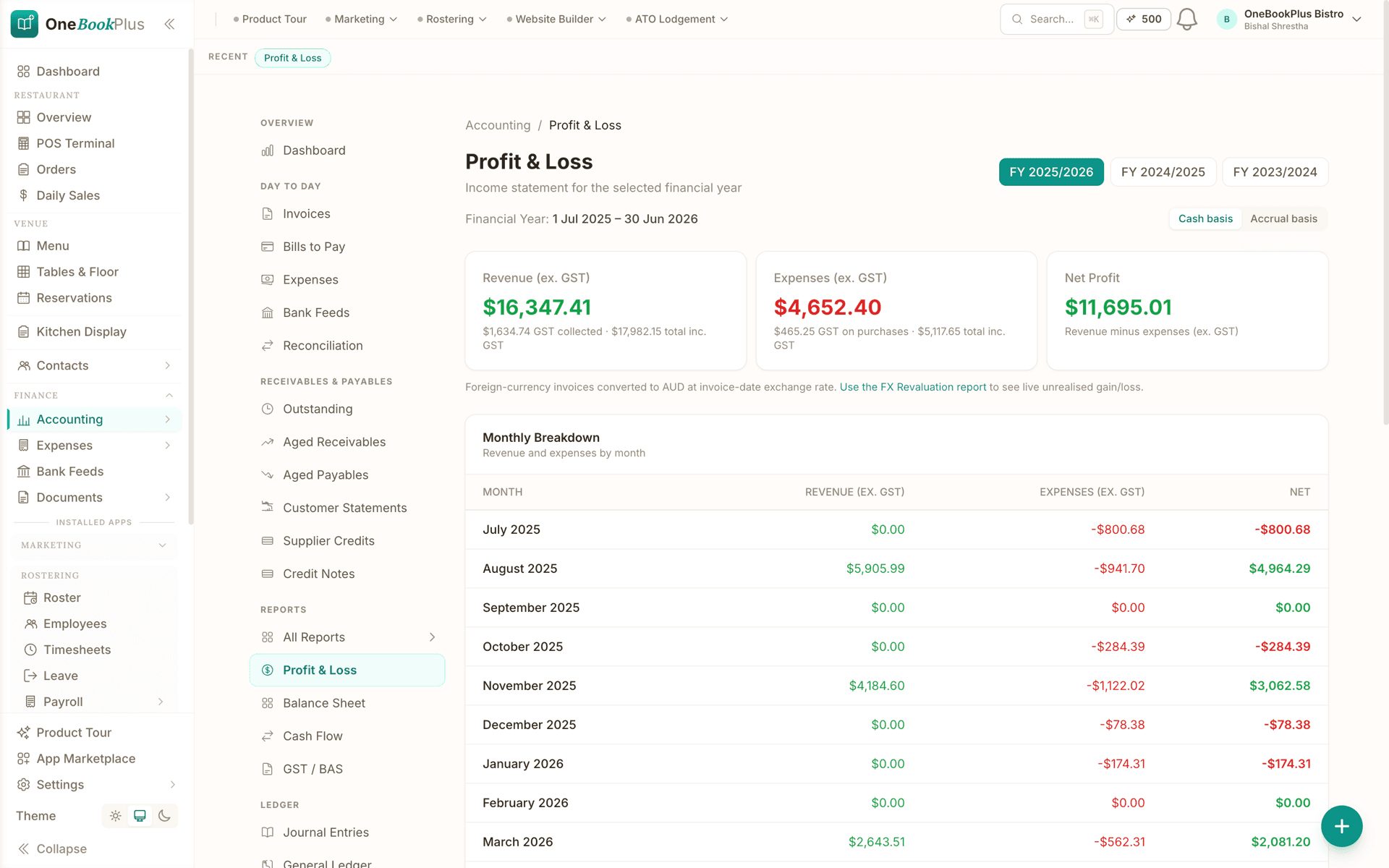
Profit & Loss with cash/accrual toggle and comparative columns
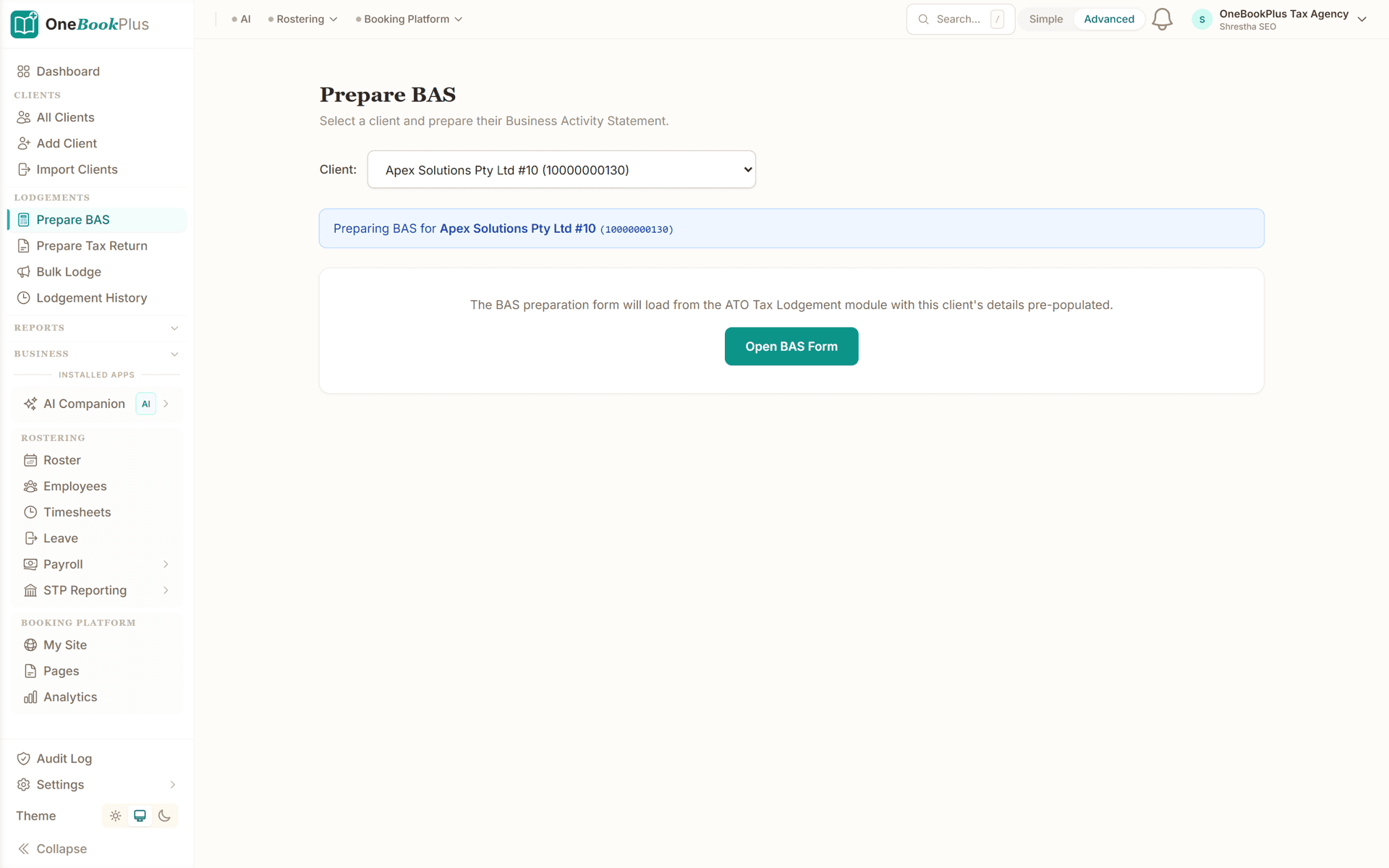
BAS / GST summary with G1-G11 breakdown ready for ATO lodgement
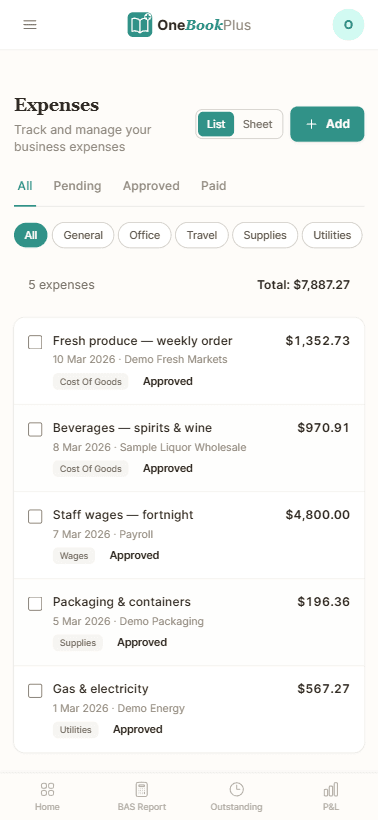
Expenses + receipt inbox with OCR-suggested categorisation
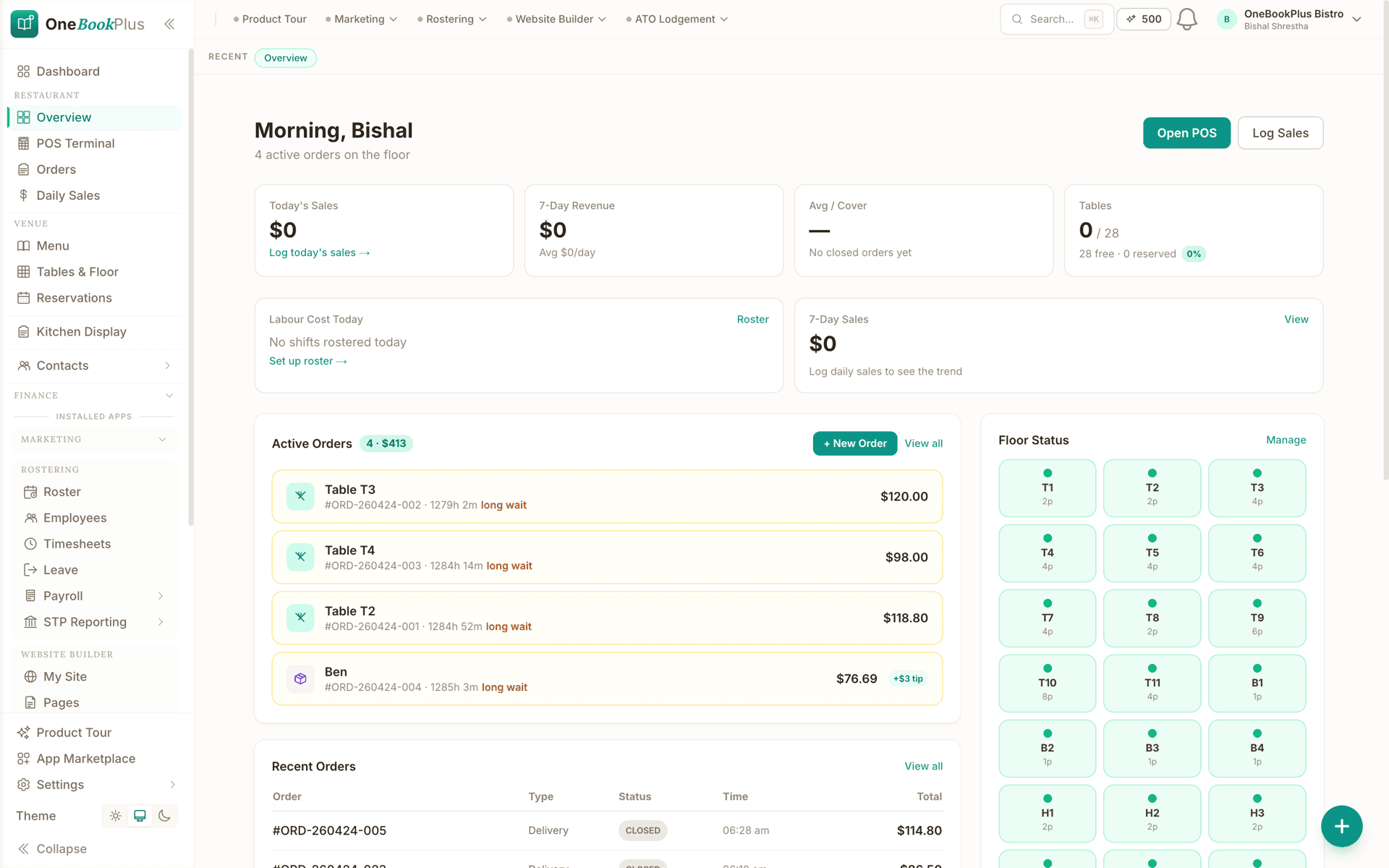
Real-time business dashboard showing GL-fed KPIs
328
Reports including comparative, drill-downs, year-end pack and CSV export
12 wk
Forward cash-flow forecast with negative-week alerts
4
Fixed-asset depreciation methods including SBE pool and immediate write-off
7
Currencies invoiced out of the box, with FX revaluation on the unpaid ones
Simple setup
How OneBookPlus Finance works
Day 1: import your starting position
Drop closing balances from Xero / MYOB / QuickBooks into the Opening Balances wizard. Optionally bulk-import historical journals via CSV.
Daily: invoices and spending land in the ledger
Your invoicing and bookings already live in OneBookPlus, so every sale posts to the GL as it happens. Spending goes in the same day: photograph the receipt or drag in the supplier's PDF and the AI reads the supplier, date, GST and total for you to confirm.
Monthly: close out in minutes
Run your P&L, Balance Sheet, and Aged AR. Email customer statements for overdue amounts. Count the petty-cash tin. Pay supplier bills in one batch.
Quarterly: BAS in 5 minutes
Open the GST/BAS report, run the GST audit to catch anomalies, generate the BAS-ready summary to lodge with the ATO, and post the settlement journal when you pay. Direct ATO e-lodgement via SBR is in final ATO certification, prepare and validate BAS and returns today; we'll tell you the moment lodgement goes live on your account.
Year-end: hand off to your tax agent
Year-end close wizard rolls net profit into Retained Earnings and locks the period. Export the CGT pack, fixed-asset register, and trial balance. Tax agent does the lodgement.
Australian Accounting Software That Lives Inside Your Business
Australian small businesses need accounting software that handles the full ATO compliance flow, GST, BAS, PAYG installments, super guarantee, TPAR, CGT, fixed-asset depreciation, multi-currency, without forcing them to glue four tools together. OneBookPlus Finance is a complete double-entry accounting system: 328 reports, full general ledger with audit log, fixed-asset register with four depreciation methods, inventory with stock-take, tracking categories for dimensional reporting, period locks, trial-balance sign-off, custom tax codes, receipt and supplier-invoice scanning that reads the supplier, date, GST and total for you, customer and supplier statements with public share tokens, payment runs with ABA bank-file export for batch supplier payments, credit notes on both sides, credit limits and holds, bad-debt write-off with the GST adjustment journal posted automatically under GSTR 2000/2, opening-balances and year-end-close wizards, CSV journal import for migration, and a 12-week forward cash-flow forecast with negative-week alerts.
Every accounting feature is connected to your invoicing, jobs, bookings, and CRM from the start. Issue an invoice and it lands in the GL automatically. Convert a quote to a job and the estimated cost-base flows into the project-budget report. Mark a fixed asset disposed and we post the balanced journal entry plus flag CGT 50%-discount eligibility. Reconcile a Stripe payout against the underlying charges and fees in one workbench view. There's no sync, no import-export gymnastics, no monthly month-end pain, your books are real-time because they share the same database as your operations.
For sole traders chasing every deduction, agencies running multiple revenue lines, retailers tracking inventory and COGS, tradies costing every job, multi-site retailers or franchisees needing consolidation, or service businesses managing recurring retainers | OneBookPlus Finance covers the whole picture. The GST Audit Report catches anomalies before BAS lodgement. The Deduction Finder surfaces under-claimed home-office, motor-vehicle and prepayment patterns. The Receipt Coverage scan flags expenses over the ATO's $82.50 substantiation threshold without an attached receipt. The Supplier ABN Audit picks up suppliers in breach of TAA 1953 s 12-190 before you withhold incorrectly. Working-capital ratios, break-even analysis and recurring-revenue insights translate the ledger into decisions you can act on. Everything exports to CSV for your tax agent, or roll the whole year into the one-click Year-End Pack PDF/CSV bundle.
How we compare
Finance vs the competition
See how OneBookPlus Finance compares to Xero, MYOB, and QuickBooks.
| Feature | OneBookPlus | Xero | MYOB | QuickBooks |
|---|---|---|---|---|
| Chart of accounts (custom + CSV import) | Yes | Yes | Yes | Yes |
| General ledger + journal entries with reversal | Yes | Yes | Yes | Yes |
| Balance sheet + cash flow statement | Yes | Yes | Yes | Yes |
| P&L cash / accrual basis toggle | Yes | Yes | Yes | Yes |
| Aged receivables/payables with drilldown | Yes | Yes | Yes | Yes |
| BAS / GST report (G1, 1A, 1B, G10, G11, W2) | Yes | Yes | Yes | Yes |
| BAS lodgement audit record + revisions | Yes | Yes | Yes | No |
| GST Audit Report (pre-lodgement anomaly detection) | Yes | Yes | No | No |
| PAYG Installments (T7 / T1×T2) | Yes | Yes | Yes | No |
| Super Guarantee tracking | Yes | Yes | Yes | No |
| TPAR (Taxable Payments Annual Report) | Yes | Yes | Yes | No |
| ATO 12-month forward compliance calendar | Yes | No | No | No |
| Deduction Finder + Receipt Coverage + Anomalies | Yes | No | No | No |
| Supplier ABN Audit (TAA 1953 s 12-190) | Yes | No | No | No |
| Multi-currency invoicing + FX revaluation | Yes | Yes | Yes | Yes |
| Fixed assets + depreciation (4 methods) + CGT | Yes | Yes | Yes | Yes |
| Inventory tracking + stock-take | Yes | Yes | Yes | Yes |
| Tracking categories + P&L by tracking | Yes | Yes | No | Yes |
| Bank feeds and bank-rule auto-categorisation | No | Yes | Yes | Yes |
| Payment runs with ABA bank-file export | Yes | Yes | Yes | No |
| Credit notes (customer + supplier) | Yes | Yes | Yes | Yes |
| Credit limits and customer holds | Yes | No | Yes | No |
| Bad-debt write-off with GST adjustment journal | Yes | Yes | Yes | Yes |
| Period locks + trial-balance sign-off | Yes | Yes | Yes | No |
| Year-end close + opening balances wizards | Yes | Yes | Yes | Yes |
| CSV journal import (Xero/MYOB migration) | Yes | Yes | Yes | Yes |
| 12-week cash flow forecast (negative-week alerts) | Yes | Yes | No | Yes |
| Working capital ratios, break-even, cost-plus pricing | Yes | No | No | No |
| Recurring revenue insights (MRR / ARR / churn) | Yes | No | No | No |
| Project / job costing + budget vs actual | Yes | Yes | Yes | Yes |
| Franchise / multi-tenant consolidation | Yes | No | No | No |
| Year-End Pack one-click PDF/CSV bundle | Yes | No | No | No |
| Built-in CRM, bookings, and invoicing in one platform | Yes | No | No | No |
| Trade compliance certs (AS/NZS 3000 CoC, AS/NZS 3760, AS/NZS 2293) | Yes | No | No | No |
| Online booking system with payment processing | Yes | No | No | No |
| Email & SMS marketing built in | Yes | No | No | No |
| AI Companion (chat-with-your-books) | Yes | No | No | No |
| Free plan for invoicing and quotes, full ledger from Starter | Yes | No | No | No |
| Price | From $29/mo for the ledger, free for invoicing | $35+/mo | $35+/mo | $25+/mo |
Example walkthrough
A month with OneBookPlus Finance
A worked example, a Brisbane design agency running its books end-to-end
Week 1: Two retainer invoices auto-issue on the 1st (Recurring Invoices). The studio manager drops the month's supplier PDFs onto the expenses page, rent, software subscriptions, AWS and the coffee account among them. The AI reads the supplier, date, GST and total off each one and she confirms the lot in about ten minutes, correcting two that scanned a date wrong.
Week 2: A US client pays an invoice issued in USD. The FX Revaluation report flags that the spot rate has moved 2% since invoice date, unrealised gain $84 AUD. Two design jobs wrap; the project lead clicks 'Convert to invoice' and the Job Costing report shows margin of 58% (labour billed $4,400, cost $1,840) on one and just 12% on the other, the team huddles on what went wrong.
Week 3: Three customers are overdue. From the Aged Receivables drilldown the studio manager picks the worst offender and clicks Email Statement; chaser sent. One customer pays the same day. The studio's biggest supplier sends six bills at once; she selects them all on the Bills page and runs a batch payment via the bank.
Week 4, month-end: She runs the P&L, Balance Sheet, and Cash Flow in two clicks each. Reviews variance vs budget on Budget vs Actual (over on contractors, under on travel, the AI suggests reallocating budget). Checks the GST audit before lodging BAS, two invoices flagged for $0 GST that should have been marked Standard; she fixes them. After lodgement she records the GST payment via GST Settlement (one click).
Total bookkeeping time this month: 3 hours. The studio's accountant pulls the year-to-date trial balance for review and signs off the BAS in 15 minutes.
Frequently asked questions
Common questions about OneBookPlus Finance.
What accounting features does it cover?
The full set you'd expect of a primary ledger: chart of accounts, general ledger, manual journal entries with reversal and audit log, balance sheet + comparative, P&L cash/accrual + comparative, cash flow statement + 12-week forecast, trial balance + comparative + sign-off, aged AR + AP with customer drilldown, customer + supplier statements, BAS report, BAS lodgement record, GST audit, GST settlement, PAYG installments (T7 / T1×T2), super guarantee tracking, TPAR, ATO calendar, deduction finder, receipt-coverage scan, expense anomalies, supplier ABN audit, FX revaluation, fixed assets with four depreciation methods, CGT cost base, inventory + stocktake, tax codes, tracking categories, P&L by tracking, period locks, receipt and bill scanning, payment runs with ABA export, credit notes, credit limits, bad-debt write-off, petty cash, recurring invoices + expenses, recurring revenue insights, job costing, project budget, quote analytics, Stripe payouts reconciliation, multi-currency invoicing, working-capital ratios, break-even, cost-plus pricing, sales forecast, franchise consolidation, year-end pack, month-end digest, and 328 reports in all.
What's the migration path from Xero or MYOB?
The Opening Balances wizard imports your closing balances as a single OPENING-BAL journal entry. Chart of Accounts has a CSV import that replaces the seeded chart wholesale. CSV journal import handles bulk historical transactions. Most tenants are operational within a day.
Does it handle multi-currency?
Yes. Invoices can be issued in USD, EUR, GBP, NZD, SGD, CAD, JPY or any custom currency with a per-invoice FX rate. The FX Revaluation report posts a year-end revaluation journal that auto-reverses on 1 July so it doesn't double-count when invoices eventually settle.
Can I track inventory + COGS?
Yes. Inventory items track on-hand quantity, purchase price, sale price, and low-stock thresholds. Stock-take / cycle-count workflow handles variance. Stock adjustments auto-post journals (Dr Inventory / Cr COGS or vice versa).
Does it handle fixed assets and CGT?
Yes. The Fixed Assets register supports four ATO depreciation methods (prime cost, diminishing value, SBE pool, immediate write-off) with business-use %. Disposals auto-post a balanced journal (Dr Bank, Dr Accumulated Depreciation, Cr Equipment, Dr/Cr Gain or Loss) and flag 50%-discount eligibility for assets held >12 months.
How does BAS work?
The BAS report calculates G1, 1A, 1B, G10, G11, W1, W2 and 5A directly from your GL with a cash/accrual toggle. The GST Audit Report flags pre-lodgement anomalies. After lodgement, mark the BAS as lodged (with the ATO receipt number), the snapshot is frozen and revisions create a new snapshot rather than overwriting. GST Settlement records the payment in one click.
What's the difference between PAYG installments and PAYG withholding?
PAYG installments are advance payments toward your own income tax, reported in 5A on the BAS. PAYG withholding is tax you withhold from employees' wages, reported in W2. Both have dedicated pages and post separately to their own liability accounts.
Does it handle TPAR for contractors?
Yes. The TPAR page auto-detects reportable contractor payments throughout the year for business types subject to the Taxable Payments Reporting System (building, cleaning, courier, IT, security, road freight). At year-end it generates the ATO-format TPAR file ready to lodge.
Can my accountant access the books?
Yes, invite them as a tenant member. They get a read-only advisor role by default, protected by step-up multi-factor authentication for sensitive actions, with full reports, audit log, and journal access. The Journal Audit Log shows every mutation with actor + timestamp so sign-off is provable.
What about payroll?
Payroll is a separate add-on, Rostering & Payroll, at $29 per month with a 14-day trial. It runs rosters, timesheets, pay runs, PAYG withholding calculated to the ATO Schedule 1 coefficients, superannuation, penalty rates, leave accrual, payslips (emailed or downloaded) and an ABA file for paying staff. Single Touch Payroll is not lodged from OneBookPlus yet, so you still report each pay run to the ATO through STP-enabled software. On the accounting side you get a Payroll Summary report, with super-guarantee accrual and PAYG withholding picked up from your pay runs.
Is there a free plan?
Yes, though the accounting module itself is not on it. Free covers invoicing, quoting, contacts and bookings, which is enough for a sole trader who is not yet registered for GST. The double-entry ledger, bank statement import, and the P&L, GST and BAS reports start at Starter. Further up, multi-currency, fixed assets, tracking categories, GST audit, payment runs with ABA, recurring expenses, CSV journal import and franchise consolidation sit on the higher paid plans, still at a fraction of what Xero charges.
What's the difference between OneBookPlus Finance and bookkeeping software?
Bookkeeping software covers the day-to-day recording: capturing receipts, coding expenses and keeping the ledger tidy. OneBookPlus Finance includes all of that plus the accounting layer on top: financial statements, BAS and GST workflows, PAYG instalments, TPAR, fixed-asset depreciation, period locks and a library of 328 reports. If you mainly need transaction-level record keeping, or you're choosing a tool for a bookkeeper, start with the bookkeeping page; if you want the full ledger-to-lodgement stack, Finance is the deeper surface. Compare the two on the bookkeeping software page.
Is a full double-entry system overkill for a sole trader?
You never have to touch the ledger to benefit from it. Day to day you invoice, photograph receipts and record the payments that come in, the same as in any simple app. The double-entry engine works underneath so that when you need a BAS, a P&L for a loan application or a clean handover to a tax agent, the numbers are already right. The Free plan covers invoicing, quotes, contacts and bookings. The ledger and the P&L, GST and BAS reports start at Starter. Trying the invoicing side costs nothing.
Australian Owned
Built in Melbourne, AU
GST Compliant
ATO-ready from day one
Encrypted & Isolated
TLS in transit, AES-256 at rest, tenant isolation at the database layer, read the security page
Free Plan Available
No credit card needed
Works great with
Other OneBookPlus products that pair naturally with Finance.
About the author

Bishal Shrestha
Founder & CEO, OneBookPlus
Bishal spent a decade running digital projects for Australian small businesses before founding OneBookPlus. He writes and maintains these pages, and publishes what OneBookPlus does not do alongside what it does.
Read the founder bioStart with OneBookPlus Finance
Start free. No credit card required. Upgrade when you're ready.
Reviewed by Bishal Shrestha