Timesheets, Rostering & Payroll
Timesheets, staff rostering and Australian payroll in one app
Key takeaways
6- Drag-and-drop weekly rosters with clock-in/out timesheets
- PIN clock-in kiosk on a counter tablet, no logins for staff
Show 4 moreShow less
- PAYG withholding + 12% super calculated to ATO rules
- Penalty rates, overtime and leave handled for AU compliance
- Payslips and an ABA bank file out of every pay run
- STP pay events are not lodged to the ATO from here
What it looks like
Inside Timesheets, Rostering & Payroll
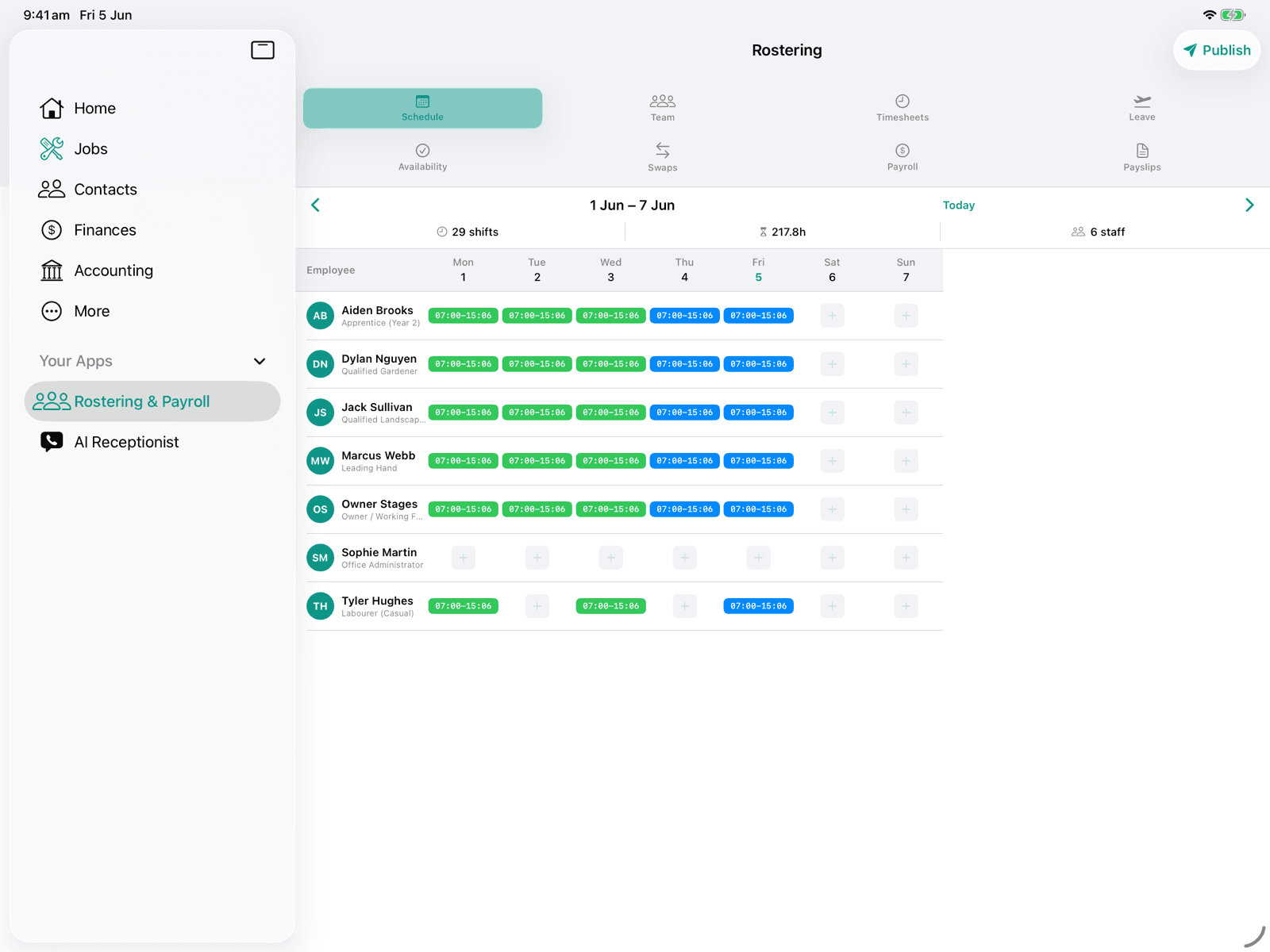
The week's roster on iPad
The whole week at a glance: every shift, its hours and its staff member, ready to publish. Pay runs, PAYG and payslips live in the Payroll and Payslips tabs alongside.
About this app
Manage your entire workforce from one place. Build weekly rosters with drag-and-drop simplicity. Staff clock in and out via the app with GPS verification. Process payroll with automatic PAYG tax withholding, superannuation at 12% (the legislated rate from 1 July 2025), penalty rates, and overtime calculations, all built for Australian compliance. Generate payslips to email or download, and an ABA file to pay staff through your bank. Single Touch Payroll is not lodged from OneBookPlus, so you still report each pay run to the ATO through STP-enabled software.
How it works
- 1
Add employees with tax, super, and bank details
- 2
Build weekly rosters and publish to staff
- 3
Staff clock in/out via the app, timesheets auto-generate
- 4
Process pay runs with one click, PAYG, super, and deductions calculated automatically
Who it's for
- Restaurants and cafes with shift-based staff
- Retail shops managing part-time and casual workers
- Trade businesses with multiple crews
- Tutoring centres and music studios running multi-teacher casual rosters with PAYG + super
- Any Australian business processing payroll in-house
Features included
- Weekly roster builder
- Clock in/out timesheets
- PAYG tax withholding (Australian)
- Superannuation at 12% (from 1 July 2025)
- Penalty rates & overtime
- Leave management (annual, sick, personal)
- Pay run processing
- Payslip generation
- ABA bank file for paying staff
- Employee onboarding
14-day free trial included
Timesheet software that flows straight into payroll
Most timesheet software stops at recording hours. You then export a CSV, upload it into a separate payroll product, and hope nothing got lost between the two. OneBookPlus keeps the whole chain in one place: a staff member clocks in and out at the kiosk on your counter, the shift becomes a timesheet, the timesheet becomes a pay run, and the pay run calculates PAYG withholding, superannuation at the legislated 12% and leave to Australian rules. No export step, no re-keying, and no gap between the hours worked and the hours paid.
Because the app runs inside OneBookPlus, wage costs land in the same books as your invoices and expenses. Your margins already include labour, without a month-end spreadsheet to stitch payroll onto the rest of the business.
Employee time tracking your team will actually use
Time tracking only works if staff do it, so the clock-in flow is deliberately simple. You leave a tablet, a spare phone or the shop computer on the counter showing your clock-in page. Your team taps their name, types a 4-digit PIN, and they are on. On the way out they tap their name again and enter their break. Nobody needs a login, an app or a password of their own, which is what makes it stick in a bakery, a cafe or a salon where the whole team is on the floor. Timesheets generate themselves from the punches, so the Friday-afternoon ritual of chasing paper timesheets or deciphering a group chat disappears.
It suits casual and part-time workforces in particular: hospitality shifts that change weekly, retail staff across locations, and trade crews that start on site rather than at the office.
Rostering built for Australian teams
The weekly roster builder is drag and drop: set up your shifts, drop staff onto them, and publish so everyone sees their week on their phone. When the roster meets reality, the timesheets show the difference between planned and actual hours, and pay runs apply penalty rates and overtime rather than paying every hour at the flat rate.
Leave is managed in the same place (annual, sick and personal), so a roster never quietly schedules someone who is on approved leave, and accruals carry through to payslips.
From timesheet to payslip and bank file
Pay runs process in one click: PAYG withholding follows the ATO schedules, super calculates at 12% (the legislated rate from 1 July 2025), and penalty rates, overtime and deductions are applied automatically. Payslips generate for every employee to email or download, and an ABA file exports for your bank so nobody re-keys account numbers on payday. Super is calculated and recorded against its quarterly due date, with a screen to mark it paid once you have sent it to the funds.
One thing this app does not do is lodge Single Touch Payroll. Pay events are not sent to the ATO from OneBookPlus, so you still report each pay run through STP-enabled software. For $29 per month it brings the roster builder, the time-tracking app and Australian pay runs into one add-on.
Reviews
New app, no reviews yet.
We only publish reviews from verified OneBookPlus customers.
Related apps
Often installed alongside Timesheets, Rostering & Payroll.
About OneBookPlus apps
How Timesheets, Rostering & Payroll fits into the rest of OneBookPlus
Most OneBookPlus apps are not external integrations wired up between separate products. They are native modules installed inside the same platform you already use for invoicing, bookings, CRM, and accounting. That means Timesheets, Rostering & Payroll reads from and writes to the same customer records, financial entries, and calendar events as every other module, with no scheduled sync delays and no risk of data drift between systems.
Because the marketplace runs inside OneBookPlus, billing is consolidated. Timesheets, Rostering & Payroll appears as a single line on the same OneBookPlus invoice as your plan, so you don't end up reconciling separate vendor charges across three or four different SaaS subscriptions. Cancellation is one click and never reaches into your data. Uninstalling an app removes the feature from the UI but preserves the underlying customer, invoice, and booking records, so reinstalling later picks up exactly where you left off.
Every app in the marketplace is built specifically for the Australian small and medium business context: GST and ABN handling are first-class concerns, dates render as DD/MM/YYYY, currency defaults to AUD, and the underlying compliance plumbing (BAS summaries, ATO-friendly records, AHPRA / NDIS / Fair Work checkpoints where relevant) is shared across modules.
For a side-by-side of which features ship as core modules versus which require an installed app, see the features page. For pricing across plans and which apps are bundled at each tier, see the pricing page.
Frequently asked questions
Common questions about Timesheets, Rostering & Payroll and the OneBookPlus app marketplace.
Is OneBookPlus a Xero rostering alternative?
Yes, for teams that want rostering, timesheets and payroll in one place. Xero handles accounting and payroll, but it does not include a drag-and-drop roster builder or a staff clock-in kiosk: rostering is typically added through a separate third-party product on its own subscription. OneBookPlus puts the roster builder, the PIN clock-in kiosk, timesheets and Australian pay runs (PAYG, 12% super, payslips, ABA file) into a single $29/mo add-on that also connects to your invoicing and accounting. One difference to weigh up: Xero lodges Single Touch Payroll to the ATO and OneBookPlus does not, so you still report each pay run through STP-enabled software.
How does the employee time tracking work?
Staff clock in and out of their shifts from the app on their phone, with GPS verification recording where each punch happened. Timesheets generate automatically from those punches and flow straight into pay runs, so there is no manual timesheet entry and no re-keying hours into a separate payroll system.
Does it handle Australian payroll compliance: PAYG, super and STP?
PAYG and super, yes. Pay runs calculate PAYG withholding to the ATO schedules, superannuation at 12% (the legislated rate from 1 July 2025), penalty rates, overtime and leave accruals, generate payslips for every employee and export an ABA file for your bank. Super is calculated and recorded with its quarterly due date and a mark-as-paid screen, it is not remitted to the funds through SuperStream. STP is the exception: OneBookPlus does not lodge Single Touch Payroll pay events to the ATO, so you still report each pay run through STP-enabled software.
What does the timesheet and rostering software cost?
Timesheets, Rostering & Payroll is a $29/mo add-on with a 14-day free trial, covering the roster builder, clock-in/out time tracking and Australian pay runs together. It is not part of a base plan, so it is $29/mo on top of your subscription. There are no lock-in contracts: uninstall from your dashboard at any time and billing stops at the end of the current period.
Every app in the marketplace
These answers are the same whichever app you install.
- Can I cancel anytime?
- Yes. There are no lock-in contracts on any OneBookPlus app. Uninstall from your dashboard at any time and billing stops at the end of the current period.
- Is my data secure?
- Yes. Encrypted in transit (TLS) and at rest (AES-256), with each business's data isolated at the database layer, hosted in Australia in line with the Privacy Act 1988. We never sell or share your business data with third parties, and the full practices are documented on the OneBookPlus security page at onebookplus.com.au/security.
- Is OneBookPlus built for Australian businesses?
- Yes. OneBookPlus is Australian-owned, built in Melbourne, with GST, ABN validation and ATO-ready BAS reporting as the foundation, not an afterthought.
Australian Owned
Built in Melbourne, AU
GST Compliant
ATO-ready from day one
Encrypted & Isolated
TLS in transit, AES-256 at rest, tenant isolation at the database layer, read the security page
Free Plan Available
No credit card needed
About the author

Bishal Shrestha
Founder & CEO, OneBookPlus
Bishal spent a decade running digital projects for Australian small businesses before founding OneBookPlus. This app sits inside the OneBookPlus marketplace, designed and maintained for Australian small to medium businesses. Timesheets, Rostering & Payroll is part of a single platform that connects invoicing, bookings, CRM, accounting, and marketing, so installing apps adds capability without adding logins.
Read the founder bioReady to add Timesheets, Rostering & Payroll?
Start your 14-day free trial. No credit card required.
Last reviewed and updated: by Bishal Shrestha