OneBookPlus vs Xero:
the all-in-one Xero alternative
Xero is great accounting software, but it's only accounting software. OneBookPlus gives Australian small to medium businesses invoicing, CRM, bookings, marketing, and accounting in one app: one subscription instead of Xero plus a CRM, a booking tool and a mailer.
Key takeaways
5- Xero is dedicated accounting software starting at $37/mo AUD (Ignite, 20 invoices/quotes per month) and running up to $500/mo on Ultra. Payroll and auto-super have been included on every plan since June 2025 (xero.com/au/accounting-software/payroll), but projects, expenses and time-tracking remain tier-locked.
- OneBookPlus is an all-in-one platform: invoicing, CRM, online bookings, accounting, marketing, and reputation management in one subscription. Free plan covers 10 invoices/month, 5 quotes/month and 250 contacts; paid plans are $0/month (Free), $29/month (Starter), $49/month (Plus), or $69/month (Growth), with a discount on annual billing. What those plans band is logins: Each plan includes a set number of logins, one login on Free, three on Starter, five on Plus and ten on Growth, and below the cap there is no per-seat charge at all. On Growth an extra login is $9/mo, added to the same invoice, so an eleventh person costs $9 and not a new plan. Staff you roster and book but who never sign in (instructors, carers, cleaners, stylists) are free and unlimited on every plan. Rostering and payroll are a $29/month add-on rather than part of any base plan, and OneBookPlus does not lodge Single Touch Payroll pay events to the ATO.
Show 3 moreShow less
- Both handle 10% Australian GST, ABN validation, and quarterly BAS-ready reporting. Xero is also a registered ATO Digital Service Provider for SBR/PLS lodgement (xero.com/au/features-and-tools); OneBookPlus is in DSPPT-49533 onboarding.
- Xero wins on: accountant-network depth (most AU bookkeepers/tax agents already work in Xero), advanced multi-currency and project costing (xero.com/au/pricing-plans, Comprehensive tier), and a 1000+ integration ecosystem (apps.xero.com).
- OneBookPlus wins on: one subscription in place of Xero plus bookings, CRM and marketing tools, a single customer record across modules, and Australian-built support.
The ledger, or the front office that fills it
OneBookPlus
From $0/mo: the whole front office bundled
- GST invoicing & quoting
- CRM & contact management
- Online booking page
- Job management & pipeline
- Email marketing & campaigns
- Accounting & P&L reports
- BAS / ATO tax summaries
- Basic sales register (full POS $39/mo add-on)
- Google review requests
- Native mobile app
- Australian-built & supported
Xero
From $37/mo: accounting only (Ignite plan)
- Invoicing & quoting
- CRM & contacts
- Online bookings
- Email marketing
- Accounting & P&L
- BAS / ATO reports
- JAX AI assistant
- Bank feeds & reconciliation
- Payroll (included since June 2025)
- Requires paid add-ons for CRM, bookings, jobs
OneBookPlus vs Xero: detailed comparison
See exactly what's included in each platform. OneBookPlus replaces Xero and 5+ other tools Australian small to medium businesses typically pay for.
| Feature | OneBookPlus | Xero |
|---|---|---|
| GST-compliant invoicing | Yes | Yes |
| Quoting with one-click accept | Yes | Yes |
| CRM & contact management | Yes | No |
| Online booking page | Yes | No |
| Job management & pipeline | Yes | No |
| Calendar subscription link (Apple, Google, Outlook) | Yes | No |
| Email marketing & campaigns | Yes | No |
| Accounting & P&L reports | Yes | Yes |
| BAS / ATO tax summaries | Yes | Yes |
| AI expense categorisation on bank feeds | No | Yes |
| AI assistant for accounting questions (JAX) | No | Yes |
| Bank feeds with reconciliation suggestions | No | Yes |
| Australian payroll (STP Phase 2) lodgement | No | Yes |
| Google review requests | Yes | No |
| Basic sales register (full POS $39/mo add-on) | Yes | No |
| Payment reminders | Yes | Yes |
| Mobile app (native) | Yes | Yes |
| Free plan available | Yes | No |
| Price (AUD) | From $0/mo | From $37/mo (Ignite) |
| One subscription | Accounting only (add-ons extra) |
Accounting depth vs platform breadth
Xero is the deeper accounting engine; OneBookPlus is the broader business platform. Here is each dimension Australian operators check first, cited against Xero’s own AU pages, and honest about where Xero is deeper.
| Category | Feature | OneBookPlus | Xero |
|---|---|---|---|
| Accounting depth | Double-entry GL, P&L, balance sheet, multi-currency | P&L, balance sheet, GST; single AUD | Deeper: multi-currency on Comprehensive+ (source: xero.com/au/pricing) |
| GST / BAS | 10% GST tracking + quarterly BAS-ready figures | Yes | Yes (source: xero.com/au/features) |
| ATO lodgement | Registered ATO Digital Service Provider (SBR/PLS) | DSPPT-49533 onboarding | Registered DSP (source: xero.com/au/features) |
| Bank feeds | Australian bank feeds + AI categorisation | Withdrawn while we replace the provider | Bank feeds + JAX reconcile suggestions (source: xero.com/au/just-ask-xero) |
| Payroll / STP | STP Phase 2 payroll + auto-super | Payroll add-on; no STP lodgement yet | Included on all plans since June 2025 (source: xero.com/au/payroll) |
| Invoicing | GST invoicing + ABN validation + one-click accept | Yes | GST invoicing; entry plan caps 20/month (source: xero.com/au/pricing) |
| CRM | Full contact CRM with client timeline | Yes | Contacts ledger only, not a CRM (source: xero.com/au/contacts) |
| Online bookings | Customer-facing booking page + calendar sync | Yes | No (source: xero.com/au/features) |
| Job management | Quote to job to invoice pipeline | Yes | Projects add-on; no field pipeline (source: xero.com/au/features) |
| Marketing | Email campaigns + Google review requests | Yes | No (source: xero.com/au/features) |
| POS / retail | Point of sale + menu/order management | Yes | Via third-party POS apps only (source: apps.xero.com) |
| AI features | Accounting AI vs business-wide AI | AI Companion $25/mo add-on (free on Growth); AI Receptionist $79/mo on top | JAX (accounting-specific) (source: xero.com/au/just-ask-xero) |
| Integrations | Third-party app ecosystem | Stripe, ABN lookup, Xero/MYOB-ready export today; a live two-way sync is not built and is not on a date | 1,000+ via Xero App Store (source: apps.xero.com) |
| Accountant network | AU bookkeeper / tax-agent familiarity | Growing; CSV + Xero export | Market-leading advisor network (source: xero.com/au/features) |
| Data residency | Where customer data is stored | AWS Sydney (ap-southeast-2) | Check vendor page (source: xero.com/au/security) |
| Annual pricing transparency | Annual price shown alongside monthly | Discount on annual billing | Monthly per-tier pricing (source: xero.com/au/pricing) |
| Starting price (AUD, inc. GST) | From $0/mo | From A$37/mo | |
| Inc. GST · Annual price shown · Core modules bundled | Ignite tier · 20 invoices/mo · accounting only |
Not mockups, real product screens
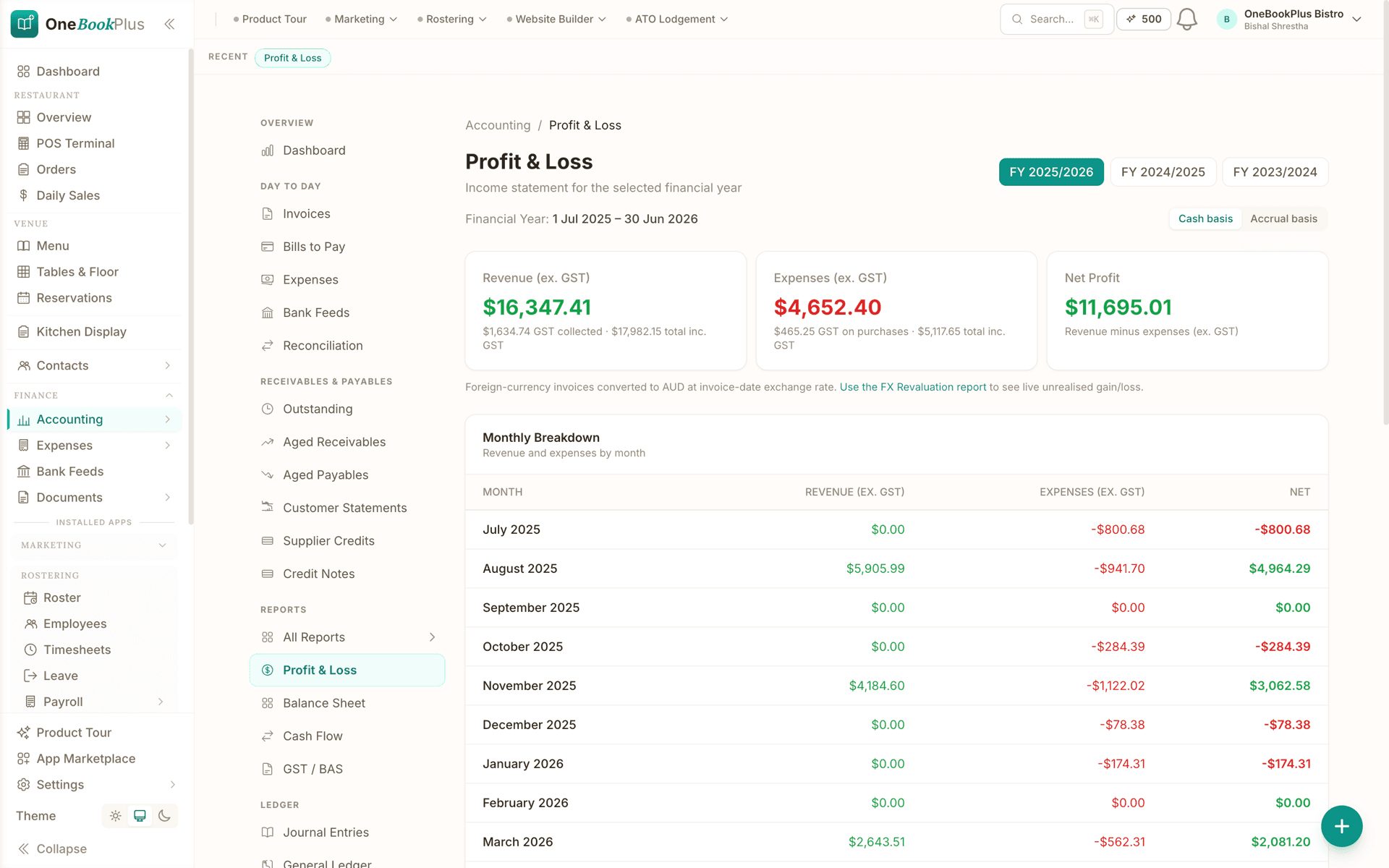
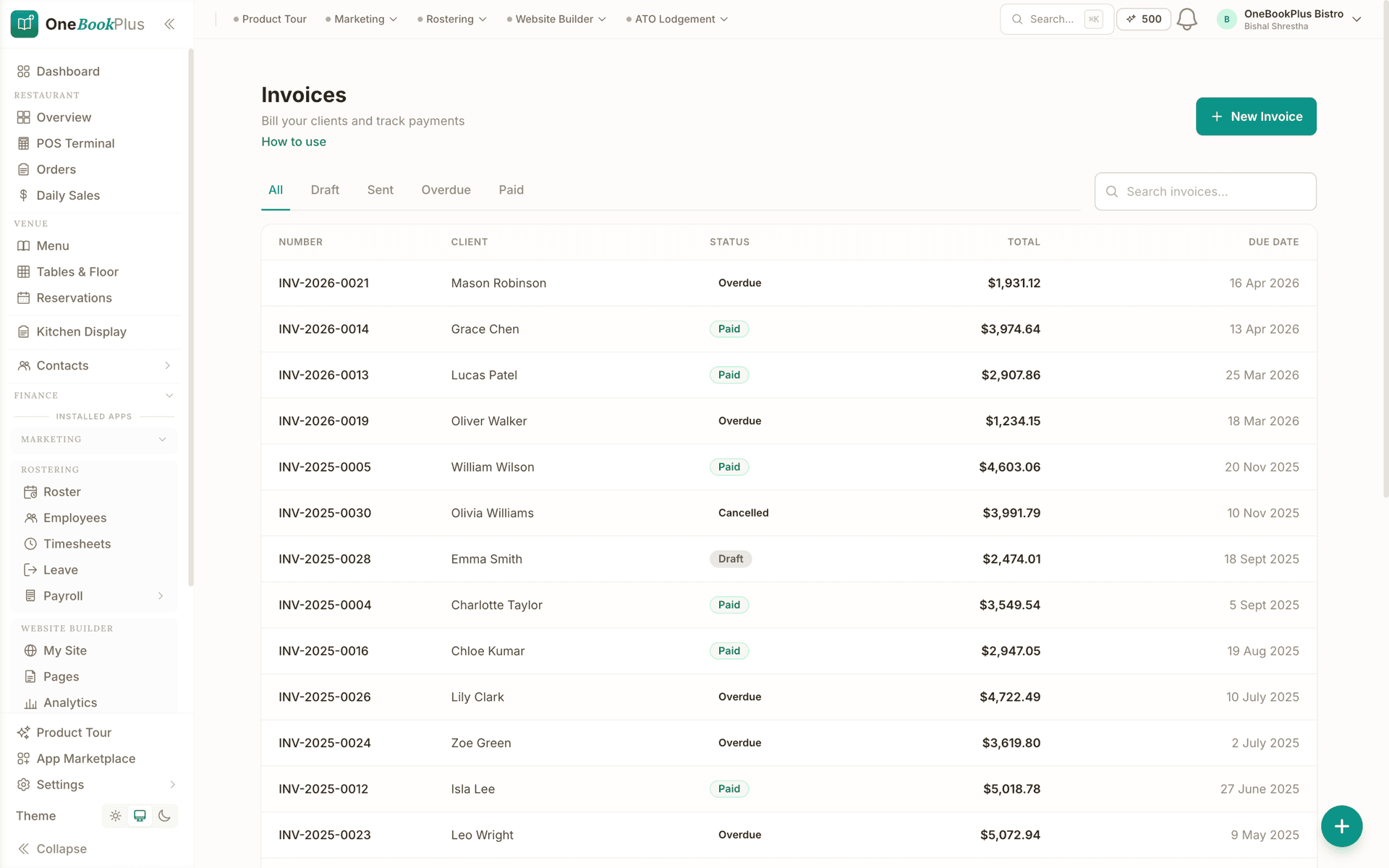
The accounting rows above, in pixels
Comparison tables are easy to typeset. These are unedited captures of the OneBookPlus product, the same screens behind the P&L, GST and BAS-ready reporting rows above.
Where Xero wins
A deeper ledger, and every bookkeeper already in it
Xero is the AU cloud-accounting market leader for a reason. The accounting engine is genuinely deeper than ours: true multi-currency on the Comprehensive plan, project costing, fixed-asset registers, and a level of audit-trail and reporting granularity that suits accountant-led books. Crucially, Xero is also a registered ATO Digital Service Provider, and almost every Australian bookkeeper and tax agent already lives in it, so handing your file to an advisor is frictionless. Its App Store lists 1,000+ integrations, and JAX gives strong accounting-specific AI for reconciliation. If your books are complex (multi-entity, multi-currency, advisor-managed), Xero is the deeper accounting tool, and the switch isn’t urgent.
Where OneBookPlus wins
One subscription, one customer record, business-wide AI
One subscription replaces the whole stack, not just the ledger. Xero is accounting only. Its features page has no online booking page, no email marketing, and only a contacts ledger, not a CRM. To run a real business on Xero you bolt on a CRM, a Calendly-style booker, and a Mailchimp-style mailer: three more bills and three more logins. OneBookPlus bundles invoicing, CRM, bookings, marketing, and accounting in one plan from $0/month.
One customer record across booking, invoice, and books. In a Xero-plus-add-ons stack, the same client exists as a contact in Xero, a lead in your CRM, and an invitee in your booking tool, kept in sync by CSV exports or paid Zapier glue. OneBookPlus carries a single client record from the first online booking through the quote, the job, the GST invoice, and the BAS line. There is no reconciliation tax between systems at quarter-end.
Business-wide AI, not just accounting AI. Xero’s JAX is deliberately scoped to the ledger: reconciliation suggestions and financial questions. OneBookPlus adds an AI Companion that chases unpaid invoices, follows up no-shows, harvests reviews, and writes end-of-day summaries, plus an AI Receptionist that answers calls and books straight into your calendar, capabilities a cloud-accounting tool is not built to cover.
The trade a Xero customer has to weigh
One subscription instead of four
Every Xero plan is accounting only, so a business that also takes bookings, keeps a CRM and sends campaigns pays for those separately. OneBookPlus bundles them with the ledger from $0 to $69 a month. What that is worth to you depends on which subscriptions you can actually retire, so price it against your own stack rather than a headline saving.
One login, one dashboard
Stop switching between 5 different apps. OneBookPlus connects your invoices, CRM, bookings, jobs, marketing, and accounting in a single platform so your data flows automatically and you never miss a beat.
Built for Australian businesses
OneBookPlus is designed in Melbourne for Australian small to medium businesses. GST calculation, ABN validation via the Australian Business Register, ATO-compliant BAS summaries, and AUD formatting are built in from day one.
Everything Xero needs add-ons for
Xero's strength is deep accounting with 1000+ integrations, but that means paying for separate CRM, booking, job management, and marketing tools. OneBookPlus gives you all of that built-in, plus a native mobile app, POS, and client portal. Payroll runs the other way: Xero includes it on every plan and lodges STP, while OneBookPlus offers rostering and payroll as a $29/month add-on that works out pay, PAYG and super but does not lodge STP. For everything else, you are still buying Xero add-ons.
OneBookPlus vs Xero: your questions answered
How does OneBookPlus compare to Xero for a small to medium business?
The difference is scope. Xero is powerful accounting software, but it's only accounting. You need add-ons like HubSpot for CRM, Calendly for bookings, and Mailchimp for email marketing, each with their own monthly fee. OneBookPlus includes invoicing, CRM, bookings, marketing, job management, POS, and accounting in one app starting from $0/month. If you need deep accounting with multi-currency, complex inventory, or multi-entity reporting, Xero may still fit better. But for sole traders, freelancers, tradies, and small teams, OneBookPlus covers more of the business on one bill.
Can OneBookPlus replace Xero for my business?
Yes for the day-to-day running of the business, with one exception worth knowing up front. OneBookPlus handles the core features small to medium businesses use Xero for: GST-compliant invoicing, expense tracking, profit and loss reports, and BAS summaries. Plus you get CRM, online bookings, job management, email marketing, POS, and review management included, features that would require paid Xero add-ons. The exception is Single Touch Payroll. Our Rostering & Payroll add-on ($29/month, 14-day trial) runs rosters, timesheets, pay runs, PAYG withholding, super, penalty rates, leave, payslips and an ABA bank file, but it does not lodge STP pay events to the ATO, so if you pay staff you still report each pay run through STP-enabled software. On price, OneBookPlus plans are $0 to $69 a month plus any add-ons you switch on, so what you save is whatever your current Xero plan plus those add-ons costs you. Price it against your own stack rather than a headline figure.
How much does Xero cost compared to OneBookPlus in 2026?
Xero's published Australian ladder, checked against xero.com/au/pricing on 2 August 2026, runs Ignite at $37/mo, Grow at $78/mo, Comprehensive at $107/mo, Ultimate 10 at $143/mo, Ultra at $500/mo. Ignite is basic accounting with limited invoices and 1 payroll employee; Ultimate 10 is sold in user bands, and Ultra sits above it. Those are the ongoing rates, and Xero was running a large introductory discount over the first months on top. Since June 2025, payroll and auto-super are included on all plans. On top of that you'll still need separate subscriptions for CRM, bookings, and email marketing, priced by whichever vendors you pick. OneBookPlus starts free and includes invoicing, CRM, bookings, marketing, and accounting for $0 to $69 a month depending on your plan, with rostering and payroll as a separate $29/month add-on that works out pay, PAYG and super but does not lodge STP to the ATO. So the comparison to run is your whole Xero stack against one OneBookPlus plan plus whatever add-ons you need. The AI Receptionist is a $79/mo add-on and it needs the AI Companion ($25/mo, included free on Growth), so budget about $104 a month on top of your plan, or $79/mo on Growth.
Does Xero have AI features that OneBookPlus doesn't?
Yes, Xero's JAX (Just Ask Xero) AI assistant handles bank reconciliation suggestions and can answer natural-language financial questions (see xero.com/au/just-ask-xero). It's an impressive accounting-specific AI tool, but it's deliberately scoped to the ledger. OneBookPlus also uses AI on the books, it reads a scanned receipt or supplier bill for the supplier, date, GST and total and suggests the expense category, but it doesn't have a ledger Q&A assistant like JAX. Beyond the books, OneBookPlus puts AI across the whole business: an AI Companion that chases unpaid invoices, follows up no-shows, and harvests reviews, plus an AI Receptionist that answers calls. If AI-powered accounting is your top priority, Xero's JAX is strong. But if you want one book that handles your CRM, bookings, jobs, marketing, and accounting without paying for 5+ separate tools, OneBookPlus is the smarter choice.
Does OneBookPlus handle GST and BAS like Xero?
Absolutely. OneBookPlus automatically calculates 10% GST on all invoices and quotes, validates ABN numbers via the Australian Business Register, tracks GST collected and paid, and generates ATO-ready BAS summaries. The accounting engine is built for Australian tax compliance from the ground up, not retrofitted like some US-based alternatives.
Who is better off switching from Xero, and who should keep it?
The ones who switch are usually paying for Xero plus a CRM, a booking tool and a mailer to run a single business. While Xero focuses on bookkeeping and accounting (with JAX AI and bank feeds), OneBookPlus gives you a complete business platform with invoicing, CRM, bookings, scheduling, job management, POS, email marketing, review management, and accounting, all built for Australian tax compliance with GST, ABN, and BAS support. There is a free plan, and paid plans start at $29/month. The ones who should stay are the businesses whose books are the hard part: multi-entity or multi-currency structures, advisor-managed files, or a bookkeeper who works in Xero every day. Staff payroll is another reason to stay: Xero lodges Single Touch Payroll pay events to the ATO and OneBookPlus does not, so your STP reporting has to keep happening in software that is set up for it. Xero is a registered ATO Digital Service Provider with a 1,000+ app ecosystem (apps.xero.com), and that depth is real.
Can I import my Xero contacts and data into OneBookPlus?
Yes. OneBookPlus imports your client contacts via CSV export from Xero during onboarding, so you keep your customer list without re-typing it. Your historical invoices stay in Xero as a record for your accountant, while new invoices, quotes, and bookings happen in OneBookPlus. OneBookPlus also lets you export your own data at any time, you are never locked in.
How OneBookPlus replaces Xero, and more
Xero is a powerful accounting tool, but that's all it is. To run a real business you end up paying for Xero on top of a CRM like HubSpot, a booking tool like Calendly, email marketing like Mailchimp, and a job manager like ServiceM8: five subscriptions and five logins. What that stack costs depends on which tools you chose and which tier each one is on, so add up your own bill rather than a headline figure.
OneBookPlus gives you invoicing, quoting, CRM with full client timeline, online booking pages, email campaigns, job pipeline management, expense tracking and accounting reports, all in one book, from $0/month. Your data flows between modules automatically: a quote converts to a job, the job converts to an invoice, the payment clears that invoice, and the GST appears in your BAS summary. No CSV exports, no copy-pasting between apps.
Feature deep dive
- Receipts and bills read for you. Drag in a supplier PDF or photograph a docket and the supplier, date, GST and total are read off it, with the expense category suggested (supplies, vehicle, utilities, and so on). You check the figures and post it, so nothing lands in the books behind your back. Bank feeds are a separate matter: ours are withdrawn while we replace the provider, so bank transactions come in from a statement import or are entered directly.
- All-in-one client hub. Every interaction with a client lives in one timeline: invoices sent, quotes accepted, bookings made, payments received, emails exchanged, notes added, documents uploaded. Xero shows you a ledger. OneBookPlus shows you a relationship. When a client calls, you see their full history in seconds, with no switching between apps.
- Industry-adaptive platform. During onboarding you tell us your business type: trades, salon, restaurant, aged care, professional services. The dashboard, navigation, enabled modules, and quick actions automatically adapt. A plumber sees Jobs, Pipeline, and Quotes. A salon owner sees Bookings, Services, and Reviews. A restaurant gets POS, Menu Management, and Kitchen Display. Same platform, zero configuration.
Who should switch from Xero
- Sole traders paying for Xero plus two or three add-ons. If you are running Xero, a booking tool and a CRM side by side, OneBookPlus replaces all three from $29/month.
- Tradies who need job management as well as accounting. Xero doesn't manage jobs. OneBookPlus gives you a full pipeline from quote to invoice with photo notes, checklists, and batch invoicing.
- New businesses who haven't committed yet. Start free with OneBookPlus rather than signing up for a paid Xero plan from day one.
- When Xero might still be better: If you have a complex multi-entity structure, need advanced inventory with multi-location tracking, or your accountant specifically requires Xero access, Xero's deeper accounting features may still be the right fit. For most Australian SMEs with under 20 staff, OneBookPlus covers everything you need.
Getting started
Switching takes minutes, not days. Sign up free at onebookplus.com.au, choose your business type during onboarding, and import your client contacts via CSV export from Xero. Your existing invoices stay in Xero for historical records. New invoices, quotes, and bookings happen in OneBookPlus from day one, and your GST defaults are set once during onboarding.
How to switch from Xero to OneBookPlus
Export your contacts from Xero
In Xero, open Contacts and export your customer and supplier list as a CSV. Import it straight into OneBookPlus: names, emails, phone numbers, ABNs, and addresses map across into proper CRM records (not just a ledger), each ready for bookings, quotes, and invoices. Your Xero file stays intact as a historical record for your accountant.
Set your ABN and GST defaults
Set your ABN, 10% GST defaults, and BAS quarter so every new invoice is ATO-compliant and feeds your BAS summary automatically. Cancel the Xero add-ons you no longer need, because CRM, booking, and email-marketing tools are now bundled.
Start new invoices in OneBookPlus, keep Xero as the archive
Pick a cut-over date, usually the start of a BAS quarter, and raise all new quotes, bookings, and invoices in OneBookPlus from that day. There's no need to migrate historical transactions; keep Xero active (or on its lowest plan) as a read-only archive until your last open BAS period is lodged, then cancel it. You can export your OneBookPlus data at any time, so you are never locked in.
From the blog
Related reading: switching from xero
Practical guides and explainers from the OneBookPlus blog, grouped by topic.
From Quote to Paid in One App: The Australian Job Workflow
One landscaping job followed from quote to money in the bank, with the customer, quote, job, invoice, payment and BAS all staying linked.
24 min readRead articleBest Job Invoicing Software in Australia (2026): Quote-to-Invoice in One App
Most invoicing apps make you retype the job to raise an invoice. What job invoicing software is, and how quote to invoice gets you paid faster.
9 min readRead articleBest Invoicing Software Australia (2026): Top 9 Compared
The nine invoicing apps Australian small businesses actually shortlist in 2026, with cited pricing, GST and BAS notes, and which are genuinely free.
10 min readRead article5 Best MYOB Alternatives for Australian Small Business (2026)
MYOB no longer fits every Australian small business. Five genuine alternatives for 2026, from all-in-one platforms to sole-trader tax tools.
10 min readRead article
Compare with real data, not tables
The live demo is a working OneBookPlus account with invoices, quotes, jobs and accounting reports already in it, open the P&L yourself before you decide anything.
Put the add-ons away
and run it all from one app
Start free, import your Xero contacts by CSV in minutes, and check every pricing claim on this page against Xero's own cited pages.
Free plan available, no card needed.

About this comparison
How we compared OneBookPlus to Xero
Feature claims about OneBookPlus reflect what is shipping today on onebookplus.com.au. Xero pricing and feature claims were read off Xero’s public Australian product pages on . Vendor pricing changes frequently, so check the Xero website for your specific situation before making a decision.
Disclosure: OneBookPlus publishes this comparison and stands to benefit if you switch. We aim to compare like-for-like on capability and Australian tax compliance, if you spot something out of date, email hello@onebookplus.com.au and we’ll review it.
About the author

Bishal Shrestha
Founder & CEO, OneBookPlus
Bishal spent a decade running digital projects for Australian small businesses before founding OneBookPlus. He writes and maintains these pages, and publishes what OneBookPlus does not do alongside what it does.
Read the founder bioHow this page was researched
Every Xero price and capability claim on this page was read off Xero's own published Australian pages on the date printed above, and recorded in competitor-facts.ts with that date. Claims about OneBookPlus describe what ships today, and the page names what we do not do.
Last reviewed and updated: by Bishal Shrestha