OneBookPlus
Job scheduling software that fills your week and gets you paid
Drag-and-drop scheduling, team dispatch and 24/7 online bookings that flow straight through to invoice.
Drag-and-drop job scheduling software for Australian service businesses: calendar, dispatch board, recurring jobs, 24/7 online bookings and one-click GST invoicing. Start free.
Also includes the full Website Builder
Same $29/month app, bookings + website builder are bundled. Blog, shop, members, AI assistance and more. See OneBookPlus Website Builder
Replaces ServiceM8, Tradify, Calendly
In the product
A look inside OneBookPlus Booking
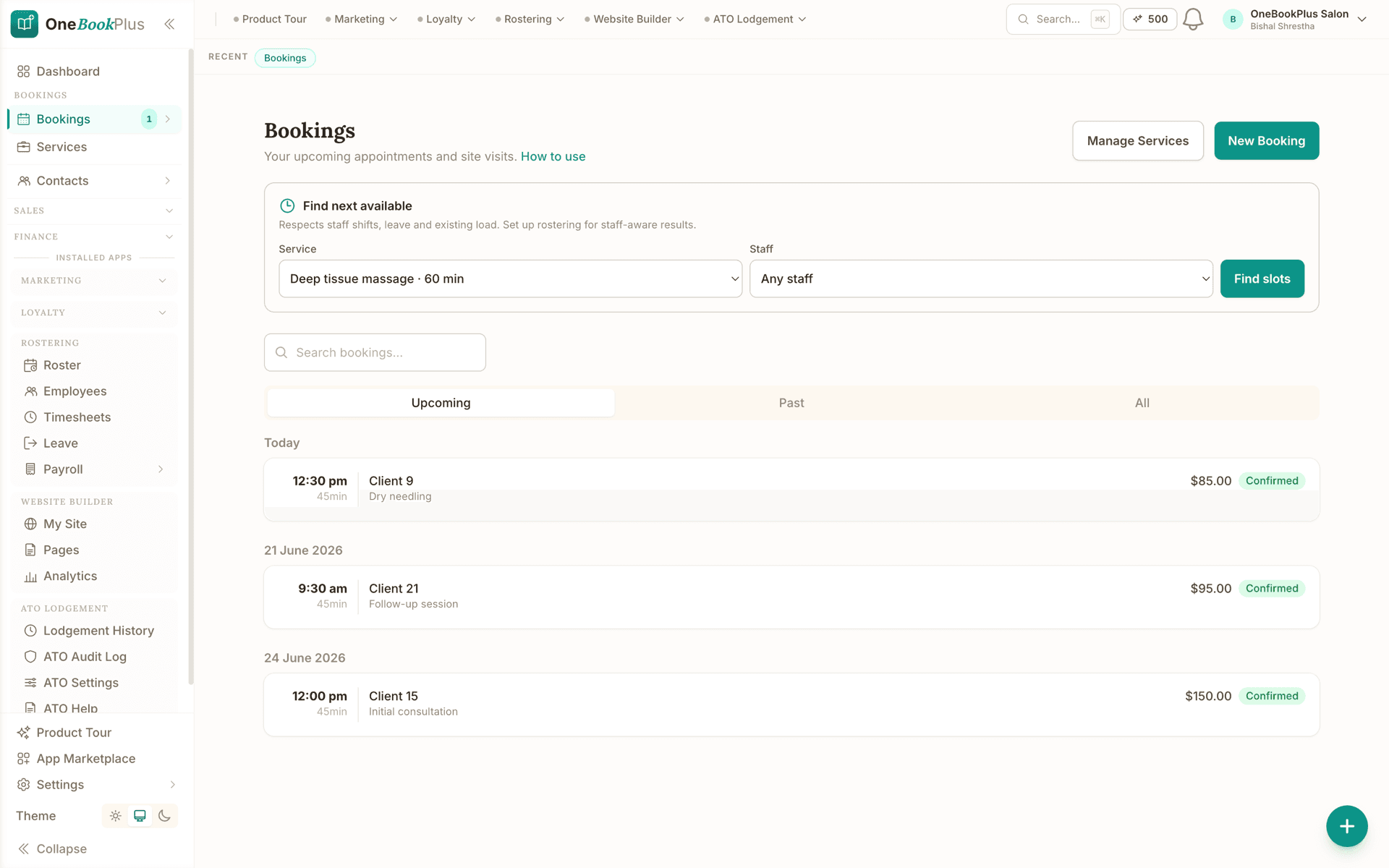
Bookings calendar with day and week views
Appointment schedule with client context
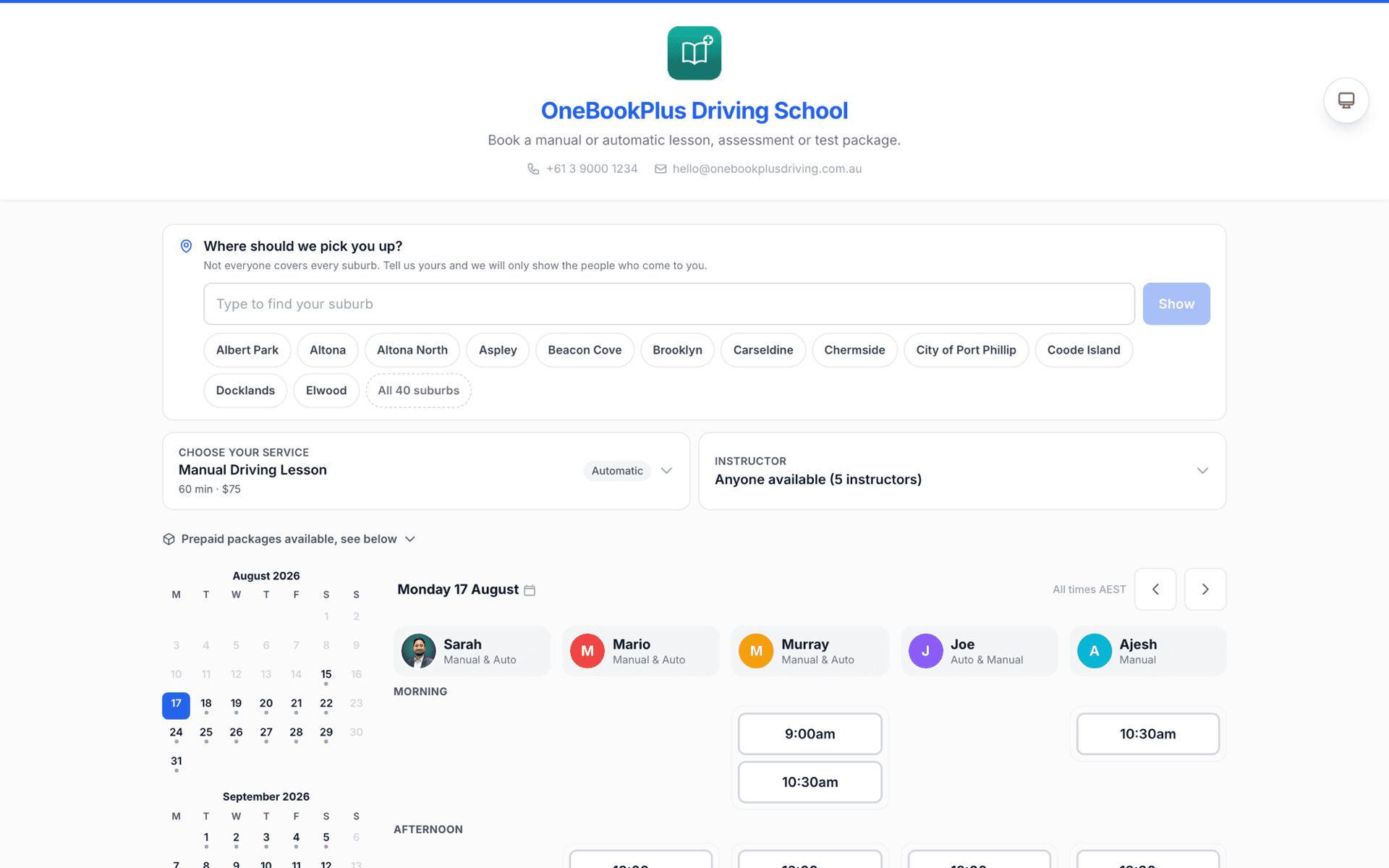
A public booking page with per-staff availability columns, live times and a suburb picker
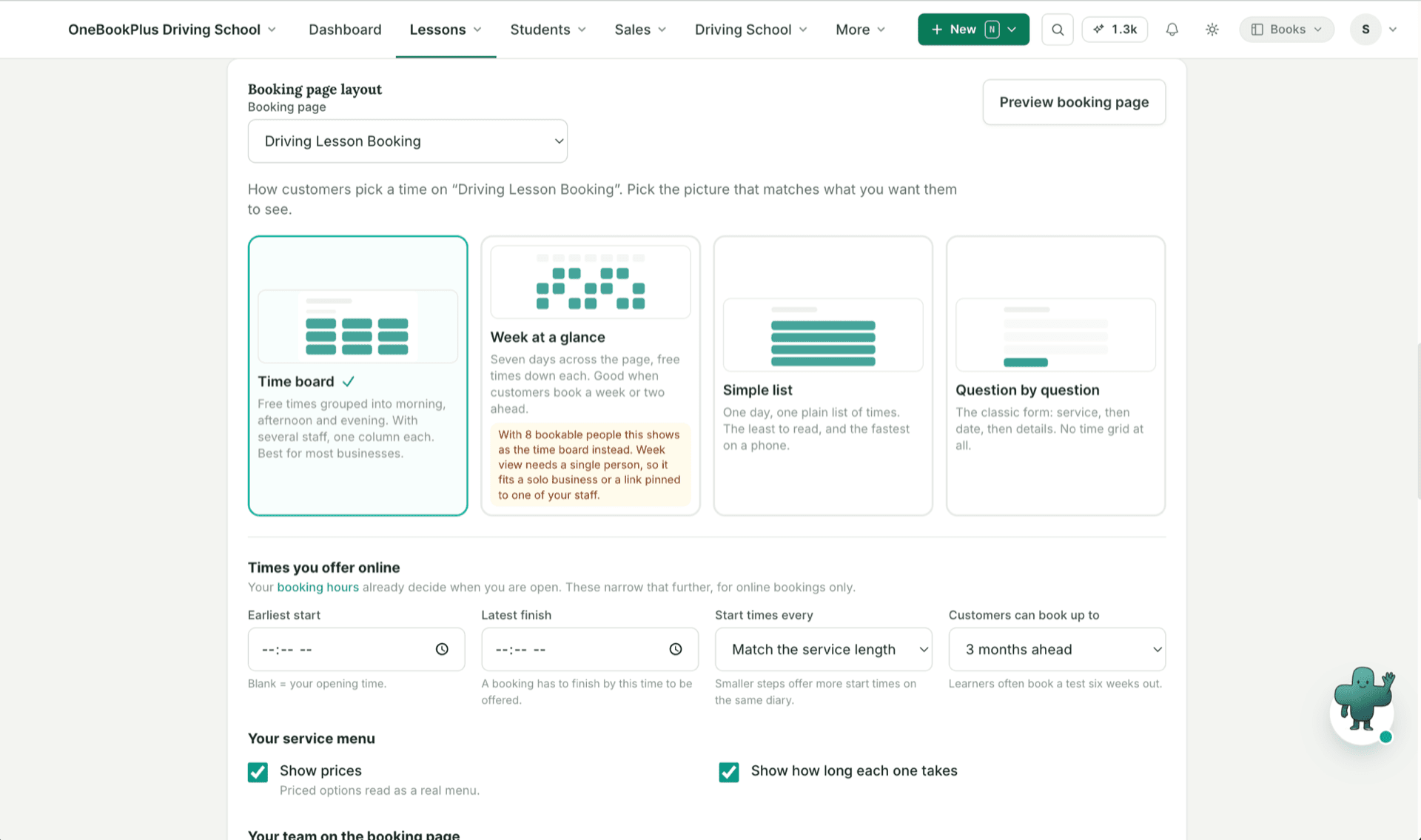
The booking page layout editor: time board, week at a glance, simple list or question by question
What's included
Everything in OneBookPlus Booking
Drag-and-drop job calendar
Month, week and day views of every job. Drag work to a new day or an exact time slot with 15-minute precision, with colour-coded statuses and priority markers so urgent jobs stand out.
Dispatch board for your team
Each team member's day in its own column, with an unassigned lane for new work. Drag a job onto a name to reassign it, and track on-the-way and arrived timestamps as the crew checks in.
Recurring job schedules
Set work to repeat weekly, fortnightly or monthly, then raise the next visit straight from the schedule with the customer, site details and nominated tradie already on it. Rounds stop after a set number of runs. Built for service rounds and maintenance contracts.
Conflict detection and next available
OneBookPlus checks upcoming bookings against scheduled jobs per staff member and warns about double-bookings before the day breaks. A next-available finder suggests the earliest genuine gap for a new client.
24/7 online booking page
Clients book themselves from live availability driven by your business hours, lead time, buffer times, slot intervals and blackout dates. You get notified instantly; they get automatic confirmation.
Trade request forms
Your booking page can capture job type, site address and urgency, so an overnight callout arrives as a scheduled job with everything you need, not a voicemail to decode.
Prepaid packages on your booking page
Offer services, prepaid session packs, or both on a booking page, or run a packages-only page at its own link. Buyers choose their instructor at purchase or at each booking. Orders land in your dashboard to confirm, you arrange payment your usual way and activate the pack.
Payment or a deposit at booking
Connect Stripe once, then choose per service whether clients pay in full, pay a deposit, or book now and settle later. Works on both the calendar and the standard booking form; the slot is held while they pay, and every payment lands against a real invoice in your accounts.
Automated reminders
Clients get an automatic email reminder before their appointment, on the lead time you choose (24 hours by default). Turn on SMS reminders for clients and new-booking texts for your team any time, using your plan's SMS allowance.
Website embed widget
Embed the booking calendar on any website with a short snippet: WordPress, Squarespace, Wix or plain HTML. The same app also includes the full OneBookPlus website builder.
One-click invoicing
Turn any completed booking or job into a GST invoice with details pre-filled, or batch-invoice a whole day's completed jobs. Payment reminders and review requests follow automatically.
3 views
Month, week and day drag-and-drop scheduling calendar
24/7
Clients book themselves from your live availability
$0/mo
Free plan includes the scheduling calendar, dispatch board and booking page
1 click
Any completed booking or job becomes a GST invoice
Simple setup
How OneBookPlus Booking works
Set up services and availability
Add your services with names, prices and durations, then set business hours, lead time, buffers and blackout dates. Your booking page and scheduling calendar both respect the same rules.
Fill the calendar
Schedule jobs with drag-and-drop, raise repeat work from your recurring rounds instead of re-typing it, and leave the booking page open for clients around the clock. Everything lands on one calendar.
Run the day from the dispatch board
See every team member's column, drag jobs to balance the load, and follow on-the-way and arrived statuses from the field. Text each person their run sheet in one tap, or let them open today's sheet themselves.
Invoice the moment work finishes
Convert any completed booking or job to a GST invoice in one click, or batch-invoice the day. Automated payment reminders chase the money while you schedule tomorrow.
Job Scheduling Software for Australian Service Businesses
Job scheduling software puts every job, every team member and every appointment on one live calendar, so nothing is double-booked, forgotten or stuck on a whiteboard back at the office. OneBookPlus gives Australian service businesses a drag-and-drop job scheduling calendar, a team dispatch board, recurring job automation and a 24/7 online booking page, all connected to the quoting, invoicing and accounting needed to get paid for the work you schedule. Plans start at $0 per month, and paid plans never cap how many jobs you can schedule.
The scheduling calendar works the way you would sketch a week on paper. Month view shows the shape of the fortnight ahead; week and day views show exact times. Drag a job to another day and it reschedules instantly; drop it onto a time slot and it snaps to 15-minute precision. Jobs are colour-coded by status (scheduled, in progress, completed) with priority markers for urgent work, and the day view splits into a swimlane per technician, so dragging a job between columns reassigns it on the spot.
For the morning rush there is a dedicated dispatch board: every team member's day in its own column, with an unassigned lane for new work. Drag jobs between people until the load is balanced, then follow the day through on-the-way and arrived timestamps as your crew checks in from the field. Text each person their run sheet in one tap, or let them open today's sheet themselves, and dedicated today and tomorrow views keep the next 48 hours in focus without scrolling.
Repeat work stops being re-typed. Set a job to recur weekly, fortnightly or monthly, and OneBookPlus builds each visit straight from that round, with the customer, site details and the person you nominated already on it, and stops after a set number of runs when a contract ends. When plans change, batch tools fix a whole day at once: batch reschedule when weather pushes site access, batch reassign when someone calls in sick, and batch invoice when the day's jobs are done.
Scheduling intelligence runs underneath. OneBookPlus checks upcoming bookings against scheduled jobs for each staff member and flags double-bookings before they become an awkward phone call. A next-available finder surfaces the earliest genuine gap for a new enquiry.
The booking side keeps the calendar full without you lifting the phone. Your public booking page takes appointments 24/7 against real availability, driven by your business hours, lead time, buffer times, slot intervals and blackout dates. Tradies can switch on a trade request form that captures job type, site address and urgency, so an overnight callout request lands as a scheduled job rather than a voicemail. Clients get automatic confirmation and an email reminder before their appointment (24 hours by default, or a lead time you set), your team can get instant notifications including SMS, and you can subscribe the calendar to Apple, Google or Outlook so new bookings appear there automatically.
If you travel to the client, you decide where. Set the suburbs you serve and the booking page only offers what you cover; each team member can carry their own pickup area, so clients only see the people who actually service their suburb. In strict mode, an out-of-area enquiry sees a contact card with your phone and email instead of a time picker, so you still get the lead without taking on a job you cannot reach.
Clients who lose their personal booking link are not locked out. A Find my lessons page lets them enter the phone number or email they booked with, receive a one-time code, and land straight back on their own bookings, with no account or password involved. And your booking page comes with a ready-made link, website button and QR code, so putting the right one in a text, an email signature or on your website is copy and paste.
It fits how Australian service businesses actually work. Electricians and plumbers run the dispatch board with recurring test-and-tag and maintenance rounds; cleaners schedule weekly rounds per cleaner; salons, clinics and studios lean on the booking page, reminders and no-show tracking. Because scheduling, bookings, CRM and invoicing share one database, a client's whole history sits behind every calendar entry.
Compared with the usual suspects: ServiceM8 is the best-known job scheduling software in Australia and its scheduling is genuinely capable, but every tier is job-capped, from 30 jobs a month on the free plan to about 1,500 on the $349 Premium Plus tier (servicem8.com/pricing, verified July 2026), and accounting is handed off to Xero or MYOB. Tradify charges per user (NZ$35 to NZ$55 per user per month, tradifyhq.com/pricing) and offers no client-facing booking page. MeMate starts at A$99.85 per month (memate.com.au/prices, verified July 2026) with no free plan. OneBookPlus starts at $0 per month with no per-job caps on any plan, and the Booking and Website Builder bundle is a single $29 per month app.
When the work is done, the same system gets you paid: one click turns a completed booking or job into a GST invoice, payment reminders chase overdue amounts automatically, review requests go out after completed work, and every dollar flows through to a real profit and loss. Start on the Free plan, drag your first week of jobs onto the calendar, and see how much of your admin disappears.
Online booking works best when it feeds the rest of the platform: you can turn confirmed bookings into scheduled work with job management software, or compare Australian booking software options.
How we compare
Booking vs the competition
See how OneBookPlus compares to the tools you might already be using.
| Feature | OneBookPlus | ServiceM8 | Tradify | MeMate |
|---|---|---|---|---|
| Drag-and-drop job scheduling calendar | Yes | Yes | Yes | Yes |
| Recurring job schedules | Yes | Yes | Yes | Yes |
| 24/7 client self-booking page + embed widget | Yes | Yes | No | No |
| Booking converts to a GST invoice in one click | Yes | Yes | No | No |
| Built-in double-entry accounting (P&L, balance sheet) | Yes | No | No | No |
| BAS-ready GST reports | Yes | No | No | No |
| Rostering & payroll add-on (pay runs, PAYG, super, ABA file) | Yes | No | No | No |
| AI assistant chases quotes and overdue invoices | Yes | No | No | No |
| No per-job caps on any plan | Yes | No | Yes | Yes |
| Works beyond trades (salons, clinics, studios) | Yes | No | No | Yes |
| Free plan available | Yes | Yes | No | No |
| Price | From $0/mo | $0-$349/mo, job-capped | NZ$35-55/user/mo | From A$99.85/mo |
Example walkthrough
A day with OneBookPlus scheduling
A worked example: a Brisbane electrical contractor running three on the tools
Sean runs a three-electrician crew in Brisbane. At 6:45am he opens the dispatch board over coffee: eleven jobs today, one unassigned. He drags a switchboard upgrade onto Jake's column and the run sheets update.
Overnight, a property manager booked an urgent fault callout through the booking page. The trade request form captured job type, site address and urgency, so it arrived as a scheduled job, not a voicemail to decode. The monthly test-and-tag round for a childcare centre was due, so Sean raised this month's visit from the recurring schedule in one tap and it landed on Priya's column with the site details already attached.
At 11am a builder pushes back site access on Thursday's rough-in. Sean drags the job two days later in week view; OneBookPlus flags that Jake is double-booked against a 2pm appointment, so he drops it onto Marco's column instead. Two taps, no phone calls.
By 4pm, seven jobs are complete. Sean batch-invoices them, GST calculated and payment links attached, and review requests queue for the two happiest customers. He checks tomorrow's run sheet: a full day, no conflicts, and nothing left on the whiteboard, because there is no whiteboard anymore.
Frequently asked questions
Common questions about OneBookPlus Booking.
What is job scheduling software?
Job scheduling software replaces the whiteboard and paper diary with a live calendar of every job, who it is assigned to and when it happens. Good software for job scheduling also handles the surrounding workflow: recurring work you raise from a saved round rather than re-key, client bookings that land as scheduled jobs, and invoices raised from completed work. OneBookPlus covers all of that in one system, with a free plan to start on.
How does the drag-and-drop job scheduling calendar work?
Open the calendar in month, week or day view. Drag any job to a new day, or to an exact time slot in week and day view, and it reschedules instantly with 15-minute precision. The day view adds a column per technician, so dragging a job between columns reassigns it. There is nothing to learn beyond drag and drop, which is what makes it easy job scheduling software for a small team.
Can I dispatch jobs to my team?
Yes. The dispatch board shows each team member's day side by side with an unassigned lane, so you can drag work onto whoever has capacity. On-the-way and arrived timestamps show where everyone is up to, and each person gets a daily run sheet. If someone calls in sick, batch reassign moves their whole day to a teammate in one action, and batch reschedule shifts a rained-out day in one go.
Does OneBookPlus handle recurring job schedules?
Yes. Set a job to repeat weekly, fortnightly or monthly and OneBookPlus builds the next visit straight from that round, with the customer, site details and the person you nominated already filled in, and the round stops after a set number of runs when a contract ends. It suits mowing rounds, test-and-tag contracts, pool servicing and any other repeat work you currently re-enter by hand.
How does OneBookPlus compare to ServiceM8 for job scheduling?
ServiceM8's scheduling is capable, but every plan is job-capped: the $29 Starter tier covers 50 jobs a month and the $349 Premium Plus tier covers about 1,500, per servicem8.com/pricing (verified July 2026). OneBookPlus has no per-job caps on any plan, and it builds in the accounting and BAS reports that ServiceM8 hands off to Xero or MYOB. Rosters, pay runs, PAYG withholding, super and the ABA bank file sit in the Rostering & Payroll add-on at $29 per month; Single Touch Payroll is not lodged from OneBookPlus, so pay events still go to the ATO through STP-enabled software. Our OneBookPlus vs ServiceM8 comparison page carries the full cited plan-by-plan detail.
Is there a free job scheduling program?
Yes. The OneBookPlus Free plan includes the job scheduling calendar, dispatch board and CRM at $0 per month, with no cap on jobs, plus 10 invoices and 5 quotes a month. Paid plans from $29 per month lift the invoice and quote limits. ServiceM8's free tier caps you at 30 jobs a month per servicem8.com/pricing; Tradify and MeMate offer trials but no free plan. You can run a full week of scheduling before paying anything.
Is OneBookPlus a job booking system as well as a job scheduler?
Yes, that is the point of it. Your public booking page takes client bookings 24/7 against real availability, respecting your business hours, lead times, buffers and blackout dates, and trade request forms capture job type, site address and urgency. Bookings land alongside your scheduled jobs, and conflict detection warns you when the same staff member is double-booked across the two.
Can clients book without creating an account?
Yes. Clients book directly on your public booking page without signing up for anything. They enter their name and email, pick a service and a time from your live availability, and get an automatic confirmation email, plus a reminder email before the appointment (24 hours by default, or a lead time you set).
Can I sell prepaid packages from my booking page?
Yes. A booking page can offer services, prepaid packages, or both, and you can run a packages-only page at its own link. Buyers choose their instructor at purchase or at each booking, depending on how you set the package up, and no card is charged online: the order arrives in your dashboard as pending, you arrange payment however you normally do, then activate the pack so their sessions are ready to book.
Can I embed the booking form on my website?
Yes. OneBookPlus provides a booking widget you can embed on any website with a short snippet: Squarespace, WordPress, Wix or plain HTML. If you do not have a website yet, the same $29/mo app includes the full OneBookPlus website builder, so you can launch a booking-ready site without hiring a developer.
Is there a job scheduling app for iPhone and Android?
There is a native OneBookPlus iOS app for iPhone and iPad, and the web app runs in any mobile browser on Android. The scheduling views are responsive, so checking tomorrow's run sheet or rescheduling a job from the ute works fine on a phone. We do not yet ship a native Android app, so if that is a hard requirement, compare carefully before switching.
Australian Owned
Built in Melbourne, AU
GST Compliant
ATO-ready from day one
Encrypted & Isolated
TLS in transit, AES-256 at rest, tenant isolation at the database layer, read the security page
Free Plan Available
No credit card needed
Works great with
Other OneBookPlus products that pair naturally with Booking.
About the author

Bishal Shrestha
Founder & CEO, OneBookPlus
Bishal spent a decade running digital projects for Australian small businesses before founding OneBookPlus. He writes and maintains these pages, and publishes what OneBookPlus does not do alongside what it does.
Read the founder bioStart with OneBookPlus Booking
Start free. No credit card required. Upgrade when you're ready.
Reviewed by Bishal Shrestha