OneBookPlus vs Zoho:
one app instead of fifty
Zoho has 50+ products and per-user pricing that adds up fast. OneBookPlus gives you CRM, invoicing, bookings, accounting, and marketing in one simple app, built for Australian businesses, with flat pricing.
Key takeaways
5- Zoho One is quoted in USD across two plans, Essentials (15+ apps) and Standard (50+ apps). Standard is sold either as All Employee Pricing, which requires a licence for every employee, or as Flexible User Pricing at US$90 per user per month on annual licensing (zoho.com/one/pricing). The bundle includes Books, CRM, Bookings, Campaigns, Desk, Projects, and Inventory.
- OneBookPlus replaces the actively-used core of Zoho One (typically Books + CRM + Bookings + Campaigns) with one platform from $0/month (Free), $29/month (Starter), $49/month (Plus), or $69/month (Growth), billed in AUD, no per-employee scaling.
Show 3 moreShow less
- If your team only lives in a handful of the bundled apps day-to-day, the rest become context-switching cost, different UI per app, separate logins, separate notifications, that you still pay for under Zoho One's per-employee licensing.
- Zoho wins on the depth of any individual app you happen to need: Zoho Books is a full double-entry accounting product and Zoho CRM is a mature sales platform with automation and scoring (zoho.com/au/books, zoho.com/crm). Zoho One is the better fit when you genuinely run several of its apps daily.
- OneBookPlus wins on: total cost for AU SMEs that don't need Zoho's full 50-app suite, AUD billing without USD exchange-rate exposure, and a unified customer record (against Zoho's separate-database-per-app architecture even within Zoho One).
Fifty apps per user, or one app on a flat plan
OneBookPlus
From $0/mo: one app, flat pricing
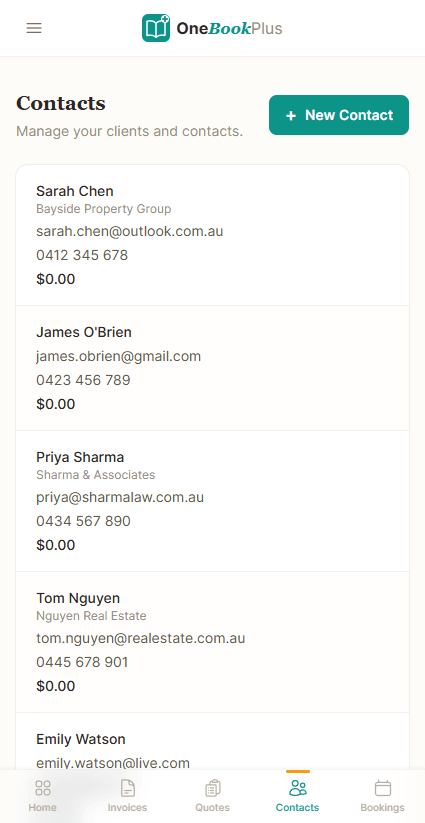
- Simple CRM & contact management
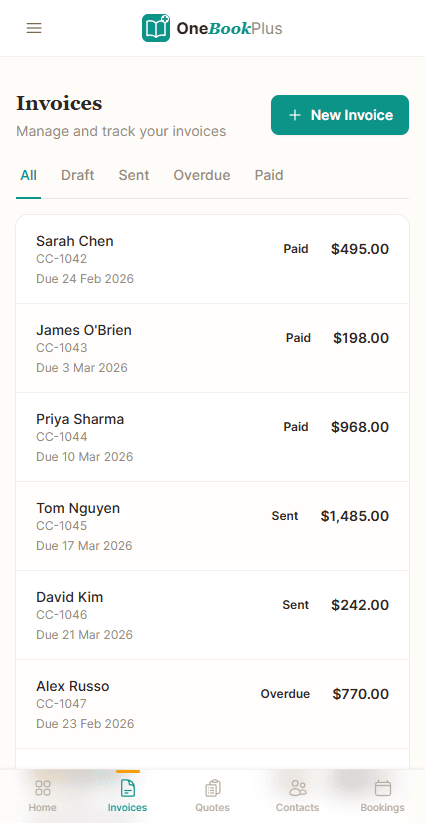
- GST-compliant invoicing
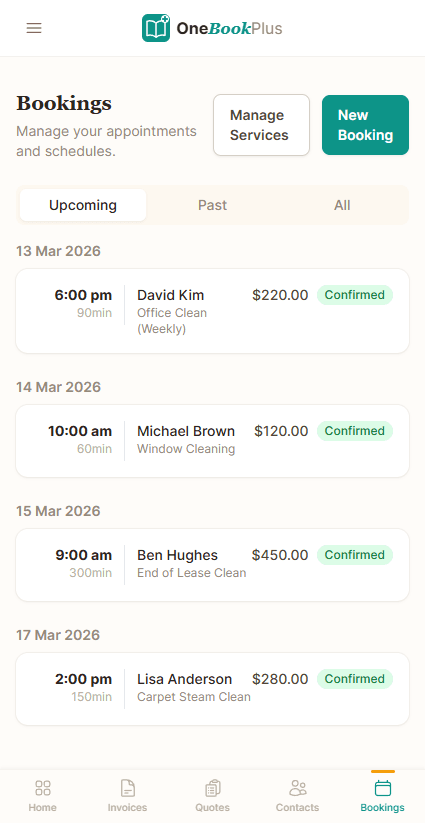
- Online booking page
- Accounting & BAS reports
- Email marketing & campaigns
- Google review requests
- Job management & pipeline
- Flat pricing, not per-user
- Setup in under 5 minutes
Zoho
50+ products, licensed per user or per employee
- CRM (Zoho CRM, separate product)
- Invoicing (Zoho Books/Invoice)
- Online booking page
- Accounting (Zoho Books)
- Email marketing (Zoho Campaigns)
- Australian GST + BAS reports (Zoho Books AU)
- Live ABN lookup against the ABR
- Google review management
- Need to choose from 50+ products
OneBookPlus vs Zoho: detailed comparison
Zoho's ecosystem is massive, but you need to buy and configure multiple products to get what OneBookPlus includes out of the box. See how they compare.
| Feature | OneBookPlus | Zoho |
|---|---|---|
| CRM & contact management | Yes | Yes |
| GST-compliant invoicing | Yes | Yes |
| Online booking page | Yes | Yes |
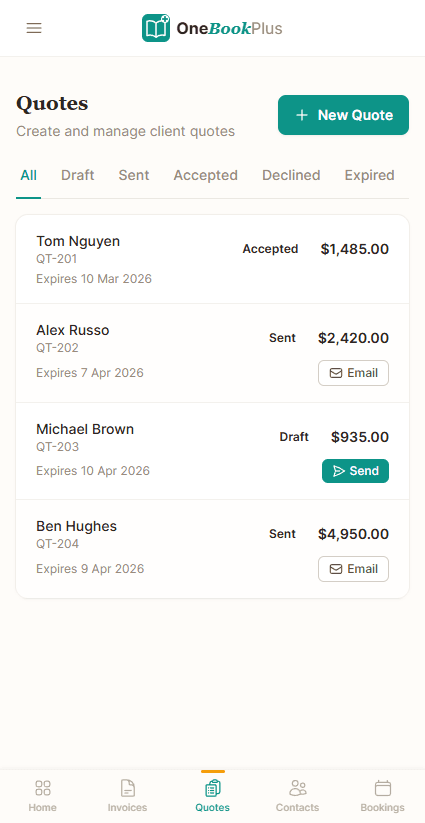
| Quoting with one-click accept | Yes | Yes |
| Accounting & P&L reports | Yes | Yes |
| Email marketing & campaigns | Yes | Yes |
| BAS / ATO tax summaries | Yes | Yes |
| Live ABN lookup against the ABR | Yes | No |
| Australian payroll (add-on, $29/mo) | Yes | Yes |
| Google review requests | Yes | No |
| Job management for trades | Yes | No |
| Basic sales register (full POS $39/mo add-on) | Yes | No |
| Simple setup (under 5 min) | Yes | No |
| One app, one login | Yes | No |
| Flat plan fee, team logins included by tier | Yes | No |
| 50+ specialised apps under one Zoho One subscription | No | Yes |
| Deep customisation (custom modules & scripting) | No | Yes |
| Price | From $0/mo AUD | Quoted in USD (Zoho One) |
| Flat plan, 1 / 3 / 5 / 10 logins by tier | Per-employee or per-user · separate products |
One bundled platform vs a 50-app suite you assemble
The dimensions where buying one Australian platform differs from licensing Zoho One and wiring its separate apps together. Each Zoho cell is cited against Zoho’s public product pages.
| Category | Feature | OneBookPlus | Zoho |
|---|---|---|---|
| Suite shape | One app vs separate products to assemble | One app, one login | 50+ apps in Zoho One Standard; pick & wire each (source: zoho.com/one) |
| CRM | Contacts, pipeline & deal management | Yes | Zoho CRM (separate product) (source: zoho.com/crm) |
| Invoicing | GST invoicing with ABN on the document | Yes | Zoho Books / Invoice (source: zoho.com/au/books) |
| Accounting | Double-entry ledger, P&L, balance sheet | Yes | Zoho Books (separate product) (source: zoho.com/au/books) |
| GST / BAS | BAS-ready figures (G1, 1A, 1B) for the ATO | Yes | Zoho Books AU edition generates BAS reports (source: zoho.com/au/books) |
| ABN validation | Live ABN lookup against the ABR | Yes | ABN printed on the invoice; live ABR lookup not documented (source: zoho.com/au/books) |
| Bank feeds | Australian bank feeds + AI categorisation | Withdrawn while we replace the provider | Bank feeds via Books (source: zoho.com/au/books) |
| Payroll | STP Phase 2 lodgement & SuperStream | Payroll add-on; no STP lodgement yet | Zoho Payroll AU edition (separate product) (source: zoho.com/au/payroll) |
| Bookings | Customer-facing online booking widget | Yes | Zoho Bookings (separate product) (source: zoho.com/bookings) |
| Email marketing | Campaigns to your customer list | Yes | Zoho Campaigns (separate product) (source: zoho.com/campaigns) |
| Reviews | Automated Google review requests after a job | Yes | Not documented (source: zoho.com/one) |
| Customer record | Single shared record across modules | One database | Separate database per app; sync via integration (source: zoho.com/one) |
| Billing model | Per-user / per-employee scaling | Flat plan, team included (1 / 3 / 5 / 10 logins by tier) | All Employee Pricing (licence every employee) or Flexible User Pricing (source: zoho.com/one/pricing) |
| Billing currency | Billed in AUD without FX risk | AUD | Priced in USD, no AUD rate published; Flexible User Pricing US$90 per user per month, on annual licensing (source: zoho.com/one/pricing) |
| Setup | Time from sign-up to first invoice | Under 5 minutes | Choose apps, configure inter-app flows (source: zoho.com/one) |
| Made for | Built ground-up for Australian SMEs | Built in Melbourne for AU tax | Global suite adapted per region (HQ India) (source: zoho.com/one) |
| Starting price (AUD, inc. GST) | From $0/mo | Quoted in USD | |
| Flat plan · 1 / 3 / 5 / 10 logins by tier · billed in AUD | Per-employee or per-user · no AUD rate published · separate apps |
Where Zoho wins
Any single app you need, built deep
Zoho has been building business software since 1996, and the depth shows in any single app you happen to need. Zoho CRM is a genuine HubSpot-class CRM with sales automation, scoring and a deep custom-module engine; Zoho Books rivals Xero for full accounting; and Zoho One Standard bundles 50+ apps including Desk (help desk), Projects, Inventory, Analytics and Creator (low-code custom apps). If you genuinely run several of those apps daily (a help desk, a project tool, a custom app built in Creator, plus CRM and accounting), Zoho One is extraordinary value and OneBookPlus does not try to replace that breadth. For an organisation with an IT team to administer the ecosystem, Zoho’s catalogue is hard to match.
Where OneBookPlus wins
One record, flat AUD pricing, AU tax at the foundation
One shared customer record, not a database per app. Even inside Zoho One, CRM, Books, Bookings and Campaigns are separate products with their own data stores that you connect via integration. In OneBookPlus a booking, a quote, an invoice and an accounting entry all hang off the same contact. Accept a booking and the contact, job card and CRM timeline are created at once, with nothing to sync.
Flat AUD pricing, not per-employee USD licensing. Zoho One’s all-employee plan requires you to license every employee in the business, and Zoho quotes it in USD with no published AUD rate. OneBookPlus is$0 to $69 a month flat, billed in AUD, and the plan includes the team: one login on Free, three on Starter, five on Plus and ten on Growth. Below ten people there is no per-seat fee at all, so your software bill doesn’t climb with every hire or move with the exchange rate. Over ten, talk to us about an enterprise arrangement rather than assuming it is unlimited.
Australian tax is the foundation, not a regional adaptation. OneBookPlus is built in Melbourne with GST invoicing, live ABN lookup against the ABR and BAS-ready G1/1A/1B figures, plus a Rostering and Payroll add-on at $29/monththat works out PAYG withholding, super and payslips (pay events are not lodged to the ATO through STP from here yet). Zoho runs an AU edition of Books and a separate AU Payroll product, but it’s a global suite localised per region rather than designed ground-up for Australian SMEs.
Why Australian businesses choose OneBookPlus over Zoho
One app instead of fifty
Zoho has 50+ products, CRM, Books, Invoice, Inventory, Campaigns, Projects, Desk, and more. You need to research which ones you need, set each up, and manage multiple logins. OneBookPlus is one app with one login that covers CRM, invoicing, bookings, accounting, and marketing. No product selection paralysis.
Flat plan fee, logins included by tier
Zoho charges per user, per product, and Zoho One is licensed either per user or across every employee in the business, quoted in USD. Either way the bill grows with headcount. OneBookPlus is $0 to $69 AUD a month flat, the same price whether you have 1 user or 10, so your software cost doesn't grow with every hire.
Built for Australian tax
Zoho Books has an Australian edition that applies GST, prints your ABN and generates BAS reports, so the tax basics are covered there. What it does not do is live ABN lookup against the Australian Business Register, and it is a separate product from the CRM, bookings and campaigns you buy alongside it. OneBookPlus is built in Melbourne with GST invoicing, BAS-ready figures and ABN lookup as standard on the same record, plus rostering and payroll as a $29/month add-on.
No integration headaches
With Zoho, your CRM data lives in Zoho CRM, invoices in Zoho Books, campaigns in Zoho Campaigns, and you need to configure integrations between them. OneBookPlus has everything in one database. Send an invoice, and it appears in the client's CRM timeline. Accept a booking, and a contact is created automatically. Zero configuration.
OneBookPlus vs Zoho: your questions answered
What is the difference between OneBookPlus and Zoho for an Australian small business?
It comes down to breadth against simplicity. Zoho is an impressive ecosystem with 50+ products, but that breadth creates complexity. You need to choose between Zoho One, Zoho Books, Zoho CRM, Zoho Invoice, and Zoho Inventory, and figure out which combination suits you. OneBookPlus gives you CRM, invoicing, bookings, accounting, and marketing in one app with one login, purpose-built for Australian businesses with GST, BAS, and ABN compliance included from day one.
How much does Zoho cost compared to OneBookPlus?
Zoho's pricing varies by product, and it is quoted in USD. Checked against zoho.com/one/pricing on 2 August 2026, Zoho One sells two plans, Essentials (15+ apps) and Standard (50+ apps), and Standard offers two licensing models: All Employee Pricing, where you must buy a licence for every employee in the business rather than only the ones who log in, and Flexible User Pricing at US$90 per user per month, on annual licensing. Zoho does not publish a per-employee figure for All Employee Pricing on that page, and there is no Australian pricing page, so ask Zoho for the AUD rate before you compare. OneBookPlus is $0 to $69 AUD a month flat regardless of team size: no per-employee scaling, no USD exchange-rate exposure, and no choosing between 50+ products.
Can OneBookPlus replace Zoho for my business?
For most Australian small businesses, yes. OneBookPlus covers the core features small businesses actually use from Zoho: CRM, invoicing, quoting, accounting, email marketing, and bookings, all in one book. If you depend on Zoho's advanced features like custom app development (Zoho Creator), helpdesk (Zoho Desk), or project management (Zoho Projects), you may need those specific tools. But if you're a 1-50 person business using Zoho for basic CRM and accounting, OneBookPlus is simpler and more affordable.
Does Zoho handle Australian tax compliance?
It does, and we should be straight about that. The Australian edition of Zoho Books applies GST, prints your ABN on the invoice and generates BAS reports (zoho.com/au/books), so on the tax basics it is a capable Australian accounting product. The real difference is not the BAS, it is the shape of the stack: Zoho Books is one product and you buy Zoho CRM, Zoho Bookings and Zoho Campaigns alongside it, each with its own database and login. OneBookPlus does GST invoicing, live ABN lookup against the Australian Business Register and BAS-ready G1, 1A and 1B figures off the same record as your bookings, CRM and marketing, on one flat AUD plan.
Which Zoho customers are better off on OneBookPlus, and which should stay on Zoho?
If you licensed Zoho One and your team really lives in three or four of its apps, you are paying per employee for 50+ products to use a handful. OneBookPlus is one app that combines CRM, GST invoicing, online bookings, accounting, email marketing, and review management, built in Melbourne with Australian GST, BAS and ABN compliance built in. Plans start free and go up to $69/month, a flat plan fee with the team included, one login on Free, three on Starter, five on Plus and ten on Growth, and no per-seat charge below that. Rostering and payroll are a $29/month add-on. Stay on Zoho if you genuinely use its breadth: Zoho CRM is a mature sales platform with automation and lead scoring (zoho.com/crm), Zoho Books is a full double-entry accounting product (zoho.com/au/books), and Zoho One bundles Desk, Projects, Inventory, Analytics and Creator (zoho.com/one). If several of those run daily and you have someone to administer the ecosystem, that catalogue is hard to beat.
What is a BAS, and does OneBookPlus produce one for me without Zoho Books?
A BAS (Business Activity Statement) is the form Australian businesses lodge with the ATO to report GST collected on sales, GST paid on purchases, and the net amount owed or refunded. OneBookPlus produces BAS-ready GST figures automatically from your invoices and expenses, G1 (total sales), 1A (GST on sales) and 1B (GST on purchases), so you can lodge or hand them to your accountant without a second accounting subscription. With Zoho you would run the AU edition of Zoho Books as a separate product alongside Zoho CRM, Zoho Bookings and Zoho Campaigns; OneBookPlus keeps invoicing, accounting and BAS in the same record as your CRM and bookings.
How OneBookPlus runs your business in one place
Running a business on Zoho usually means stitching together several products (Zoho CRM for contacts, Zoho Books for invoicing and accounting, Zoho Bookings for appointments, and Zoho Campaigns for email), each a separate app with its own login, its own dashboard, and its own database that you connect through Zoho's inter-app integrations. OneBookPlus collapses that into a single workflow. A new enquiry, whether from your online booking page, a phone call, or a referral, lands as a contact in the built-in CRM, and you raise a quote against it with one tap. The client gets a professional PDF with your ABN and a GST breakdown and a one-click accept.
Once the quote is accepted it becomes a job and, on completion, a GST-compliant invoice, all on the same record, so you never re-key a customer into a second product. Payment reminders go out automatically. In Zoho One that same journey crosses CRM, Bookings and Books, and you rely on the integrations holding the shared identity together; in OneBookPlus there is one customer record the whole way through.
Where OneBookPlus diverges most from Zoho is Australian tax. Every dollar flows straight into the built-in accounting ledger, where profit and loss and balance sheet update in real time, invoices reconcile against the payments you record, a photographed receipt or supplier invoice is read and filed as an expense, and at BAS time OneBookPlus generates an ATO-ready summary of GST collected (1A), GST paid (1B) and total sales (G1). There is no export to a separate accounting product and no integration to keep healthy, because the BAS figures come from the same invoices and expenses you already entered.
After a job is done and paid, OneBookPlus can automatically send a Google review request, and you can drop the client into an email campaign for seasonal reminders or repeat-business offers, without leaving for Zoho Campaigns or configuring a sync. One app, one login, one customer record, billed in AUD at a flat price no matter how many staff you add.
Three features where OneBookPlus pulls ahead
Australian tax built into the core, not bolted on
Zoho runs an AU edition of Zoho Books with GST support, plus a separate Zoho Payroll product, both adapted from a global platform. OneBookPlus was built in Melbourne with Australian obligations as a first-class concern: GST invoicing, live ABN validation against the ABR, and BAS-ready G1/1A/1B figures on the same record as your CRM and bookings, so there is no juggling separate products to keep your tax data in sync. Rostering and payroll is a $29/month add-on that handles rosters, timesheets, pay runs, PAYG withholding, super, payslips and an ABA bank file. Single Touch Payroll pay events are not lodged to the ATO from OneBookPlus yet, so you still report each pay run through STP-enabled software.
A booking page wired straight into the business
Zoho offers Zoho Bookings as a separate product you license and then connect to CRM and Books. In OneBookPlus the booking page is part of the same app: a customer picks a service and a time slot, and the booking instantly creates a contact in the CRM, a job card, and the start of the quote-to-invoice pipeline, with no app-to-app integration, and no separate database for the appointment to live in away from the customer's invoices.
One customer record across CRM, invoicing and accounting
Zoho One's value is breadth, but each app keeps its own data store; the unified view depends on integrations between products. OneBookPlus stores the contact, their bookings, quotes, invoices, payments and accounting entries in a single database, so the CRM timeline shows the full financial history with no configuration. For a small Australian team without an admin to maintain inter-app flows, that single source of truth is the difference between software that just works and software you manage.
Who should switch from Zoho to OneBookPlus
Teams paying for Zoho One but using only a handful of apps.
If you licensed Zoho One on All Employee Pricing, which requires a licence for every employee, but your team really only lives in CRM, Books and the odd booking, you're paying per employee for 50+ apps to use three. OneBookPlus delivers that core at flat pricing with no per-employee scaling.
Owners tired of maintaining integrations between Zoho apps.
If you spend time keeping CRM, Books and Campaigns talking to each other, and chasing records that didn't sync, OneBookPlus keeps everything in one database. There are no inter-app flows to configure because there are no separate apps to connect.
Australian businesses that need real GST, BAS and ABN support.
If GST, BAS lodgement figures and live ABN lookup matter to you, OneBookPlus has them in the core product. Zoho's AU edition of Books covers GST, but you add Books and Payroll as separate products on top of CRM, Bookings and Campaigns.
When Zoho might still be the better fit:
If you genuinely use Zoho's breadth (a help desk in Zoho Desk, project management in Zoho Projects, custom applications built in Zoho Creator, inventory in Zoho Inventory) and you have someone to administer the ecosystem, Zoho One's 50+ apps are hard to beat. OneBookPlus deliberately focuses on the run-your-business core (CRM, invoicing, bookings, accounting, marketing) rather than matching that catalogue.
How to switch from Zoho to OneBookPlus
Export contacts from Zoho CRM and invoices from Zoho Books
In Zoho CRM, export your Contacts and Accounts as CSV; in Zoho Books, export your customers and invoice history. Because your data is spread across multiple Zoho products, you'll pull a file from each app you currently use: CRM, Books, and Bookings if you run it.
Import once into OneBookPlus and set your AU tax details
Use the bulk import to bring contacts and invoice history into the single OneBookPlus database, where they merge into one customer record instead of staying split across apps. Set your ABN, GST preferences and payment terms so every quote and invoice is ATO-compliant from day one. This takes about 15 minutes.
Cancel the Zoho products you no longer need
Because OneBookPlus replaces several Zoho apps at once, most businesses retire three or four subscriptions (CRM, Books, Bookings and Campaigns) on day one, ending per-employee billing immediately. Keep Zoho live for a month as a read-only archive if you want, then close it once the new workflow is comfortable.
Zoho vs OneBookPlus: simplicity over a 50-product maze
Zoho has built an impressive empire of business software: over 50 products covering everything from CRM to project management to custom app development. For large organisations with IT teams to manage the ecosystem, that breadth is genuinely valuable. But for a small Australian business owner who just needs to send invoices, manage clients, and take bookings, Zoho's product catalogue creates more confusion than capability.
The core challenge with Zoho is decision fatigue before you even start. Do you need Zoho CRM or Zoho Bigin? Zoho Books or Zoho Invoice? Zoho One bundles everything, but it is licensed per user or per employee and quoted in USD, so costs escalate with headcount for small teams. Meanwhile, Zoho's Australian tax compliance remains limited: it was built in India and adapted for global markets, not designed ground-up for GST, BAS, and ABN requirements the way a local platform is.
Feature deep dive
- One app, zero product selection. Zoho asks you to choose between CRM, Books, Invoice, Inventory, Campaigns, Desk, Projects, and dozens more, then configure integrations between them. OneBookPlus is a single app with one login that includes CRM, invoicing, quoting, bookings, accounting, email marketing, and review management. No product research, no integration setup, no multiple dashboards to check.
- Australian-first tax and compliance. Zoho Books offers basic GST support adapted from its global platform, but lacks native BAS report generation, ATO-ready summaries, and real-time ABN validation. OneBookPlus is built in Melbourne with Australian tax obligations as a first-class concern: GST invoicing, automated BAS calculations and ABN lookup are included from day one.
- Industry-adaptive interface. Where Zoho gives every business the same generic interface across its products, OneBookPlus adapts its UI based on your industry. A tradesperson sees job management and quoting up front. A retailer sees POS and inventory. A consultant sees time tracking and bookings. You get a focused workspace instead of a sprawling dashboard built for everyone and optimised for no one.
Who should switch
- You signed up for Zoho One but your team only uses CRM and invoicing, so you're paying per user for 50 products while using two. OneBookPlus gives you those features on a flat plan that includes the team, one login on Free, three on Starter, five on Plus and ten on Growth, with no per-seat charge below that.
- You're spending hours configuring Zoho integrations between CRM, Books, and Campaigns, data doesn't sync reliably, and you're maintaining three separate dashboards. OneBookPlus keeps everything in one database with zero configuration.
- You need proper Australian tax compliance (BAS summaries and ABN validation) and Zoho's adapted global platform doesn't cut it.
- When Zoho might still be better: If you need specialised tools like Zoho Creator (custom apps), Zoho Desk (helpdesk), or Zoho Projects (project management) and you have an IT team to manage the ecosystem, Zoho's breadth is hard to match.
Getting started
Export your contacts and invoices from Zoho CRM and Zoho Books as CSV files. Sign up for OneBookPlus and use the bulk import tool to bring everything across, contacts, invoice history, and client notes. Because OneBookPlus replaces several Zoho products at once, work out which of your current Zoho subscriptions the one plan covers before you switch, and cancel those as they fall due.
From the blog
Related reading: switching from zoho
Practical guides and explainers from the OneBookPlus blog, grouped by topic.
Industries
Comparisons
One app to pick,
not fifty
CRM, invoicing, bookings and Australian GST in one product, with no module shopping and no per-user bill: logins are included by tier (1 / 3 / 5 / 10 logins by tier).
Free plan available, no card needed.
About this comparison
How we compared OneBookPlus to Zoho
Feature claims about OneBookPlus reflect what is shipping today on onebookplus.com.au. Zoho pricing and feature claims were read off Zoho’s public Australian product pages on . Vendor pricing changes frequently, so check the Zoho website for your specific situation before making a decision.
Disclosure: OneBookPlus publishes this comparison and stands to benefit if you switch. We aim to compare like-for-like on capability and Australian tax compliance, if you spot something out of date, email hello@onebookplus.com.au and we’ll review it.
About the author

Bishal Shrestha
Founder & CEO, OneBookPlus
Bishal spent a decade running digital projects for Australian small businesses before founding OneBookPlus. He writes and maintains these pages, and publishes what OneBookPlus does not do alongside what it does.
Read the founder bioHow this page was researched
Every Zoho price and capability claim on this page was read off Zoho's own published Australian pages on the date printed above, and recorded in competitor-facts.ts with that date. Claims about OneBookPlus describe what ships today, and the page names what we do not do.
Last reviewed and updated: by Bishal Shrestha