For Market Stalls, Pop-ups & Festival Vendors
Run Your Stall From Your Phone
Count the till in 90 seconds, then drive home.
Phone-camera POS, GST-aware receipts, 90-second end-of-day cash count, sole-trader BAS summary. Built for Australian market stallholders, weekend pop-ups and festival vendors who don't need an iPad stand or a card-terminal contract to take a sale. All-in-one for $0 to $69/mo, replaces the Square POS app + Xero + a stock spreadsheet.
Free plan. No card required. · GST & ABN built-in · Phone-camera barcode scan · Sign up in 60 seconds
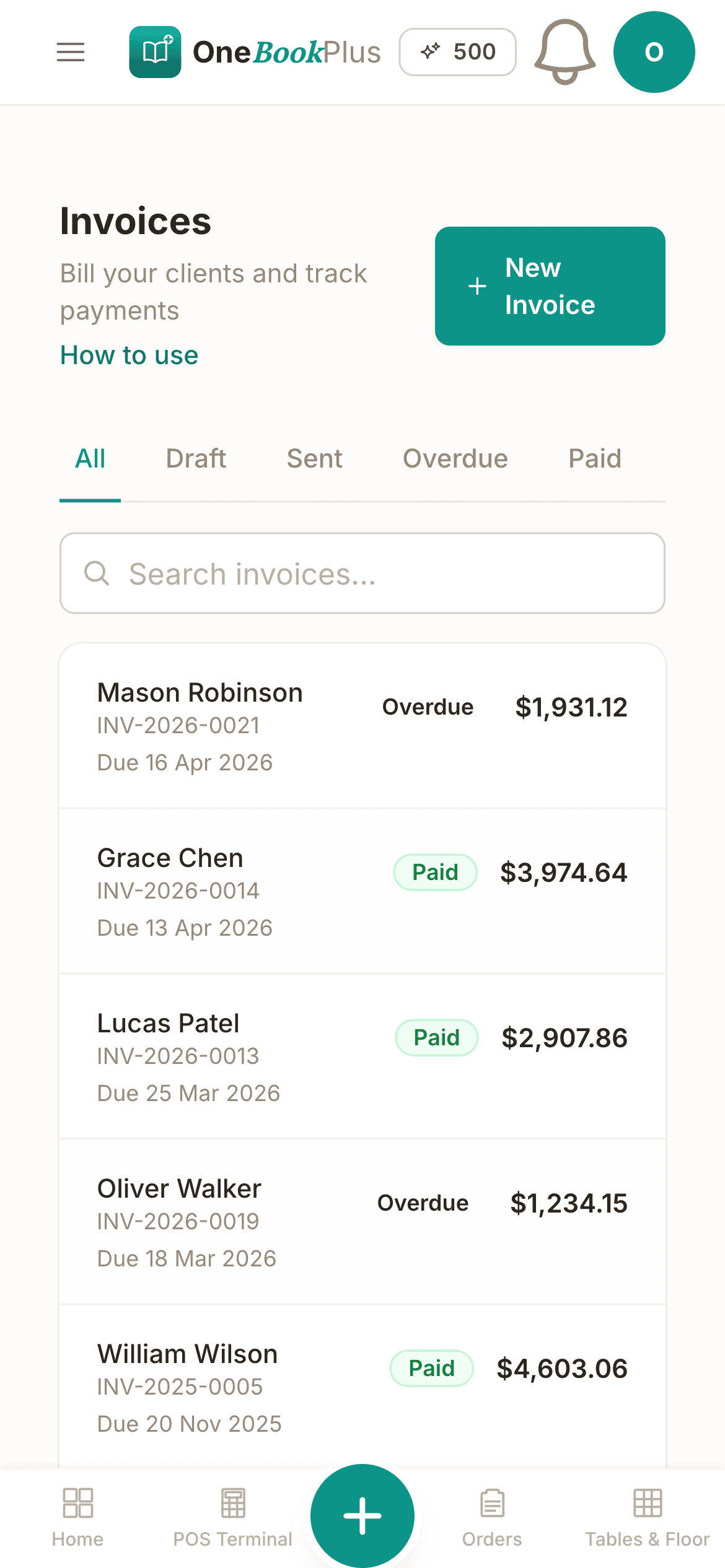
Cut $37+/mo from your software stack by replacing the Square POS app + Xero + a stock spreadsheet with OneBookPlus.
See your savingsFree Tools & Resources
Reference material for owners and stallholders
Start a Retail Business
8-step founder guide, ABN, GST, lease, POS, supplier terms, online channel, opening week.
ComplianceConsumer Guarantees (ACL)
Section 54 acceptable quality, section 55 fitness for purpose, refund vs replace decision tree, signage requirements.
ReferenceMarket Stall Permits by State
Food-stall permits, casual trader licences, council fees, public-liability requirements for market vendors.
Operator GuidePOS Buyer's Guide
Square vs Lightspeed vs Vend vs Shopify POS vs Tyro, features, hardware costs, transaction fees, AU support.
InteractiveMarkup & Break-Even Calculator
Interactive, cost, markup % vs margin %, retail price, GST, break-even unit volume and dollars.
Key takeaways
5- Australian sole-trader stallholders need an ABN (free via the Australian Business Register) and become GST-registered above $75,000 turnover (the GST threshold). Below that line you can still claim a tax deduction for stall fees, packaging, fuel and stock, register an ABN even if you don't register for GST so you avoid 47% no-ABN withholding on supplier invoices.
- Most state councils now require a temporary food licence + Food Safety Supervisor (FSS) for any prepared-food stall (FSANZ Standard 3.2.2A). Non-food stalls (crafts, art, plants, secondhand) typically need only a market-operator's permit + public liability insurance, Markets Australia and the Australian Made Campaign offer member rates.
Show 3 moreShow less
- Common AU stall payment hardware: a Square Reader or a Stripe Terminal BBPos, each a once-off reader cost plus a percentage per tap, or a Tyro Go on a monthly fee plus a lower percentage. Read the current figures off each vendor's own page before you budget. Pure cash works too, and many stallholders take a clean lunch break of cash on a busy day.
- OneBookPlus replaces the typical stall-vendor stack, Square POS + Xero + a stock-tracker spreadsheet, with one platform from $0/month (Free, perfect for one-stall sole traders) to $29/month (Starter) or $69/month (Growth). Bundled: counter POS, daily sales, end-of-day cash count, GST-aware invoicing, BAS-ready summary, supplier expenses, Google review automation.
- Free plan covers a small stall's needs forever, 10 invoices/month, 250 contacts, online booking page (for pre-orders or wholesale enquiries), and Stripe payments. Australian-built and supported, in Melbourne.
Built for the truck-and-trestle setup
Everything fits in one apron pocket
Most retail software assumes you have a fixed location, a permanent terminal, and a barcode scanner bolted to the counter. Market stalls don't. So we made the phone the till, the scanner, the way the receipt reaches the customer and the end-of-day calculator, and the books take care of themselves between markets.
Phone is the POS
Ring up a sale and take cash, then email the receipt. Bring whatever card kit you already use, a Square Reader, a Tyro Go or a bank terminal, and record the tender against the sale. Tap to Pay on iPhone is built but stays switched off in the public app until Apple grants the distribution entitlement, so plan on the payment link. No iPad mount, no per-transaction kit to remember at 6am.
Phone-camera barcode scanning
Scan an EAN-13 with the camera in half a second. No $40 USB scanner to pack, no hardware to drop in the mud. Generate your own internal barcodes for hand-made goods (200-prefix EAN-13, GS1-compliant for in-store use).
Cash-heavy end-of-day count
Market stalls are still 60% to 80% cash for most operators. Tap end-of-day, enter your physical till count, the system computes expected cash from POS, shows variance colour-coded, and tells you exactly what to deposit Monday morning.
Receipts by print, email or SMS
Hand the docket over however the customer wants it. Your ABN and the GST split are on all three. Two AU rules apply and they are not the same one: proof of transaction is compulsory at $75 excluding GST and up, and a GST-registered seller must give a tax invoice on request at $82.50 including GST and up. The till titles the document correctly for whichever you are, and never shows GST an unregistered stallholder did not charge.
Digital loyalty for regulars
The Sunday-market crowd remembers stallholders who remember them. Phone-number signup at the till, stamps fire automatically on every sale, the dashboard shows who's drifted so you can text them before next weekend.
Sole-trader BAS without the spreadsheet
GST collected over the quarter, GST credits on stall fees + stock + fuel + packaging, rolled into a one-click summary. Quarterly BAS for sole traders takes minutes, not Sunday afternoons.
Free plan available · No credit card · No card terminal contract
See it in action
The screens between the counter and the books.
Not mockups, the real product screens for a Saturday at the market.
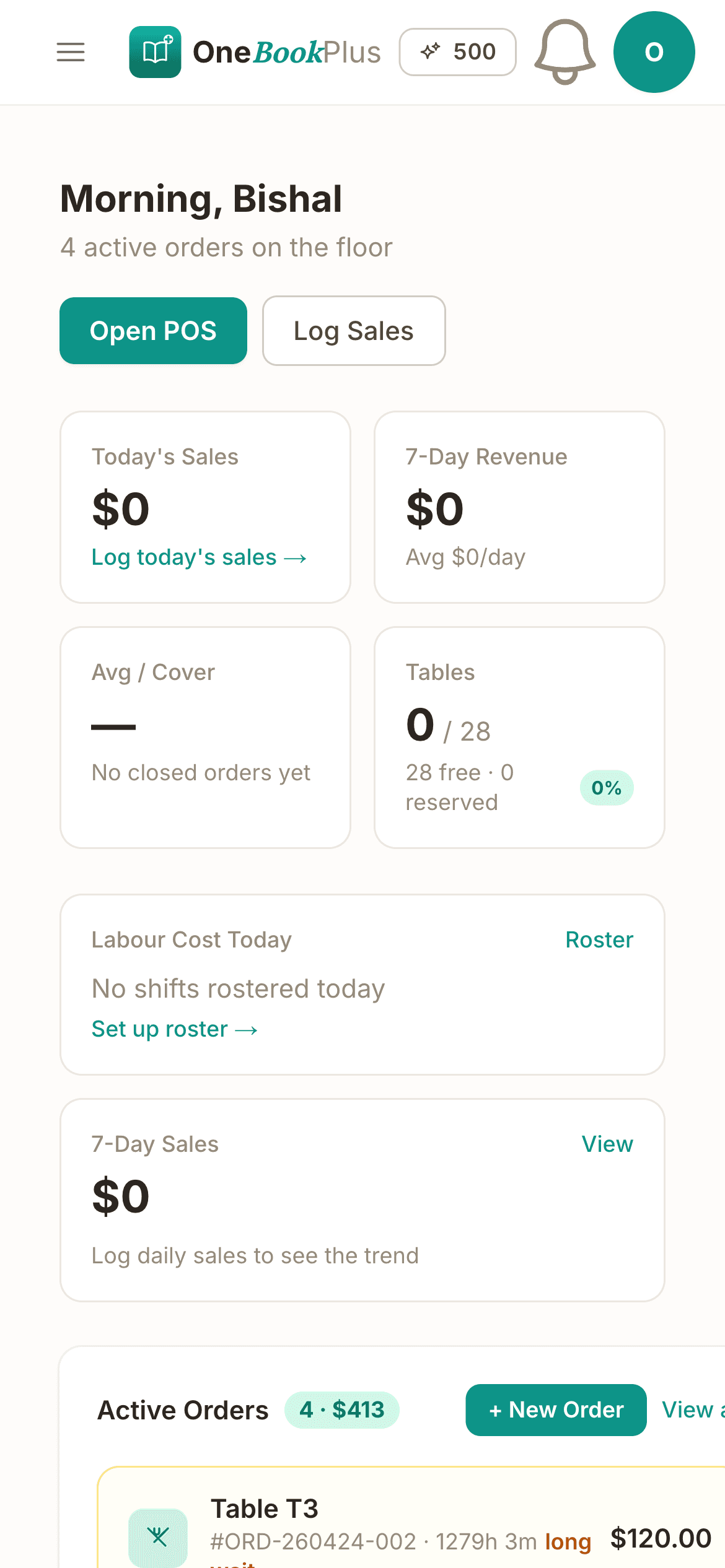
Phone-camera POS at the trestle
Scan an EAN-13 with the camera, tap a category, take cash, or take the card on your own Square Reader or bank terminal and record it against the sale as Card. Email or text the receipt and the sale auto-posts to your books. No iPad mount, no contract with us.
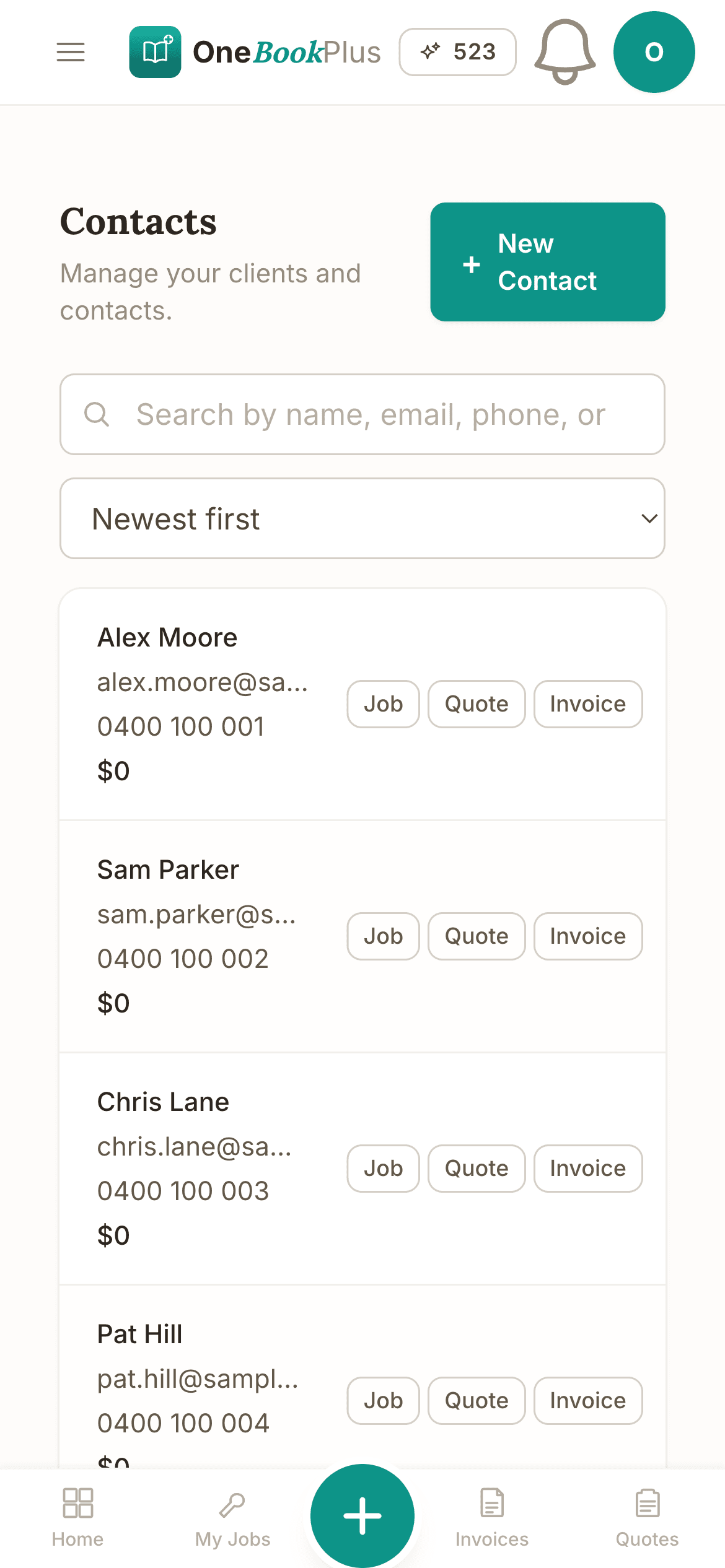
Product catalogue with internal barcodes
Set GST-inclusive prices, snap a photo, and bulk-generate GS1 200-prefix EAN-13s for hand-made candles, ceramics or jams, no GS1 Australia membership, no per-barcode fee. Print shelf tags from the same screen.
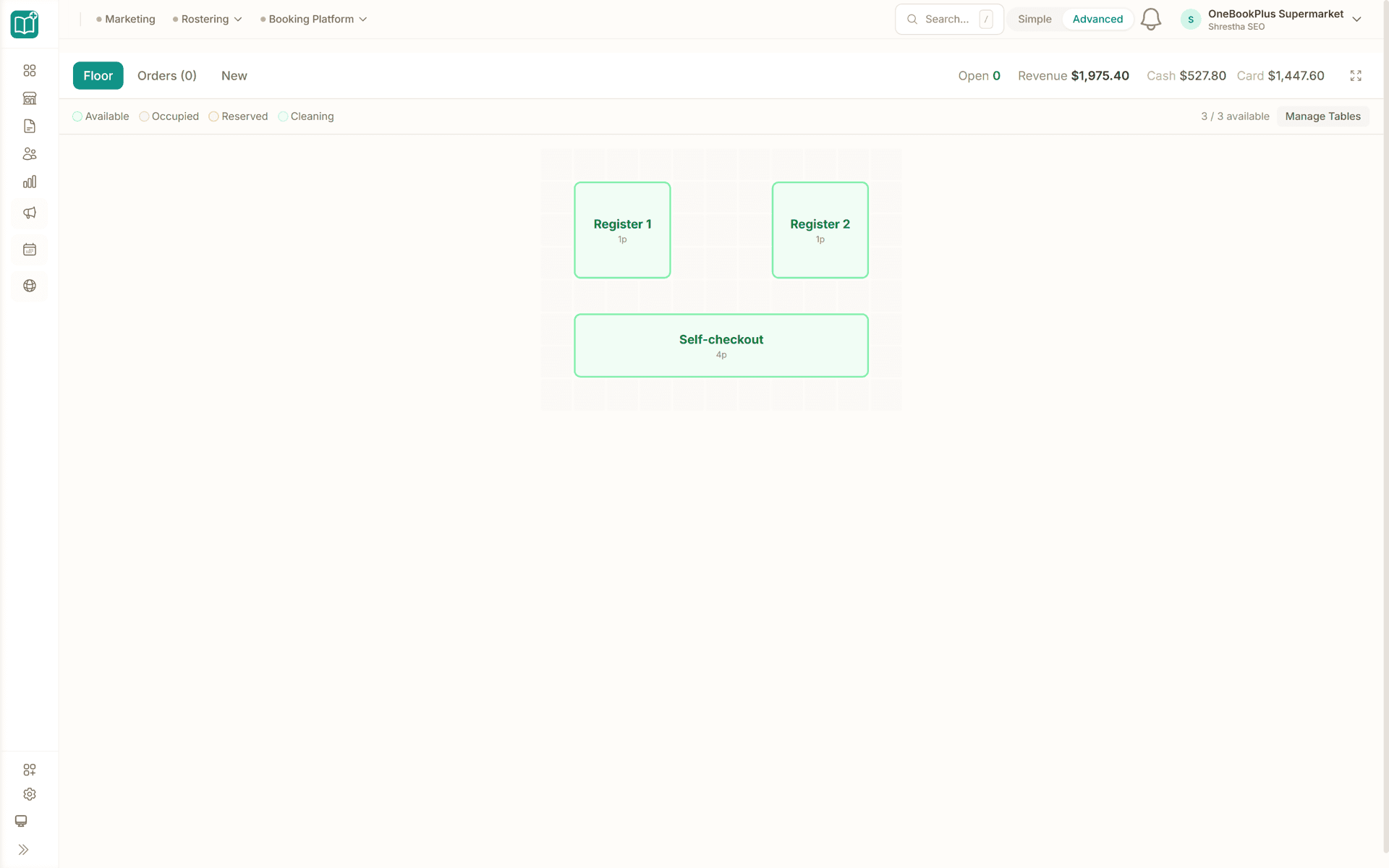
End-of-day cash count + takings dashboard
Tap Close out the till, enter the tin count against expected cash, see variance colour-coded and the exact deposit figure. The dashboard rolls daily takings, AOV and the Square deposit you are expecting on Monday.
Saturday to Sunday lockup
How a market day runs on OneBookPlus
Set up the catalogue once, open POS at the market, count the till at the truck, quarterly BAS in one click. The phone does the rest.
Set up before the market
Add your products on the phone, set GST-inclusive prices, snap optional photos. If you want barcodes, generate them in the catalogue (EAN-13 internal-use prefix, fully scannable).
Open POS Saturday morning
Phone-camera scan or tap a category. Cash or tap-and-go. Send the receipt by email or SMS, or print it to a printer the device already uses. Every sale auto-posts to your books, no Monday data entry.
Close out at the truck
End of market: tap End-of-Day, count the cash drawer, enter the figure. Variance shows colour-coded, deposit amount calculates. 90 seconds, done, drive home.
BAS at end of quarter
GST collected on every sale, GST credits on stall fees + packaging + stock + fuel, one click summary. Drop it to your accountant, or self-lodge via the ATO Tax Lodgement app (coming soon).
Ring up your first test sale the day you sign up
Who it's for
Built for every kind of stall
From a one-table candle maker to a 6-week festival vendor.
Hand-made / Crafts
Candles, soaps, ceramics, jewellery: one person, one weekend a fortnight. Needs phone POS, internal-use barcodes, GST-aware receipts, sole-trader BAS.
Food / Bakery Stall
Bread, jams, granolas, hot food. Needs FSS-compliant receipts, expense tracking for ingredients + market fees + fuel, daily-bake stock decrement.
Plants / Garden
Seedlings, potted plants, fresh produce. Often cash-heavy. Needs strong EOD cash count + supplier-invoice tracking for soil/seeds/fertiliser.
Festival / Pop-up Vendor
Multi-day events, mixed-volume sales, high-cash takings. Needs a fast POS that survives unreliable wi-fi and a clean per-event takings report.
What a four-tool stack costs each month
Named tools, at each vendor’s own cheapest published plan, and ours underneath. Vendor pricing changes, so check each one before you decide.
Or use OneBookPlus
$0/mo
Everything in the list above, on one bill.
Start freeNo credit card · Free forever · Cancel anytime
Example walkthrough
Saturday at the stall, first sale to pack-down
An illustrative walkthrough of a typical market-stall day
You unload before dawn, get the trestle up and the banners pinned, and the stall is ready before the first customer arrives.
You open the POS on your phone and scan the item's barcode with the camera, using the labels you printed with the bulk barcode generator. The customer taps her card on your reader and you record the sale as a card payment. The receipt emails itself from her loyalty record, which she joined by phone number at an earlier market, and the next stamp on her card fires automatically.
Through the morning the transactions stack up, mostly cash, and the phone dashboard shows takings climbing without you tallying anything.
When you pack up, you tap End-of-Day before driving home. The POS shows the expected cash, you enter the float and the physical count from the tin, and the variance is calculated for you. You record how much is going to the bank and save the snapshot.
The market operator's fee invoice gets snapped on the phone and tagged as market fees, so the GST credit joins the quarterly BAS pile automatically.
At quarter-end the BAS summary comes out in one click, with GST collected on every sale, GST credits on stall fees, materials and fuel, and the net amount owing worked out. You email it to your accountant.
How we compare
OneBookPlus vs the market-stall stack
The honest comparison against what most stallholders run today.
| Feature | OneBookPlus | Square POS app | Lightspeed Retail | Spreadsheet |
|---|---|---|---|---|
| Phone-camera POS | Yes | Yes | No | No |
| GST-aware receipts | Yes | No | No | No |
| Internal-barcode generator | Yes | No | No | No |
| End-of-day cash reconciliation | Yes | No | Yes | No |
| Supplier-expense capture (phone photo) | Yes | No | No | Yes |
| BAS-ready quarterly summary | Yes | No | No | No |
| Loyalty stamp cards | Yes | No | No | No |
| Per-market takings filter | Yes | No | No | Yes |
| Free plan available | Yes | Yes | No | Yes |
| Price | From $0/mo | Free + 1.6-2.2% / tap | Subscription | Free (your time) |
Built for Australian market stallholders
$0
Free plan, perfect for one-stall sole traders
1 screen
End-of-market count and takings in one entry
Phone-only
No card terminal, no hardware kit
BAS-ready
GST in, GST out, one-click summary
Retail savings calculator
What does your retail tech stack really cost?
Adjust the inputs below to match your real spend. The total updates live, and so does the dead-stock value you'd recover by acting on the report each month.
POS subscription (Square, Shopify POS, Lightspeed)
Monthly per-location fee
Stock / inventory app (Cin7, DEAR, TradeGecko)
Monthly subscription
Accounting (Xero, MYOB)
Monthly subscription
Email marketing (Mailchimp, Klaviyo)
Newsletters + campaigns
Average inventory value on hand
Used to size the dead-stock recovery bonus
Active SKUs / variants
More SKUs means more drift toward dead stock
Your current tool stack
$216/mo
= $2,592/year
With OneBookPlus Starter
$29/mo
Replaces everything in the list. One bill.
~1% of $30,000 inventory recovered/mo via the dead-stock report. Markdown the slowest movers before they cost you shelf space.
Free plan available · No card required · Cancel anytime
One day, written by itself, an illustrated day of an Australian market stall run on OneBookPlus
An illustrated day, not real customer data. Scroll through it from morning to 5pm: the AI receptionist answers and books a missed call, the work runs from the app, the GST invoice is sent on the spot, payment lands and the books balance themselves, a review invite is queued for the next daily run, and the day closes with the ledger already written.
6:10am
While the trestle goes up
The wholesale call you'd have missed at 6:14am.
A cafe owner saw your mugs last Saturday. She rings at 6:14 am while you're pinning banners, twenty mugs for her new fit-out.
AI Receptionist
Answered while the trestle went up.
The AI answers in two rings, takes the wholesale order and texts her a pickup time, while you set out the first crate.
At the stall
The order packs itself onto a card.
Between customers, the order card is on your phone: twenty speckled mugs, wholesale price pre-filled from your price list.
From the stall
Invoice sent at pickup.
She collects at ten. One tap turns the order into a GST invoice with a pay link, no laptop, no Sunday-night paperwork.
During the midday rush
Paid. Counted. Balanced.
The payment lands during the midday rush, the books update themselves, and $60.00 GST is set aside for BAS.
Reputation on autopilot
The review ask, once the mugs are collected.
Two hours after payment the AI asks the cafe owner for a review, timed to the delay you set. No chasing, no awkward ask.
Pack-down, not paperwork
A full market day, and a wholesale account.
You traded a full market day and landed a wholesale account. The book did the rest.
$0
collected
0
admin tasks done by AI
0
evenings lost
An illustrated day, not real customer data. AI Receptionist is a $79/mo add-on that needs AI Companion ($25/mo, included on Growth), and AI Companion is what sends the review invite as well. The rest of the day is the app itself.
Stallholder pricing
Four plans. All built for stalls and pop-ups.
Start free, upgrade when the markets justify it. No contracts, no setup fees, no per-terminal tax, because there's no terminal. Cancel any time.
Free
$0/forever
Ring up your first market sale this weekend, no credit card.
- 10 invoices/month
- Phone-camera POS + cash tender pad
- End-of-day cash count
- Receipts by print, email or SMS
- 250 contacts + online booking page
- Mobile PWA (works at the trestle)
Starter
$29/mo
Replaces the Square POS app + Xero + your stock spreadsheet.
- Everything in Free
- Unlimited invoices, sales & products
- Internal-barcode generator + shelf tags
- Stripe Pay Now link on every invoice
- Loyalty stamp cards for regulars
- Cash-count variance + deposit figure
- Accounting, P&L & one-click BAS summary
- 3 team members (you + 2 helpers)
No card · Drops to Free if you don't upgrade
Plus
$49/mo
Outgrowing the basics, unlimited contacts & bookings, advanced reporting.
- Everything in Starter
- Unlimited contacts & bookings
- Advanced reporting & analytics
- Batch invoicing
- Budget tracking
- 5 team logins
- 10 GB website media storage
Growth
$69/mo
For vendors working a circuit, Rose St, Finders Keepers, Salamanca, the Bowerbird and the EKKA.
- Everything in Plus
- Per-market takings filter + tags
- Reputation Engine (auto Google reviews)
- SMS marketing to your regulars list
- Paid add-on: Google Ads dashboard, $99/mo
- Supplier expense capture (snap the stall-fee invoice)
- 10 team members
Prices in AUD inc. GST. Online card payments carry Stripe processing fees (1.7% + 30¢ AU cards) plus a 2.5% OneBookPlus platform fee. Cards taken on your own reader carry only that reader's fees. See the full plan comparison
Already running a POS app?
Switching from Square, Shopify POS, Lightspeed X-Series or a stock spreadsheet?
Switching is designed to fit in a single evening between markets. Export your products and customers as CSV from Square (or just open your stock spreadsheet), import them into OneBookPlus with the bulk importer, generate your internal barcodes, and you're ringing up sales before Saturday's setup.
- 1Export your item library + customers CSV from Square, or grab your stock spreadsheet (5 min)
- 2Upload via the bulk importer, names, GST-inclusive prices and stock auto-map (10 min)
- 3Bulk-generate internal-use EAN-13 barcodes and print shelf tags (15 min)
- 4Cancel your Xero subscription and bin the spreadsheet, coffee in hand
Switch from
Built-in AI
Can’t get to the phone? Your AI can.
You're serving the counter, the phone rings for stock, orders and hours you can't get to.
OneBookPlus
AI Receptionist · incoming call
“Do you have the blue one in stock to pick up?”
If you don't answer, the AI books it, Click & collect · ready today 3pm, and texts a confirmation.
Extend Your Toolkit
Apps for stalls & pop-ups
POS, loyalty, reviews, accounting, install only what you need, cancel anytime.
Australian Owned
Built in Melbourne, AU
GST Compliant
ATO-ready from day one
Encrypted & Isolated
TLS in transit, AES-256 at rest, tenant isolation at the database layer, read the security page
Free Plan Available
No credit card needed
Frequently asked questions
Common questions about market-stall and pop-up management software in Australia.
Do I need a card reader to take payments at my stall?
Not yet on the phone itself. Tap to Pay on iPhone is built but stays switched off in the public app until Apple grants the distribution entitlement, so bring whatever card kit you already use (Square Reader, Tyro Go, a bank terminal, or nothing) and record the sale as 'Card' or 'Cash'. The POS logs the tender and reconciles against your bank deposits later, and the EOD cash count is built specifically for the cash-heavy market vendor.
How do I do barcodes when I make my own products?
Open the products page and use the bulk barcode generator, it creates EAN-13 codes with the GS1 200 prefix (reserved for in-store / restricted-distribution use, won't clash with any manufacturer code). Print them with the built-in shelf-tag printer, stick them on your hand-made goods, and the phone camera scans them like any other product barcode. No GS1 membership fee, no per-barcode cost.
I'm a sole trader and probably under the GST threshold. Does the platform still make sense?
Yes. Below $75,000 turnover you're not required to register for GST, and OneBookPlus's Free plan covers a small-stall sole-trader's full needs forever, invoicing, POS, daily sales, online booking page, Stripe payments. When you cross the threshold (most stalls hit it in a couple of good seasons), enabling GST is one toggle and every receipt becomes GST-inclusive with your ABN. The BAS summary builds itself.
What about end-of-market cash counting? That's our biggest headache.
It's specifically built for you. After the market, tap 'Close out the till'. The POS already knows the expected cash from today's sales. Enter your physical count + the opening float. Variance shows live, colour-coded (balanced under $1, amber under $5, red above). The 'cash to bank' figure is exactly what you drop in the safe. Most stallholders finish in 90 seconds.
How does the loyalty stamp card work for one-stall-per-week regulars?
Customers join at the till by phone number, five seconds, no app to download. Every paid sale fires a stamp automatically. When their card fills (e.g. 'buy 10 coffees get 1 free' or 'spend $100 get $10 off'), the next purchase shows the reward as a cart discount the operator confirms. The dashboard shows whose birthday is this week so you can offer a free item when they're at next weekend's market.
Multi-market vendors, can I separate sales by location?
Use the order tags / notes field to mark which market each sale came from. Sales reports can then filter or you can run a dedicated dashboard per location. Multi-tenant support (totally separate books per stall) is on the roadmap, most one-person stalls don't need it; multi-stall operators today usually run one tenant and filter by market in reports.
What does it replace?
Most stall-holders we onboard come off a Square POS app (free hardware, but 1.6% to 2.2% per tap), Xero ($37/mo for the books), and a spreadsheet for stock. Vendor prices verified 2 August 2026. OneBookPlus replaces the trio from $0/mo Free, $29/mo Starter or $69/mo Growth. The ROI calculator below shows the side-by-side with your real numbers.
About the author

Bishal Shrestha
Founder & CEO, OneBookPlus
Bishal spent a decade running digital projects for Australian small businesses before founding OneBookPlus. He writes and maintains these pages, and publishes what OneBookPlus does not do alongside what it does.
Read the founder bioHow this page was researched
The compliance and licensing statements above are taken from the bodies this page links to, including Food Standards Australia New Zealand, the ATO and the ACCC, so you can read the rule rather than take our word for it. Plan prices come from the OneBookPlus price registry, so the page and the checkout cannot disagree. Everything said about OneBookPlus describes what the product does today, and the page says so where it does not do something.
How OneBookPlus Works for Market Stalls
Most weekend stallholders run on a patchwork: the free Square POS app for the sales, a stock spreadsheet that never quite matches the tin, and Xero at $37/mo for the books that you only open at BAS time. You take 1.6% to 2.2% on every Square tap, you re-key the day's takings on Sunday night, and when the market operator's stall-fee invoice arrives you stuff it in the glovebox and hope to find it in October. The cash count is the worst part, counting the drawer against a guess, never sure whether you're $5 down or just remembered the float wrong.
OneBookPlus rebuilds the stall around the phone. The phone is the POS, the EAN-13 scanner, the way the docket reaches the customer, and the end-of-day calculator. Ring up a sale by camera-scanning a barcode or tapping a product tile; take cash, or take the card on the reader you already carry and record the tender against the sale. Tapping the card on the phone itself is not live: Tap to Pay on iPhone is built but stays switched off in the public app until Apple grants the distribution entitlement. Then email or text the receipt straight to the buyer, or print it if you have a printer on the device. It carries your ABN and the GST split per line, and it is titled a tax invoice only when you are registered for GST and the sale actually carried some, so an unregistered stallholder never hands over a document claiming tax they did not charge. A phone cannot drive a thermal printer over Bluetooth, and no browser POS can, which is exactly why the send-it-to-them path exists. And every sale posts straight to the books, so Sunday-night data entry simply stops.
Your Market Day
Set the catalogue up once, GST-inclusive prices, a photo, internal-use barcodes generated with the GS1 200 prefix (no GS1 Australia membership, no per-barcode cost). Saturday morning you open POS at the trestle; sales fly through the camera scanner even on patchy market wi-fi. Loyalty stamps fire automatically for the regular who knows your bowls by hand. At pack-up you tap “Close out the till”, count the tin against the expected-cash figure the POS already knows, and the variance shows colour-coded with the exact deposit amount, most stallholders finish in 90 seconds and drive home.
Expenses & Accounting
Snap the market operator's stall-fee invoice on the phone and tag it “market fees”; fuel, packaging, clay, glazes and stock from your suppliers categorise as GST credits. Come BAS time the quarterly summary is already built, GST collected on sales, GST credits on expenses, net amount owing, exportable in one click or, once the ATO Tax Lodgement app ships (coming soon), lodged direct to the ATO.
Getting Started
Sign up free, no credit card, no card-terminal contract. Choose “Market stall” as your business type and OneBookPlus pre-configures GST-inclusive pricing, an AU chart of accounts, and receipt templates with your ABN. Import your products and customers via CSV from the Square item library or your stock spreadsheet, and generate your barcodes. The Free plan covers a one-stall sole trader's needs forever; flip on GST in one toggle the season you cross the $75,000 threshold.
Set up the stall. We'll handle the books.
Phone POS, cash count, BAS. From $0/mo, no contract, no hardware kit, no Sunday-afternoon spreadsheet.
Get started freeReviewed by Bishal Shrestha
Authoritative sources
Where the tax, GST and food-safety facts on this page come from
Australian stallholders operate under the GST law, the no-ABN-withholding rule, state food-safety standards and consumer law. We cite the primary bodies for the claims on this page so you can verify directly.
- ATO, Registering for GST ($75,000 turnover threshold) , When a sole-trader stall must register for GST.
- ATO, Business activity statements (BAS) , Quarterly GST reporting obligations for stallholders.
- ATO, No-ABN withholding (47%) on supplier payments , Why a tax invoice must quote an ABN.
- FSANZ, Standard 3.2.2A Food Safety Management Tools , Food Safety Supervisor requirement for prepared-food stalls.
- Australian Business Register, Apply for an ABN , Free ABN registration every stallholder needs.
- ACCC, Invoicing and receipts , Receipt obligations for sales over $75 on request.
From the blog
Related reading for market stalls
Practical guides and explainers from the OneBookPlus blog, grouped by topic.
From Quote to Paid in One App: The Australian Job Workflow
One landscaping job followed from quote to money in the bank, with the customer, quote, job, invoice, payment and BAS all staying linked.
24 min readRead articleThe Australian Small Business Cash Flow & Late Payments Report 2026
In the March quarter 2026, Australian small businesses waited an average of 24.1 days to be paid and were paid 6.9 days late (Xero Small Business Insights). This fully-sourced report aggregates the latest getting-paid, cash-flow, insolvency and payments-reform figures from Xero, the Payment Times Reporting Regulator, the RBA, ASBFEO, the ABS, CommBank-UNSW and CreditorWatch into one extractable resource.
27 min readRead articleBest Invoicing Software Australia (2026): Top 9 Compared
The nine invoicing apps Australian small businesses actually shortlist in 2026, with cited pricing, GST and BAS notes, and which are genuinely free.
10 min readRead articleBest Job Invoicing Software in Australia (2026): Quote-to-Invoice in One App
Most invoicing apps make you retype the job to raise an invoice. What job invoicing software is, and how quote to invoice gets you paid faster.
9 min readRead article
Industries
Features
Comparisons
Tools & Apps