OneBookPlus vs Acuity Scheduling:
a great scheduler, or the whole business in one book
Acuity Scheduling is a polished, dedicated appointment scheduler, and it's genuinely good at it. But it stops at the calendar. OneBookPlus puts bookings, GST invoicing, quotes, jobs, CRM and accounting in one Australian-built app, priced in AUD with a $0 free plan.
Key takeaways
5- Acuity Scheduling is a dedicated, polished appointment scheduler (owned by Squarespace), best-in-class for self-booking, intake forms and reminders. OneBookPlus is an all-in-one Australian platform where bookings are one module alongside invoicing, quotes, jobs, CRM and accounting. This is scheduler-vs-platform, not a like-for-like teardown.
- Acuity publishes pricing in US dollars (taxes excluded): Starter US$20/mo (US$16 annually, 1 calendar), Standard US$34/mo (US$27, up to 6 calendars), Premium US$61/mo (US$49, up to 36 calendars), with a 7-day trial and no free plan (acuityscheduling.com/pricing). OneBookPlus is priced in AUD inclusive of GST with a $0 free plan and paid plans from $29/mo.
Show 3 moreShow less
- Acuity does scheduling only, it takes deposits at booking but does not raise GST tax invoices, run a CRM, manage jobs or produce BAS figures. OneBookPlus carries one customer record from the booking through the quote, GST invoice, job and BAS line.
- Acuity wins on: scheduling polish, deeper per-service intake forms, up to 36 calendars and a custom API on Premium, and native embedding into Squarespace websites (squarespace.com/scheduling).
- OneBookPlus wins on: Australian GST/ABN/BAS being native, AUD inc-GST pricing with a $0 free plan, and replacing a scheduler-plus-invoicing-plus-CRM-plus-accounting stack with one subscription and one shared record.
The booking link, and the business behind it
OneBookPlus
From $0/mo. Bookings, invoicing, CRM and accounting on one plan; AI and POS are add-ons
- Online booking page & reminders
- GST invoicing & quoting
- CRM & contact management
- Job management & pipeline
- Accounting, P&L & BAS summaries
- Email marketing & campaigns
- Basic sales register (full POS $39/mo add-on)
- AI Companion ($25/mo add-on, free on Growth); AI Receptionist ($79/mo on top)
- Native mobile app
- AUD inc-GST pricing
- Australian-built & supported
Acuity Scheduling
From US$16/mo billed annually, scheduling only (Starter)
- Customer self-scheduling page
- Custom intake forms (deep)
- Email & SMS reminders
- Deposits / payments at booking
- Up to 36 calendars (Premium)
- Squarespace website embedding
- GST tax invoicing
- CRM & client timeline
- Job management & accounting
- $0 free plan (trial only)
OneBookPlus vs Acuity: detailed comparison
Acuity is excellent at scheduling. OneBookPlus does scheduling too, then keeps going into invoicing, CRM, jobs and accounting. Here's where each one stops.
| Feature | OneBookPlus | Acuity |
|---|---|---|
| Customer self-scheduling page | Yes | Yes |
| Automatic appointment remindersOneBookPlus reminders are by email; Acuity adds SMS on Standard and up | Yes | Yes |
| Custom intake questions on the booking pageAcuity attaches a different form per appointment type; OneBookPlus asks its questions per booking page, so a business needing different questions per service uses a second page | Yes | Yes |
| Take a payment / deposit at bookingOneBookPlus can take the full price or a percentage deposit per service, and a deposit on an invoice | Yes | Yes |
| Multiple staff calendarsAcuity caps calendars by plan (1 / 6 / 36) | Yes | Yes |
| GST-compliant tax invoicing | Yes | No |
| Quoting with one-click accept | Yes | No |
| CRM & client timelineAcuity keeps a client list, not a CRM | Yes | No |
| Job management & pipeline | Yes | No |
| Accounting, P&L & BAS summaries | Yes | No |
| Email marketing & campaigns | Yes | No |
| Google review requests | Yes | No |
| Basic sales register (full POS $39/mo add-on) | Yes | No |
| AI assistant + AI receptionist | Yes | No |
| Native website builder integrationAcuity embeds natively into Squarespace sites | No | Yes |
| AUD-native, GST-inclusive pricingAcuity is priced in USD | Yes | No |
| $0 free plan (not just a trial) | Yes | No |
| Price | From $0/mo AUD inc. GST | From US$16/mo (annual) |
| Whole business included | Scheduling only (USD) |
Scheduling depth vs platform breadth
Acuity is the deeper scheduler; OneBookPlus is the broader business platform. Here is each dimension Australian operators check, cited against Acuity’s own pages, and honest about where Acuity is deeper.
| Category | Feature | OneBookPlus | Acuity |
|---|---|---|---|
| Online bookings | Customer self-scheduling page | Yes | Best-in-class (source: acuityscheduling.com) |
| Intake forms | Custom intake questions | Per booking page | Deeper: per appointment type (source: help.acuityscheduling.com) |
| Reminders | Automatic appointment reminders | Yes | SMS on Standard+ (source: acuityscheduling.com) |
| Calendars | Multiple staff calendars | Team scheduling | Up to 36 (Premium) (source: acuityscheduling.com/pricing) |
| Payments | Take a deposit / payment at booking | On the invoice | Stripe, Square, PayPal (source: acuityscheduling.com) |
| Invoicing | GST tax invoices after the appointment | Yes | No (source: acuityscheduling.com) |
| Quoting | Send quotes with one-click accept | Yes | No (source: acuityscheduling.com) |
| CRM | Full contact CRM with client timeline | Yes | Client list, not a CRM (source: acuityscheduling.com) |
| Job management | Quote to job to invoice pipeline | Yes | No (source: acuityscheduling.com) |
| Accounting | P&L, expenses & BAS-ready figures | Yes | No (source: acuityscheduling.com) |
| GST / BAS | 10% GST tracking + quarterly BAS figures | Yes | No (source: acuityscheduling.com/pricing) |
| Marketing | Email campaigns + Google review requests | Yes | No (source: acuityscheduling.com) |
| AI features | Business-wide AI assistant + AI receptionist | AI Companion + Receptionist | No (source: acuityscheduling.com) |
| Website builder | Embed in a hosted website | Booking page | Squarespace integration (source: squarespace.com/scheduling) |
| Free plan | $0 free tier (not just a trial) | Free plan | 7-day trial only (source: acuityscheduling.com/pricing) |
| Pricing currency | AUD-native, GST-inclusive list price | AUD inc. GST | Priced in USD (source: acuityscheduling.com/pricing) |
| Data residency | Where customer data is stored | AWS Sydney (ap-southeast-2) | Check vendor page (source: squarespace.com/scheduling) |
| Starting price (AUD, inc. GST) | From $0/mo | From US$16/mo | |
| AUD inc. GST · $0 free plan · Bookings + invoicing + CRM + accounting | Starter tier billed annually · 1 calendar · scheduling only · USD |
Not mockups, real product screens
The booking page, and the diary behind it
Every competitor row above cites Acuity Scheduling's own page. Our side says the page your customers book from and the record your business runs on are the same thing, so here are both ends of it.
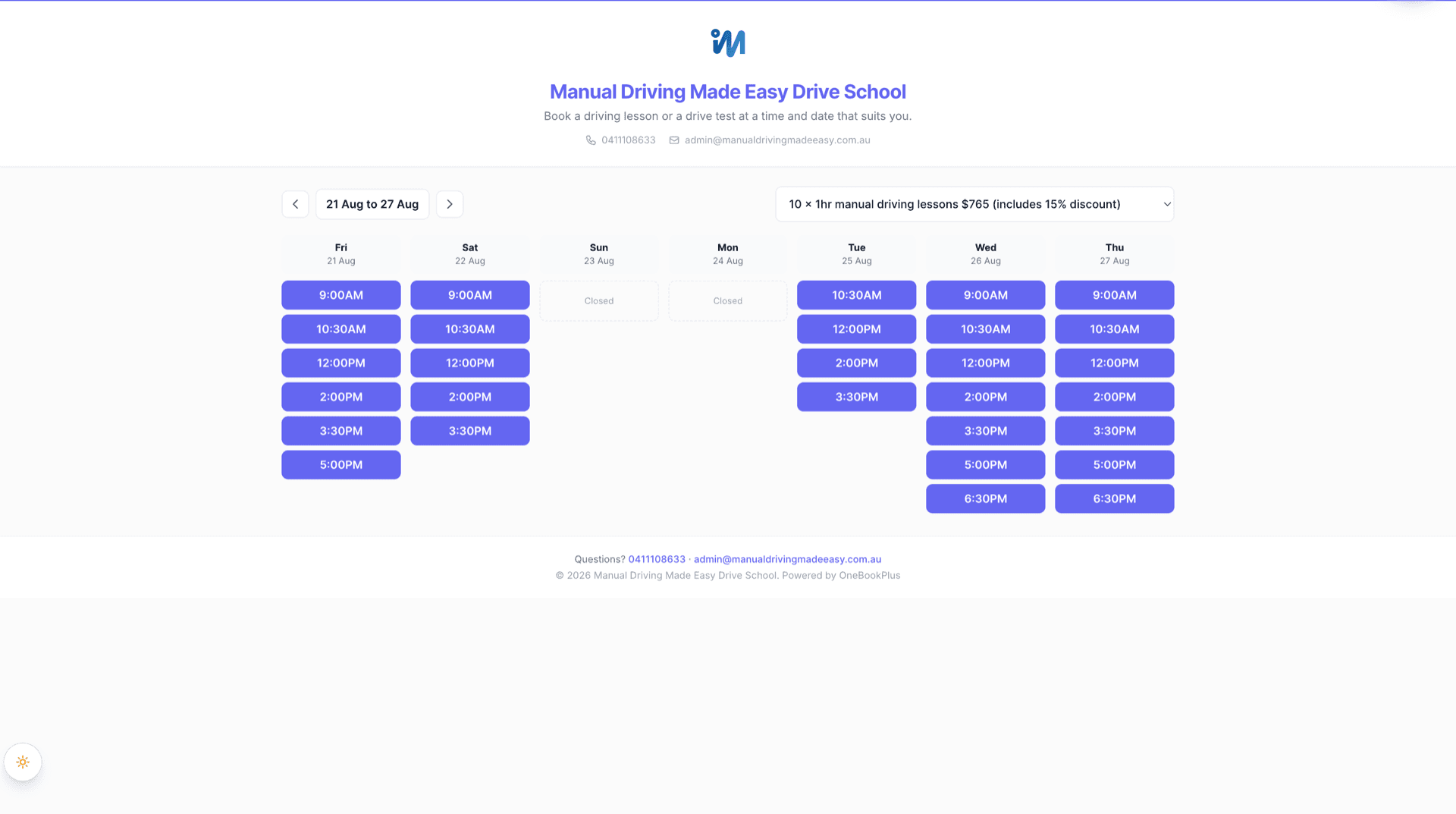
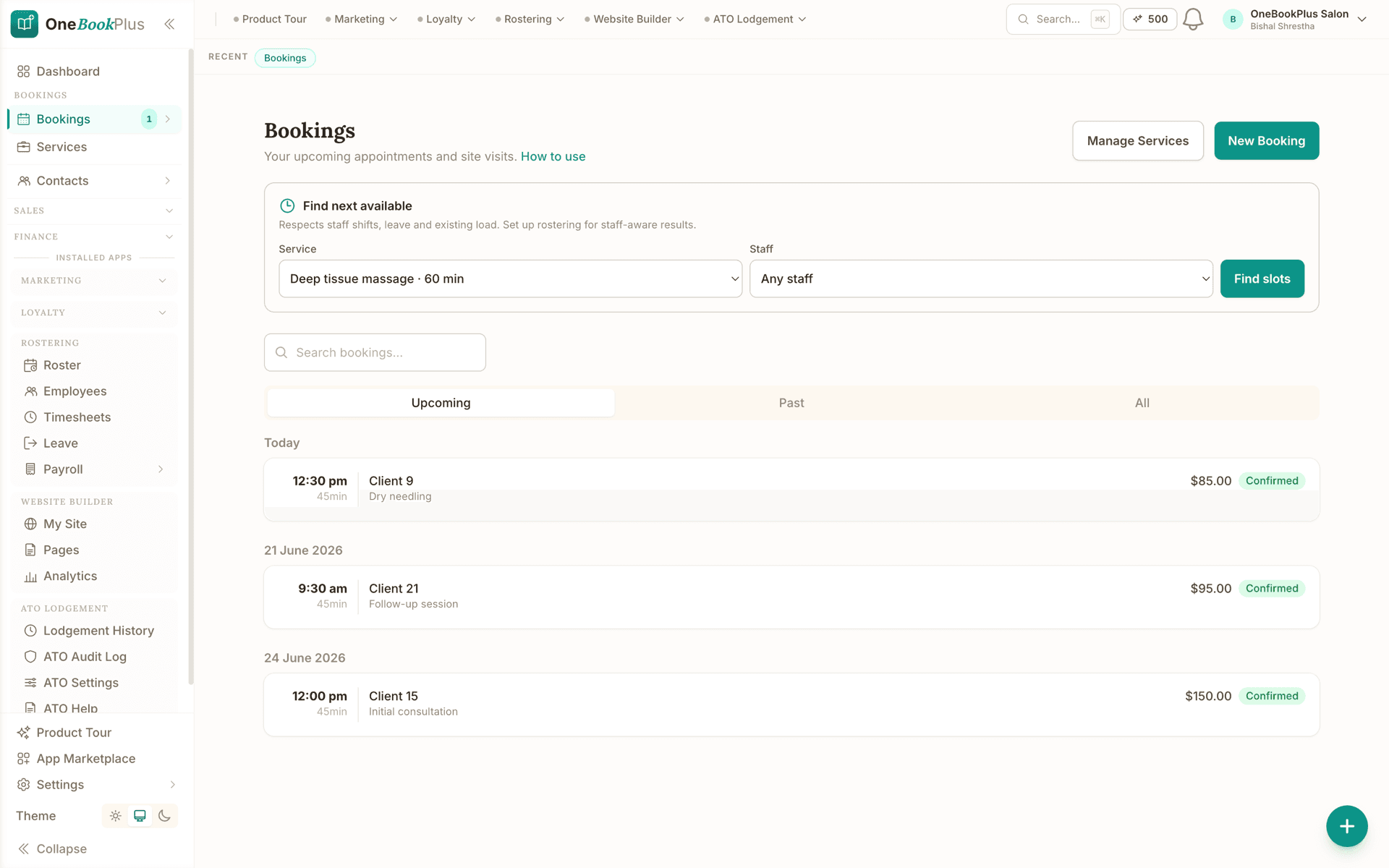
Open the same screens yourself
The live demo is a working OneBookPlus account with jobs, bookings, quotes and invoices already in it. Click into the screens above rather than taking the ticks on faith.
Where Acuity wins
Deeper intake forms, and 36 calendars
Acuity Scheduling is a genuinely excellent product at the one thing it sets out to do: appointment scheduling. The self-booking experience is polished and mobile-friendly, and its intake forms are deeper than ours: unlimited questions, with different forms attached to different appointment types. Its Premium plan supports up to 36 separate calendars plus a custom API and CSS for developers, and because Acuity is owned by Squarespace it embeds natively into Squarespace websites. If scheduling is genuinely your entire workflow (many practitioners, many distinct calendars, or a site already built on Squarespace), Acuity is a focused, mature, best-in-class choice, and the case to switch is weak.
Where OneBookPlus wins
Where a scheduler stops and a platform starts
The booking is the start, not the whole job. Acuity can take a booking and a deposit, then it stops. Its plans don’t raise a GST tax invoice, keep a CRM record, manage the job, or do your BAS. In OneBookPlus the same booking flows into a quote, a GST invoice, a job and the accounting on one shared customer record, with no second system to re-enter the customer into.
Australian by default, in dollars and in tax. Acuity publishes its pricing in US dollars (taxes excluded), so your real AUD cost moves with the exchange rate, and it has no native GST, ABN validation or BAS reporting. OneBookPlus is priced in Australian dollars inclusive of GST, calculates 10% GST on every invoice and quote, validates ABNs against the Australian Business Register, and produces BAS-ready figures, built for the ATO, not retrofitted.
One subscription replaces a stack, and there’s a $0 plan. To run a real service business on Acuity you bolt on invoicing/accounting software, a CRM and a marketing tool: more bills, more logins, more things to keep in sync. OneBookPlus bundles bookings, invoicing, CRM, jobs, marketing, POS and accounting in one plan from $0/month, with an AI Companion that chases unpaid invoices and follows up no-shows, plus an AI Receptionist that answers calls, capabilities a dedicated scheduler isn’t built to cover.
Why Australian service businesses outgrow a standalone scheduler
Stop paying in USD for half the workflow
Acuity is priced in US dollars for scheduling only, so your AUD cost drifts with the exchange rate. You'd still buy invoicing/accounting, a CRM and a mailer separately. OneBookPlus bundles all of it from $0/month, priced in AUD inclusive of GST.
One booking, one record
In Acuity the customer lives in your scheduler; the invoice, the job and the books live somewhere else, kept in step by exports or Zapier glue. OneBookPlus carries one client record from the first booking through the quote, GST invoice, job and BAS line, nothing to reconcile.
Built for Australian tax
GST calculation, ABN validation via the Australian Business Register, ATO-compliant BAS summaries and AUD formatting are built in from day one, not bolted onto a US scheduler that was never designed for them.
Everything Acuity needs add-ons for
Acuity's strength is scheduling. OneBookPlus gives you that booking page and reminders, then adds invoicing, quoting, CRM, job management, POS, email marketing, review requests and accounting in the same app, plus a native mobile app and an AI receptionist.
OneBookPlus vs Acuity Scheduling: your questions answered
Is OneBookPlus a replacement for Acuity Scheduling?
It depends what you need. If you only need appointment scheduling, a polished booking page, intake forms and reminders, Acuity is an excellent, dedicated tool and OneBookPlus's bookings module covers the same job inside a broader platform. But most Australian service businesses need more than a calendar: they also send quotes, raise GST tax invoices, chase payments, keep customer history and do their BAS. Acuity doesn't do those things; OneBookPlus does them all in one app, so the booking flows straight into the invoice, the CRM record and the accounting without a second system. If scheduling is genuinely all you do, Acuity is hard to beat. If bookings are just the start of the job, OneBookPlus replaces Acuity plus several other tools.
How much does Acuity Scheduling cost in Australia in 2026?
Acuity publishes its pricing in US dollars (taxes excluded): Starter is US$20/month (US$16/month billed annually) with 1 calendar; Standard is US$34/month (US$27/month annually) with up to 6 calendars, SMS reminders and packages; and Premium is US$61/month (US$49/month annually) with up to 36 calendars, custom API and HIPAA. There's a 7-day free trial but no free plan. Because the list price is in USD, your actual AUD cost moves with the exchange rate and any card-conversion fees. OneBookPlus is priced in Australian dollars inclusive of GST, with a $0 free plan and paid plans from $29/month, and that single subscription also covers invoicing, CRM and accounting, which on the Acuity side you'd buy separately. (See acuityscheduling.com/pricing for Acuity's current figures.)
Does Acuity Scheduling handle GST invoicing and BAS like OneBookPlus?
No. Acuity is a scheduling product, it can take a deposit or payment at the time of booking via Stripe, Square or PayPal, but it does not raise GST-compliant tax invoices, track GST collected and paid, or produce quarterly BAS-ready figures. For those you'd add separate accounting software. OneBookPlus calculates 10% GST on every invoice and quote, validates ABNs via the Australian Business Register, and generates ATO-ready BAS summaries, built for Australian tax compliance from the ground up, with bookings and accounting in the same book.
What does Acuity do better than OneBookPlus?
Acuity is a dedicated scheduler and its scheduling depth shows. Its intake forms are more configurable (unlimited questions, different forms per appointment type), its self-booking experience is highly polished and mobile-friendly, and it offers up to 36 separate calendars on the Premium plan along with a custom API and CSS for developers. It also embeds natively into Squarespace websites, which is a genuine advantage if your site is already on Squarespace. If your only requirement is best-in-class appointment scheduling, especially many practitioners or many distinct calendars, Acuity is a credible, focused choice.
How does taking payment compare between OneBookPlus and Acuity?
Acuity takes payments and deposits at the time of booking through Stripe, Square or PayPal (see acuityscheduling.com). OneBookPlus handles payment a step later: every booking becomes a GST tax invoice with a Stripe Pay Now link, so the customer pays by card and the payment, the booking and the books stay one connected record rather than a charge captured in a scheduling tool that you then re-enter elsewhere.
How does OneBookPlus compare to Acuity as an alternative for Australian businesses?
For businesses that want more than just scheduling, OneBookPlus is a strong Australian alternative: it includes online bookings, GST invoicing, quoting, job management, CRM, email marketing, POS and accounting in one platform built for Australian tax (GST, ABN, BAS) and priced in AUD inclusive of GST, with a $0 free plan. If you genuinely only need a scheduler, and especially if you're already on a Squarespace website, Acuity remains an excellent dedicated tool. The deciding question is whether bookings are your whole workflow or just the first step of it.
Can I keep Acuity for scheduling and use OneBookPlus just for invoicing and accounting?
You can, and some businesses do exactly that during a changeover. There's no native integration between the two, so a booking taken in Acuity has to be re-entered in OneBookPlus before you can invoice it, which is workable at low volume but tedious as bookings grow. If you run both, treat it as a transition arrangement: let your existing Acuity appointments play out while you invoice from OneBookPlus, then move the booking page across so the booking, the invoice and the customer record are created once, in one place.
Can I move my Acuity clients and appointment history to OneBookPlus?
Your client list moves easily: export it from Acuity as a CSV and import it during OneBookPlus onboarding, where each contact becomes a CRM record. Appointment history is the honest caveat: past Acuity bookings don't import as bookings, so most businesses let upcoming Acuity appointments run their course and take new bookings in OneBookPlus from the cutover date. Keep an export of your Acuity history for your records, and note your OneBookPlus data is exportable at any time too, so you're never locked in on either side.
How to move from Acuity to OneBookPlus
Export your clients and recreate your services
Export your client list from Acuity as a CSV and import it into OneBookPlus, where each contact becomes a proper CRM record (not just a booking entry). Recreate your services, durations and prices, and because they live next to your invoicing, each service can carry its GST treatment from the start.
Set up your booking page and reminders
Publish your OneBookPlus booking page, switch on automatic email reminders, and connect Stripe so customers can pay by card once you invoice. Set your ABN and 10% GST defaults so every booking can flow straight into a compliant tax invoice.
Redirect your booking link, then turn off Acuity
Point your website (including a Squarespace site, via an embed or link) and your “Book now” buttons at the OneBookPlus page, let existing Acuity appointments run out, then cancel Acuity. From day one your bookings, invoices, CRM and BAS all live in one book, and you can export your OneBookPlus data anytime, so you're never locked in.
From the blog
Related reading: switching from acuity
Practical guides and explainers from the OneBookPlus blog, grouped by topic.
Industries
Features
Keep the great scheduling.
Add the rest of the business.
Bookings, GST invoicing, CRM and accounting in one Australian app, from $0/month.
Free plan available, no card needed.

About this comparison
How we compared OneBookPlus to Acuity Scheduling
Feature claims about OneBookPlus reflect what is shipping today on onebookplus.com.au. Acuity Scheduling pricing and feature claims were read off Acuity Scheduling’s public Australian product pages on . Vendor pricing changes frequently, so check the Acuity Scheduling website for your specific situation before making a decision.
Disclosure: OneBookPlus publishes this comparison and stands to benefit if you switch. We aim to compare like-for-like on capability and Australian tax compliance, if you spot something out of date, email hello@onebookplus.com.au and we’ll review it.
About the author

Bishal Shrestha
Founder & CEO, OneBookPlus
Bishal spent a decade running digital projects for Australian small businesses before founding OneBookPlus. He writes and maintains these pages, and publishes what OneBookPlus does not do alongside what it does.
Read the founder bioHow this page was researched
Every Acuity Scheduling price and capability claim on this page was read off Acuity Scheduling's own published Australian pages on the date printed above, and recorded in competitor-facts.ts with that date. Claims about OneBookPlus describe what ships today, and the page names what we do not do.
Last reviewed and updated: by Bishal Shrestha