OneBookPlus vs Setmore:
scheduling, or the whole business?
Setmore is a genuinely good free appointment scheduler, but it's only scheduling, and it's priced in US dollars. OneBookPlus is the Australian all-in-one: the same online bookings, plus GST invoicing, quotes, jobs, CRM and accounting in one app.
Key takeaways
6- Setmore is dedicated appointment-scheduling software with a genuinely generous free tier: $0/month for up to 4 users, with unlimited appointments (setmore.com/pricing). For pure self-booking, it's hard to beat.
- Setmore's Pro plan is priced per user for unlimited users, SMS reminders, 2-way calendar sync, recurring appointments and video, and its Team and Enterprise tiers are contact-sales. The current figures are in the comparison table below, taken from setmore.com/pricing. Setmore prices in US dollars, so the AUD cost moves with the exchange rate.
Show 4 moreShow less
- Repeating appointments sit behind a paid plan at both companies. Setmore keeps them on Pro; OneBookPlus includes one repeating series on Free and makes them unlimited from Starter at $29/mo in Australian dollars. One-off bookings are unlimited on every OneBookPlus plan.
- OneBookPlus is an all-in-one Australian platform: the same online bookings and calendar, plus GST invoicing, quoting, CRM, job management, marketing, POS and accounting in one subscription, with its own $0 free plan in Australian dollars.
- Setmore wins on: a no-time-limit free plan for up to 4 staff, built-in video appointments on Pro, and a wider set of payment processors, Stripe, Square and PayPal (Square on Free; Stripe + PayPal on Pro, see setmore.com/features/payments/aus). If you only ever need scheduling, that's a great fit.
- OneBookPlus wins on: tying every booking to a GST invoice, a single client record across bookings/quotes/jobs/accounting, and Australian-built GST/ABN/BAS compliance, things a global scheduler isn't built to do.
A free scheduler, or a free plan that also invoices
OneBookPlus
From $0/mo. Bookings, invoicing, CRM and accounting on one plan; AI and payroll are add-ons
- Online booking page & calendar
- Email + SMS reminders
- GST invoicing & quoting
- CRM & client timeline
- Job management & pipeline
- Accounting & P&L reports
- BAS / ATO GST summaries
- Email marketing & campaigns
- Basic sales register (full POS $39/mo add-on)
- Google review requests
- Australian-built & AU-hosted
Setmore
Free tier, then a per-user Pro plan, scheduling only
- Online booking page & calendar
- Email reminders (1 on Free)
- SMS reminders (Pro plan)
- Payments via Stripe, Square + PayPal
- Video appointments (Pro plan)
- Class / group booking
- GST invoicing & quoting
- CRM beyond customer profiles
- Accounting / BAS / GST reports
- Built for Australian tax (USD pricing)
OneBookPlus vs Setmore: detailed comparison
Setmore covers scheduling well. OneBookPlus covers scheduling and everything that happens after the booking: the quote, the GST invoice, the job and the books.
| Feature | OneBookPlus | Setmore |
|---|---|---|
| Online booking page | Yes | Yes |
| Staff calendars & scheduling | Yes | Yes |
| Email reminders | Yes | Yes |
| SMS remindersSetmore SMS is on the paid Pro plan; Free gets 1 email reminder | Yes | Yes |
| Take payments / deposits at bookingSetmore Free is effectively Square-only; Stripe + PayPal are on the Pro plan | Yes | Yes |
| Recurring appointmentsBoth put repeating appointments largely on a paid plan: Setmore's are Pro-only, while OneBookPlus includes one repeating series on Free and makes them unlimited from Starter at $29/mo in Australian dollars, alongside invoicing and accounting. One-off bookings are unlimited on every OneBookPlus plan | Yes | Yes |
| Video appointmentsSetmore Pro includes built-in video; OneBookPlus does not | No | Yes |
| GST-compliant invoicing | Yes | No |
| Quoting with one-click accept | Yes | No |
| CRM & client timelineSetmore has basic customer profiles, not a CRM | Yes | No |
| Job management & pipeline | Yes | No |
| Accounting & P&L reports | Yes | No |
| BAS / ATO GST summaries | Yes | No |
| Email marketing & campaignsSetmore offers a Mailchimp integration only | Yes | No |
| Google review requests | Yes | No |
| Basic sales register (full POS $39/mo add-on) | Yes | No |
| Australian-built (GST/ABN/BAS-native) | Yes | No |
| Free plan available | Yes | Yes |
| Price | From $0/mo (AUD) | Free, then a per-user Pro plan (USD) |
| All modules included | Scheduling only |
Scheduling depth vs platform breadth
Setmore is the lean, focused scheduler with a strong free tier; OneBookPlus is the broader Australian business platform. Here is each dimension, cited against Setmore’s own pages, and honest about where Setmore is the better-shaped tool.
| Category | Feature | OneBookPlus | Setmore |
|---|---|---|---|
| Online booking | Customer-facing self-booking page | Yes | Yes (source: setmore.com/features) |
| Calendar | Staff calendars + 2-way Google/Outlook sync | Staff calendars yes; sync is a subscription link, two-way built but not yet open to customers | Pro plan only (source: setmore.com/pricing) |
| Reminders | Email + SMS appointment reminders | Yes | SMS is Pro only; Free = 1 email reminder (source: setmore.com/pricing) |
| Payments | Take deposits / payments at booking | Stripe payments | Stripe, Square + PayPal (Square on Free; Stripe + PayPal on Pro) (source: setmore.com/features/payments/aus) |
| Video | Built-in video appointments | No | Pro plan (video appointments) (source: setmore.com/pricing) |
| Classes | Group / class seat booking | Yes | Yes (source: setmore.com/features) |
| Quoting | Send quotes with one-click accept | Yes | No (source: setmore.com/features) |
| Invoicing | GST tax invoices + ABN validation | Yes | No (source: setmore.com/features) |
| Accounting | P&L, expenses, BAS-ready GST reporting | Yes | No (source: setmore.com/features) |
| CRM | Full contact CRM with client timeline | Yes | Customer profiles only (source: setmore.com/pricing) |
| Jobs | Quote to job to invoice pipeline | Yes | No (source: setmore.com/features) |
| Marketing | Email campaigns + Google review requests | Yes | Mailchimp integration only (source: setmore.com/pricing) |
| POS | Point of sale + retail / order management | Yes | No (source: setmore.com/features) |
| AU fit | Australian-built, GST/ABN/BAS-native | AWS Sydney hosting | Global product; prices in USD (source: setmore.com/pricing) |
| Free plan | Genuinely free tier | $0 plan | $0, up to 4 users, unlimited appointments (source: setmore.com/pricing) |
| Pricing model | Flat AUD price vs per-user USD | Flat AUD plan | Per-user, billed in USD (source: setmore.com/pricing) |
| Starting price (AUD, inc. GST) | From $0/mo | Free / USD $5/user/mo | |
| AUD · Inc. GST · All modules bundled | Free: 4 users, unlimited appointments · Pro: per-user, USD |
Not mockups, real product screens
The booking page, and the diary behind it
Every competitor row above cites Setmore's own page. Our side says the page your customers book from and the record your business runs on are the same thing, so here are both ends of it.
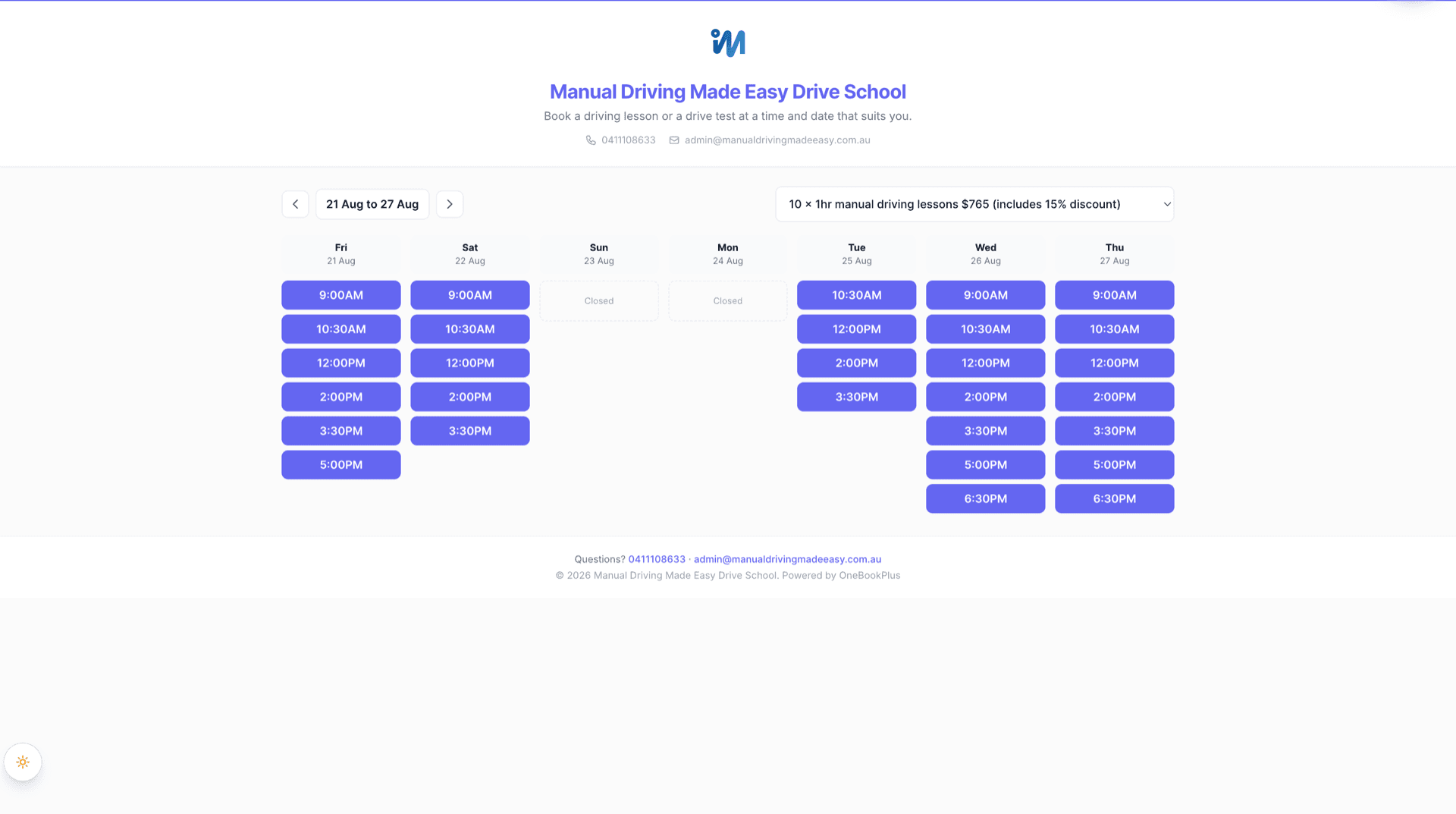
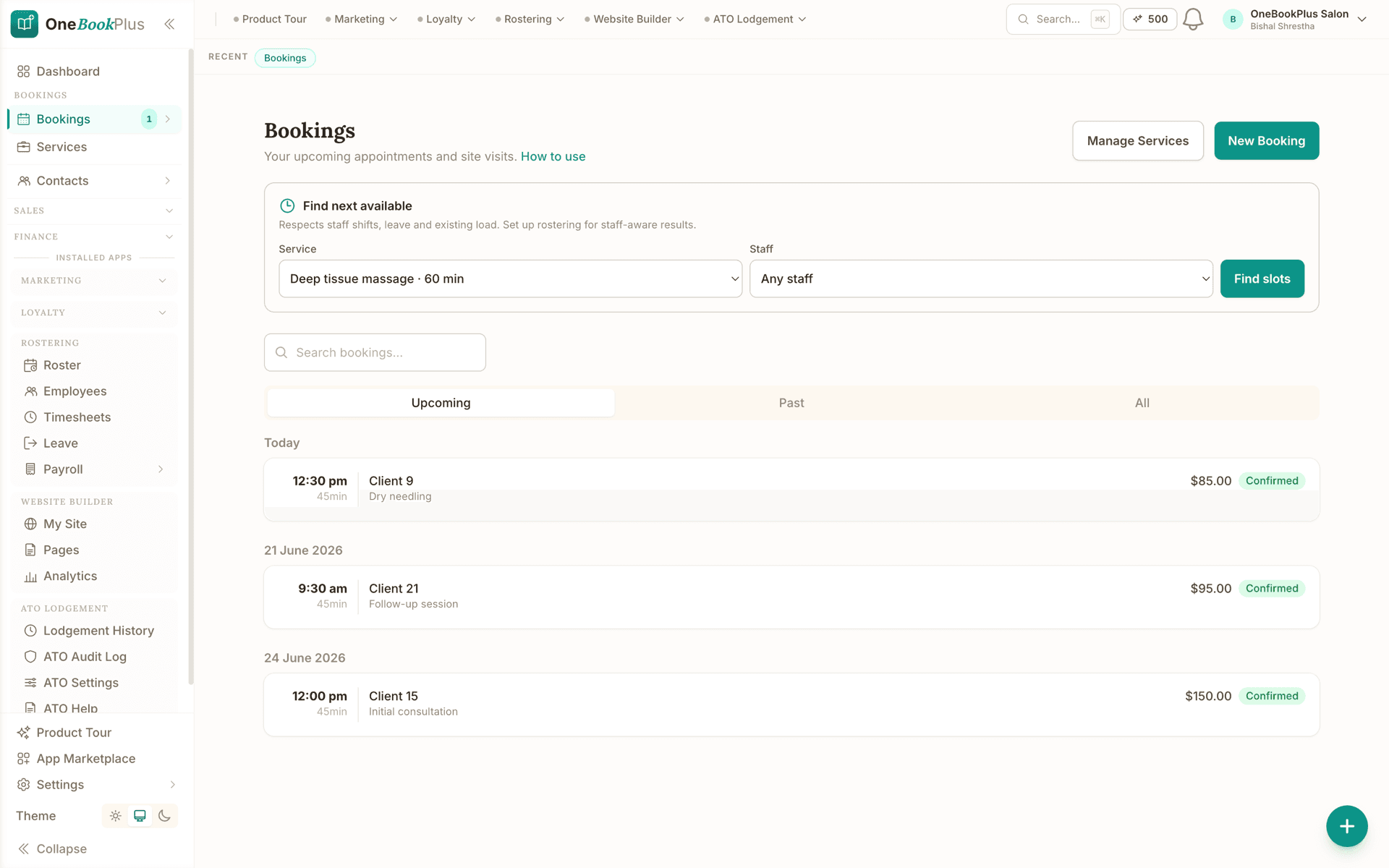
Open the same screens yourself
The live demo is a working OneBookPlus account with jobs, bookings, quotes and invoices already in it. Click into the screens above rather than taking the ticks on faith.
Where Setmore wins
A free plan that is genuinely generous
Setmore is a genuinely good appointment scheduler, and its free plan is one of the most generous in the category: $0/month, for up to 4 staff and 200 appointments a month, with no time limit. That alone makes it a smart first pick for a solo practitioner or a small team that just needs customers to self-book a time. Its Pro plan adds built-in video appointments (handy for telehealth and remote consults, which OneBookPlus doesn’t offer natively), recurring appointments, SMS reminders and 2-way calendar sync, and it takes payments through Stripe, Square and PayPal (Square on the Free plan; Stripe and PayPal on Pro, see setmore.com/features/payments/aus). For telehealth providers it also offers a HIPAA BAA via Setmore Health, a dedicated Pro-level account type. We’ll be even-handed about the recurring line: OneBookPlus charges for repeating appointments too, past the first. Free includes one repeating series and Starter at $29/mo makes them unlimited, while one-off bookings stay unlimited on every plan. If your business is purely appointment-based, doesn’t send invoices, and you want free multi-staff scheduling with video, Setmore is a focused, credible choice and the switch isn’t urgent.
Where OneBookPlus wins
What changes once the booking becomes an invoice
The booking turns into a GST invoice, in the same app. Setmore’s features stop at the calendar: you can take a payment at booking via Stripe, Square or PayPal, but there’s no tax invoice, no GST tracking and nothing that feeds a BAS. OneBookPlus carries the same appointment through to a 10% GST tax invoice, a quote, a job and a P&L line, so the booking and the books are one record, not two systems glued together.
One customer record, not just a profile. Setmore keeps basic customer profiles tied to bookings. OneBookPlus carries a single client record from the first online booking through the quote, the invoice, the payment and the review request, a real CRM with a full timeline, so when a client calls you see their whole history in seconds rather than a list of past appointments.
Australian-built, in Australian dollars. Setmore is a global product priced in US dollars (see setmore.com/pricing), so your AUD cost moves with the exchange rate and there’s no GST, ABN or BAS tooling. OneBookPlus is built in Australia and hosted in AWS Sydney, with GST calculation, ABN validation via the Australian Business Register and BAS-ready summaries built in from day one.
Why Australian businesses outgrow Setmore
The booking is only step one
A self-booked appointment is great, but then you still have to quote, invoice with GST, chase payment and reconcile it. Setmore stops at the calendar. OneBookPlus carries the same booking all the way to a paid, BAS-ready invoice without leaving the app.
One subscription, not a stack
With Setmore you bolt on a separate invoicing tool, a CRM, an email-marketing app and accounting software, each with its own bill and login. OneBookPlus bundles bookings, invoicing, CRM, marketing, POS and accounting in one plan, from $0/month.
Priced and built for Australia
Setmore is a global product priced in US dollars, with no GST, ABN or BAS tooling. OneBookPlus is built in Australia, charged in Australian dollars, and handles 10% GST, ABN validation and ATO-ready BAS summaries natively.
Free, then it keeps growing with you
Setmore's free plan is excellent for pure scheduling. OneBookPlus also starts free, but the same free account already includes invoicing, a CRM and accounting, so you don't have to re-platform the day you send your first invoice.
OneBookPlus vs Setmore: your questions answered
Is OneBookPlus a replacement for Setmore?
It can be, but they aren't the same kind of product. Setmore is dedicated appointment-scheduling software, and it does that one job well, including a genuinely generous free tier: $0 for up to 4 staff with unlimited appointments (see setmore.com/pricing). OneBookPlus is an all-in-one Australian business platform: the same online booking page and calendar Setmore gives you, plus GST invoicing, quoting, job management, CRM, marketing, POS and accounting in one subscription. If all you need is a self-booking calendar, Setmore's free plan is hard to beat. If you also send invoices, chase payments and track GST, OneBookPlus replaces Setmore and the four or five other tools you'd otherwise bolt on.
Where does Setmore's free plan stop costing nothing?
Setmore's Free plan is $0/month for up to 4 users, with unlimited appointments. Its Pro plan is USD $5/user/month billed annually (or USD $12/user/month billed monthly) for unlimited users and appointments, with SMS reminders, 2-way calendar sync, recurring appointments and video; Team and Enterprise tiers are contact-sales (see setmore.com/pricing). Note Setmore prices in US dollars, so an Australian customer's AUD cost moves with the exchange rate. OneBookPlus has its own $0 free plan and flat Australian-dollar paid plans, and those plans include invoicing, CRM, accounting and marketing, not just scheduling. Where Setmore's free tier carries four users, ours carries one login and the paid tiers band the rest: one login on Free, three on Starter, five on Plus and ten on Growth, with no per-seat charge below the cap. Say it plainly, because it is the one place Setmore's free plan is more generous than ours. Repeating appointments are the one place both products draw a paid line: Setmore keeps them on Pro, OneBookPlus includes one repeating series on Free and makes them unlimited from Starter at $29/mo. One-off bookings are unlimited on every OneBookPlus plan, including Free. So Setmore can be cheaper if you only need bookings, but OneBookPlus replaces several paid tools at once.
Does Setmore do invoicing, GST or accounting?
No. Setmore is scheduling software, its own features pages show no invoicing, quoting, accounting/bookkeeping or GST/tax calculation, and no CRM beyond basic customer profiles (see setmore.com/features). You can take a payment at the time of booking via Stripe, Square or PayPal, but there's no tax invoice, no GST tracking, and nothing that feeds a BAS. OneBookPlus calculates 10% GST on every invoice and quote, validates ABNs via the Australian Business Register, tracks GST collected and paid, and generates ATO-ready BAS summaries, so the booking, the invoice and the tax line are the same record.
Is Setmore Australian, and does it handle GST and ABN?
Setmore is a global product offered in multiple languages, not an Australia-specific one, and it prices in US dollars (see setmore.com/pricing). Its scheduling works fine for Australian businesses, but there's no GST calculation, ABN validation or BAS reporting because it isn't an accounting or invoicing tool. OneBookPlus is built in Australia and AU-hosted in AWS Sydney, with GST, ABN validation and BAS summaries built in from day one, so your bookings and your tax compliance live in the same place.
What does Setmore do that OneBookPlus doesn't?
Two things stand out. First, Setmore's Pro plan includes built-in video appointments, which OneBookPlus doesn't currently offer natively, useful if you run telehealth or remote consults. Second, Setmore's free plan covers up to 4 users with no time limit, and it supports a wider set of payment processors, Stripe, Square and PayPal (Square on the Free plan, Stripe and PayPal on Pro) where OneBookPlus uses Stripe. If your business is purely appointment-based, doesn't invoice, and you specifically want free multi-staff scheduling with video, Setmore is a strong, focused choice.
Why do Australian service businesses pick OneBookPlus over Setmore?
For Australian businesses that want more than a booking calendar, OneBookPlus is a strong Setmore alternative. It keeps everything you'd use Setmore for, an online booking page, staff calendars, reminders and payments, and adds GST invoicing, quoting, a real CRM, job management, email marketing, review requests, POS and accounting, all built for Australian tax compliance and starting from a $0 free plan. If you only ever need scheduling, Setmore's free tier is excellent; if your bookings turn into invoices, OneBookPlus is built for the whole journey.
Can I run Setmore and OneBookPlus side by side?
Yes, and it's a sensible way to switch. There's no native integration between the two, so keep taking already-booked appointments in Setmore while you set up services, staff and your booking page in OneBookPlus, then swap the links on your website and Google profile when you're ready. Running both permanently means double data entry, every Setmore booking you want to invoice has to be re-entered, so most businesses treat the overlap as a few weeks of transition rather than a long-term setup.
Is the OneBookPlus free plan really free, and what are its limits?
Yes, it's $0/month with no time limit and no card required. It includes your booking page and calendar alongside up to 10 invoices and 5 quotes a month and 250 contacts, which is a different shape from Setmore's free tier: Setmore is generous on appointments (200 a month, 4 users) but has no invoicing at all. If you outgrow the free limits, OneBookPlus paid plans start at $29/month in Australian dollars inclusive of GST, and you can export your data at any time on either plan.
Can I move my Setmore bookings and customers to OneBookPlus?
Yes. Export your customer list from Setmore as a CSV and import it into OneBookPlus during onboarding, names, emails and phone numbers map across into proper CRM records, each ready for bookings, quotes and invoices. Set up your services and staff calendar, publish your OneBookPlus booking page, and point your existing booking links at it. You keep your Setmore account running until you've cut over, and you can export your OneBookPlus data at any time, so you're never locked in.
How to switch from Setmore to OneBookPlus
Export your customers from Setmore
Export your customer list as a CSV from Setmore and import it straight into OneBookPlus. Names, emails and phone numbers map across into proper CRM records (not just a list of past appointments), each ready for bookings, quotes and GST invoices.
Rebuild your services, staff and booking page
Add your services, durations, prices and staff calendars, then publish your OneBookPlus booking page. Set your ABN and 10% GST defaults so every booking can flow straight into a BAS-ready tax invoice, the step Setmore never covered.
Point your links at OneBookPlus and cut over
Swap the booking link on your website, Google profile and social bios to your OneBookPlus page, then take new bookings there. Keep Setmore active until the changeover is done. You can export your OneBookPlus data at any time, so you’re never locked in.
From the blog
Related reading: switching from setmore
Practical guides and explainers from the OneBookPlus blog, grouped by topic.
Best Booking Software in Australia
Two identical six-chair salons, one paying $29 a month for booking software and the other $252. Calendly, Acuity, Square, Setmore, Fresha, Timely and SimplyBook.me compared on what they actually cost an Australian business, with prices read from each vendor in August 2026.
15 min readRead articleBest Salon Software in Australia (2026): A Fresha Alternative That Keeps Your Client Data
Salon and beauty booking software in Australia for 2026, compared. Cut no-shows, take deposits, and keep your own client list.
10 min readRead article
Industries
Features
Keep the free bookings.
Add the invoice, the CRM and the books.
Everything Setmore does, plus GST invoicing, quotes, jobs, CRM and accounting, in one Australian app, from $0/month.
Free plan available, no card needed.

About this comparison
How we compared OneBookPlus to Setmore
Feature claims about OneBookPlus reflect what is shipping today on onebookplus.com.au. Setmore pricing and feature claims were read off Setmore’s public Australian product pages on . Vendor pricing changes frequently, so check the Setmore website for your specific situation before making a decision.
Disclosure: OneBookPlus publishes this comparison and stands to benefit if you switch. We aim to compare like-for-like on capability and Australian tax compliance, if you spot something out of date, email hello@onebookplus.com.au and we’ll review it.
About the author

Bishal Shrestha
Founder & CEO, OneBookPlus
Bishal spent a decade running digital projects for Australian small businesses before founding OneBookPlus. He writes and maintains these pages, and publishes what OneBookPlus does not do alongside what it does.
Read the founder bioHow this page was researched
Every Setmore price and capability claim on this page was read off Setmore's own published Australian pages on the date printed above, and recorded in competitor-facts.ts with that date. Claims about OneBookPlus describe what ships today, and the page names what we do not do.
Last reviewed and updated: by Bishal Shrestha