OneBookPlus vs BookingTimes
Built for driving schools, books included
BookingTimes is a capable Australian booking-led platform with a genuine driving-school template. OneBookPlus is built driving-first inside a whole small-business platform: prepaid lesson credits that draw down automatically, a parent link on every student record, a day route map, and GST invoicing with BAS-ready accounting, in one subscription.
Key takeaways
5- BookingTimes is a broad Australian booking-led platform with a real driving-school template, online booking, SMS, invoicing, payments and packages. Its published tiers run $99 to $199 a month billed annually, plus an Enterprise plan on quote (bookingtimes.com/Prices, August 2026). OneBookPlus is $49/mo for Driving School Complete on top of a core plan, so $49 all-in solo and $78 to $98 once several people need a login.
- BookingTimes genuinely wins as an all-rounder: a capable scheduler with a driving template, packages and gift vouchers, student progress tracking, invoicing, SMS, payments and unlimited bookings and clients on every tier.
Show 3 moreShow less
- OneBookPlus wins on driving-specific depth we could not find in BookingTimes' published material: a per-student credit ledger with automatic per-lesson draw-down, a parent linked to the student record so invoices route to the payer, and a day route map with ordered waypoints.
- The back-office difference is the ATO layer, not accounting in general: BookingTimes publishes expense tracking and financial reports but no GST or BAS reporting, and its own documentation calls its external calendar sync one-way. OneBookPlus includes BAS-ready GST reporting from the Starter core plan, plus a free calendar subscription link (Apple, Google, Outlook); two-way Google Calendar sync is built but not yet open to customers.
- The choice comes down to shape: a booking-led platform with a driving template, or a driving-first suite inside a whole small-business platform. Check bookingtimes.com/Prices for the exact feature list on each BookingTimes tier.
Booking-led with the rest on quote, or one published price
OneBookPlus Driving School Complete
$49/mo Driving School Complete on top of a core plan: $49 all-in solo, $78 to $98 once several people need a login, inside a whole business platform
- Online lesson bookings
- Prepaid packages with automatic credit draw-down
- Packages sold from the booking page, with a buy-button link for your website
- Find my lessons code login for learners who lose their booking link
- Suburb service areas that filter instructors by pickup area
- Parent linked to the student record
- Day route map with ordered waypoints
- GST invoicing & BAS-ready reports (Starter core plan and up)
- Free calendar subscription link (Apple, Google, Outlook)
- Free OneBookPlus directory listing
BookingTimes
Booking-led all-rounder, tiers $99 to $199/mo billed annually plus Enterprise on quote
- Online self-service booking
- Driving-school template
- SMS reminders
- Invoicing & payments
- Packages & gift vouchers
- Student progress tracking
- Two-way calendar sync (one-way per its own documentation)
- BAS-ready GST reporting (business-wide rate and per-item tick published)
- Free plan or free trial (entry is via a demo)
Each unticked row links to the BookingTimes page or support document it was checked against.
OneBookPlus vs BookingTimes, side by side
A booking-led platform and a driving-specific platform overlap on scheduling, then diverge. Here is where each one fits.
Every row we mark as not available on BookingTimes carries the note and the link to the BookingTimes page or support document it was checked against. Ticked rows are from bookingtimes.com and its BookingTimes features page. Re-check before relying on any of it, since its plans change.
The dimensions driving instructors check first
Where a broad AU booking platform and a driving-specific platform genuinely differ, with each BookingTimes cell linked to its source.
| Category | Feature | OneBookPlus | BookingTimes |
|---|---|---|---|
| Product shape | What it is built for | Driving-specific suite inside a full AU business platform | Booking-led business platform with a dedicated driving-school template (source: bookingtimes.com/Complete-Driving-School-Software) |
| Business model | How you pay to use it | $49/mo Driving School Complete on a core plan: $49 all-in solo on Free, $78 to $98 once several people need a login | Kick Starter $99/mo, Nail & Scale $159/mo, Evolve $199/mo (AUD, billed annually), Enterprise on quote; extra calendars $29 to $69/mo each (source: bookingtimes.com/Prices) |
| Free entry | Try it without paying | Free core plan, no card needed | No free plan or trial published, entry is via a demo (source: bookingtimes.com/Prices) |
| Online bookings | Learner self-service booking | Yes, with suburb service areas that filter instructors by pickup area, and a Find my lessons code login for learners who lose their booking link | Yes (source: bookingtimes.com) |
| SMS reminders | Automated SMS lesson reminders | Yes, 25 to 500 SMS a month by core plan | Yes (source: bookingtimes.com) |
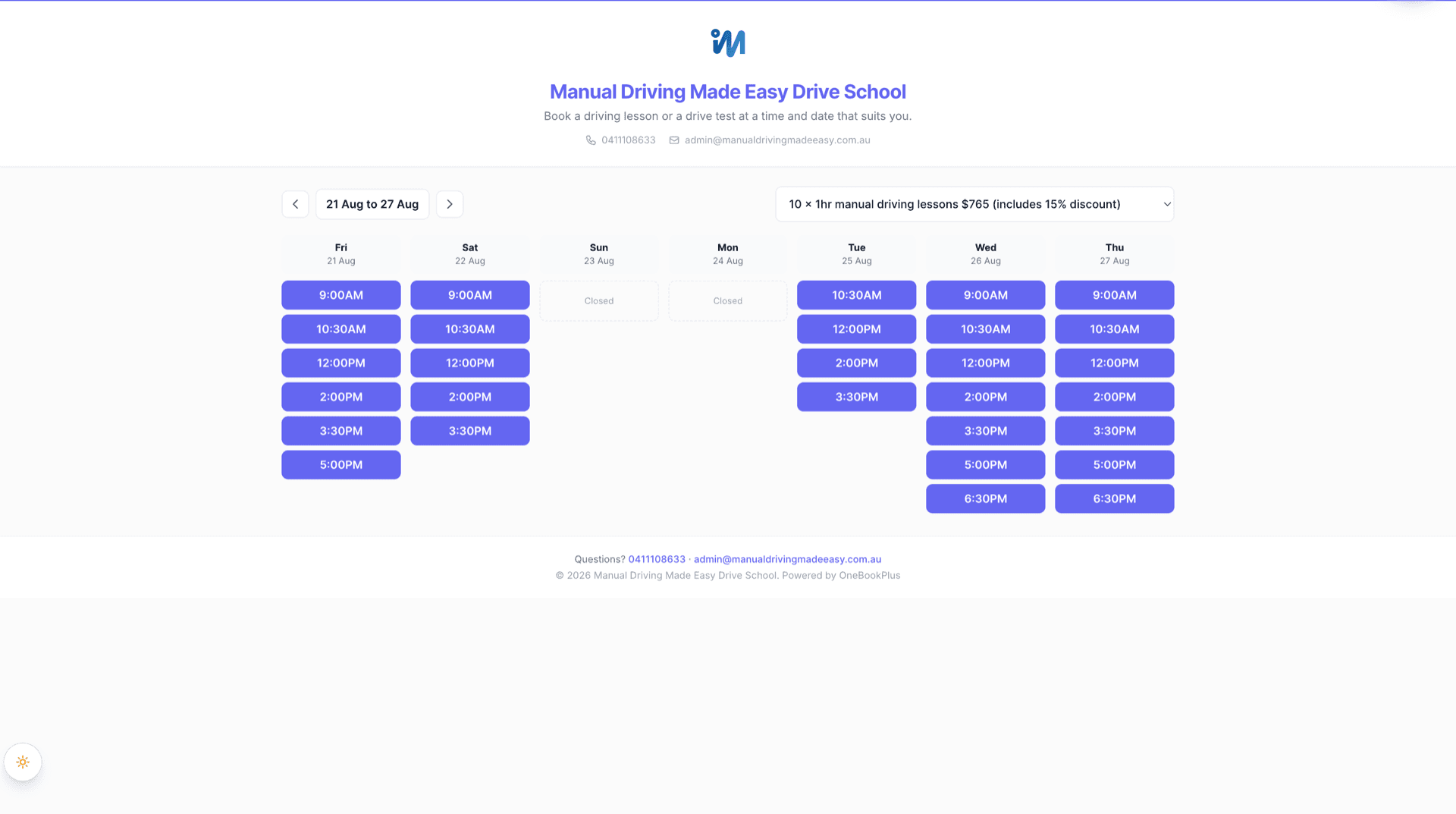
| Lesson packages | Prepaid packages and credits | Per-student credit ledger, automatic draw-down each lesson, expiry and no-show forfeit; packages sell from the booking page with the instructor chosen at purchase or at booking, and every package gets a buy link for your website | Voucher bundles (e.g. 5 x 1 hour lessons) with expiry and a business-level liability report (source: support.bookingtimes.com, creating a voucher) |
| Student CRM | Student records and the parent link | Parent linked on the student record, invoices route to the payer | Client records with optional guardian name, phone and email (source: support.bookingtimes.com, importing client data) |
| Route map | Map view of the day's lessons | Day map with ordered Google Maps waypoints | Not in its published feature material (checked August 2026) (source: bookingtimes.com/Software-Features-For-Business) |
| Calendar sync | Google Calendar | Subscribe by link (Apple, Google, Outlook) ships today; two-way sync is built but not yet open to customers | “A one-way sync only” by its own documentation, external edits do not sync back (source: support.bookingtimes.com, external calendar export) |
| Invoicing | GST on invoices | GST-native invoices under your ABN | Automated invoicing with a business-wide tax rate and a per-item GST tick (source: support.bookingtimes.com, sales tax and GST) |
| Accounting / BAS | BAS-ready GST reporting | Built-in ledger with BAS-ready GST figures (Starter core plan and up) | Expense tracking and financial reports, no GST or BAS reporting published (source: bookingtimes.com/Software-Features-For-Business) |
| Accountant handoff | What reaches Xero | No handoff needed, the books live in the same product | Xero link posts one daily cash total as a single bank transaction (source: support.bookingtimes.com, integrating with Xero) |
| Directory listing | Free public directory to be found in | Free listing in the OneBookPlus directory | No public directory published on bookingtimes.com (checked August 2026) (source: bookingtimes.com) |
| Other verticals | Runs the rest of your business too | Full small-business platform (18 verticals) | Payroll, inventory and asset management published, no AU tax or BAS layer (source: bookingtimes.com/Software-Features-For-Business) |
| Data residency | Where your data is stored | AWS Sydney (ap-southeast-2) | AWS Sydney (ap-southeast-2), stored in Australia by default, per its privacy policy (source: bookingtimes.com/Privacy) |
| Usage limits | Bookings and clients per plan | Unlimited bookings; contacts 250 (Free), 1,000 (Starter), unlimited from Plus; 1 active repeating booking series on Free, unlimited from Starter | Unlimited bookings, clients, products and services on every tier (source: bookingtimes.com/Prices) |
| Starting price (AUD, inc. GST) | $49 to $98/mo all-in | From $99/mo billed annually | |
| Driving-specific · BAS-ready books from the Starter core plan ($29/mo) | Kick Starter $99/mo, Nail & Scale $159/mo, Evolve $199/mo, Enterprise on quote; extra calendars $29 to $69/mo each (bookingtimes.com/Prices, AUD billed annually, August 2026) · no free plan or trial published |
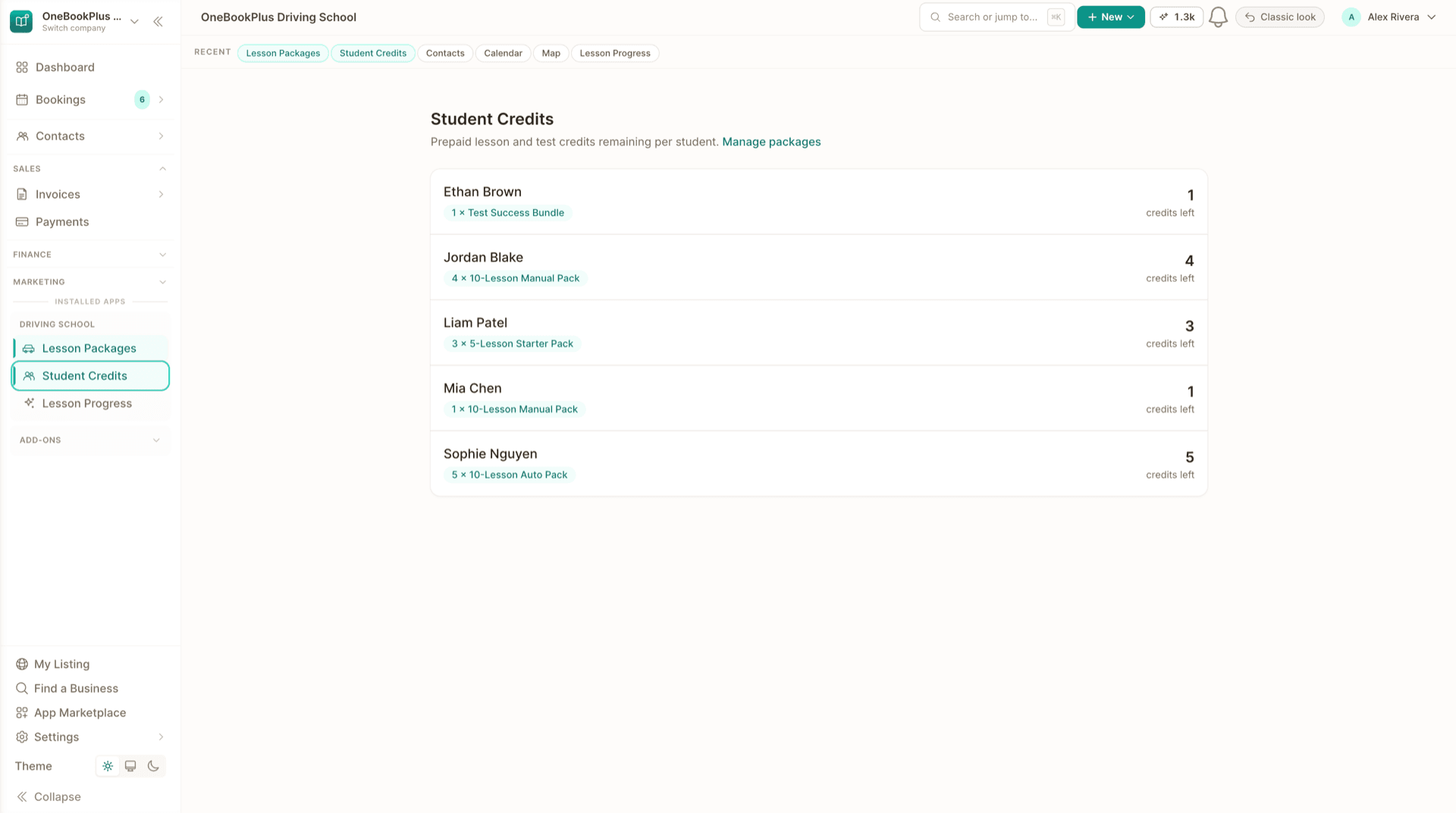
Not mockups, real product screens
Prepaid credits, and the page students book against them
Every competitor row above cites BookingTimes's own page. Our side turns on packages and who holds the credit, so these are the two screens that do it.
Open the same screens yourself
The live demo is a working OneBookPlus account with jobs, bookings, quotes and invoices already in it. Click into the screens above rather than taking the ticks on faith.
Where BookingTimes wins
A capable Australian all-rounder
BookingTimes is a genuinely good booking-led platform. By its own BookingTimes privacy policy it is managed from New Zealand and runs its infrastructure on AWS in Sydney, so your data stays in Australia just as it does with us. It runs a real driving-school template with online booking, SMS reminders, invoicing and payments, sells packages and gift vouchers, tracks student progress, and its wider feature list covers payroll, expense tracking, inventory and financial reports. Its plans are generous on volume too, with unlimited bookings, clients, products and services on every tier. If your school mainly needs a tidy way to take online bookings, send reminders and raise invoices, it is well suited and easy to recommend. Check bookingtimes.com/Prices for what each of its four tiers includes.
Where OneBookPlus wins
Driving-specific, and the whole business
Built for driving, not adapted to it. BookingTimes sells lesson packages as counted voucher bundles with expiry and a business-level liability report, which is a solid start. OneBookPlus runs a per-student credit ledger instead: every booked lesson draws down one credit automatically, a cancellation returns it, a no-show can forfeit it under your policy, and students and parents see a live balance. Add a parent linked to the student record, so invoices route to the payer while notes and credits stay with the learner, and a day route map with ordered Google Maps waypoints for the day's pickups. Those are the details we could not find in BookingTimes' published material.
Your books are already inside. BookingTimes publishes invoicing, expense tracking and financial reports, so we will not pretend otherwise. The difference is the ATO layer: OneBookPlus posts every invoice and payment to a built-in ledger and produces GST-native invoices under your ABN with BAS-ready figures, from the Starter core plan. BookingTimes' published GST settings stop at a business-wide rate and a per-item tick, and its Xero integration posts one daily cash total as a single bank transaction, not invoices or contacts.
Your bookings show up wherever you look. BookingTimes' external-calendar documentation describes its export as “a one-way sync only” and says you will not be able to make updates via your external calendar. OneBookPlus offers a free calendar subscription link (Apple, Google, Outlook): confirmed lessons appear on your personal calendar, refreshed on that calendar app's own schedule. Two-way sync, where a busy block in your personal calendar closes off availability on your public booking page, is built and in testing but not yet open to customers.
One platform, not a point tool. Beyond driving you get a free listing in the OneBookPlus directory where locals search and book, post-booking review requests on every plan, email campaigns from the Starter plan, and room to run the rest of your business in the same place. See how the tools and pricing compare in the best driving school software guide.
OneBookPlus vs BookingTimes, your questions answered
What is the difference between OneBookPlus and BookingTimes?
BookingTimes is an Australian booking-led business platform, it describes itself as an all-in-one business platform, with a dedicated driving-school page, online booking, SMS reminders, invoicing, payments, packages and gift vouchers, student progress tracking and payroll, across four tiers with unlimited bookings and clients on every tier. OneBookPlus is driving-first inside a full Australian small-business platform: a per-student prepaid credit ledger that draws down automatically each lesson, a parent link on the student record so invoices route to the payer, a day route map, and GST-native invoicing with BAS-ready reporting. It is $49/mo for Driving School Complete, on a core plan that is $0 for a solo instructor or from $29/month once more than one person needs a login.
Is BookingTimes good for driving schools?
Yes, for the right school. BookingTimes runs a dedicated driving-school page and names the pain points directly (pickups and drop-offs, changing instructor schedules, cancellations, commission tracking), and it publishes packages and gift vouchers, student progress tracking, instructor and commission management and driving-school website templates. If that list covers what you need, it is easy to recommend. The differences are specific: its published material has no GST or BAS reporting, its external calendar sync is one-way by its own documentation, its lesson packages are counted voucher bundles with a business-level liability report rather than a per-student ledger that draws down automatically each lesson, and no day route map appears in its published features. Check bookingtimes.com for the current list on each tier.
Does BookingTimes handle accounting, GST and BAS?
BookingTimes includes invoicing, payments, expense tracking and financial reports; its features page lists automated invoicing, quotes, revenue and expense tracking and advanced financial reports. What its published material does not cover is the ATO layer. Its GST settings are a business-wide rate, a choice of tax inclusive or added, and a per-item Include GST tick, with no BAS or GST return mechanics, and its Xero integration posts one daily cash total as a single bank transaction rather than invoices or contacts. OneBookPlus posts every invoice and payment to a built-in ledger and produces BAS-ready GST figures under your ABN, on the Starter core plan and up, so the books live in the same product as the bookings.
Should a driving school switch from BookingTimes?
If you want software built specifically for driving instruction and the whole business behind it, yes. BookingTimes is a strong booking-led platform with a genuine driving-school template. OneBookPlus adds the driving-specific depth we could not find in its published material: prepaid lesson credits on a per-student ledger with automatic draw-down, expiry and no-show forfeit, a parent linked to the student record so invoices route to the payer, a day route map with ordered waypoints, and BAS-ready GST reporting in the same subscription. If booking, reminders and invoicing cover your needs, BookingTimes may be enough. If you want the lesson-credit, route and BAS depth in one place, OneBookPlus fits better.
How much does each one cost?
BookingTimes publishes Kick Starter at $99/month, Nail & Scale at $159 and Evolve at $199, each marked billed annually, plus an Enterprise plan on quote. Each tier covers one booking calendar, and additional calendars are $29, $39 and $69 per calendar per month on the three published tiers on annual billing, or $39, $49 and $79 each if you pay monthly. Every tier includes unlimited bookings, clients, products and services, and there is no free plan or free trial (entry is via a demo). Those are the Australian dollar figures, which is what its price table shows an Australian visitor by default, with a currency switcher if you need another (bookingtimes.com/Prices, checked August 2026). OneBookPlus prices the driving tools as an add-on. Driving School Complete is $49/mo on top of a core plan. The free core plan suits a solo instructor (1 login, 250 contacts, 10 invoices a month), so a solo operator pays $49 all-in. A school where several people need to log in sits on Starter at $29 or Plus at $49, so budget $78 to $98 all-in. Driving School Suite on its own is $29/mo if you do not need vehicle scheduling.
Can I switch from BookingTimes to OneBookPlus without losing my client records?
Yes. Ask BookingTimes for an export of your client list (its support team can tell you which formats it provides), then import the CSV in OneBookPlus under Contacts, then Import, which recognises common columns, de-duplicates on email and gives you a downloadable template. Each learner becomes a student record you can link to a parent, a lesson package and their invoices going forward. Bookings already made in BookingTimes are best left to run their course while new bookings come through your OneBookPlus page. Keep your own export of invoices raised in BookingTimes, your accountant will want the full year regardless of which system issued them, and your OneBookPlus data is exportable at any time.
Which one suits a school with several instructors?
Both can schedule multiple instructors. BookingTimes prices by booking calendar: every tier includes one, and additional calendars are $29 to $69 per calendar per month depending on tier on annual billing ($39 to $79 if you pay monthly), with unlimited bookings and clients throughout (bookingtimes.com/Prices). OneBookPlus schedules instructors as roster records, so putting another instructor on the calendar costs nothing; what the core plans band is logins, one on Free, three on Starter, five on Plus and ten on Growth. Every instructor you give a login to sees the same student records, the same prepaid-credit balances and the same pickup address on every lesson, so a learner can move between instructors without their history living in one person's head.
From the blog
Related reading for driving schools
Practical guides and explainers from the OneBookPlus blog, grouped by topic.
Best Booking Software in Australia
Two identical six-chair salons, one paying $29 a month for booking software and the other $252. Calendly, Acuity, Square, Setmore, Fresha, Timely and SimplyBook.me compared on what they actually cost an Australian business, with prices read from each vendor in August 2026.
15 min readRead articleHow to Start a Driving School in Australia (2026)
Becoming a driving instructor in Australia in 2026: eligibility, checks, the Cert IV, your state licence, a dual-control car, insurance and bookings.
10 min readRead articleHow Much Do Driving Lessons Cost in Australia? (2026)
Driving lessons average about $80 an hour in Australia, but a licence runs from a few hundred dollars to several thousand. The 2026 breakdown.
10 min readRead articleLearner Logbook Hours by State in Australia (2026): How Many You Need
Logbook hours in every Australian state and territory for 2026, including night hours, L-hold periods, over-25 exemptions and hazard perception.
10 min readRead article
More than booking.
Built for driving schools.
Bookings, lesson credits, student CRM and accounting in one Australian platform.
Free plan available, no card needed.
About this comparison
How we compared OneBookPlus to BookingTimes
Feature claims about OneBookPlus reflect what is shipping today on onebookplus.com.au. BookingTimes pricing and feature claims were read off BookingTimes’s public Australian product pages on . Vendor pricing changes frequently, so check the BookingTimes website for your specific situation before making a decision.
Disclosure: OneBookPlus publishes this comparison and stands to benefit if you switch. We aim to compare like-for-like on capability and Australian tax compliance, if you spot something out of date, email hello@onebookplus.com.au and we’ll review it.
About the author

Bishal Shrestha
Founder & CEO, OneBookPlus
Bishal spent a decade running digital projects for Australian small businesses before founding OneBookPlus. He writes and maintains these pages, and publishes what OneBookPlus does not do alongside what it does.
Read the founder bioHow this page was researched
Every BookingTimes price and capability claim on this page was read off BookingTimes's own published Australian pages on the date printed above, and recorded in competitor-facts.ts with that date. Claims about OneBookPlus describe what ships today, and the page names what we do not do.
Last reviewed and updated: by Bishal Shrestha